[English](./README.md) | 简体中文
# @ray-js/lamp-circle-picker-color
> 照明圆形色盘组件
## 预览
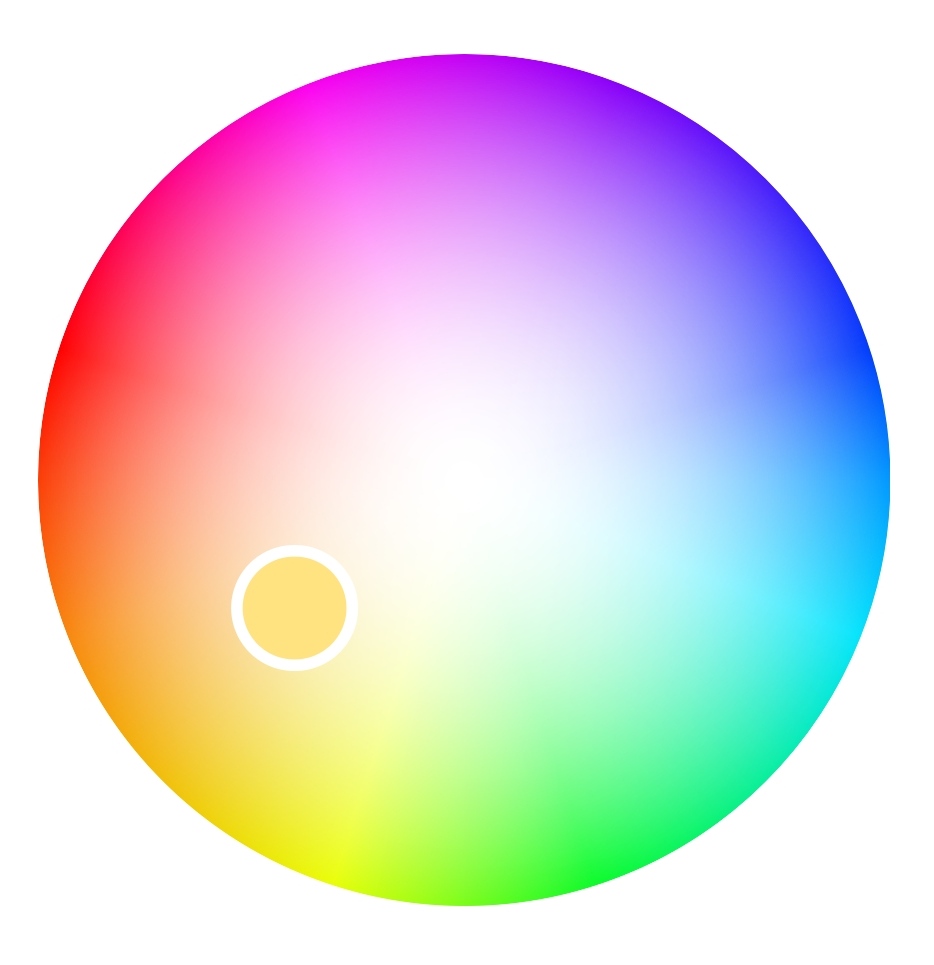 ## 安装
```sh
$ npm install @ray-js/components-ty-lamp
// 或者
$ yarn add @ray-js/components-ty-lamp
```
## 使用
- 属性与方法
```js
type HS = {
h: number, // 0 - 359
s: number, // 0- 1000
};
type TProps = {
hs: HS, // 圆形色盘颜色值 hsv中的hs[参考链接](https://baike.baidu.com/item/HSV/547122?fr=aladdin)
thumbRadius?: number, // 圆形色盘thumb的半径 推荐范围10 - 25
radius?: number, // 圆形色盘的半径
whiteRange?: number, // 中心白光渲染范围 (0.1 - 0.5)
useEventChannel?: boolean // 是否开启事件通道 注意⚠️:基础库版本大于2.18.0, 是否启用事件通道,当多个 rjs 组件同时使用时,用于优化 rjs 间数据传输时的性能问题
eventChannelName?: string; // 事件通道名称
onTouchStart?: (e: HS) => void, // 圆形色盘触摸开始的回调函数
onTouchMove?: (e: HS) => void, // 圆形色盘触摸移动的回调函数 ⚠️注意:move触发频率过高可添加节流来提升性能
onTouchEnd?: (e: HS) => void, // 圆形色盘触摸结束的回调函数
};
```
```tsx
import { LampCirclePickerColor } from '@ray-js/components-ty-lamp';
const Main = () => {
const [hs, setHS] = useState({ h: 36, s: 500 });
useEffect(() => {
setTimeout(() => {
setHS({
h: 100,
s: 1000,
});
}, 1000);
}, []);
const handleTouchStart = (hsRes: HS) => {
setHS(hsRes);
};
const handleTouchMove = (hsRes: HS) => {
console.log(hsRes, 'handleTouchMove');
// setHS(hsRes);
};
const handleTouchEnd = (hsRes: HS) => {
// console.log(hsRes, 'handleTouchEnd');
setHS(hsRes);
};
return (
);
};
```
```js
// 开启了 useEventChannel 属性,可以在其他 Rjs 组件中使用
Render({
// 其他xxx
renderChannel() {
const eventChannelName = 'lampCirclePickerColorEventChannel';
this.instance.eventChannel.on(eventChannelName, e => {
// 此处可以接收到当颜色变化时传递的颜色数据
const {
rgba, // [r, g , b, a]
touchType, // : 'start' | 'move' | 'end'
pos,
} = e;
console.log('eventChannel get', e);
});
},
});
```
## 安装
```sh
$ npm install @ray-js/components-ty-lamp
// 或者
$ yarn add @ray-js/components-ty-lamp
```
## 使用
- 属性与方法
```js
type HS = {
h: number, // 0 - 359
s: number, // 0- 1000
};
type TProps = {
hs: HS, // 圆形色盘颜色值 hsv中的hs[参考链接](https://baike.baidu.com/item/HSV/547122?fr=aladdin)
thumbRadius?: number, // 圆形色盘thumb的半径 推荐范围10 - 25
radius?: number, // 圆形色盘的半径
whiteRange?: number, // 中心白光渲染范围 (0.1 - 0.5)
useEventChannel?: boolean // 是否开启事件通道 注意⚠️:基础库版本大于2.18.0, 是否启用事件通道,当多个 rjs 组件同时使用时,用于优化 rjs 间数据传输时的性能问题
eventChannelName?: string; // 事件通道名称
onTouchStart?: (e: HS) => void, // 圆形色盘触摸开始的回调函数
onTouchMove?: (e: HS) => void, // 圆形色盘触摸移动的回调函数 ⚠️注意:move触发频率过高可添加节流来提升性能
onTouchEnd?: (e: HS) => void, // 圆形色盘触摸结束的回调函数
};
```
```tsx
import { LampCirclePickerColor } from '@ray-js/components-ty-lamp';
const Main = () => {
const [hs, setHS] = useState({ h: 36, s: 500 });
useEffect(() => {
setTimeout(() => {
setHS({
h: 100,
s: 1000,
});
}, 1000);
}, []);
const handleTouchStart = (hsRes: HS) => {
setHS(hsRes);
};
const handleTouchMove = (hsRes: HS) => {
console.log(hsRes, 'handleTouchMove');
// setHS(hsRes);
};
const handleTouchEnd = (hsRes: HS) => {
// console.log(hsRes, 'handleTouchEnd');
setHS(hsRes);
};
return (
);
};
```
```js
// 开启了 useEventChannel 属性,可以在其他 Rjs 组件中使用
Render({
// 其他xxx
renderChannel() {
const eventChannelName = 'lampCirclePickerColorEventChannel';
this.instance.eventChannel.on(eventChannelName, e => {
// 此处可以接收到当颜色变化时传递的颜色数据
const {
rgba, // [r, g , b, a]
touchType, // : 'start' | 'move' | 'end'
pos,
} = e;
console.log('eventChannel get', e);
});
},
});
```