Prerequisites
- Have read Ray Beginner's Guide and understand the basics of the Ray framework.
- Have read Developing a Universal Panel with Ray and understand the basics of Ray panel development.
Development Environment
- Smart Living App
- Tuya MiniApp IDE
- NVM and Node development environment (18.x series recommended)
- Yarn dependency management tool
See Panel Mini Program > Environment Setup for details.
Quick Preview
Open the Smart Life App or Tuya App (version 7.0.5 and above) and scan the QR code below to preview:

Creating a Product
First, you need to create a product, define its functionalities, and then implement these functionalities one by one in the panel.
Register and log in to the Tuya Developer Platform, and create a product on the platform:
- Click AI Products > Product Development on the left side of the page, and then click Create Product on the Product Development page.
- For more information on the creation details of the AI Pixel Screen Text-to-Image Product, please contact your project manager or submit a support ticket for assistance.
Creating a Panel Mini-Program on the Developer Platform
The development of panel mini-programs is carried out on the Mini-Program Developer Platform. First, please go to the Mini-Program Developer Platform to complete the registration and login.
For detailed operation steps, please refer to Panel Mini-Program > Creating a Panel Mini-Program。
Creating a Project Based on a Template in the IDE
Open the Tuya MiniApp IDE, create a new panel project in the IDE, and select the AI Pixel Screen Text-to-Image Template to quickly create the project, as shown in the image below:
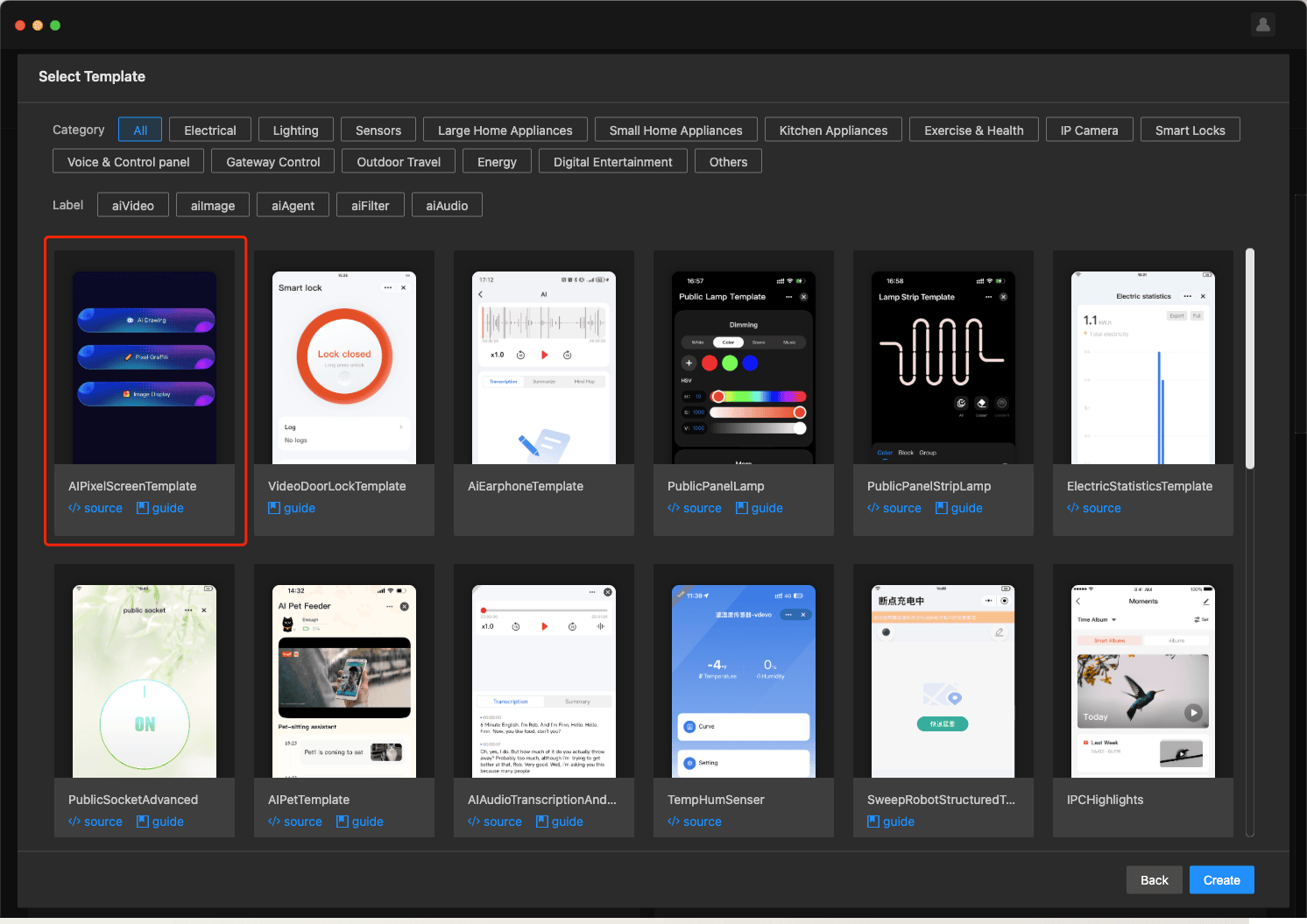
For detailed operation steps, please refer to Panel Mini Program > Initialize Project。
Template Functionality
You can use the Panel Mini Program to develop and build a pixel screen panel based on the Ray framework with edge AI text-to-image generation capabilities, and implement the following functions:
- Edge AI Text-to-Image Generation: After selecting a tag sent by the client, the client will call the local AI large model to generate the corresponding image based on the tag text.
- Pixel Art: Draw content using the canvas drawing component, and save the generated image.
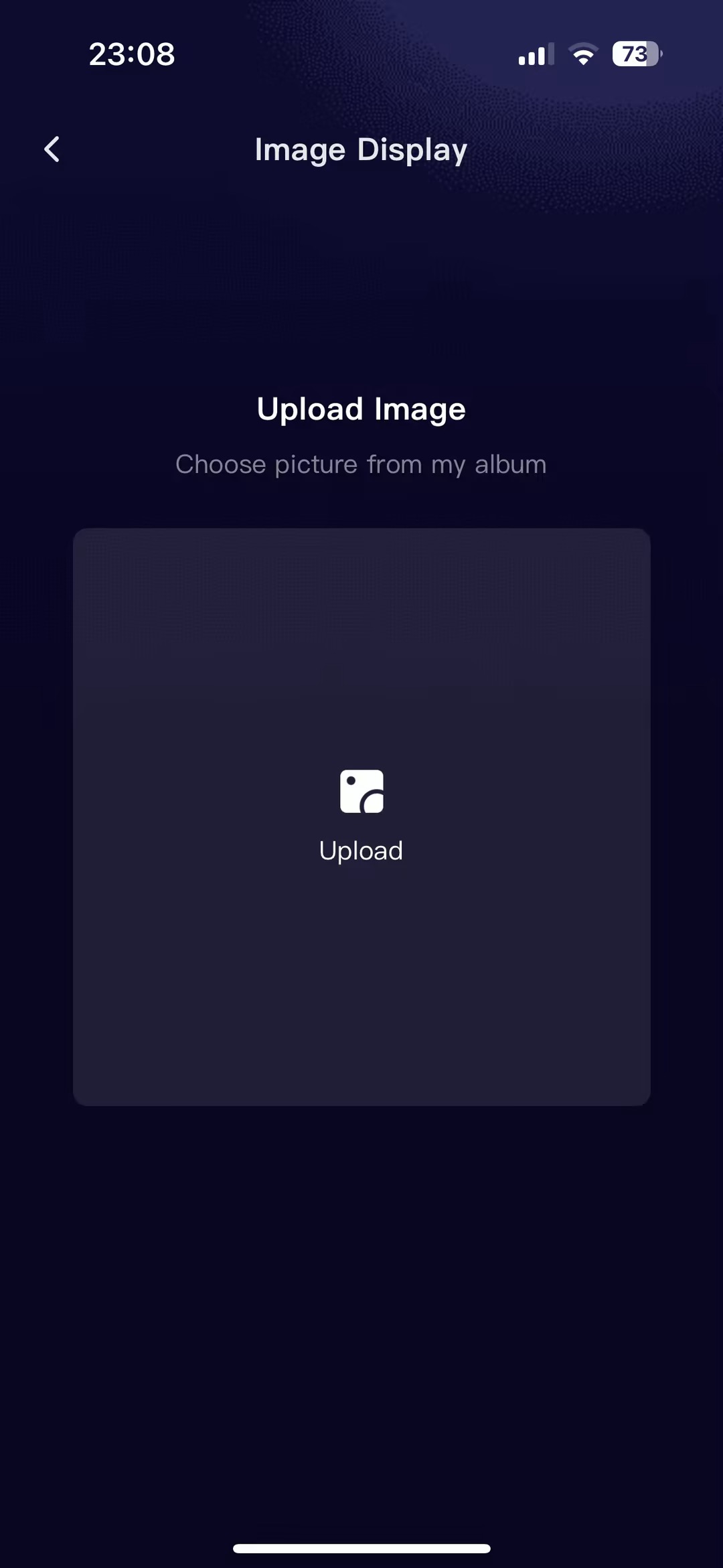
- Image Upload and Cropping: Supports users to select content from their album or take a photo and then crop the image.
- Bluetooth Big Data Transfer: Supports sending image content to devices for display via segmented pass-through.
- Bluetooth Pixel Screen Debugging: Introduces the overall debugging process for Bluetooth pixel screens, facilitating quick development and debugging for developers.
Related Materials
- App Version
- Smart Life v7.0.5 and above
- Kit Dependencies
- BaseKit:v3.29.1
- MiniKit:v3.12.0
- DeviceKit:v4.6.1
- BizKit:v4.10.0
- HomeKit: 3.4.0
- AIKit: 1.8.1
- baseversion:v2.29.18
- Component Dependency
- @ray-js/ray^1.7.34
- @ray-js/panel-sdk^1.14.1
- @ray-js/smart-ui^2.7.3
- @ray-js/lamp-color-slider^1.1.7
- @ray-js/lamp-saturation-slider^1.1.7
- @ray-js/ray-error-catch^0.0.26
- omggif^1.0.10
- md5^1.0.10
Image Generation Initialization On-App AI
- Function: Mobile on-device image generation model initialization.
- API Details: pixelImageInit
Image Generation Label List On-App AI
- Function: Image generation label list configured locally on mobile device.
- API Details: fetchPixelImageCategoryInfo
Image Generation On-App AI
- Function: Invoke mobile on-device image generation model and return generated image.
- API Details: generationPixelImage
Initialization Progress On-App AI
- Function: Monitor mobile on-device image generation model initialization progress.
- API Details: onPixelImageInitProgressEvent
Remove Listener: Initialization Progress On-App AI
- Function: Remove listener for mobile on-device image generation model initialization progress.
- API Details: offPixelImageInitProgressEvent
Bluetooth data pass-through
- Function:BLE(thing) sends and transmits data.
- API Details:publishBLETransparentData
Image Cropping
- Function: Image cropping.
- API Details: cropImages
Feature Demonstration
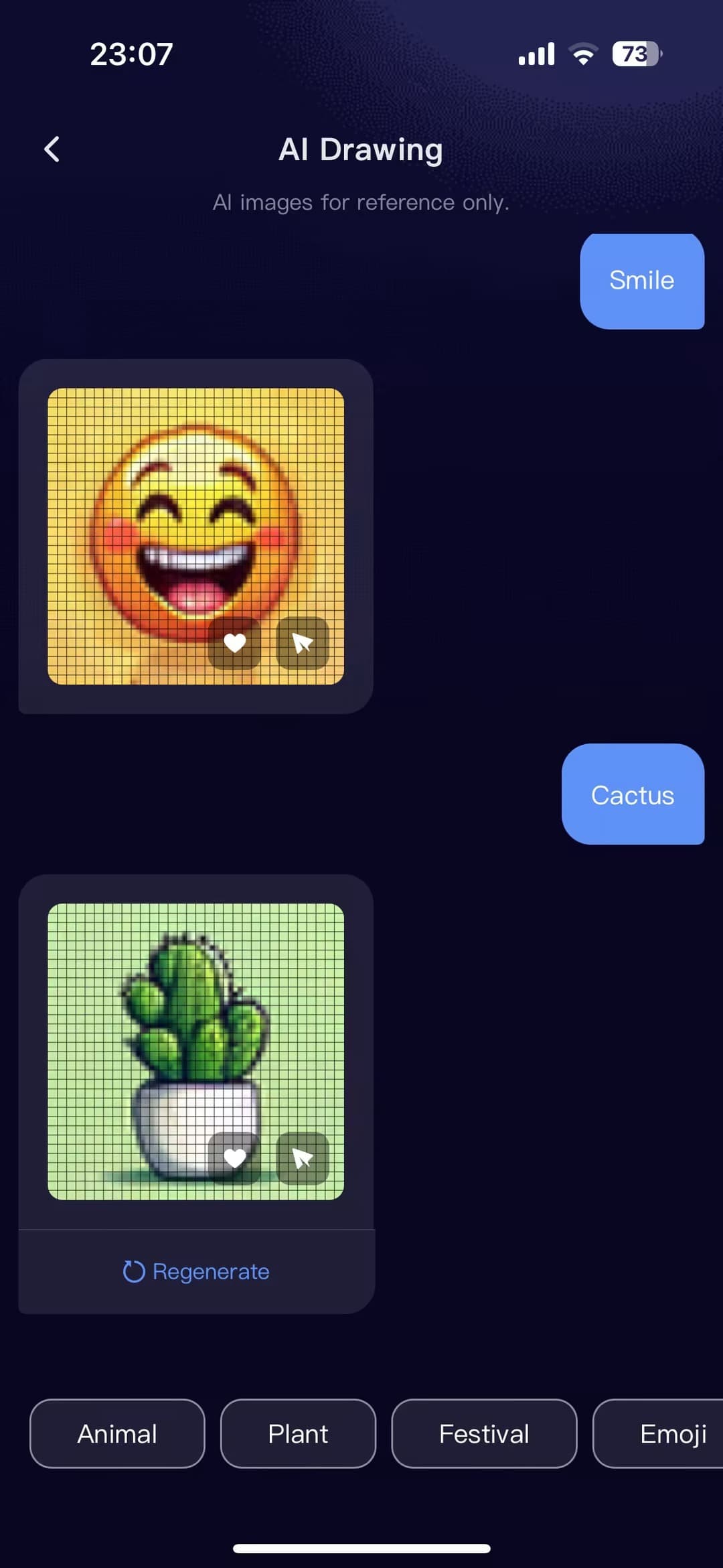
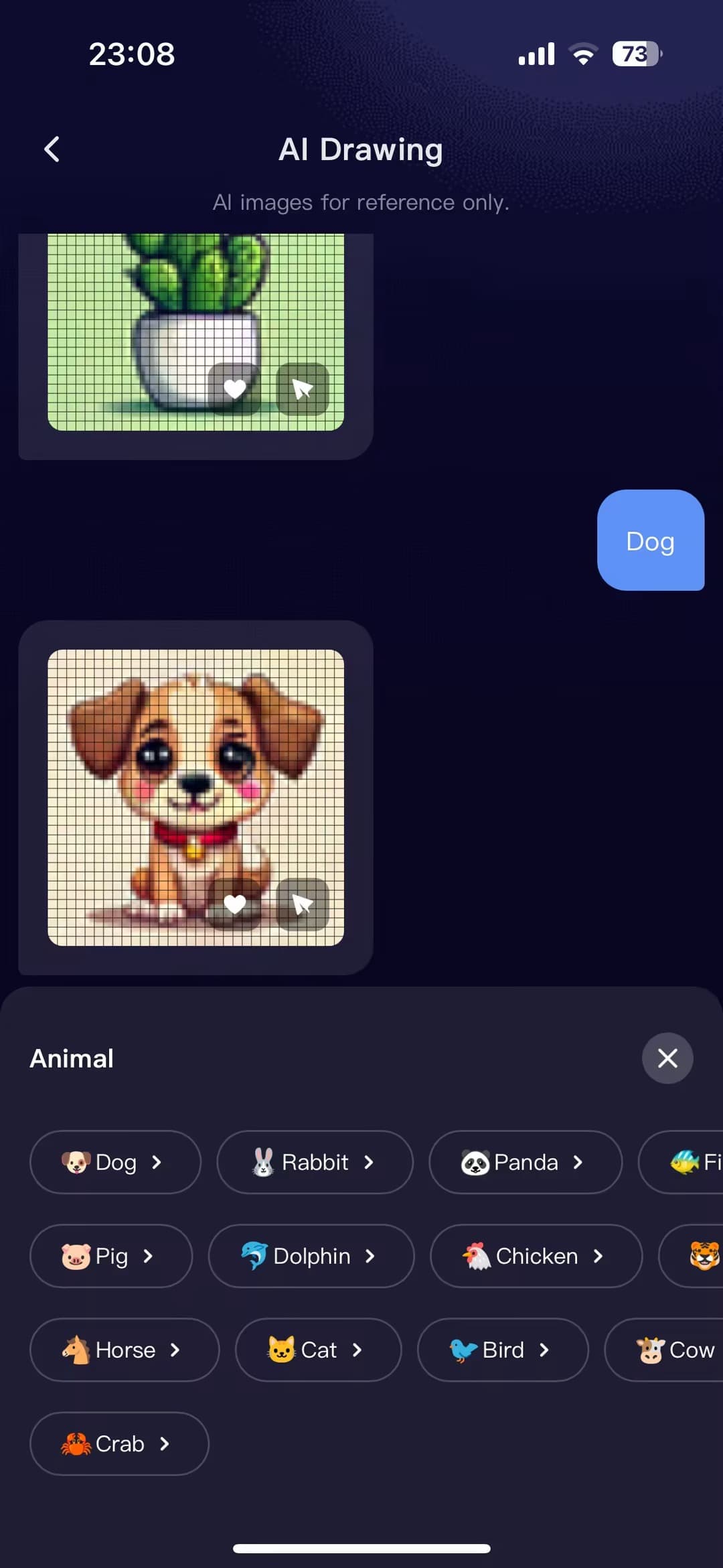
Function Description
- After selecting a tag and sending, the client will call the local AI model to generate the corresponding image based on the tag.
- Clicking the "Save" button on the image will save it to the gallery.
- Clicking the "Send Preview" button on the image will transmit the image to the device via Bluetooth for display.
Code Logic
- Enter the AI drawing page and check if the local AI model has been initialized.
- If not initialized, call pixelImageInit to initialize the local model.
- After initializing the local AI model, call fetchPixelImageCategoryInfo to retrieve the AI text-to-image tag data from the client.
- Clicking the tag calls generationPixelImage to generate an image from the client's local AI model.
- Update the message flow and display the generated image.
- Clicking the "Save" and "Send" buttons on the image will execute the corresponding logic.
Code Snippets
- Initialize the local model and fetch tag data
useEffect(() => {
  if (hasModelInit) {
    initLabels();
  } else {
    init();
  }
}, []);

 // Retrieve the latest tag list from the client
const initLabels = async () => {
  const labelInfo = await fetchPixelImageCategoryInfo({});
  dispatch(updateLabelAsync(labelInfo));
};

// Initialize the local AI model
const init = async () => {
  try {
    globalLoading.show('初始化中...', false);
    const isInit = await pixelImageInit({});
    dispatch(setHasModelInit(true));
    initLabels();
    setTimeout(() => {
      globalLoading.hide();
    }, 500);
  } catch (error) {
    setTimeout(() => {
      globalLoading.hide();
    }, 500);
  }
};
- AI Image Generation and Processing
// Generate images based on tags
const imageResult = await generationPixelImage({
  deviceId: devInfo.devId,
  label,
  imageWidth: 462,
  imageHeight: 462,
  outImagePath: localPath,
});
handleGenerationImage(imageResult);

// Process the returned images
const handleGenerationImage = result => {
  if (result.success) {
    // Get the latest message status
    const currentMessages = selectMessageList(store.getState());
    const newMsgList = currentMessages.slice();
    const lastMsg = newMsgList[newMsgList.length - 1];

    if (!lastMsg || lastMsg.isLoaded) {
      // If there are no unloaded messages, no action is taken.
      return;
    }

    const updatedMessages = [
      ...newMsgList.slice(0, newMsgList.length - 1),
      {
        ...lastMsg,
        isLoaded: true,
        path: result?.imagePath || '',
        type: 'image' as const,
      },
    ];
    // 更新消息对话流
    updateMessages(updatedMessages);
    setLoading(false);
  } else {
    handleImageFail();
    setLoading(false);
  }
};
- Click the "Send Preview" button to send the data to the device via the Bluetooth data pass-through interface.
const preview = async () => {
  try {
    // Determine if image read permission is granted.
    await authorizeAsync({ scope: 'scope.writePhotosAlbum' });
  } catch (error) {
    return;
  }

  if (md5Id && tempFilePath && rawData) {
    await sendPic();
    return;
  }
  // Read the image base64 data first if it has not been read before.
  const _tempFilePath = cardData.path;
  const base64 = readFileBase64(_tempFilePath);
  const _base64Src = `data:image/jpg;base64,${base64}`;

  setType('preview');
  setTempFilePath(_tempFilePath);
  setBase64Src(_base64Src);
};

// Send data to the device
const sendPic = async () => {
  try {
    // Data is transmitted using a pre-packaged Bluetooth fragmented pass-through method.
    const isSuccess = await sendPackets({
      data: rawData,
      dpCode: 'gif_pro',
      params: { md5Id, programId: 60 },
      sendDp: () => {
        dpActions.gif_pro.set({ md5Id, programId: 60 });
      },
    });
    if (isSuccess === true) {
      ToastInstance({
        selector: `#${cardData.id}native-smart-toast`,
        message: Strings.getLang('sentPleaseCheckTheEffectOnTheDevice'),
        position: 'middle',
      });
    }
  } catch (error) {
    console.log('sendPackets fail');
  }
};
Function Description
- Switch between brush mode, eraser mode, and paint bucket mode by changing the operation type.
- Different brush colors can be selected using the color slider.
- Send the x, y coordinate path data of each brush stroke to the device for real-time canvas display.
- Check the canvas status by clicking the clear button.
- Canvas preview: Transmit the generated image data to the device for display.
- Canvas save: Add the generated image data to the favorites list and transmit the image data to the device for display.
Code Logic
- Dynamically calculate the canvas size based on the screen resolution, initialize the canvas, and draw pixel squares.
- Listen for
touchevents, fill the currently touched square with color, and collect the coordinate data of touched squares. Send the pixel doodle function points intouchend. - Click save to obtain the doodle canvas data, convert it to a single-frame GIF, and then convert the GIF to base64 data and transmit it to the device.
Pixel Graffiti Components: Materials -> Graffiti
Code snippet
import { GifWriter } from 'omggif';
import { arrayBufferToBase64, quantizeColors } from '@/utils/genImgData';

const pixelRatio = Math.floor(getSystemInfo().pixelRatio) || 1; // Resolution, Integer

export default Render({
  // Initialize the canvas
  async initPanel({
      width,
      height,
      mode,
      gridSize,
      pixelSize,
      pixelGap,
      pixelShape,
      pixelColor,
      penColor,
    }) {
      let canvas = await getCanvasById('sourceCanvas');

      // The canvas size is dynamically calculated based on the screen resolution.
      if (mode === 'grid') {
        const gridModeSize = (pixelSize + pixelGap) * gridSize + pixelGap;
        canvas.width = gridModeSize * pixelRatio;
        canvas.height = gridModeSize * pixelRatio;
        canvas.style.width = gridModeSize + 'px';
        canvas.style.height = gridModeSize + 'px';
      } else {
        canvas.width = width * pixelRatio;
        canvas.height = height * pixelRatio;
        canvas.style.width = `${width}px`;
        canvas.style.height = `${height}px`;
      }

      const ctx = canvas.getContext('2d');
      ctx.scale(pixelRatio, pixelRatio);
      this.canvas = canvas;
      this.ctx = ctx;

      this.mode = mode;
      this.gridSize = gridSize;
      this.pixelSize = pixelSize;
      this.pixelGap = pixelGap;
      this.pixelShape = pixelShape;
      this.pixelColor = pixelColor;
      this.penColor = penColor;

    // Initialize the canvas and draw pixel squares.
      this.createPixel(pixelColor);

      // A collection of grid coordinates used to store the movement from the start to the end of a touch.
      const touchedSquaresSet = new Set();
      // Record whether touch started
      let isTouchStarted = false;
      // Listen for touch-related events
      const handleTouchstart = e => {
        touchedSquaresSet.clear();
        isTouchStarted = true;
        const touch = e.changedTouches[0];
        const rect = canvas.getBoundingClientRect();
        const x = Math.floor((touch.pageX - rect.left - pixelGap) / (pixelSize + pixelGap));
        const y = Math.floor((touch.pageY - rect.top - pixelGap) / (pixelSize + pixelGap));
        const coordinate = `${x},${y}`;
        if (!touchedSquaresSet.has(coordinate)) {
          // Collect the coordinates of the touched squares
          touchedSquaresSet.add(coordinate);
          // Fill the current touch square with color
          this.fillPixel(x, y, this.penColor);
        }
      };
      const handleTouchmove = e => {
        e.preventDefault();
        if (isTouchStarted) {
          const touch = e.changedTouches[0];
          const rect = canvas.getBoundingClientRect();
          const x = Math.floor((touch.pageX - rect.left - pixelGap) / (pixelSize + pixelGap));
          const y = Math.floor((touch.pageY - rect.top - pixelGap) / (pixelSize + pixelGap));
          const coordinate = `${x},${y}`;
          if (!touchedSquaresSet.has(coordinate)) {
            // Collect the coordinates of the touched squares
            touchedSquaresSet.add(coordinate);
            // Fill the current touch square with color
            this.fillPixel(x, y, this.penColor);
          }
        }
      };
      // The system processes the array of touch squares and sends it to the device for real-time display of the current stroke.
      const handleTouchend = e => {
        isTouchStarted = false;
        const touchedSquares = [];
        for (const coordinateStr of touchedSquaresSet) {
          const [x, y] = coordinateStr.split(',');
          touchedSquares.push({ x: Number(x), y: Number(y) });
        }
        this.callMethod('touchend', touchedSquares);
      };
      canvas.addEventListener('touchstart', handleTouchstart, false);
      canvas.addEventListener('touchmove', handleTouchmove, false);
      canvas.addEventListener('touchend', handleTouchend, false);

      ctx.imageSmoothingEnabled = true;
      ctx.imageSmoothingQuality = 'high';
    },
    // Draw the default pixel grid.
    createPixel(pixelColor) {
      const { pixelSize, pixelGap, gridSize } = this;
      let gridSizeX = gridSize;
      let gridSizeY = gridSize;
      if (this.mode !== 'grid') {
        gridSizeX = this.canvas.width / (pixelSize + pixelGap);
        gridSizeY = this.canvas.height / (pixelSize + pixelGap);
      }
      for (let x = 0; x < gridSizeX; x++) {
        for (let y = 0; y < gridSizeY; y++) {
          this.fillPixel(x, y, pixelColor);
        }
      }
    },
    // Fill pixel squares
    fillPixel(x, y, color) {
      const { ctx, pixelSize, pixelGap, pixelShape } = this;
      const offsetX = pixelGap + x * (pixelSize + pixelGap);
      const offsetY = pixelGap + y * (pixelSize + pixelGap);
      // Clear the existing fill color
      ctx.clearRect(offsetX, offsetY, pixelSize, pixelSize);
      ctx.fillStyle = color; // Fill color
      if (pixelShape === 'rect') {
        ctx.fillRect(offsetX, offsetY, pixelSize, pixelSize);
      } else {
        const radius = pixelSize / 2;
        // Start drawing the path
        ctx.beginPath();
        // Use the `arc` method to draw a circle, passing in the x-coordinate of the center, the y-coordinate of the center, the radius, the starting angle (in radians), and the ending angle (in radians).
        ctx.arc(offsetX + radius, offsetY + radius, radius, 0, Math.PI * 2);
        // Close Path
        ctx.closePath();

        // Perform a fill operation to fill the inside of the circle with the set color.
        ctx.fill();
      }
    },
    // Change brush color
    updateColor(color) {
      this.penColor = color;
    },
    // Eraser
    eraser() {
      // The eraser color matches the default color of the grid.
      this.penColor = this.pixelColor;
    },
    // Paint bucket
    changeBg(color) {
      this.penColor = color;
      this.createPixel(color);
    },
    // Clear canvas
    clear() {
      this.ctx.clearRect(0, 0, this.canvas.width, this.canvas.height);
      this.createPixel(this.pixelColor);
    },
    async save() {
      // Get the context of the source canvas and the target canvas.
      const sourceCanvas = this.canvas;
      let targetCanvas = this.targetCanvas;
      let targetCtx = this.targetCtx;

      const gridSize = this.gridSize;
      let gridSizeX = gridSize;
      let gridSizeY = gridSize;
      if (this.mode !== 'grid') {
        gridSizeX = this.canvas.width / (pixelSize + pixelGap);
        gridSizeY = this.canvas.height / (pixelSize + pixelGap);
      }

      if (!targetCtx) {
        targetCanvas = await getCanvasById('targetCanvas');
        targetCtx = targetCanvas.getContext('2d');
        this.targetCanvas = targetCanvas;
        this.targetCtx = targetCtx;
        targetCanvas.width = gridSizeX;
        targetCanvas.height = gridSizeY;
        targetCanvas.style.width = `${gridSizeX}px`;
        targetCanvas.style.height = `${gridSizeY}px`;
      }

      targetCtx.clearRect(0, 0, targetCanvas.width, targetCanvas.height);

      // Get the width and height of the source canvas
      const sourceWidth = sourceCanvas.width;
      const sourceHeight = sourceCanvas.height;

      // Get the width and height of the target canvas
      const targetWidth = targetCanvas.width;
      const targetHeight = targetCanvas.height;

      targetCtx.fillStyle = '#000000';
      targetCtx.fillRect(0, 0, targetWidth, targetHeight);

      targetCtx.drawImage(
        sourceCanvas,
        0,
        0,
        sourceWidth,
        sourceHeight,
        0,
        0,
        targetWidth,
        targetHeight
      );

      targetCtx.imageSmoothingEnabled = true;
      targetCtx.imageSmoothingQuality = 'high';

      // Image converted to single frame GIF
      const imageData = targetCtx.getImageData(0, 0, targetWidth, targetHeight);
      // Use a custom method to convert RGBA to indexed colors.
      const { indexedPixels, palette } = quantizeColors(imageData);

      // Calculate buffer size
      const buffer = new Uint8Array(targetWidth * targetHeight * 5);
      const gif = new GifWriter(buffer, targetWidth, targetHeight, { loop: 0, palette });
      gif.addFrame(0, 0, targetWidth, targetHeight, indexedPixels, {
        delay: 5,
        palette: palette,
      });

      const gifData = buffer.subarray(0, gif.end());

      // Convert GIF data to base64
      const base64String = arrayBufferToBase64(gifData);
      const base64Data = `data:image/gif;base64,${base64String}`;

      this.callMethod('genImageData', {
        base64Data,
      });
    },
});
Feature Demonstration
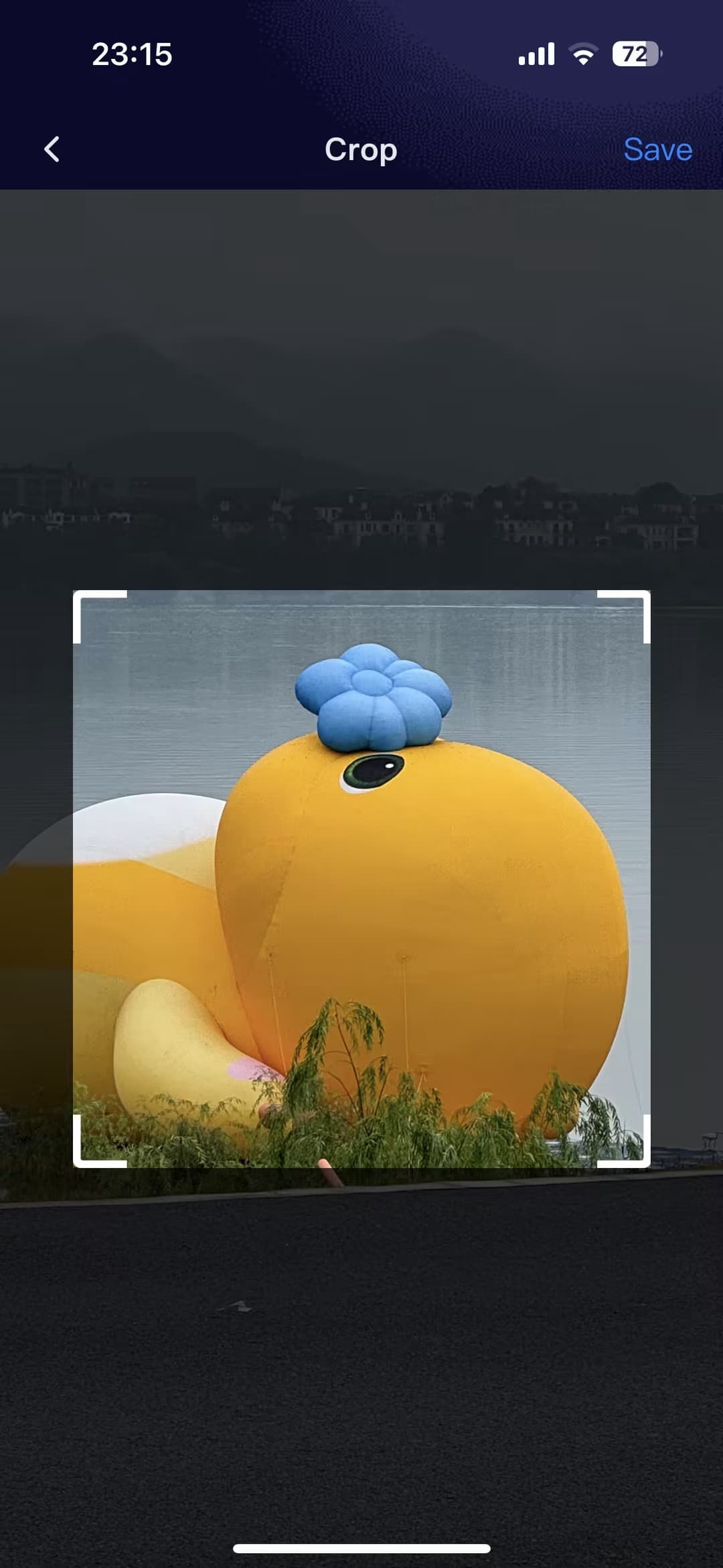
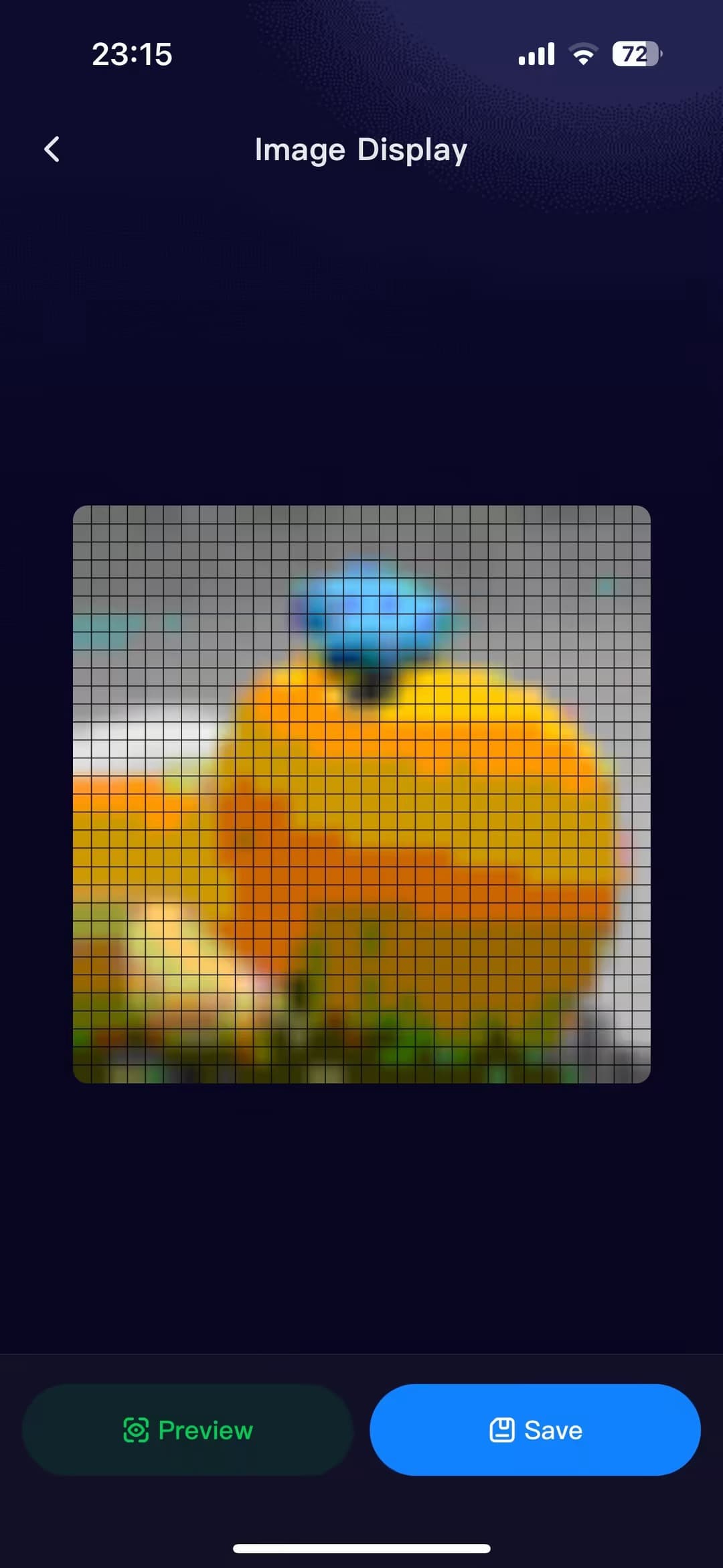
Function Description
- Users can select images from their album or take photos (supports both image and GIF formats).
- Cropping of the selected image or GIF.
- Pixelation of the uploaded image.
- Canvas preview; image data generated on the canvas is passed through to the device for display.
- Canvas saving; image data generated on the canvas is added to the favorites list and passed through to the device for display.
Code Logic
- Check album permissions; enter the album to select an image or use the camera to take a photo and obtain the local image path information
tempFiles. - Select the area to be cropped by dragging the image; call cropImages to crop the image.
- Pixelate the cropped image and convert it to single-frame GIF format; read the GIF's base64 data.
- Save or preview and then pass the data through to the device.
Image selection component: Materials -> ImageAreaPicker
Code Snippet
- Upload image/GIF and add it to the album list
  const handleClick = () => {
    const lave = IMAGE_NUM - photos.length;
    const count = lave > MAX_CHOOSE_IMAGE_NUM ? MAX_CHOOSE_IMAGE_NUM : lave;
    // Permission request: Write to album permission
    authorizeAsync({ scope: 'scope.writePhotosAlbum' })
      .then(() => {
        return chooseImageAsync({
          count,
          sizeType: ['original'],
        });
      })
      .then(res => {
        globalLoading.show(Strings.getLang('loading'));
        const newPhotos = (res.tempFiles || []).map(item => {
          return {
            ...item,
            id: 60,
            md5: md5(item.path),
          };
        });
        // Filter out photos that are the same as "newPhotos"
        const _newPhotos = newPhotos.filter(item => !photos.find(old => old.md5 === item.md5));

        if (_newPhotos.length < newPhotos.length) {
          globalToast.success(
            Strings.getLang('theAlreadySelectedImageHasBeenChosenAndItHasBeenFiltered')
          );
        }

        if (_newPhotos.length > 0) {
          dispatch(addPhotosAsync(_newPhotos));
        }
        globalLoading.hide();
      })
      .catch(err => {
        globalLoading.hide();
      });
  };
- Obtain the cropping region and call cropImages to crop the image. The cropImages API is used for cropping.
// After selecting the image, obtain the cropping coordinates using getCropSize, and then call...
const save = () => {
  const data = getCropSize(imgInfo);
  const cropParams = {
    cropFileList: [data],
  };
  handleCrop(cropParams).then(cropRes => {
    const { fileList: cropedFileList } = cropRes;
    // Save to album for local testing.
    const tempFilePath = cropedFileList[0];
    const base64Data = readFileBase64(tempFilePath);
    const base64DataStr = imgInfo.path.endsWith('.gif')
      ? `data:image/gif;base64,${base64Data}`
      : `data:image/png;base64,${base64Data}`;
    dispatch(updateCropedFile(base64DataStr));
    router.push('/img-pixelation');
  });
};

// Use cropImages to crop images.
const handleCrop = useCallback((params: { cropFileList: CropImageList }) => {
  return cropImageAsync(params as any)
    .then(res => {
      return res;
    })
    .catch(err => {
      console.warn('🚀 ~ handleCrop ~ err', err);
    });
}, []);
Function Demonstration
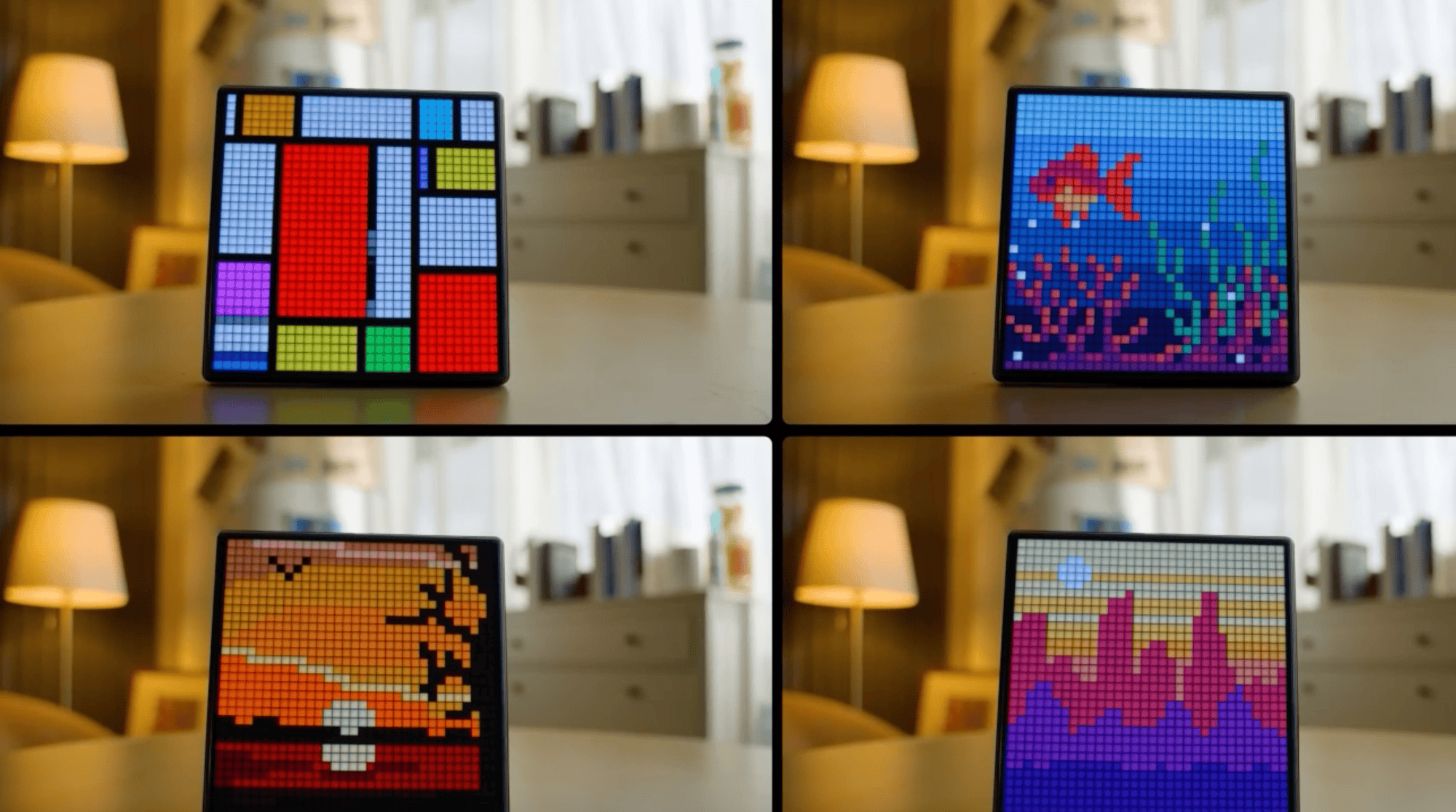
Function Description
- Supports sending panel images to devices for display.
Code Logic
- Converts the base64 data of the image to hexadecimal and then segments it.
- Passes the segmented data to the device for display via publishBLETransparentData.
Bluetooth data transfer tool: Materials -> Bluetooth data transfer tool
Code Snippet
- Bluetooth Big Data Transmission Method
export const sendPackets = async ({
  data,
  publishFn = packet =>
    publishTransparentData({
      data: packet.map(byte => byte.toString(16).padStart(2, '0')).join(''),
    }),
  parseConfirmationFn = parseConfirmation,
  timeout = 500, // Set the timeout to 500ms
  onProgress = progress => {},
  dpCode,
  params,
  sendDp,
}) => {
  // Determine if the device is successfully connected to the current panel.
  const devInfo = getDevInfo();
  const res = await getDeviceOnlineType({
    deviceId: devInfo?.devId,
  });
  const isBleOnline = [1, 5, 3].includes(+res?.onlineType)
    ? false
    : ![0].includes(+res?.onlineType);
  if (!isBleOnline) {
    globalToast.fail(Strings.getLang('un_online'));
    return false;
  }

  globalLoading.show(Strings.getLang('sending'));
  let dpSuccess = false;
  // Get dpId and dpValue
  const schema = devices.common.getDpSchema();
  const dpId = schema[dpCode].id;
  const dpValue = protocolUtils[dpCode].formatter(params);
  // dp data change callback
  const dpChangeCallBack = res => {
    const result = Object.entries(res.dps).some(
      ([key, value]) => Number(key) === dpId && value === dpValue
    );
    dpSuccess = result;
  };

  const packets = createPackets(data); // Create subpackage

  const packetStatus = packets.map(() => ({
    confirmed: false, // Has it been confirmed?
    retries: 0, // Number of retries
  }));

  let receivedPacketIndex = -1; // Previously received packet number
  // BLE (thing) device data pass-through channel reporting notification callback
  const bleCallback = res => {
    receivedPacketIndex = parseConfirmationFn(res); // Parse package number
    packetStatus[receivedPacketIndex].confirmed = true;
  };

  try {
    // Monitor changes in dp data
    onDpDataChange(dpChangeCallBack);
    // Send dp data
    sendDp();
    // Wait for dp to be sent successfully before sending transparent data.
    const waitDpSuccess = (): Promise<boolean> => {
      return new Promise<boolean>(resolve => {
        const dpStartTime = Date.now();

        const interval = setInterval(() => {
          if (dpSuccess) {
            clearInterval(interval);
            resolve(true); // Confirmation received
          }

          if (Date.now() - dpStartTime > 60000) {
            clearInterval(interval);
            resolve(false); // time out
          }
        }, 10); // Check every 10 milliseconds
      });
    };

    const isDpSuccess = await waitDpSuccess();

    offDpDataChange(dpChangeCallBack);

    if (!isDpSuccess) {
      throw new Error(`onDpDataChange timeout`);
    }
    const startTimeAll = Date.now();
    // Waiting for the device to report confirmation of receiving the fragmented data
    const waitForConfirmation = (expectedIndex: number): Promise<boolean> => {
      return new Promise<boolean>(resolve => {
        const startTime = Date.now();

        const interval = setInterval(() => {
          if (receivedPacketIndex === expectedIndex) {
            clearInterval(interval);
            resolve(true); // Confirmation received
          }

          if (Date.now() - startTime > timeout) {
            clearInterval(interval);
            resolve(false); // time out
          }
        }, 10); // Check every 10 milliseconds
      });
    };

    // Listen for notifications reported via the BLE (thing) device data pass-through channel.
    onBLETransparentDataReport(bleCallback);
    console.log(`Starting to send ${packets.length} packets.`);

    // Send the first 4 packets, regardless of timeout or acknowledgment, at 10ms intervals.
    for (let index = 0; index < 4 && index < packets.length; index++) {
      const sendTime = Date.now() - startTimeAll;
      console.log(`Sending packet ${index + 1}/${packets.length}, , send time: ${sendTime}`);
      publishFn(packets[index]);
      onProgress({ index: index + 1, total: packets.length }); // 进度回调

      if (index < 3) {
        // Delay 10ms before sending the next packet
        await new Promise(resolve => setTimeout(resolve, 10));
      }
    }

    await waitForConfirmation(3);

    // Starting from the 5th packet, continue sending regardless of timeout or whether confirmation has been received.
    for (let index = 4; index < packets.length; index++) {
      const sendTime = Date.now() - startTimeAll;
      console.log(`Sending packet ${index + 1}/${packets.length}, send time: ${sendTime}`);
      publishFn(packets[index]);

      // Wait for confirmation, but regardless of whether confirmation is received after the timeout, continue sending the next packet.
      await waitForConfirmation(index);

      // Update package confirmation status
      onProgress({ index: index + 1, total: packets.length }); // Progress callback
    }

    // Check for any failed packets; if so, retry.
    let retries = 0;
    while (retries < 5) {
      const failedPackets = packetStatus
        .map((status, index) => ({ index, confirmed: status.confirmed }))
        .filter(packet => !packet.confirmed); // Unconfirmed package found

      if (failedPackets.length === 0) {
        break; // All packets have been confirmed. Retry complete.
      }

      console.log(`Retrying failed packets (attempt ${retries + 1})`);

      for (const { index } of failedPackets) {
        console.log(`Retrying packet ${index + 1}/${packets.length}, attempt ${retries + 1}`);
        publishFn(packets[index]);
        await waitForConfirmation(index);
      }

      retries++;
    }

    const endTimeAll = Date.now();
    const duration = endTimeAll - startTimeAll;
    console.log(
      'All packets sent successfully.',
      `${packets.length} number of packets, sending time ${duration} ms`
    );
    globalLoading.hide();
    // Cancel monitoring of BLE (thing) device data pass-through channel reporting notifications
    offBLETransparentDataReport(bleCallback);

    if (packetStatus.some(status => !status.confirmed)) {
      console.error('Some packets failed', packetStatus);
      globalToast.fail(Strings.getLang('failedToSend'));
      return false;
    }
    return true;
  } catch (error) {
    globalLoading.hide();
    globalToast.fail(Strings.getLang('failedToSend'));
    offDpDataChange(dpChangeCallBack);
    offBLETransparentDataReport(bleCallback);
    console.error('Error while sending packets:', error);
    throw error;
  }
};
- Generate pass-through fragmented data
// Generate fragmented data packets
function createPackets(hexString, maxPacketSize = 1006) {
  const data = hexStringToByteArray(hexString); // Convert to byte array
  const dataLength = data.length; // Total data length
  const totalPackets = Math.ceil(dataLength / maxPacketSize); // Total number of packages
  const packets = [];

  for (let i = 0; i < totalPackets; i++) {
    // The start and end positions of the current packet's data
    const start = i * maxPacketSize;
    const end = Math.min(start + maxPacketSize, dataLength);

    // The data portion of the current subpackage
    const payload = data.slice(start, end);
    // const payloadLength = payload.length;
    const payloadLength = maxPacketSize;

    // Baotou
    const packetHeader = [
      0x00,
      0x01, // Program data identifier
      // eslint-disable-next-line no-bitwise
      (6 + payloadLength) >> 8,
      // eslint-disable-next-line no-bitwise
      (6 + payloadLength) & 0xff, // Data length
      // eslint-disable-next-line no-bitwise
      totalPackets >> 8,
      // eslint-disable-next-line no-bitwise
      totalPackets & 0xff, // Total number of data packets
      // eslint-disable-next-line no-bitwise
      i >> 8,
      // eslint-disable-next-line no-bitwise
      i & 0xff, // Current package number
      // eslint-disable-next-line no-bitwise
      payloadLength >> 8,
      // eslint-disable-next-line no-bitwise
      payloadLength & 0xff, // Subcontracting length
    ];

    // Merge header and data sections
    const packet = [...packetHeader, ...payload];
    packets.push(packet);
  }

  return packets;
}

// Convert a continuous hexadecimal string into a byte array.
function hexStringToByteArray(hexString) {
  const byteArray = [];
  for (let i = 0; i < hexString.length; i += 2) {
    byteArray.push(parseInt(hexString.substr(i, 2), 16)); // Each pair of characters is parsed into 1 byte.
  }
  return byteArray;
}
- Bluetooth pass-through method
// Call the Bluetooth pass-through API to send data
const publishTransparentData = ({ data }) => {
  return new Promise((resolve, reject) => {
    const { devId } = getDevInfo();
    publishBLETransparentDataAsync({
      deviceId: devId,
      data,
    })
      .then(res => {
        resolve(res);
      })
      .catch(err => {
        reject(err);
      });
  });
};

const publishBLETransparentDataAsync = nativeFnWrap(
  ty.device.publishBLETransparentData,
  'device.publishBLETransparentData'
);
Device Introduction
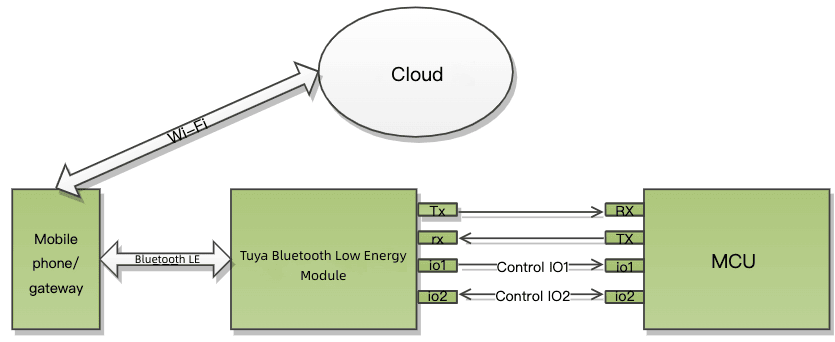
Before debugging a Bluetooth pixel screen, it's essential to understand the device. The image below shows the Bluetooth pixel screen device to be debugged:
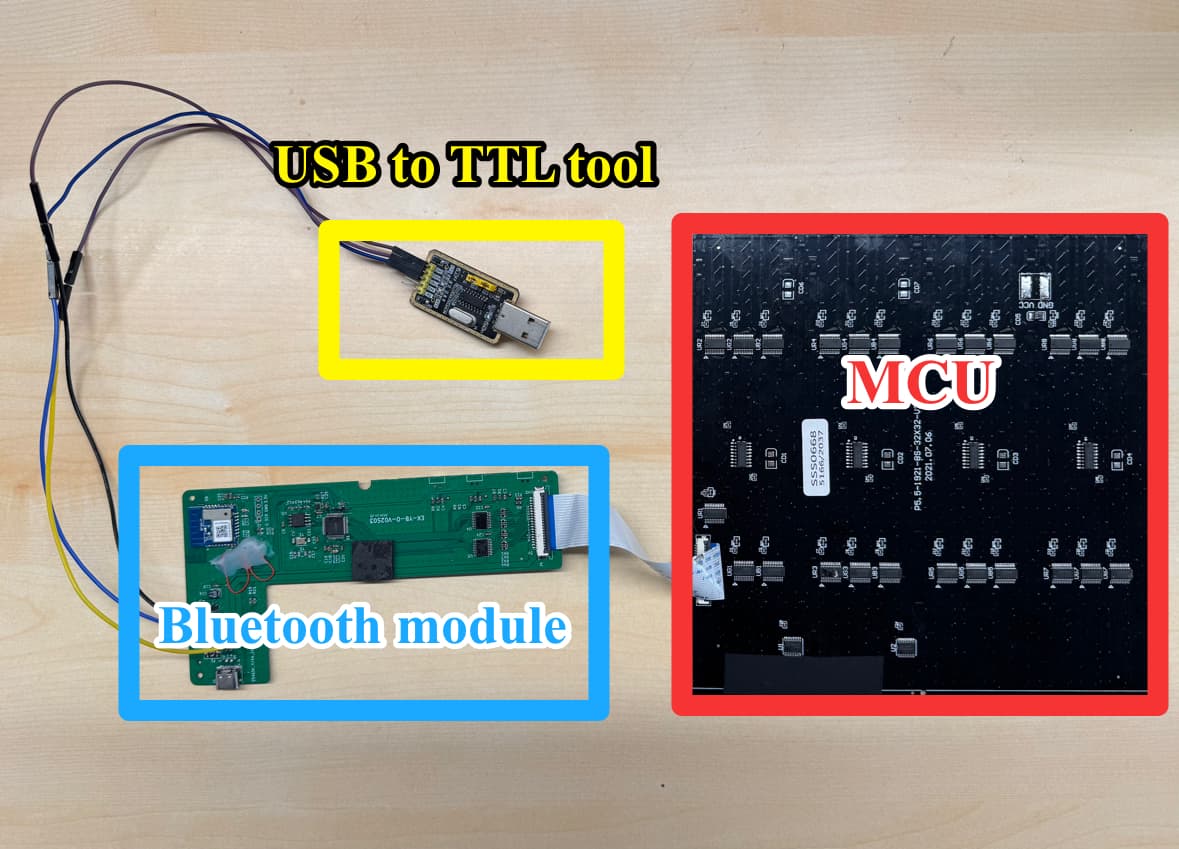
The Bluetooth pixel screen mainly consists of an MCU and a Bluetooth module.
- The pixel screen MCU is primarily used to implement the control and display logic of the pixel screen.
- The pixel screen Bluetooth module is used for connection and communication with the drawing app and as a bridge for data transmission between the MCU and the drawing app.
- The MCU and Bluetooth module communicate via a wired serial port.
- The Bluetooth module communicates wirelessly with the mobile app via Bluetooth.
Device Debugging
MCU and Computer Serial Port Connection
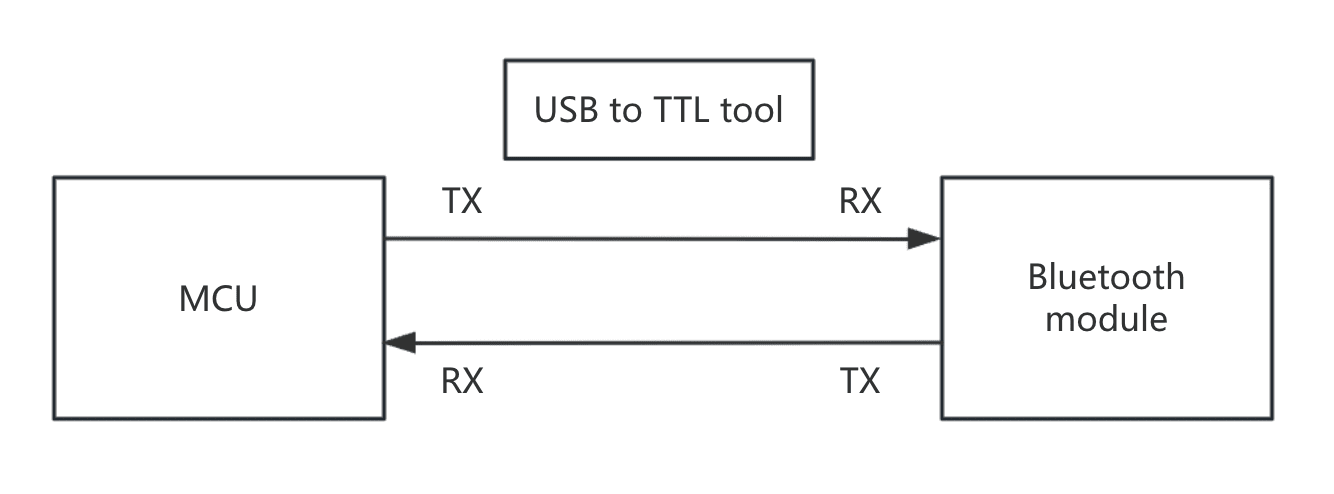
When the MCU supports log output, sending the MCU's log output to the computer requires a USB-to-TTL adapter. The MCU's TTL level serial data is fed to this adapter, which converts it to USB data before sending it to the computer for display. Data transmission is similar; the MCU's serial port can both receive and transmit. Reception is via RX, and transmission is via TX.
A diagram illustrating the connection between the MCU's serial port and the computer's serial port using a USB-to-TTL adapter is shown below:
Log Viewing
- SecureCRT
After connecting a Windows computer to a serial port, you need to use SecureCRT to view the logs. So, what is SecureCRT?
SecureCRT is a secure terminal client used for remotely connecting to Linux/Unix servers, network devices, serial devices, etc. It supports protocols such as SSH1/SSH2, Telnet, Serial, RLogin, and TAPI. SecureCRT provides complete Serial connection capabilities and can connect to various devices.
- Serial Port Debugging
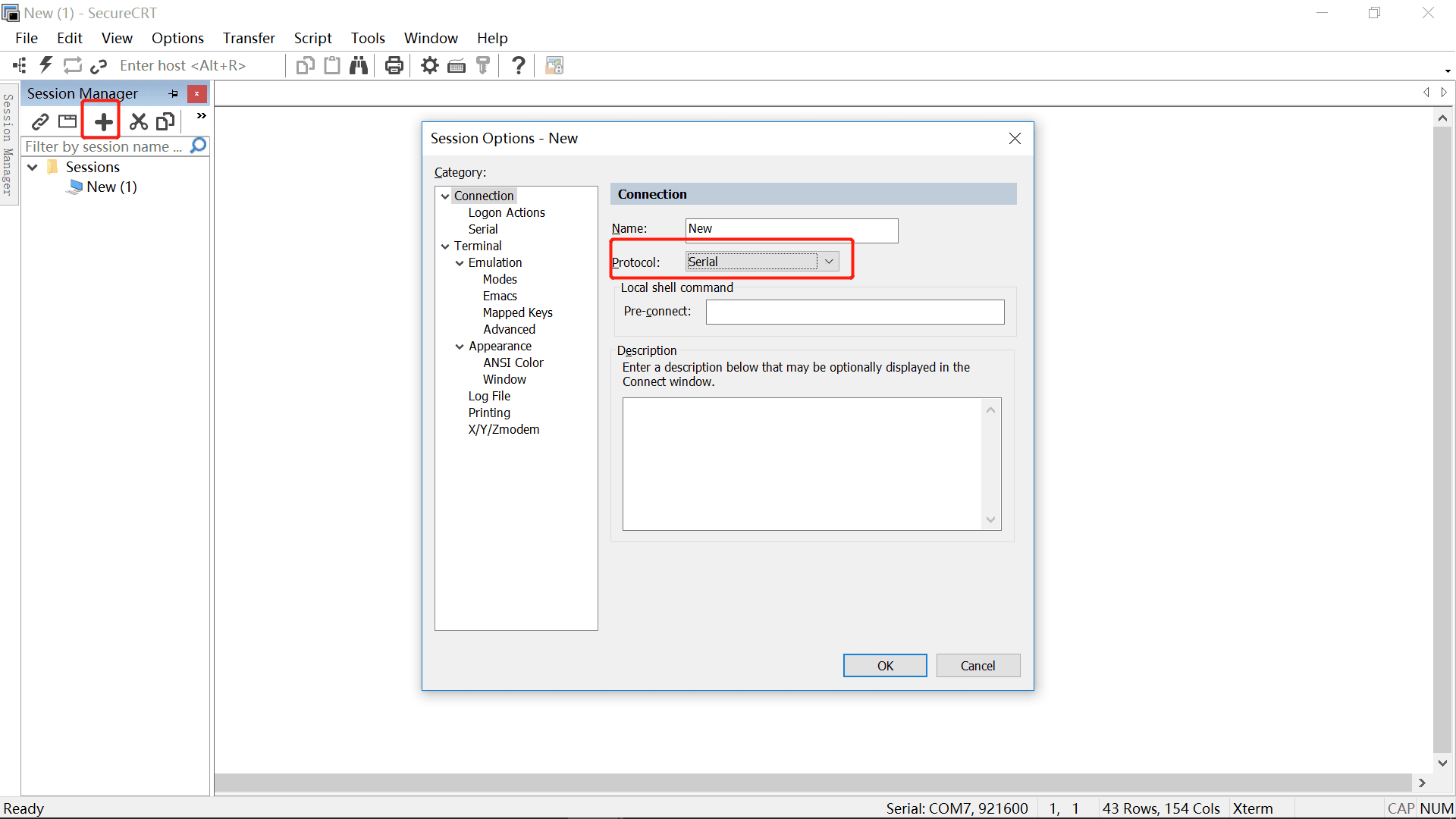
- Create a New Session
File → New Session or File → Quick Connect
- Select Protocol
Select: Serial, as shown in the image below:
- Fill in the serial port parameters
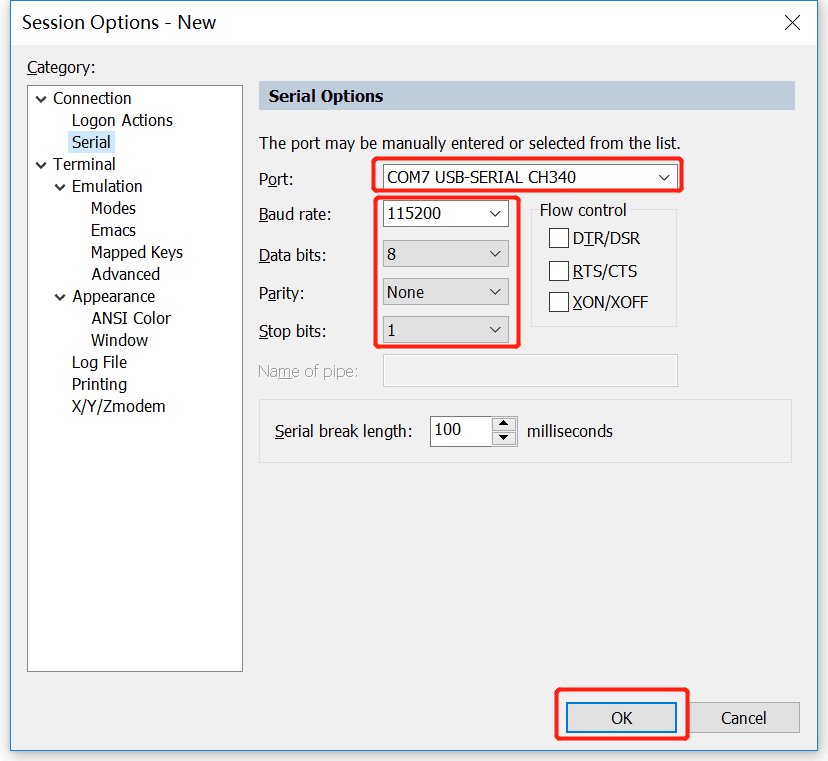
Basic serial port parameters:
| Parameter | Recommended value | Explanation |
| ——————– | ———————- | ———— |
| Port (serial port number) | Depends on the system (COM3 / ttyUSB0, etc.) | Automatically assigned for USB to serial ports |
| Baud rate | 115200 | Default value for most embedded devices |
| Data bits | 8 | Standard configuration |
| Parity | None | No parity |
| Stop bits | 1 | Standard configuration |
| Flow control | None | Do not enable, otherwise there may be no output |
- Click Connect to view logs
After a successful connection, you will see the device's log output. See the image below:
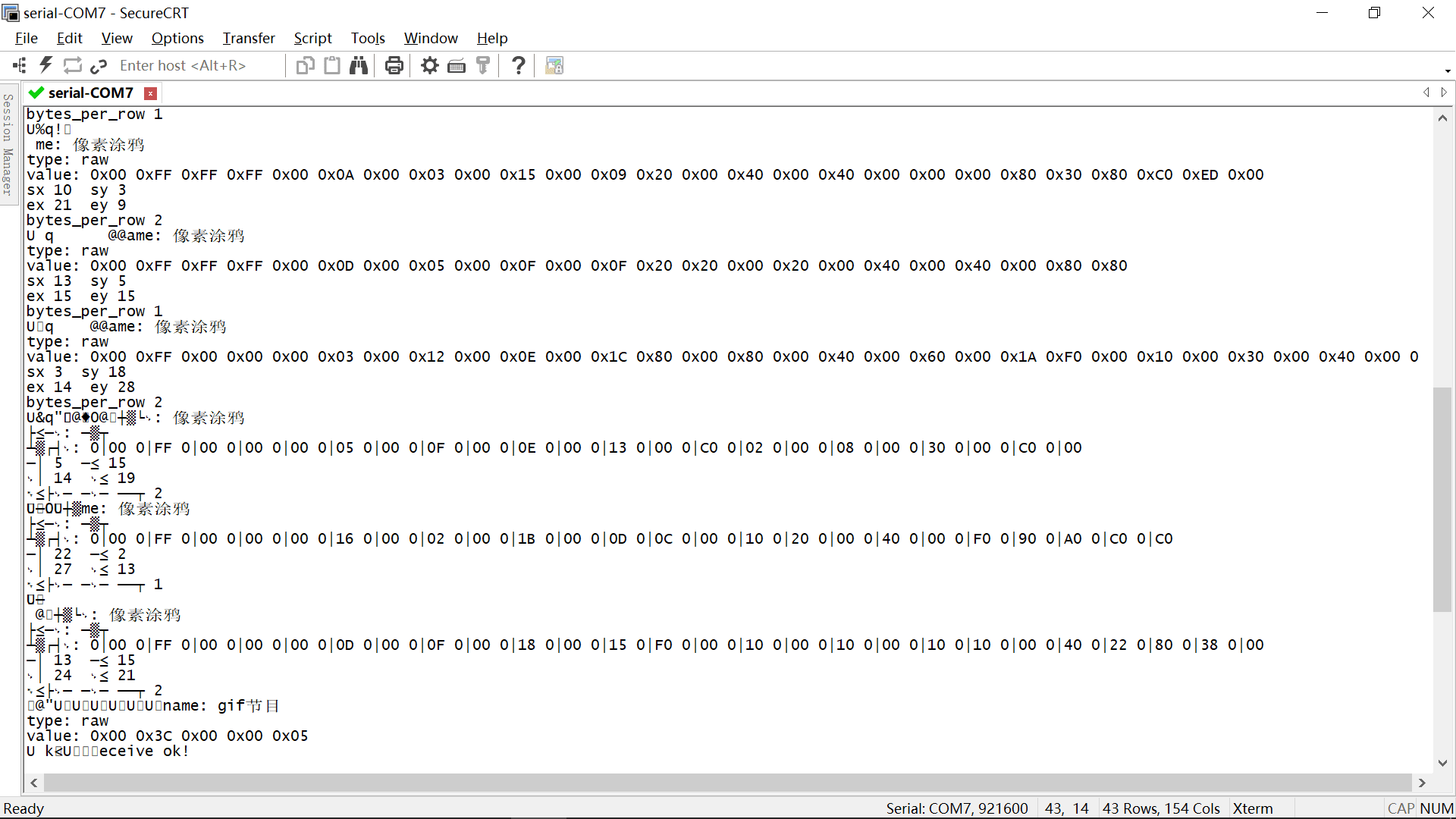
Bluetooth pixel screen image data transmission requires sending image data to the device via Bluetooth big data chunking. Whether the panel data has been transmitted to the device, and whether the device has reported data to the panel, can be determined by checking the log output.
This helps troubleshoot issues during panel development. Developers can quickly locate and resolve problems by checking the output logs, improving development efficiency.
- Congratulations 🎉 on completing this tutorial!
- For any questions, please contact the Tuya Smart Mini Program team.