Prerequisites
- Have read the Ray Getting Started to get to know the basics of the Ray framework.
- Have read Develop Universal Panel Based on Ray to get to know the basics of Ray panel development.
Create a panel
In this Codelab, you will build a smart video lock panel using Panel MiniApp development. By utilizing the data point (DP) protocol and APIs, you will implement the following capabilities:
- Remote lock and unlock: When users tap and hold a specific UI button on the device panel miniapp, the door will be opened or closed accordingly.
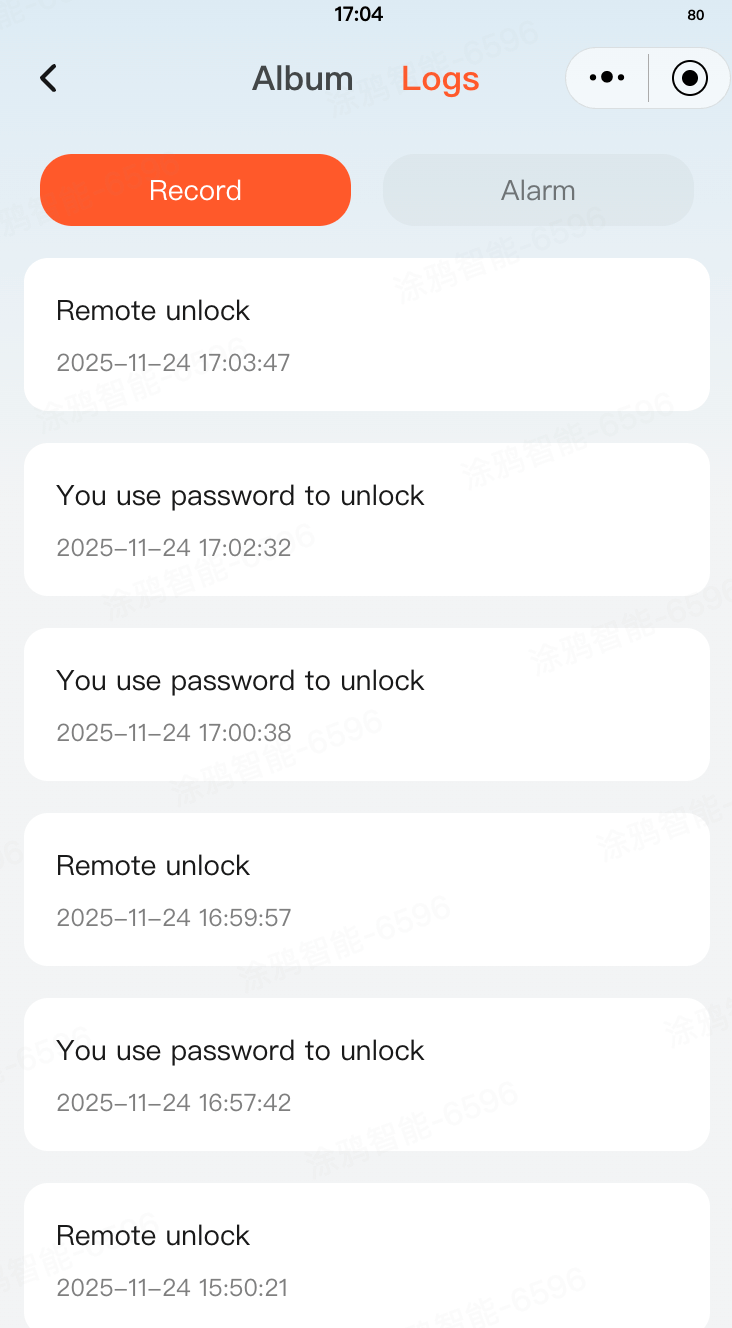
- Log management: View unlock records, alarm records, and image/video logs. Users can use paginated search, pull down to refresh, and pull up to load.
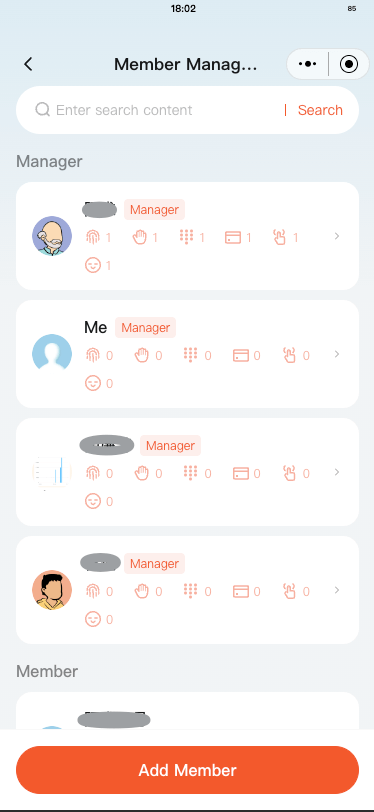
- Member management: View the member list, add members, view member details, and delete members.
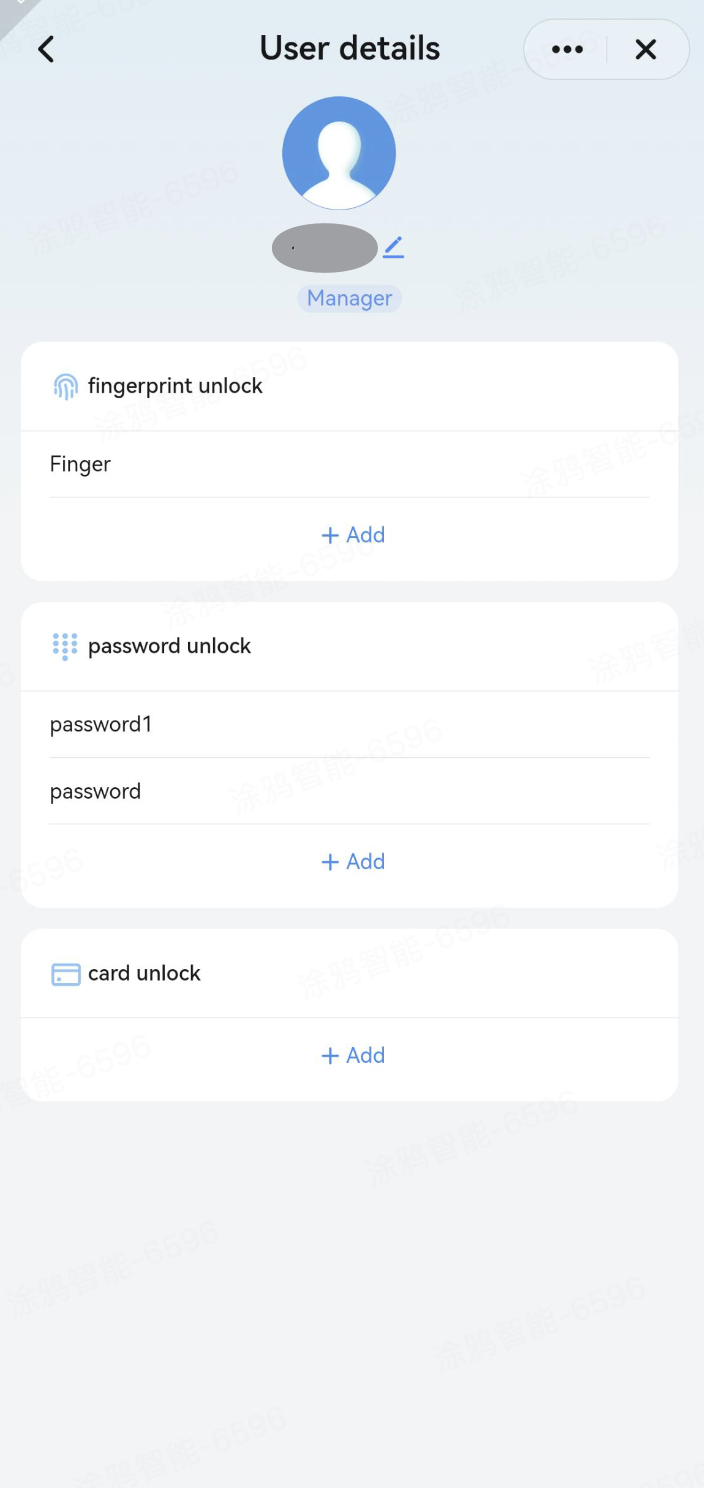
- Unlock method management: Add, edit, and delete unlock methods such as fingerprints, facial recognition, key cards, palm veins, and finger veins, as well as manage passwords.
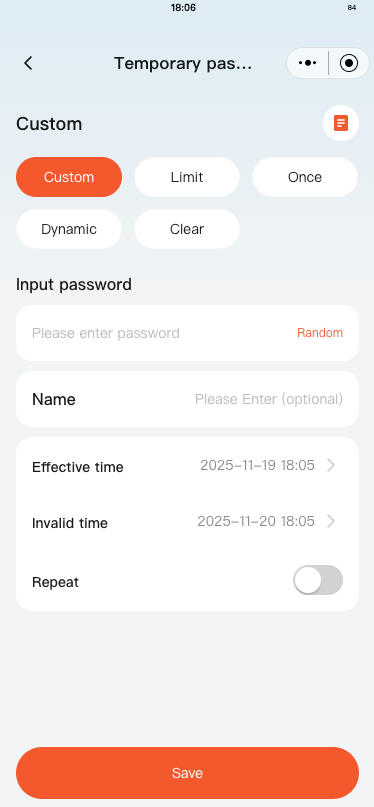
- Temporary password management: Create and manage temporary passwords, including custom passwords, time-limited passwords, one-time passwords, and dynamic passwords.
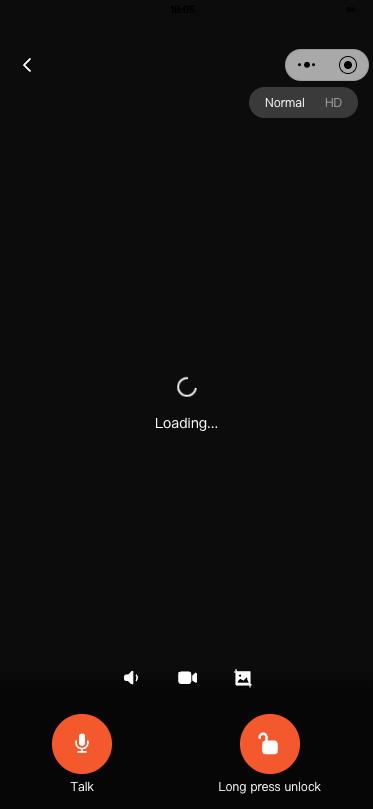
- Video talk: When users tap a live monitoring button on the device panel miniapp, they will be navigated to a live video talk page for viewing.
- Video playback: Tapping a video log entry navigates to a video playback page where users can view and download recordings.
Learning objectives
- Explore how to create a smart video lock product.
- Explore how to lock and unlock the door by tapping and holding a specific UI button.
- Explore how to navigate to a video talk page by tapping the live monitoring button.
- Explore how to support general settings for locks in the panel.
- Understand the commonly used functional modules of door locks.
- Understand the video playback and replay functions of video intercom devices.
Required conditions
- Tuya app
- Tuya MiniApp Tools
- NVM and Node development environment (v16.x is recommended)
- Yarn dependency management tool
For more information, see Panel MiniApp > Set up environment.
A product defines the DPs of the associated panel and device. Before you develop a panel, you must create a product, defines the required DPs, and then implement these DPs on the panel.
Register and log in to the Tuya Developer Platform and create a product.
- In the left-side navigation pane, choose AI Product > Development > Create.
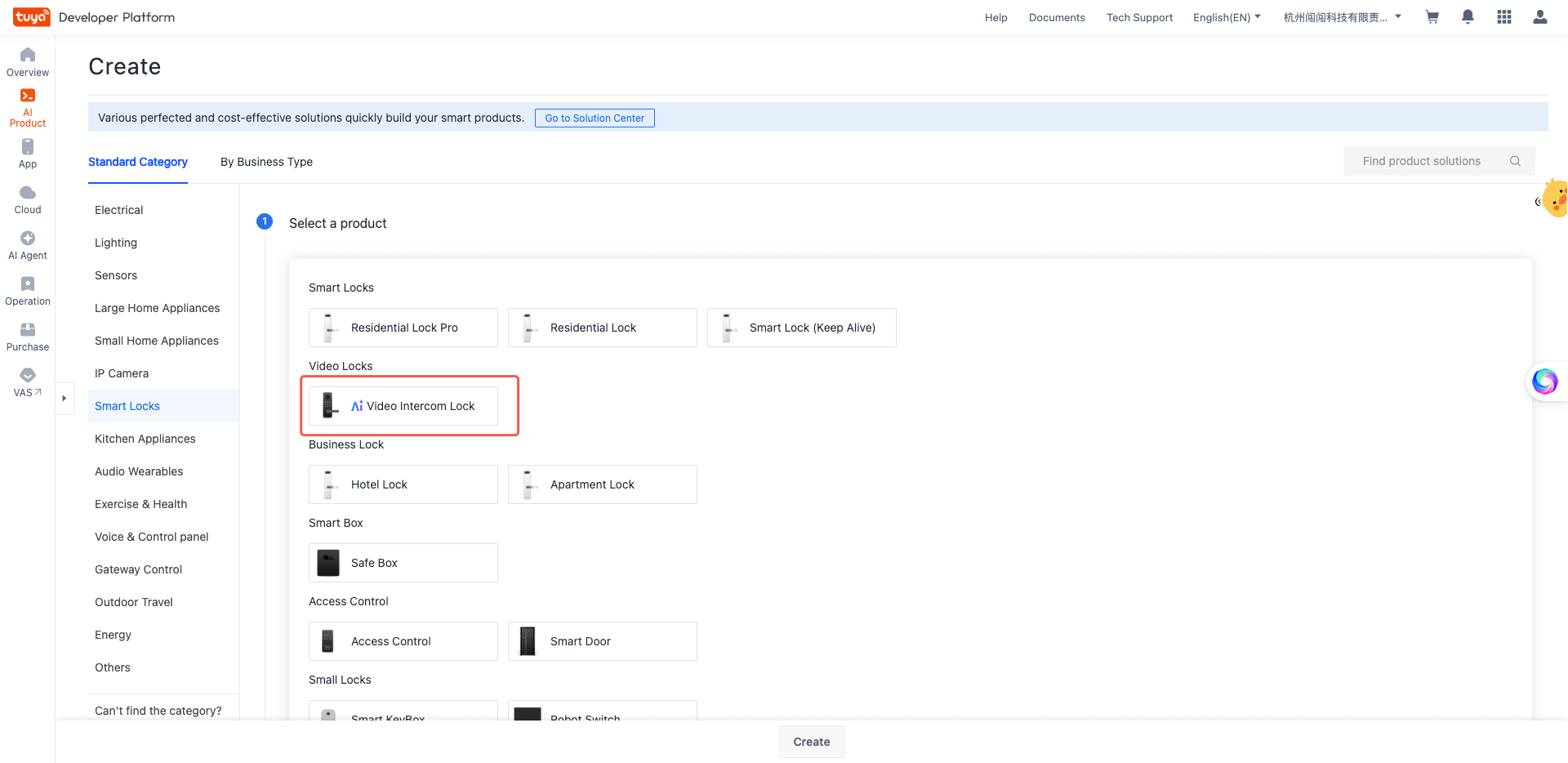
- In the Standard Category tab, choose Smart Locks > Video Intercom Lock.
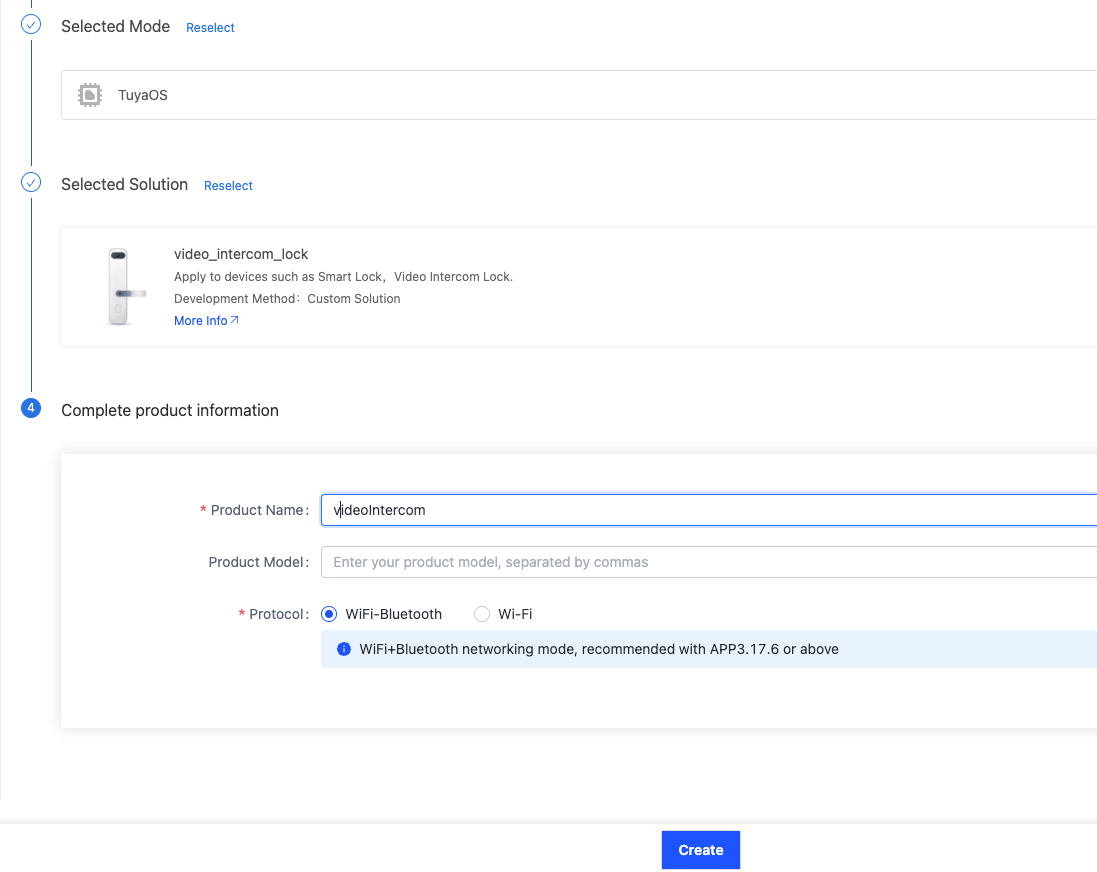
- Select a smart mode and solution, and complete product information. For example, specify Product Name as videoIntercom.
- Click Create.
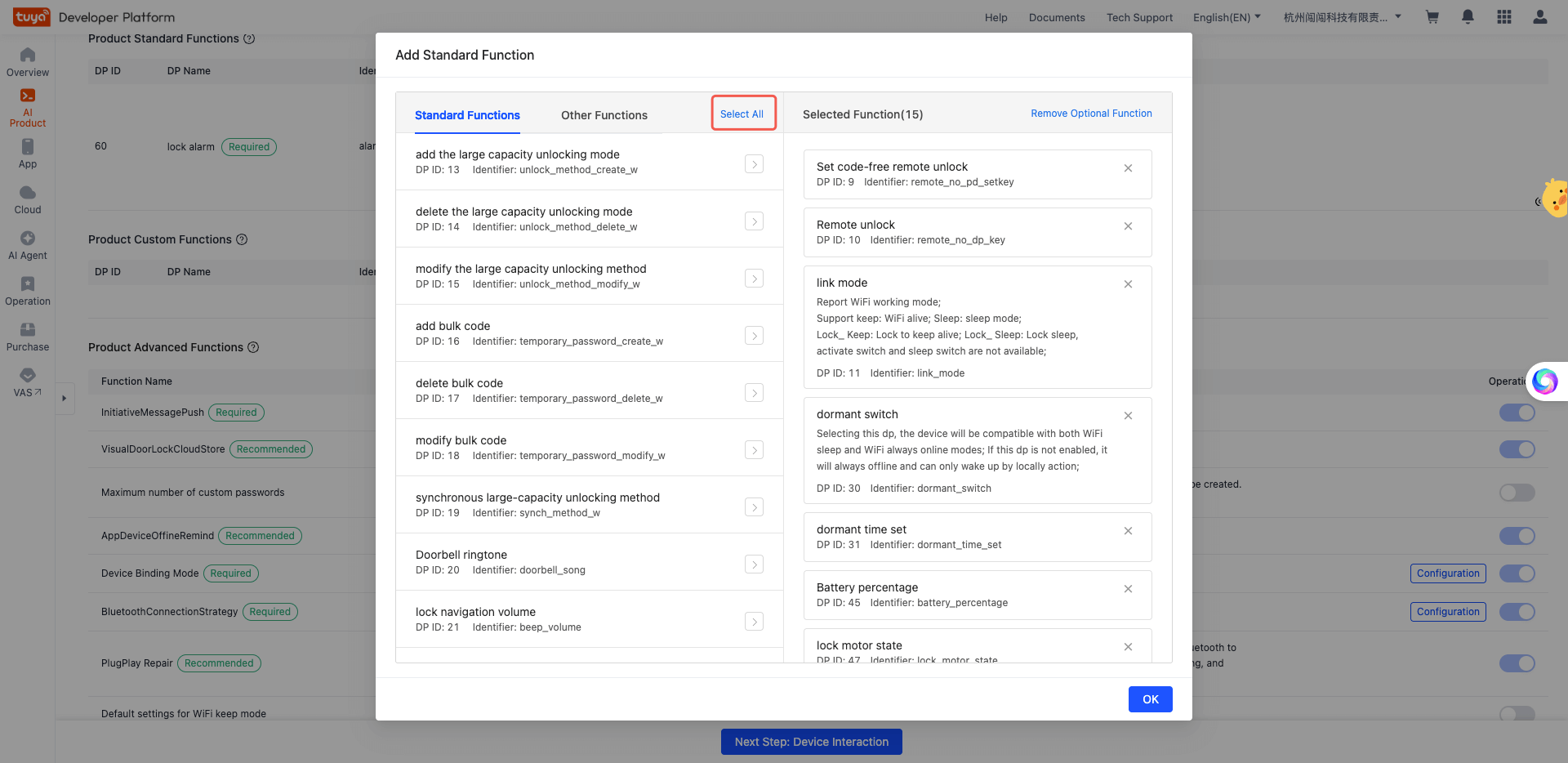
- After your product is created, the Add Standard Function dialog box appears. You can select all the DPs.
🎉 Now, you have created a smart video lock product named videoIntercom.
Create panel miniapp on Smart MiniApp Developer Platform
Register and log in to the Smart MiniApp Developer Platform. For more information, see Create panel miniapp.
Create a project based on a template
Open the Tuya MiniApp IDE and create a panel miniapp project based on the smart video lock template.
For more information, see Initialize project.
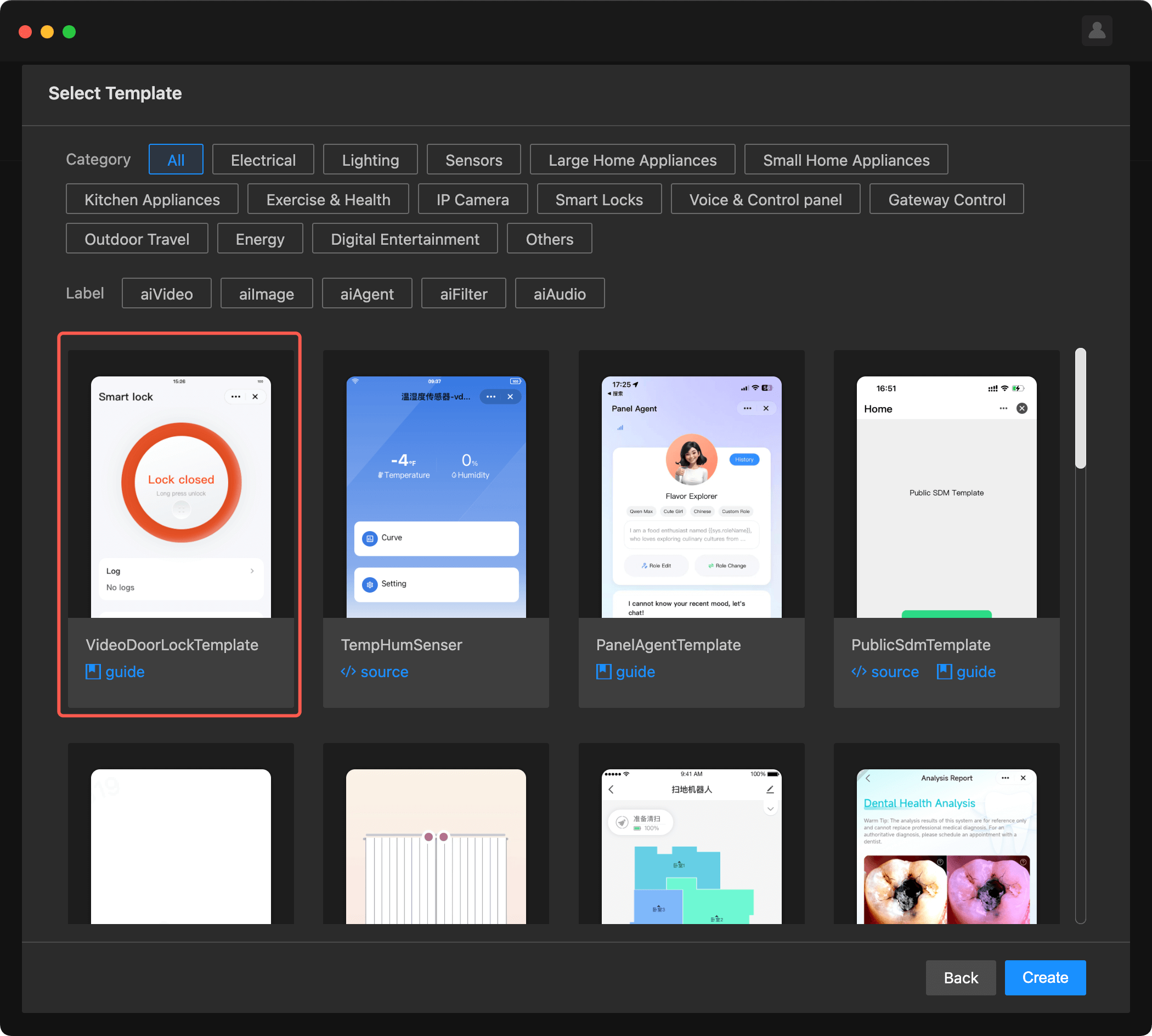
By now, you have completed the initialization of the development template of a panel miniapp. This section introduces the project directory.
├── src
│  	├── @types // Define global types
│  	├── api
│  	│   ├── getCachedLaunchOptions.ts // Get cached launch options
│  	│   ├── getCachedSystemInfo.ts // Get cached system information
│  	│   └── request.ts // Request wrapper
│  	├── components
│  	│   ├── action-sheet // Action sheet popup
│  	│   ├── aes-image // AES-encrypted image component
│  	│   ├── calendar // Calendar component
│  	│   ├── date-range // Date range picker component
│  	│   ├── effective-time-config // Effective time configuration component
│  	│   ├── loading-data // Data loading component
│  	│   ├── loading-more // Load more component
│  	│   ├── page-container // Page container component
│  	│   ├── time-picker // Time picker component
│  	│   ├── time-range-popup // Time range popup component
│  	│   └── video-player // Video player component
│  	├── constant // Common configurations
│  	├── devices // Device models
│  	│   ├── index.ts // Device initialization
│  	│   ├── protocols // Protocol configurations
│  	│   └── schema.ts // Device schema
│  	├── hooks // Custom hooks
│  	│   ├── useSelectorWithEquality.ts // Redux selector hook
│  	│   ├── useSystemInfo.tsx // System information hook
│  	│   └── useTempInfos.tsx // Temporary password info hook
│  	├── i18n // Internationalization
│  	│   ├── index.ts // i18n initialization
│  	│   └── strings.ts // Language strings
│  	├── pages
│   │   ├── home // Homepage
│   │   │   ├── components
│   │   │   │   ├── log // Log preview component
│   │   │   │   ├── open // Lock/unlock component
│   │   │   │   └── options // Feature entry component
│   │   │   ├── index.tsx // Homepage main file
│   │   │   ├── index.module.less // Homepage styles
│   │   │   └── index.config.ts // Homepage configurations
│   │   ├── logs // Log management page
│   │   │   ├── components
│   │   │   │   ├── album-item // Album item component
│   │   │   │   ├── log-item // Log item component
│   │   │   │   └── tabs // Tab component
│   │   │   ├── index.tsx // Log page main file
│   │   │   ├── logs.tsx // Unlock records page
│   │   │   ├── alarm.tsx // Alarm records page
│   │   │   ├── album.tsx // Album logs page
│   │   │   └── record-alarm.tsx // Alarm details page
│   │   ├── members // Member management page
│   │   │   ├── list // Member list page
│   │   │   ├── details // Member details page
│   │   │   └── components
│   │   │       └── member // Member item component
│   │   ├── unlock // Unlock method management page
│   │   │   ├── password // Password management page
│   │   │   ├── add // Add unlock method
│   │   │   ├── edit // Edit unlock method
│   │   │   └── unbind-list // The list of unbound unlock methods
│   │   ├── temporary // Temporary password management
│   │   │   ├── password // Create temporary password
│   │   │   ├── valid-list // The list of valid passwords
│   │   │   ├── invalid-list // The list of invalid passwords
│   │   │   ├── edit-custom // Edit custom password
│   │   │   ├── success // Creation success
│   │   │   └── clear-one // Clear single password
│   │   ├── video // Video talk page
│   │   │   ├── components
│   │   │   │   ├── clarity // Clarity switch component
│   │   │   │   └── tools // Tools component
│   │   │   ├── index.tsx // Main file of video talk page
│   │   │   ├── video.tsx // Video component
│   │   │   └── utils.ts // Utility functions
│   │   ├── player // Video playback page
│   │   │   ├── index.tsx // Main file of video playback page
│   │   │   └── index.module.less // Styles
│   │   └── settings // Settings page
│   │       └── overview // Settings overview page
│  	├── redux // Redux state management
│   │   ├── index.ts // Redux store
│   │   └── modules // Redux modules
│   │       ├── themeSlice.ts // Theme slice
│   │       └── systemInfoSlice.ts // System information slice
│   ├── res // Local resources
│   │   ├── icons.ts // Icon resources
│   │   └── *.png // Image resources
│   ├── styles // Global styles
│   │   └── index.less // Global styles file
│   ├── utils // Common utility methods
│   │   ├── constant.tsx // Constant definitions
│   │   ├── error.ts // Error handling utilities
│   │   ├── index.ts // Utility functions
│   │   ├── log.ts // Logging utilities
│   │   └── transfer.ts // Data transfer utilities
│   ├── app.config.ts // App configurations
│   ├── app.less // App styles
│   ├── app.tsx // App entry
│   ├── composeLayout.tsx // Layout composer (handles SDK initialization and so on)
│   ├── global.config.ts // Global configurations
│   ├── routes.config.ts // Routing configurations
│   └── variables.less // Style variables
In composeLayout.tsx, you need to initialize the door lock SDK and configure password parameters and strict mode when the application starts.
Code path: src/composeLayout.tsx
import { init as initLock } from '@ray-js/lock-sdk';

async onLaunch(object: any) {
  console.log('=== App onLaunch', object);
  devices.common.init();
  // Initialize the door lock SDK.
  initLock({
    passwordDigitalBase: 10,      // Password digit base. It is 10 by default.
    passwordSupportZero: true,    // Specifies whether the password supports the digit 0. It is true by default.
    strictMode: false,            // Strict mode. It is true by default.
  });
  devices.common.onInitialized(device => dpKit.init(device));
  // ...
}
In the lock/unlock component on the homepage, remotely control the door lock by tapping and holding a specific button, and check the device status in real time.
Code path: src/pages/home/components/open/index.tsx
import {
  openDoor,
  closeDoor,
  isSleep,
  getDeviceStatus,
  onDeviceStatusChange,
  offDeviceStatusChange,
} from '@ray-js/lock-sdk';

function Open() {
  const doorLockStatus = useProps(d => d.lock_motor_state);
  const [deviceStatus, setDeviceStatus] = useState(() => {
    return getDeviceStatus();
  });
  const [operateing, setOperateing] = useState(false);

  // Listen for device status changes
  useEffect(() => {
    const handleDeviceStatusChange = (status: any) => {
      setDeviceStatus(status);
    };
    onDeviceStatusChange(handleDeviceStatusChange);
    return () => {
      offDeviceStatusChange(handleDeviceStatusChange);
    };
  }, []);

  // Perform unlock/lock operations
  const handleRemote = useCallback(async () => {
    try {
      setOperateing(true);
      if (doorLockStatus) {
        await closeDoor();
      } else {
        await openDoor();
      }
    } catch (e) {
      ToastInstance.fail('Operation failed');
    } finally {
      setOperateing(false);
    }
  }, [doorLockStatus]);

  return (
    <View onLongClick={handleRemote}>
      {/* UI display */}
    </View>
  );
}
View unlock records, alarm records, and image/video logs. Users can use paginated search, pull down to refresh, and pull up to load.
Demonstration:
Code path: src/pages/logs/index.tsx
import {
  getLatestLogs,
  getLogs,
  getAlarms,
  getAlbums,
  onLogsRefresh,
  offLogsRefresh,
} from '@ray-js/lock-sdk';

// Preview homepage log
const [logs, setLogs] = useState({
  data: [],
  unreadCount: 0,
});

useEffect(() => {
  getLatestLogs().then(logs => {
    setLogs(logs);
  });
}, []);

// Listen for log refresh events
useEffect(() => {
  const handleRefresh = () => {
    getLatestLogs().then(logs => {
      setLogs(logs);
    });
  };
  onLogsRefresh(handleRefresh);
  return () => {
    offLogsRefresh(handleRefresh);
  };
}, []);

// Get log list
const fetchLogs = async (pageNo: number) => {
  const res = await getLogs({ page: pageNo });
  setList(res.list);
  setHasNext(res.hasMore);
};
Manage door lock members. For example, view the member list, search for members, add members, view member details, and delete members.
Demonstration:
Code path: src/pages/members/list/index.tsx
import {
  getUsers,
  addUser,
  removeUser,
} from '@ray-js/lock-sdk';

// Get user list (search supported)
const getMembers = async (name: string) => {
  const members = await getUsers({
    keyword: name,
    page: 1,
    pageSize: 50,
  });
  setMembers(members.list);
};

// Add members
const handleAddMember = () => {
  DialogInstance.input({
    title: 'Add ordinary members',
    value: '',
    placeholder: 'Please enter nickname',
    beforeClose: async (action, value) => {
      if (action === 'confirm' && value) {
        await addUser({ name: value });
        ToastInstance.success('Saved successfully');
      }
      return true;
    },
    emptyDisabled: true,
  });
};
The following features are implemented:
- Add unlock methods such as fingerprint, facial recognition, card, palm vein, and finger vein recognition.
- Add passwords.
- Edit and delete unlock methods.
Demonstration:
Code path: src/pages/unlock/add/index.tsx
import {
  startAddUnlockMethod,
  onAddUnlockMethod,
  offAddUnlockMethod,
  cancelAddUnlockMethod,
  addPassword,
} from '@ray-js/lock-sdk';

// Start adding unlocking methods
const handleAdd = async () => {
  try {
    const { total } = await startAddUnlockMethod({
      userId,
      type: 'finger', // 'finger' | 'face' | 'card' | 'hand' | 'fingerVein'
    });
    setTotal(total);
    setAddState(1);
  } catch (e) {
    // Handle errors
  }
};

// Listen for the adding progress
useEffect(() => {
  const handleStep = (event) => {
    switch (event.stage) {
      case 'step':
        setStep(event.step);
        break;
      case 'success':
        setAddState(2);
        break;
      case 'fail':
        setAddState(3);
        break;
    }
  };
  onAddUnlockMethod(handleStep);
  return () => {
    offAddUnlockMethod(handleStep);
  };
}, []);
Create and manage temporary passwords, including custom passwords, time-limited passwords, one-time passwords, and dynamic passwords.
Demonstration:
Code path: src/pages/temporary/password/index.tsx
import {
  createTempCustom,
  createTempLimit,
  createTempOnce,
  createTempDynamic,
  getTempEffectiveList,
  renameTemp,
  updateTempCustom,
  freezeTemp,
  unfreezeTemp,
  removeTempCustom,
} from '@ray-js/lock-sdk';

// Create a custom password
const save = async () => {
  const res = await createTempCustom({
    password,
    name,
    effective: {
      effectiveDate: Math.floor(effectConfig.effectiveTime.valueOf() / 1000),
      expiredDate: Math.floor(effectConfig.invalidTime.valueOf() / 1000),
      repeat: effectConfig.repeat ? 'week' : 'none',
      weeks: effectConfig.weeks,
      effectiveTime: effectConfig.startTime,
      expiredTime: effectConfig.endTime,
    },
  });
};

// Create a time-limited password
await createTempLimit({
  name: 'Time-limited password',
  effectiveTime: Math.floor(startTime.valueOf() / 1000),
  invalidTime: Math.floor(endTime.valueOf() / 1000),
});

// Create a one-time password
await createTempOnce({ name: 'One-time password' });

// Create a dynamic password
await createTempDynamic();
View live videos
On the video talk page, view live video and enjoy features such as switching video quality and muting.
Demonstration:
Code path: src/pages/video/video.tsx
import Player from '@ray-js/ray-ipc-player';
import {
  getDeviceStatus,
  getMediaRotate,
  onDeviceStatusChange,
  offDeviceStatusChange,
} from '@ray-js/lock-sdk';

const VideoView = () => {
  const { devId } = useDevice(d => d.devInfo);
  const [deviceStatus, setDeviceStatus] = useState(() => {
    return getDeviceStatus();
  });
  const [muted, setMuted] = useState(false);
  const [clarity, setClarity] = useState<'normal' | 'hd'>('normal');
  const [isPlaying, setIsPlaying] = useState(false);

  const rotateInfo = getMediaRotate();

  const handleChangeStreamStatus = useCallback((data: number) => {
    setIsPlaying(data === 1002);
  }, []);

  return (
    <>
      <CoverView className={styles.menus}>
        <NavBar title="" leftArrow border={false} onClickLeft={handlBack} />
        <Clarity clarity={clarity} onChange={setClarity} />
        <Tools disabled={!isPlaying} muted={muted} onMutedChange={setMuted} />
      </CoverView>
      <View className={styles.content}>
        <Player
          defaultMute={muted}
          devId={devId}
          onlineStatus={deviceStatus.type === 'online'}
          rotateZ={rotateInfo.videoAngle}
          onChangeStreamStatus={handleChangeStreamStatus}
          clarity={clarity}
          brandColor="#FF592A"
        />
      </View>
    </>
  );
};
Video playback
On the video playback page, play back recorded videos, with support for play, pause, and download functions.
Code path: src/pages/player/index.tsx
import { IpcPlayer, createIpcPlayerContext, ipc } from '@ray-js/ray';
import { getMediaRotate, getMediaUrl, MediaInfo } from '@ray-js/lock-sdk';

const Player = () => {
  const { devId } = useDevice(d => d.devInfo);
  const data = useMemo(() => {
    return transfer.receive<MediaInfo>('mediaData');
  }, []);
  const ctx = useRef<ReturnType<typeof createIpcPlayerContext>>(null);
  const [status, setStatus] = useState<'init' | 'playing' | 'pause' | 'stop' | 'error'>('init');
  const [mediaUrl, setMediaUrl] = useState('');

  const rotateInfo = getMediaRotate();

  // Initialize the player
  const initPlayer = useCallback(() => {
    ctx.current?.createMessageDevice({
      devId,
      success: () => {
        ctx.current?.setMessageVideoMute({ mute: 0 });
        ctx.current?.setRotateZ(rotateInfo.videoAngle);
        ipc.onPlayMessageVideoFinish(handlePlayMessageVideoFinish);
      },
    });
    ipc.createMediaDevice({ deviceId: devId });
  }, []);

  // Play the video
  const handlePlay = useCallback(async () => {
    if (status === 'init' || status === 'stop' || status === 'error') {
      const res = await getMediaUrl({
        mediaPath: data.mediaPath,
        mediaBucket: data.mediaBucket,
      });
      ctx.current?.startMessageVideoPlay({
        encryptKey: data.mediaKey,
        path: res.mediaUrl,
        startTime: 0,
        success: () => {
          setStatus('playing');
        },
      });
    } else if (status === 'playing') {
      ctx.current?.pauseMessageVideoPlay({
        success: () => {
          setStatus('pause');
        },
      });
    } else if (status === 'pause') {
      ctx.current?.resumeMessageVideoPlay({
        success: () => {
          setStatus('playing');
        },
      });
    }
  }, [data, status]);

  // Download the video
  const handleDownload = useCallback(() => {
    ipc.startDownloadMessageVideo({
      deviceId: devId,
      path: mediaUrl,
      encryptKey: data.mediaKey,
      savePath: 2,
      rotateMode: rotateInfo.videoAngle || 0,
    });
  }, [mediaUrl]);

  return (
    <>
      <NavBar title="" background="#000" leftArrow border={false} onClickLeft={handlBack} />
      <View className={styles.content}>
        <IpcPlayer
          type={2}
          deviceId={devId}
          autoplay={false}
          objectFit="contain"
          orientation="vertical"
          rotateZ={rotateInfo.videoAngle}
          onCreateViewSuccess={initPlayer}
          className={styles.player}
        />
        <CoverView className={styles.preview}>
          {status !== 'playing' && status !== 'pause' && (
            <AESImage
              devId={devId}
              className={styles.mediaImage}
              fileKey={data.fileKey}
              url={data.fileUrl}
              fillType="width"
              rotate={rotateInfo.imageAngle}
            />
          )}
          <View className={styles.tools}>
            <View className={styles.playButton} onClick={handlePlay}>
              <Icon name={status === 'playing' ? Pause : Play} size="48rpx" />
            </View>
            <View className={styles.downloadButton} onClick={handleDownload}>
              <Icon name={Download} size="48rpx" />
            </View>
          </View>
        </CoverView>
      </View>
    </>
  );
};
Sleep settings
On the settings page, configure the device's sleep time period.
Code path: src/pages/settings/overview/components/sleep-settings/index.tsx
import {
  getSleepPeriod,
  setSleepPeriod,
  isSleep,
  onSleepStatusChange,
  offSleepStatusChange,
} from '@ray-js/lock-sdk';

// Get the sleep time period
const fetchSleepPeriod = async () => {
  const period = await getSleepPeriod();
  setSleepPeriod(period);
};

// Set the sleep time period
const handleSave = async () => {
  await setSleepPeriod({
    start: startTime,
    end: endTime,
  });
};
Remote unlocking permission
On the settings page, configure remote unlocking permissions.
Code path: src/pages/settings/overview/components/remote-unlock/index.tsx
import {
  getRemotePermission,
  updateRemotePermission,
  remoteEnabled,
  checkRemoteEnabled,
} from '@ray-js/lock-sdk';

// Get remote unlocking permission
const fetchPermission = async () => {
  const enabled = await checkRemoteEnabled();
  const permission = await getRemotePermission();
  setEnabled(enabled);
  setPermission(permission);
};

// Update remote unlocking permission
const handleUpdate = async () => {
  await updateRemotePermission(permission);
};
- Congrats! 🎉 You have finished learning this guide.
- If you have any problem during the development, you can contact Tuya's Smart MiniApp team for troubleshooting.