本文档面向已经了解 面板小程序开发 的开发者,你需要充分的了解什么是面板小程序 产品功能 若您对上述概念有所疑问,我们推荐你去看一些预备知识。如果您已了解,可跳过本文。
理解关系
面板作为 IoT 智能设备在 App 终端上的产品形态,创建产品之前,首先来了解一下什么是面板,以及和产品、设备之间的关系。
面板是运行在智能生活 App、OEM App(涂鸦定制 App)上的界面交互程序,用于控制智能设备的运行,展示智能设备实时状态。产品将面板与智能设备联系起来,产品描述了其具备的功能、在 App 上面板显示的名称、智能设备拥有的功能点等。智能设备是搭载了涂鸦智能模组的设备,通常在设备上都会贴有一张二维码,使用智能生活 App扫描二维码,即可在 App 中获取并安装该设备的控制面板。产品、面板、设备之间的关系可参考下图。
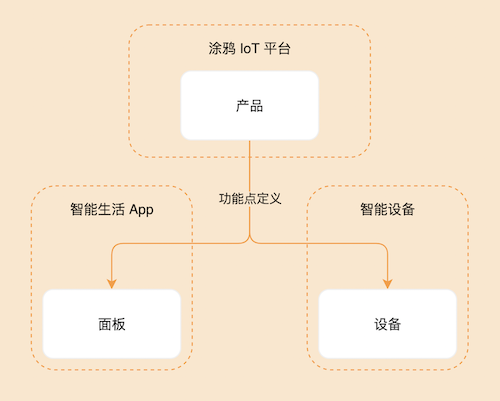
电工模板使用 SDM(Smart Device Model) 开发,关于 SDM 相关可以 查看 SDM 文档
相关概念
产品名称:通用电工排插
产品介绍
提供排插的打开与关闭的基本功能,并提供关闭倒计时、增加电量、更新当前电流、功率参数等功能,根据以下通用电工的开发教程帮助您开发面板小程序去控制排插。
需求原型
首页点击中间按钮切换switch_1、switch_2开关状态。首页页面展示倒计时提示,根据开关状态、手机系统的 24 小时制或 12 小时制、countdown_1、countdown_2的值来显示对应的提示文案,若未设置倒计时则不展示。点击首页底部倒计时弹出倒计时提示框组件来设置倒计时,若未设置则展示设置倒计时的组件,若已设置则可关闭倒计时。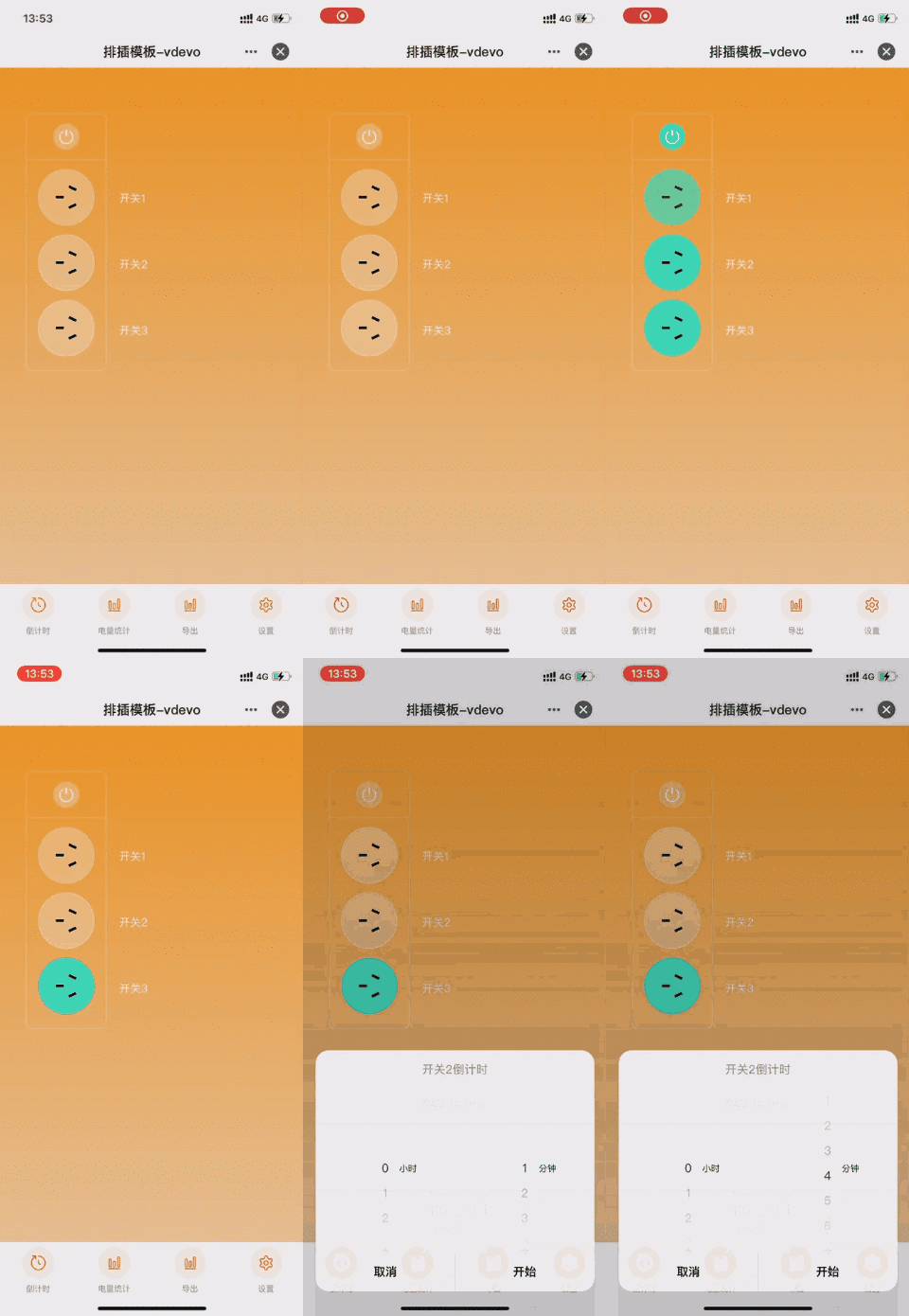
点击首页底部电量统计进入电量统计页面,可以查看当前的用电情况。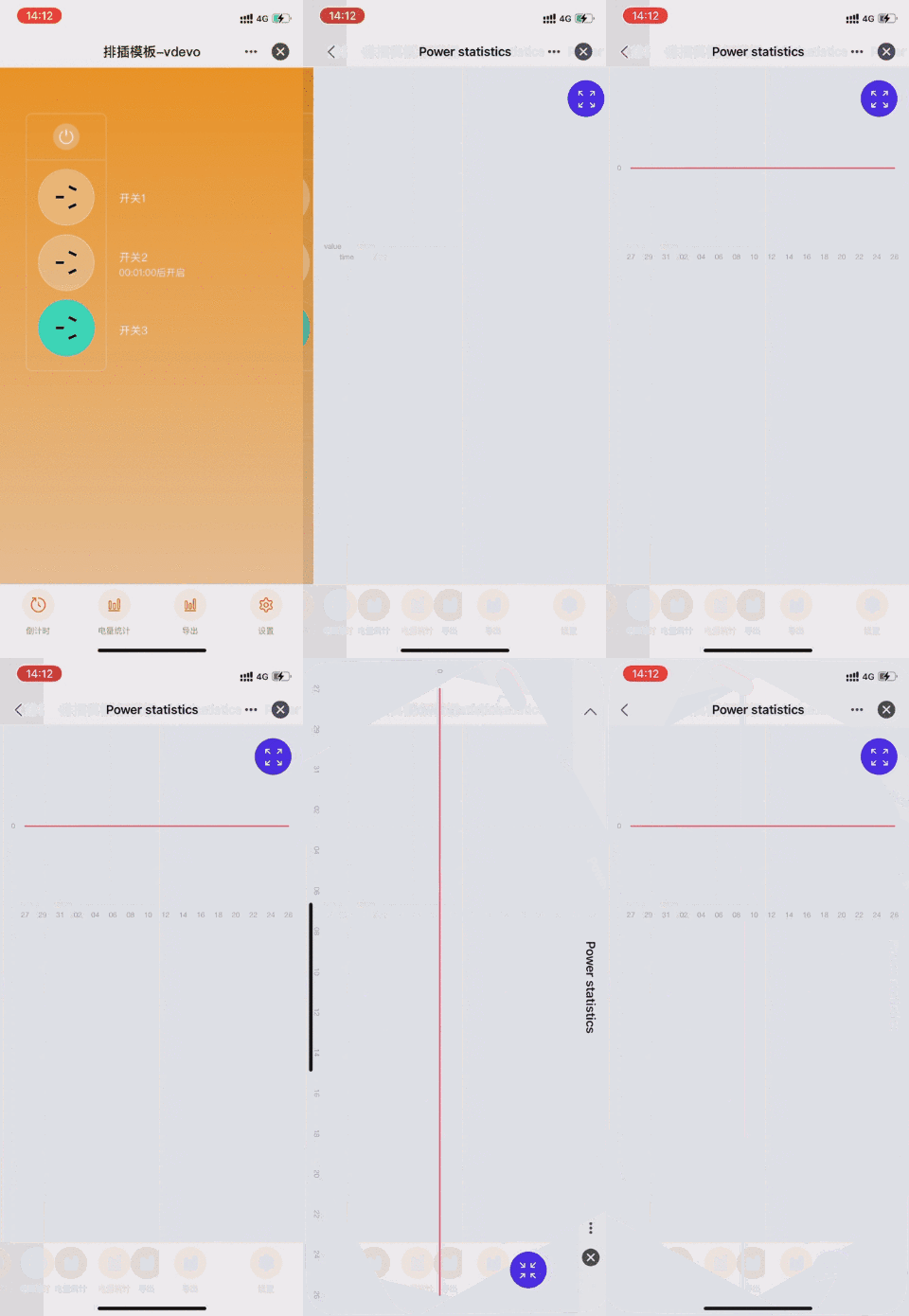
点击首页底部导出进入导出数据页面,可以导致用电数据。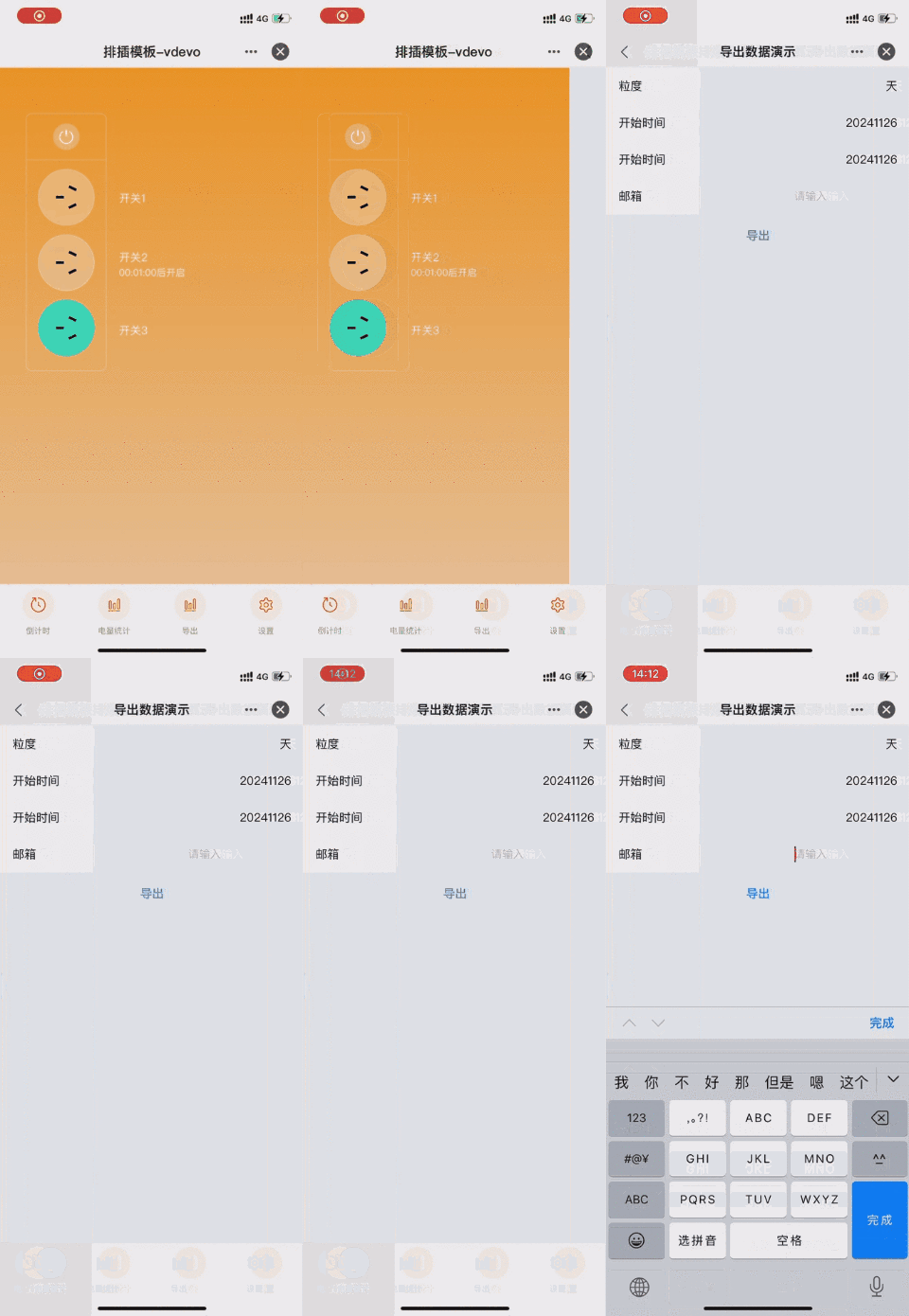
点击首页底部设置进入设置页面,可以对除开关和倒计时功能 外的所有可下发可上报(rw)功能进行设置。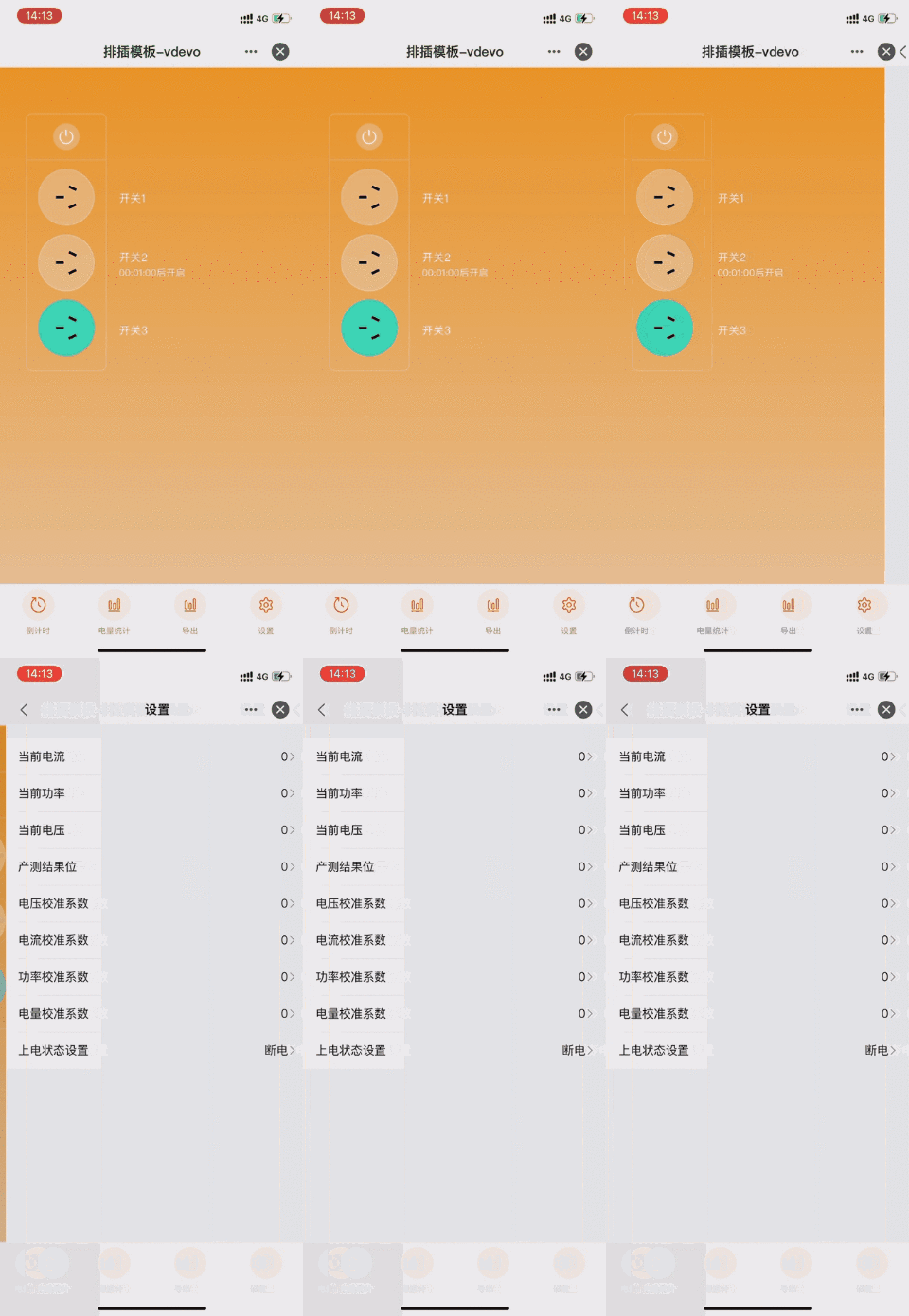
功能汇总
当前电工排插模板必须的功能点:
switch_1,
countdown_1,
switch_2,
countdown_2,
add_ele,
dp 功能 | dpid | code | type | mode | property | |
开关 1 | 1 | switch_1 | 布尔型(Bool) | 可下发可上报(rw) | ||
倒计时 1 | 9 | countdown_1 | 数值型(Value) | 可下发可上报(rw) | 数值范围: 0-86400, 间距: 1, 倍数: 0, 单位: s | |
开关 2 | 1 | switch_2 | 布尔型(Bool) | 可下发可上报(rw) | ||
倒计时 2 | 9 | countdown_2 | 数值型(Value) | 可下发可上报(rw) | 数值范围: 0-86400, 间距: 1, 倍数: 0, 单位: s | |
增加电量 | 17 | add_ele | 数值型(Value) | 可下发可上报(rw) | 数值范围: 0-50000, 间距: 100, 倍数: 3, 单位: kwh | |
首先需要创建一个电工类产品,定义产品有哪些功能点,然后面板中再根据这些功能点一一实现。
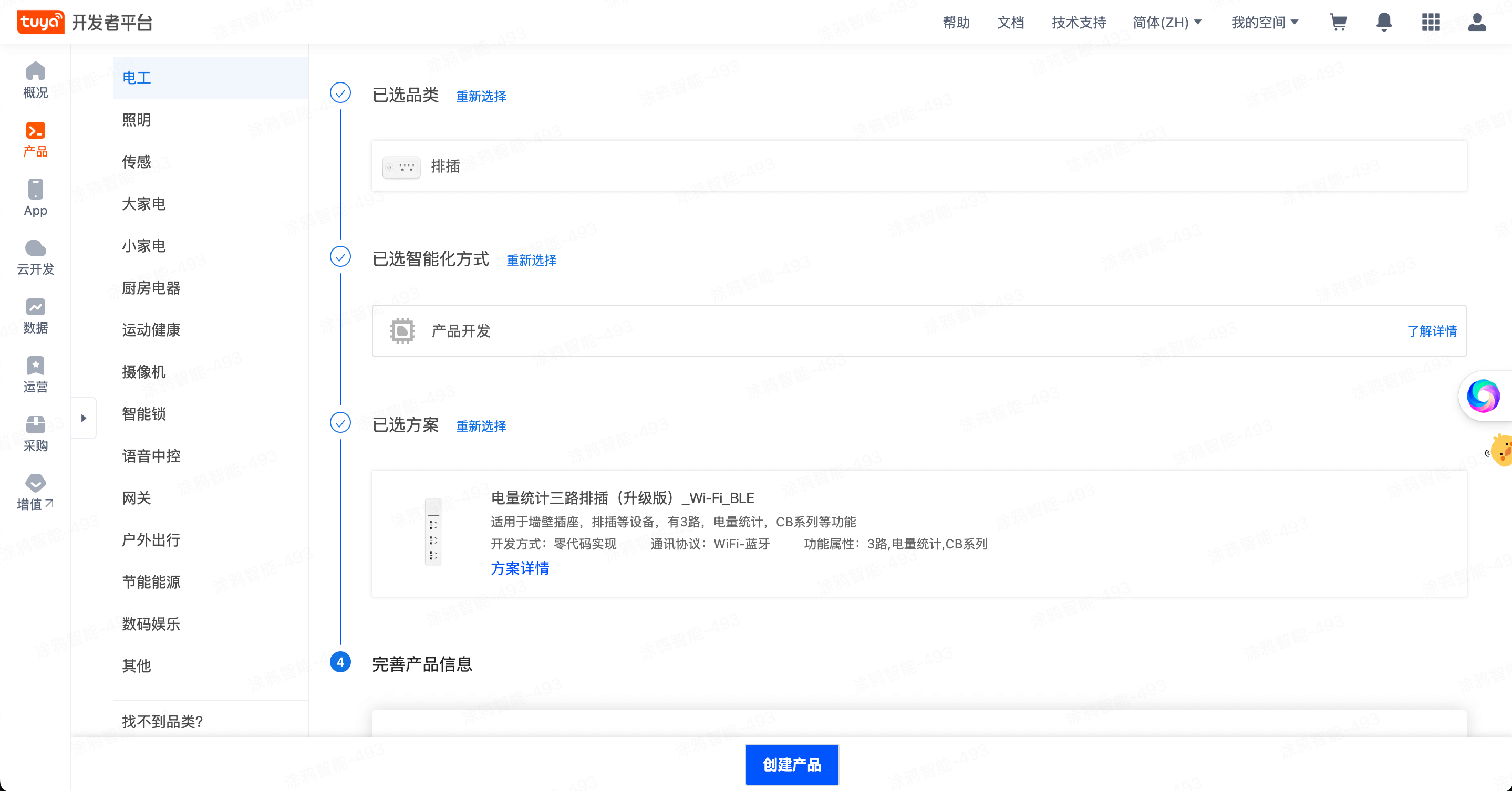
进入IoT 平台,点击左侧产品菜单,产品开发,创建产品,选择标准类目 -> 电工 -> 排插,然后选择 电量统计 的排插产品方案:
选择功能点,这里我们只需要默认的标准功能即可。
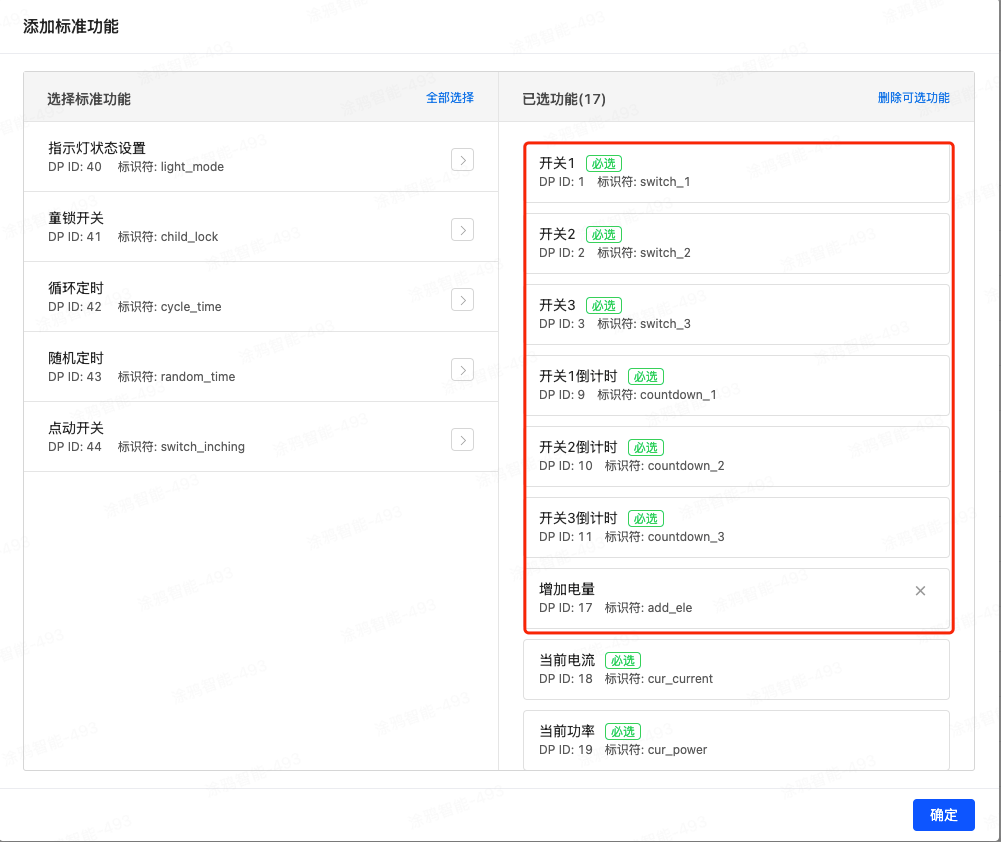
🎉 在这一步,我们创建了一个名为 电量统计三路排插 的电工排插产品。
开发者平台创建面板小程序
这部分我们在 小程序开发者 平台上进行操作,注册登录 小程序开发者平台。
新建小程序,填写信息 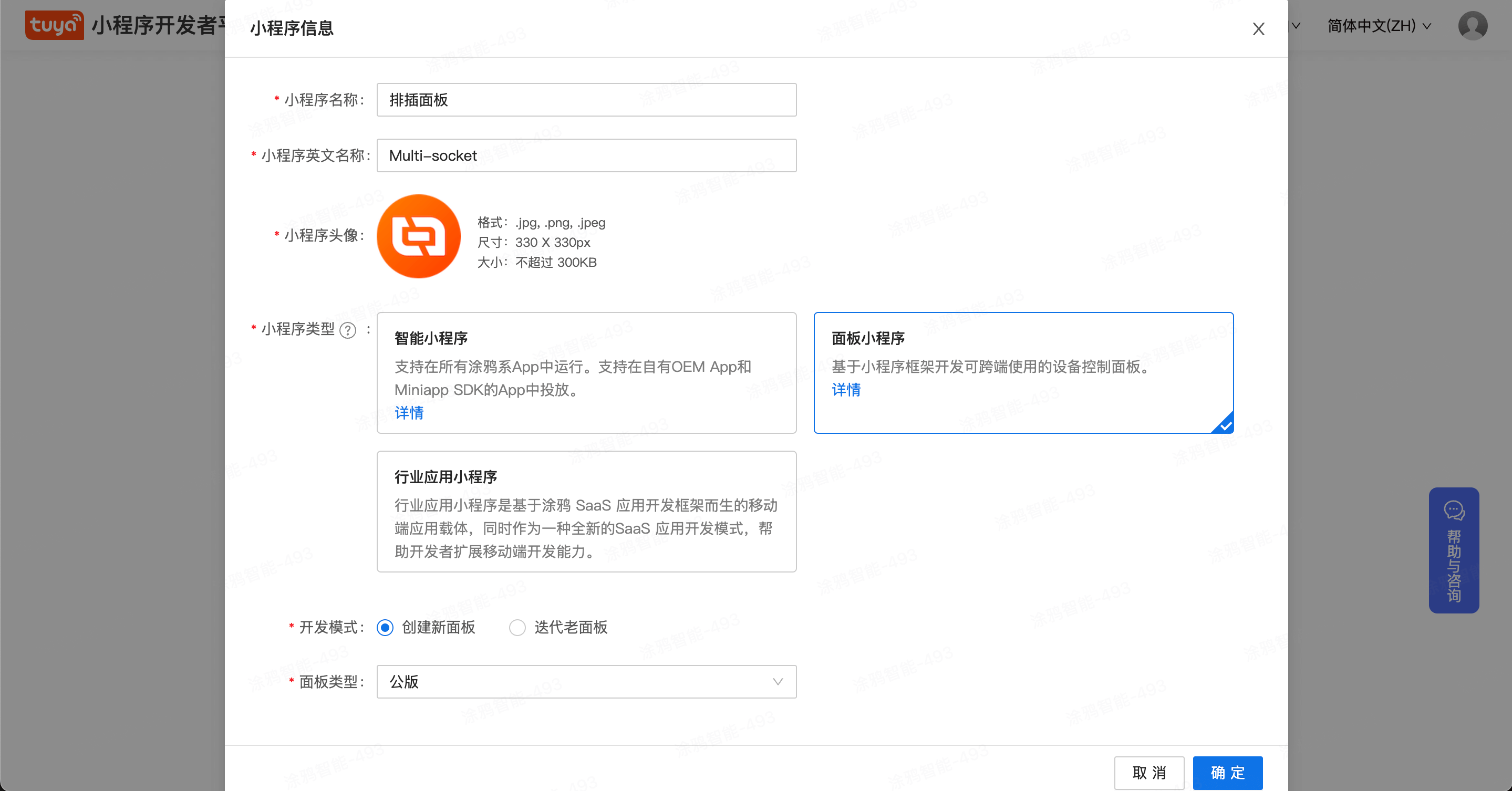 点击确定,完成创建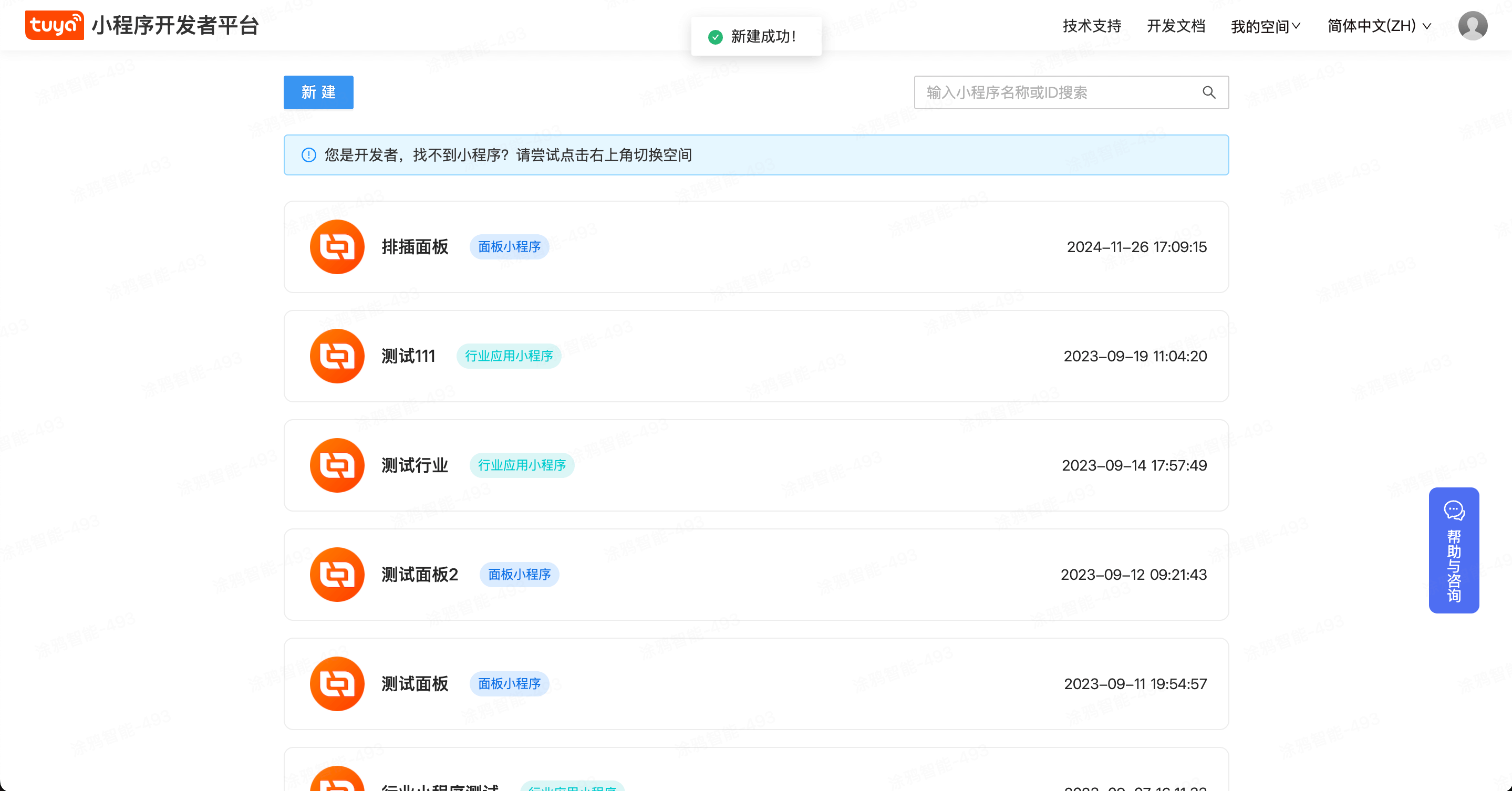
创建 IDE 项目
打开 IDE,选择新建,输入项目名称,关联创建的面板小程序,选择单插产品,然后点击下一步。 
在下一步中,找到电工单插模板,并完成创建项目 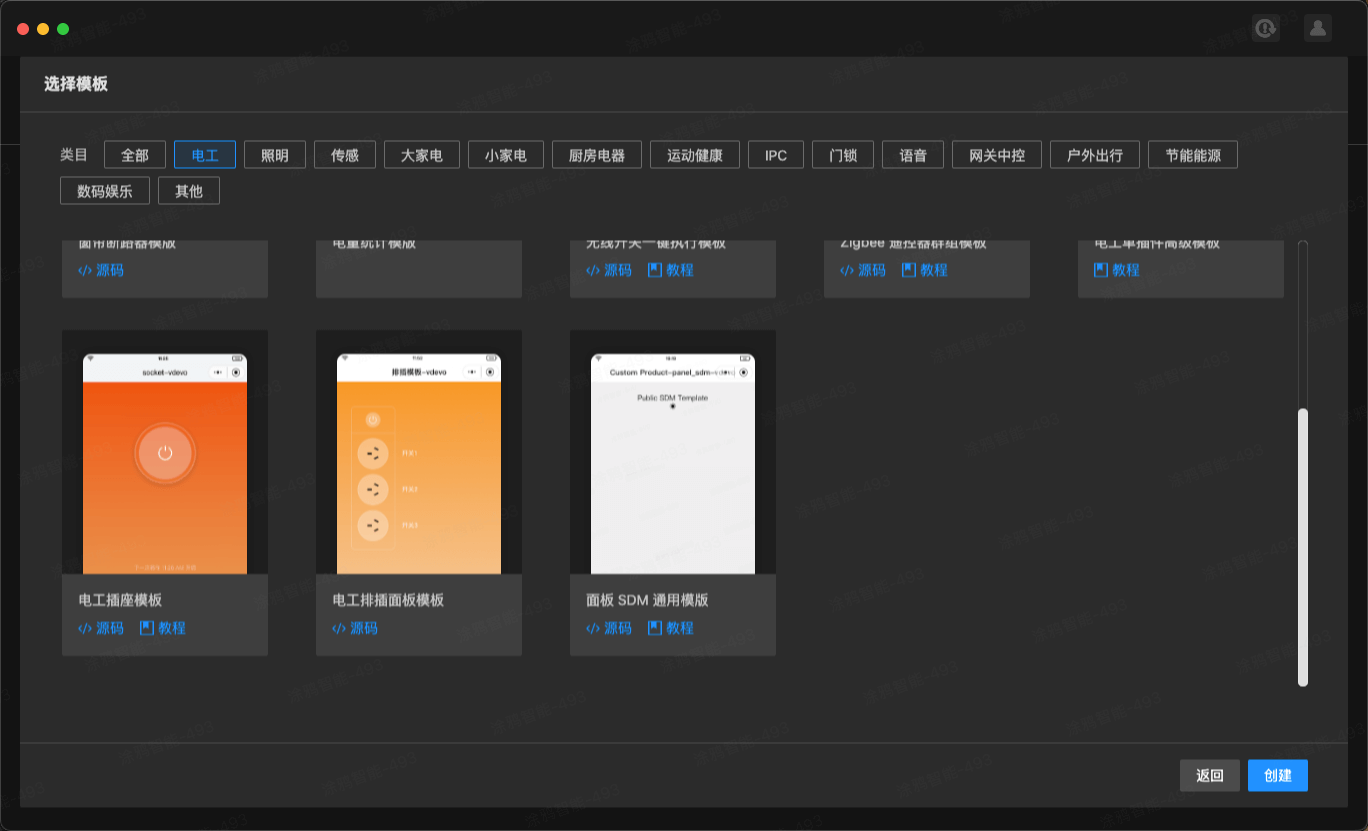
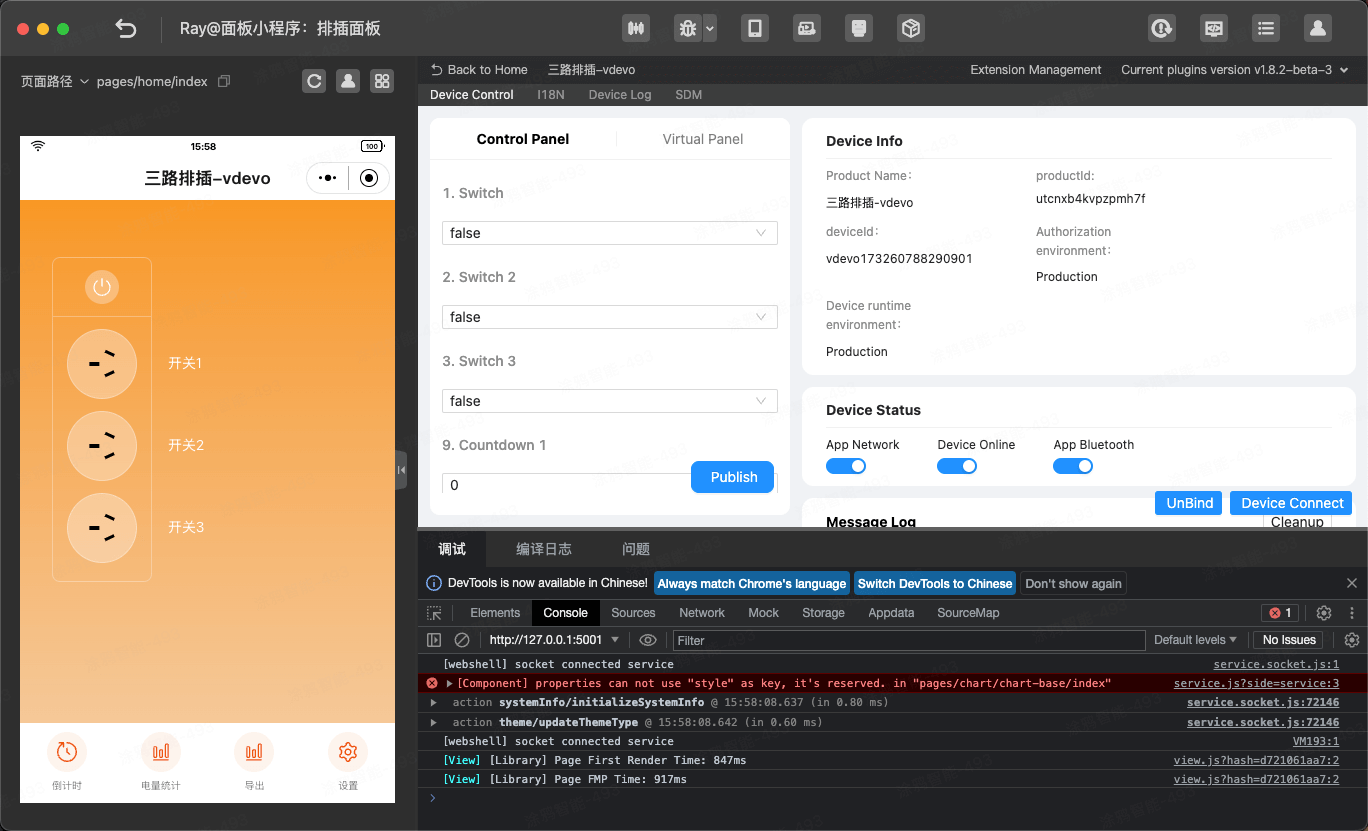
此时,回到项目管理列表,选择刚创建好的项目,进入后,即可进行预览并开发。
工程目录
上面的步骤我们已经初始化好了一个面板小程序的开发模板,下面我们介绍下工程目录。
├── src
│ ├── app.config.ts # 自动生成配置
│ ├── app.tsx # App 根组件
│ ├── components # 组件目录
│ ├── constant # 常量目录
│ ├── devices # 智能设备模型目录
│ │ ├── index.ts # 定义并导出智能设备模型
│ │ └── schema.ts # 当前智能设备 DP 功能点描述,IDE 可自动生成
│ ├── global.config.ts
│ ├── hooks # 自定义 hooks 目录
│ ├── i18n # 多语言目录
│ ├── pages # 页面目录
│ └── routes.config.ts # 路由配置
│─── typings #业务类型定义目录
│ └── sdm.d.ts #智能设备类型定义文件
需求实现
1. IDE 生成 SDM schema到项目。
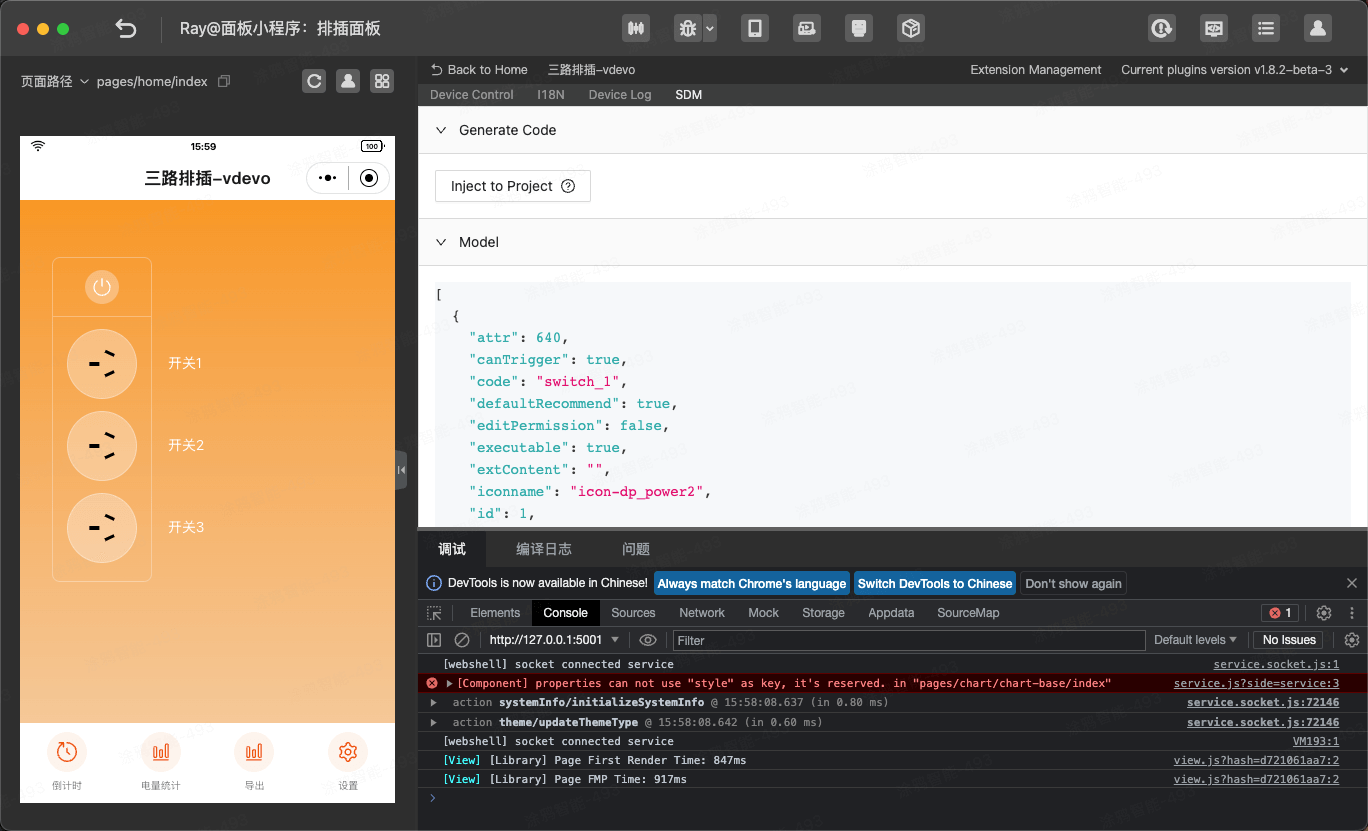
生成 SDM schema 至项目中,可以查看 src/devices/schema.ts
export const defaultSchema = [
  {
    attr: 1040,
    canTrigger: true,
    code: 'switch_1',
    defaultRecommend: false,
    editPermission: true,
    executable: true,
    extContent: '',
    iconname: 'icon-dp_power2',
    id: 1,
    mode: 'rw',
    name: '开关1',
    property: { type: 'bool' },
    type: 'obj',
  },
  {
    attr: 1024,
    canTrigger: true,
    code: 'switch_2',
    defaultRecommend: false,
    editPermission: true,
    executable: true,
    extContent: '',
    iconname: 'icon-dp_power2',
    id: 2,
    mode: 'rw',
    name: '开关2',
    property: { type: 'bool' },
    type: 'obj',
  },
  {
    attr: 1024,
    canTrigger: true,
    code: 'switch_3',
    defaultRecommend: false,
    editPermission: true,
    executable: true,
    extContent: '',
    iconname: 'icon-dp_power2',
    id: 3,
    mode: 'rw',
    name: '开关3',
    property: { type: 'bool' },
    type: 'obj',
  },
  {
    attr: 0,
    canTrigger: true,
    code: 'usb_switch_1',
    defaultRecommend: false,
    editPermission: false,
    executable: true,
    extContent: '',
    iconname: 'icon-dp_power2',
    id: 7,
    mode: 'rw',
    name: 'USB1开关',
    property: { type: 'bool' },
    type: 'obj',
  },
  {
    attr: 0,
    canTrigger: true,
    code: 'usb_switch_2',
    defaultRecommend: false,
    editPermission: false,
    executable: true,
    extContent: '',
    iconname: 'icon-dp_power2',
    id: 8,
    mode: 'rw',
    name: 'USB2开关',
    property: { type: 'bool' },
    type: 'obj',
  },
  {
    attr: 1024,
    canTrigger: true,
    code: 'countdown_1',
    defaultRecommend: false,
    editPermission: true,
    executable: true,
    extContent: '',
    iconname: 'icon-dp_time2',
    id: 9,
    mode: 'rw',
    name: '开关1倒计时',
    property: { unit: 's', min: 0, max: 86400, scale: 0, step: 1, type: 'value' },
    type: 'obj',
  },
  {
    attr: 1024,
    canTrigger: true,
    code: 'countdown_2',
    defaultRecommend: false,
    editPermission: true,
    executable: true,
    extContent: '',
    iconname: 'icon-dp_time2',
    id: 10,
    mode: 'rw',
    name: '开关2倒计时',
    property: { unit: 's', min: 0, max: 86400, scale: 0, step: 1, type: 'value' },
    type: 'obj',
  },
  {
    attr: 1024,
    canTrigger: true,
    code: 'countdown_3',
    defaultRecommend: false,
    editPermission: true,
    executable: true,
    extContent: '',
    iconname: 'icon-dp_time2',
    id: 11,
    mode: 'rw',
    name: '开关3倒计时',
    property: { unit: 's', min: 0, max: 86400, scale: 0, step: 1, type: 'value' },
    type: 'obj',
  },
  {
    attr: 0,
    canTrigger: true,
    code: 'usb_countdown_1',
    defaultRecommend: false,
    editPermission: false,
    executable: true,
    extContent: '',
    iconname: 'icon-dp_time3',
    id: 15,
    mode: 'rw',
    name: 'USB1倒计时',
    property: { unit: 's', min: 0, max: 86400, scale: 0, step: 1, type: 'value' },
    type: 'obj',
  },
  {
    attr: 0,
    canTrigger: true,
    code: 'usb_countdown_2',
    defaultRecommend: false,
    editPermission: false,
    executable: true,
    extContent: '',
    iconname: 'icon-dp_time3',
    id: 16,
    mode: 'rw',
    name: 'USB2倒计时',
    property: { unit: 's', min: 0, max: 86400, scale: 0, step: 1, type: 'value' },
    type: 'obj',
  },
  {
    attr: 1024,
    canTrigger: true,
    code: 'add_ele',
    defaultRecommend: false,
    editPermission: true,
    executable: true,
    extContent: '',
    iconname: 'icon-battery',
    id: 17,
    mode: 'rw',
    name: '增加电量',
    property: { unit: 'kwh', min: 0, max: 50000, scale: 3, step: 100, type: 'value' },
    type: 'obj',
  },
  {
    attr: 1024,
    canTrigger: true,
    code: 'relay_status',
    defaultRecommend: false,
    editPermission: true,
    executable: true,
    extContent: '',
    iconname: 'icon-zhuangtai',
    id: 38,
    mode: 'rw',
    name: '上电状态设置',
    property: { range: ['off', 'on', 'memory'], type: 'enum' },
    type: 'obj',
  },
  {
    attr: 1024,
    canTrigger: true,
    code: 'light_mode',
    defaultRecommend: false,
    editPermission: true,
    executable: true,
    extContent: '',
    iconname: 'tcl_function_light',
    id: 40,
    mode: 'rw',
    name: '指示灯状态设置',
    property: { range: ['relay', 'pos', 'none'], type: 'enum' },
    type: 'obj',
  },
  {
    attr: 1024,
    canTrigger: true,
    code: 'child_lock',
    defaultRecommend: false,
    editPermission: true,
    executable: true,
    extContent: '',
    iconname: 'icon-dp_lock',
    id: 41,
    mode: 'rw',
    name: '童锁开关',
    property: { type: 'bool' },
    type: 'obj',
  },
  {
    attr: 1024,
    canTrigger: true,
    code: 'cycle_time',
    defaultRecommend: false,
    editPermission: true,
    executable: true,
    extContent: '',
    iconname: 'icon-dp_time',
    id: 42,
    mode: 'rw',
    name: '循环定时',
    property: { type: 'string', maxlen: 255 },
    type: 'obj',
  },
  {
    attr: 4096,
    canTrigger: true,
    code: 'work_state',
    defaultRecommend: false,
    editPermission: false,
    executable: true,
    extContent: '',
    iconname: 'icon-zhuangtai',
    id: 101,
    mode: 'ro',
    name: '工作状态',
    property: { range: ['opening', 'closing'], type: 'enum' },
    type: 'obj',
  },
] as const;
2. 需求支持总开、总关、单开、单关
分析需求:
- 总开关的实现,由于没有总开关的功能,因此在实现的思路为
总开为所有开关为开启状态,总关为所有开关为关闭状态;总开操作为所有开关下发开启状态,总关操作为所有开关下发关闭状态。
- 单开或单关,直接显示或操作单个开关即可
- 在
SDM中 使用useProps获取实时下发的dp值。 - 在
SDM中 使用useAction实现下发的dp值。 - 引入
MultiSocketSwitch组件,该组织动态的显示排插的 UI, 安装命令
# 使用 yarn
yarn add @ray-js/multi-socket-switch
# 使用npm
npm install @ray-js/multi-socket-switch
示例代码:
import React, { useCallback, useMemo } from 'react';
import { Text, View, publishDps } from '@ray-js/ray';
import MultiSocketSwitch from '@ray-js/multi-socket-switch';
import { useActions, useDevice, useProps } from '@ray-js/panel-sdk';
import { TopBar } from '@/components';
import Strings from '@/i18n';
import { formatCountdown } from '@/utils';
import styles from './index.module.less';
import { HomeBottom } from './bottom';

export function Page() {
  const devInfo = useDevice(d => d.devInfo);
  const actions = useActions();
  const dpState = useProps(d => d);
  // 取得所有开关(fetch all switchs)
  const switchCodes = useMemo(() => {
    return devInfo.schema
      .filter(item => /^switch_(\d)$/.test(item.code))
      .map(item => item.code)
      .sort((a, b) => {
        return a > b ? 1 : -1;
      });
  }, [devInfo.devId]);
  // usb
  const usbSwitchCodes = useMemo(() => {
    return devInfo.schema
      .filter(item => /^usb_switch_(\d)$/.test(item.code))
      .map(item => item.code)
      .sort((a, b) => {
        return a > b ? 1 : -1;
      });
  }, [devInfo.devId]);
  // 开关倒计时
  const countdownCodes = useMemo(() => {
    return devInfo.schema
      .filter(item => /^countdown_(\d)$/.test(item.code))
      .map(item => item.code)
      .sort((a, b) => {
        return a > b ? 1 : -1;
      });
  }, [devInfo.devId]);

  const switchData = useMemo(() => {
    return switchCodes.map(code => ({ dpCode: code, dpValue: dpState[code] as boolean }));
  }, [dpState, switchCodes]);

  const usbData = useMemo(() => {
    return usbSwitchCodes.map(code => ({ dpCode: code, dpValue: dpState[code] as boolean }));
  }, [dpState, usbSwitchCodes]);

  const mainSwitch = useMemo(() => {
    return switchData.every(item => item.dpValue) && usbData.every(item => item.dpValue);
  }, [switchData, usbData]);

  const handleMainPower = useCallback(() => {
    const dpData: Record<string, boolean> = {};
    switchCodes.reduce((res, cur) => {
      res[cur] = !mainSwitch;
      return res;
    }, dpData);
    usbSwitchCodes.reduce((res, cur) => {
      res[cur] = !mainSwitch;
      return res;
    }, dpData);
    publishDps(dpData);
  }, [mainSwitch, switchCodes, usbSwitchCodes]);

  const handlePower = useCallback(dpCode => {
    actions[dpCode].toggle();
  }, []);

  return (
    <View className={styles.view}>
      <TopBar />
      <View
        className={styles.content}
        onClick={() => {
          // actions.switch_1.toggle();
        }}
      >
        <View className={styles.main} style={{ marginTop: '50rpx' }}>
          <View>
            <MultiSocketSwitch.Container style={{ width: 200 }}>
              <MultiSocketSwitch.MainSwitch value={mainSwitch} onClick={handleMainPower} />
              {switchData.map(item => {
                return (
                  <MultiSocketSwitch.SubSwitch
                    key={item.dpCode}
                    dpCode={item.dpCode}
                    dpValue={item.dpValue}
                    onClick={handlePower}
                  />
                );
              })}
              {usbData.map(item => {
                return (
                  <MultiSocketSwitch.USBSwitch
                    key={item.dpCode}
                    dpCode={item.dpCode}
                    dpValue={item.dpValue}
                    onClick={handlePower}
                  />
                );
              })}
            </MultiSocketSwitch.Container>
          </View>
          {/* 倒计时处理 */}
          <View className={styles.countdownBox}>
            {/* 开关名称及倒计时 */}
            <View>
              {switchCodes.map(code => {
                // 对应的倒计时
                const id = code.match(/switch_(\d)/);
                let countdownCode = '';
                if (id && id[1]) {
                  countdownCode = `countdown_${id[1]}`;
                }
                const countdown = dpState[countdownCode] || 0;
                const switchPower = dpState[code];
                return (
                  <View key={code} className={styles.countdownItem}>
                    <View className={styles.name}>{Strings.getDpLang(code)}</View>
                    {countdownCodes.includes(countdownCode) && countdown > 0 && (
                      <View className={styles.countdown}>
                        {Strings.formatValue(
                          switchPower ? 'countdown_tip_off' : 'countdown_tip_on',
                          formatCountdown(countdown)
                        )}
                      </View>
                    )}
                  </View>
                );
              })}
            </View>
          </View>
        </View>
      </View>
    </View>
  );
}

export default Home;
3. 电量统计
示例代码:
import React, { FC, useCallback, useEffect, useState } from 'react';
import { View, setPageOrientation, getStatisticsRangDay } from '@ray-js/ray';
import { Svg } from '@ray-js/svg';
import dayjs from 'dayjs';
import { useDevice } from '@ray-js/panel-sdk';
import { TopBar } from '@/components';
import Strings from '@/i18n';

import Chart from './chart-base';
import styles from './index.module.less';

const fullScreenIcon =
  'M285.866667 810.666667H384v42.666666H213.333333v-170.666666h42.666667v98.133333l128-128 29.866667 29.866667-128 128z m494.933333 0l-128-128 29.866667-29.866667 128 128V682.666667h42.666666v170.666666h-170.666666v-42.666666h98.133333zM285.866667 256l128 128-29.866667 29.866667-128-128V384H213.333333V213.333333h170.666667v42.666667H285.866667z m494.933333 0H682.666667V213.333333h170.666666v170.666667h-42.666666V285.866667l-128 128-29.866667-29.866667 128-128z';
const cancelFullScreenIcon =
  'M354.133333 682.666667H256v-42.666667h170.666667v170.666667H384v-98.133334L243.2 853.333333l-29.866667-29.866666L354.133333 682.666667z m358.4 0l140.8 140.8-29.866666 29.866666-140.8-140.8V810.666667h-42.666667v-170.666667h170.666667v42.666667h-98.133334zM354.133333 384L213.333333 243.2l29.866667-29.866667L384 354.133333V256h42.666667v170.666667H256V384h98.133333z m358.4 0H810.666667v42.666667h-170.666667V256h42.666667v98.133333L823.466667 213.333333l29.866666 29.866667L712.533333 384z';

const Page: FC = () => {
  const { devInfo, dpSchema } = useDevice();
  const [data, setData] = useState([]);
  const [orientation, setOrientation] = useState(
    'portrait' as 'landscape' | 'portrait'
  );
  const triggerScreen = useCallback(() => {
    const newValue = orientation === 'portrait' ? 'landscape' : 'portrait';
    setPageOrientation({
      pageOrientation: newValue,
      success: () => {
        setOrientation(newValue);
      },
      fail: () => {
        console.log('切换失败');
      },
    });
  }, [orientation]);

  useEffect(() => {
    const now = dayjs();
    getStatisticsRangDay({
      devId: devInfo.devId,
      dpId: dpSchema.add_ele.id,
      type: 'sum',
      startDay: now.subtract(30, 'day').format('YYYYMMDD'),
      endDay: now.format('YYYYMMDD'),
    }).then((result) => {
      const keys = Object.keys(result).sort((a, b) => (a > b ? 1 : -1));
      const list = keys.map((key) => ({
        time: key.slice(-2),
        value: result[key],
      }));
      setData(list);
    });
  }, []);

  return (
    <View className={styles.page}>
      <TopBar title={Strings.getLang('statistics')} showBack />
      <View className={styles.btn} onClick={triggerScreen}>
        <Svg viewBox="0 0 1024 1024" width="36px" height="36px">
          <path
            d={
              orientation === 'portrait' ? fullScreenIcon : cancelFullScreenIcon
            }
            fill="#fff"
          />
        </Svg>
      </View>
      <View
        className={`${
          orientation === 'landscape' ? styles.chartLandscape : styles.chart
        }`}
      >
        <Chart data={data} />
      </View>
    </View>
  );
};

export default Page;
4. 数据导出
数据导出主要使用 API:
- 导出小时数据 exportStatisticsHour
- 导出日数据 exportStatisticsDay
- 导出月数据 exportStatisticsMonth
示例代码:
import React, { FC, useState, useCallback, useRef } from 'react';
import { View, Text, Input, Button, Checkbox, showToast } from '@ray-js/ray';
import ActionSheet from '@ray-js/components-ty-actionsheet';
import List from '@ray-js/components-ty-cell';
import { DateActionSheet, TopBar } from '@/components';
import Strings from '@/i18n';
import { useDevice } from '@ray-js/panel-sdk';
import * as api from './api';

const types = ['hour', 'day', 'month'];

const exportFn = {
  hour: api.exportHour,
  day: api.exportDay,
  month: api.exportMonth,
};

const formDate = (date, format = 'YYYYMMDD') => {
  const year = date.getFullYear();
  const month = date.getMonth() + 1;
  const day = date.getDate();

  return format
    .replace('YYYY', year)
    .replace('MM', month.toString().padStart(2, '0'))
    .replace('DD', day.toString().padStart(2, '0'));
};

const Page: FC = () => {
  const { devInfo, dpSchema } = useDevice((d) => d);
  // const [unit, setUnit] = useState(false);
  const [type, setType] = useState('day');
  const [email, setEmail] = useState('');
  const isEnd = useRef(false);
  const [showList, setShowList] = useState(false);
  const [showTime, setShowTime] = useState(false);
  const [startTime, setStartTime] = useState(new Date());
  const [endTime, setEndTime] = useState(new Date());

  const handleShowEnd = useCallback(() => {
    isEnd.current = true;
    setShowTime(true);
  }, []);
  const handleShowStart = useCallback(() => {
    isEnd.current = false;
    setShowTime(true);
  }, []);
  const handleSelectTime = useCallback((v) => {
    setShowTime(false);
    if (isEnd.current) {
      setEndTime(v);
    } else {
      setStartTime(v);
    }
  }, []);

  const handleExport = useCallback(async () => {
    if (!email) {
      showToast({
        title: Strings.getLang('please_input_mail'),
        icon: 'error',
      });
      return;
    }
    const format = type === 'month' ? 'YYYYMM' : 'YYYYMMDD';
    const start = formDate(startTime, format);
    const end = formDate(startTime, format);
    const data: any = {
      title: Strings.getLang('export_title'),
      devId: devInfo.devId,
      email,
      dpExcelQuery: [
        {
          dpId: dpSchema.add_ele.id,
          name: Strings.getDpLang(dpSchema.add_ele.code),
        },
      ],
    };

    // eslint-disable-next-line default-case
    switch (type) {
      case 'hour':
        data.date = start;
        break;
      case 'day':
        data.startDay = start;
        data.endDay = end;
        break;
      case 'month':
        data.startMonth = start;
        data.endMonth = end;
        break;
    }
    try {
      await exportFn[type](data);

      showToast({
        icon: 'success',
        title: Strings.getLang('export_success'),
      });
    } catch {
      showToast({
        icon: 'error',
        title: Strings.getLang('export_error'),
      });
    }
  }, [type, email, startTime, endTime, devInfo?.devId]);

  return (
    <View>
      <TopBar title={Strings.getLang('export')} showBack />
      <List>
        <List.Item
          title={Strings.getLang('export_type')}
          onClick={() => setShowList(true)}
          content={<Text>{Strings.getLang(`export_${type}`)}</Text>}
        />
        <List.Item
          title={Strings.getLang(
            type === 'hour' ? 'export_time' : 'export_start_time'
          )}
          onClick={handleShowStart}
          content={
            <Text>
              {formDate(startTime, type === 'month' ? 'YYYYMM' : 'YYYYMMDD')}
            </Text>
          }
        />
        {type !== 'hour' && (
          <List.Item
            title={Strings.getLang('export_start_time')}
            onClick={handleShowEnd}
            content={
              <Text>
                {formDate(endTime, type === 'month' ? 'YYYYMM' : 'YYYYMMDD')}
              </Text>
            }
          />
        )}

        <List.Item
          title={Strings.getLang('export_mail')}
          content={
            <Input
              placeholder={Strings.getLang('please_input')}
              value={email}
              onInput={(e) => setEmail(e.value)}
            />
          }
        />
      </List>
      <ActionSheet
        show={showList}
        header={Strings.getLang('export_select_type')}
        onCancel={() => setShowList(false)}
        cancelText={Strings.getLang('cancel')}
        okText=""
      >
        <View style={{ background: '#fff', padding: '2rpx 0' }}>
          <List.Row
            dataSource={types.map((key) => {
              return {
                key,
                title: Strings.getLang(`export_${key}`),
                content: type === key ? <Checkbox checked /> : null,
                onClick: () => {
                  setType(key);
                  setShowList(false);
                },
              };
            })}
          />
        </View>
      </ActionSheet>
      <DateActionSheet
        visible={showTime}
        title={Strings.getLang('selectTime')}
        onCancel={() => setShowTime(false)}
        cancelText={Strings.getLang('cancel')}
        okText={Strings.getLang('confirm')}
        mode={type === 'month' ? 'month' : 'date'}
        onOk={handleSelectTime}
        onClickOverlay={() => setShowTime(false)}
      />
      <Button onClick={handleExport} style={{ marginTop: 32 }}>
        {Strings.getLang('export')}
      </Button>
    </View>
  );
};

export default Page;
5. 设置页面,可以对除 开关、倒计时 的功能外的所有 可下发可上报(rw)功能进行设置。
- 设置页面展示所有
可下发可上报(rw)的功能并进行设置。 - 通过
useDevice获取全部功能点 dpimport { useDevice } from '@ray-js/sdm-react'; const { devInfo } = useDevice(); // 获取到全部 dp schema const dpSchemas = devInfo.schema; - 根据不同
功能点 dp的类型进行展示不同 UI 及交互弹窗。
import React, { useState } from 'react';
import { useBoolean } from 'ahooks';
import { Text, View, ScrollView } from '@ray-js/ray';
import {
  DpSchema,
  DpBooleanAction,
  useActions,
  useDevice,
  useProps,
} from '@ray-js/panel-sdk';
import TyCell from '@ray-js/components-ty-cell';
import TySwitch from '@ray-js/components-ty-switch';
import TyActionsheet from '@ray-js/components-ty-actionsheet';
import { Icon, TopBar } from '@/components';
import { icons } from '@/res';
import Strings from '@/i18n';
import { useSystemInfo } from '@/hooks/useSystemInfo';
import { DpEnumContent } from './dp-enum-content';
import { DpValueContent } from './dp-value-content';
import styles from './index.module.less';

export default function Setting() {
  const { devInfo } = useDevice();
  const dpState = useProps();
  const sysInfo = useSystemInfo();
  const actions = useActions();
  const [visible, { setTrue: setVisibleTrue, setFalse: setVisibleFalse }] =
    useBoolean(false);
  const [currentSchema, setCurrentSchema] = useState<DpSchema>(null);
  const [currentDpValue, setCurrentDpValue] = useState(null);

  const dataSource = devInfo.schema
    .filter(
      (schema) =>
        ['bool', 'enum', 'value'].indexOf(schema?.property?.type) !== -1 &&
        !/^(switch_|countdown_|usb_switch_|usb_countdown_)\d/i.test(
          schema.code
        ) &&
        schema.code !== 'add_ele'
    )
    .map((schema) => {
      const { code, mode } = schema;
      const type = schema?.property?.type;
      const value = dpState[code as any];
      const BoolItem = (
        <TySwitch
          style={{ pointerEvents: 'auto' }}
          disabled={mode === 'ro'}
          checked={dpState[code] as boolean}
          onChange={(v, evt) => {
            evt?.origin?.stopPropagation();
            const action = actions[code] as DpBooleanAction;
            action.set(v);
          }}
        />
      );
      const CommonItem = (
        <View className={styles['right-item']}>
          <Text>
            {type === 'value'
              ? value
              : Strings.getDpLang(code, value as string)}
          </Text>
          <Icon
            d={icons.arrow}
            fill={
              sysInfo.theme === 'dark'
                ? 'rgba(255, 255, 255, 0.5)'
                : 'rgba(51, 51, 51, 0.5)'
            }
            size="12px"
          />
        </View>
      );
      const itemDisabled = mode === 'ro' || type === 'bool';
      return {
        style: { pointerEvents: itemDisabled ? 'none' : 'auto' },
        title: Strings.getDpLang(code),
        disabled: mode === 'ro',
        content: type === 'bool' ? BoolItem : CommonItem,
        onClick: () => {
          setCurrentSchema({ ...schema });
          setVisibleTrue();
        },
      };
    });

  const flushState = React.useCallback(() => {
    setCurrentDpValue(null);
    setVisibleFalse();
  }, []);

  const renderActionSheetDpContent = () => {
    let actionSheetDpContent: JSX.Element;
    switch (currentSchema?.property?.type) {
      case 'enum': {
        actionSheetDpContent = (
          <DpEnumContent
            value={currentDpValue || dpState[currentSchema.code]}
            schema={currentSchema}
            onItemClick={(value) => setCurrentDpValue(value)}
          />
        );
        break;
      }
      case 'value': {
        actionSheetDpContent = (
          <DpValueContent
            value={currentDpValue || dpState[currentSchema.code]}
            schema={currentSchema}
            onChange={(value) => setCurrentDpValue(value)}
          />
        );
        break;
      }
      default:
        actionSheetDpContent = null;
        break;
    }
    return actionSheetDpContent;
  };

  return (
    <View>
      <TopBar title={Strings.getLang('setting')} showBack />
      <ScrollView scrollY style={{ height: '100vh' }}>
        <TyCell dataSource={dataSource} rowKey="title" isRow />
        <TyActionsheet
          position="bottom"
          show={visible}
          header={Strings.getDpLang(currentSchema?.code)}
          cancelText={Strings.getLang('cancel')}
          okText={Strings.getLang('confirm')}
          onClickOverlay={flushState}
          onCancel={flushState}
          onOk={() => {
            if (currentDpValue !== null) {
              actions[currentSchema?.code].set(currentDpValue);
            }
            flushState();
          }}
        >
          {renderActionSheetDpContent()}
        </TyActionsheet>
      </ScrollView>
    </View>
  );
}