Service Details Setup
Function Introduction
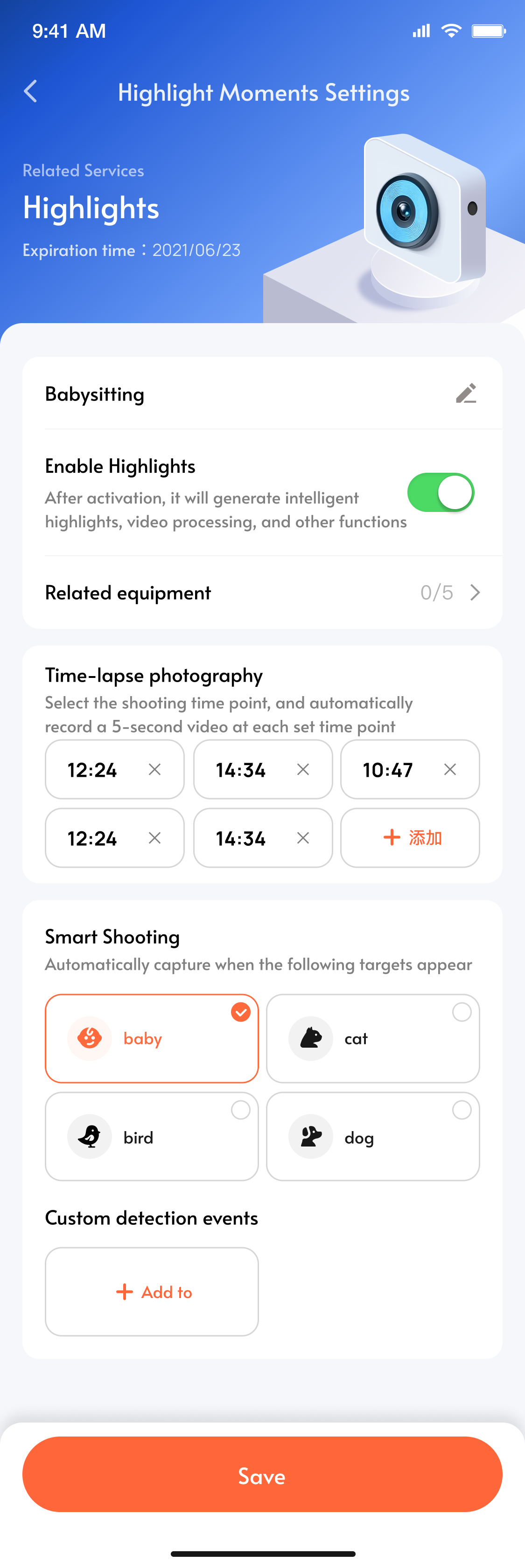
-
The Highlights service details mainly include: service name, service status, associated devices (up to 5 devices), scheduled capture, intelligent capture.
-
The setup of Highlights service details mainly relies on the following three key capabilities:
-
Get Highlights Service Configuration Information
Developers can use the getAlbumSetting API to obtain detailed configuration information of the Highlights service. -
Save Highlights Service Configuration Information
When configuring Highlights service information for the first time, developers can use the albumSettingSave API to save the detailed configuration information of the Highlights service. -
Edit Highlights Service Configuration Information
After initial configuration, developers can use the albumSettingEdit API to edit the detailed configuration information of the Highlights service.
Interaction Flow
sequenceDiagram
    participant User
    participant Panel
    participant Cloud

    rect rgb(227, 242, 253)
        Note left of Panel: Initialization Phase
        User ->> Panel: First entry into panel
        Panel ->> Cloud: getAlbumSetting-api
        Cloud -->> Panel: Return service details
        alt Data available
            Panel ->> User: Display detail data
        else No data available
            Panel ->> User: Display fallback data
        end
    end

    rect rgb(255, 243, 224)
        Note left of Panel: Editing Interaction Phase
        loop Real-time editing
            User ->> Panel: Modify content
            Panel ->> User: Update display in real-time
        end
    end

    rect rgb(232, 245, 233)
        Note left of Panel: Saving Submission Phase
        User ->> Panel: Click save
        Panel ->> Panel: Determine operation type
        alt First operation
            Panel ->> Cloud: albumSettingSave-api
        else Subsequent operations
            Panel ->> Cloud: albumSettingEdit-api
        end
        Cloud ->> Cloud: Process data modification
        Cloud -->> Panel: Return modification result
        Panel ->> User: Display operation result
endNotes
-
- Fallback Data Handling
-
It's essential to handle scenarios where there is no data during initialization, and return reasonable default values.
- The recommended fallback strategy is as follows:
-
- Save Strategy Distinction