群组管理
更新时间:2026-02-04 08:21:18LLM 副本以 Markdown 格式查看下载 PDF
设备群组由同一种类型设备组成,是一系列设备的集合。常见的有 Wi-Fi 设备群组和 Zigbee 设备群组。涂鸦支持群组管理体系,您可以创建群组、修改群组名称、管理群组设备、通过群组管理多个设备、解散群组等。
功能概述
TSmartGroup 类需要使用群组 ID(groupId)初始化。错误的群组 ID 会导致初始化失败,并且返回 undefined。
-
封装类
类名 说明 TSmartGroup 群组类 ThingSmartGroupModel 群组数据模型类 -
ThingSmartGroupModel数据模型字段 类型 描述 groupId string 群组唯一 ID productId string 群组对应的产品 ID time number 群组的创建时间 name string 群组名称 iconUrl string 群组展示图标的 URL type TSmartGroupType 群组类型 isShare boolean 是否为分享群组 dps Record<string,Object> 群组中设备的功能数据 dpCodes Record<string,Object> 群组中设备的功能数据,以键值对的形式存储 localKey string 群组通信使用的 Key deviceNum number 群组下的设备数量 productInfo Record<string,Object> 群组对应的产品相关信息 pv number 群组协议版本,Wi-Fi 协议版本 homeId number 群组所在的家庭 ID roomId number 群组所在的房间 ID displayOrder number 群组在房间维度的排序 homeDisplayOrder number 群组在家庭维度的排序 deviceList TSmartDeviceModel[] 群组的设备列表 localId string 群组在局域网通讯中的 ID meshId string 群组的 Mesh ID schemaArray TSmartSchemaModel[] 群组 DP 规则信息 standard boolean 是否是标准群组
创建 Wi-Fi 群组
查询可创建群组的设备
根据入口设备的产品 ID,查询家庭下有哪些设备可以与这个设备创建成群组。
接口说明
export class TSmartGroup {
	public static async getDeviceList(productId: string, ownerId: string, gwId?: string): Promise<TSmartGroupDevListModel[] | undefined>
}
参数说明
| 参数 | 说明 |
|---|---|
| productId | 群组的产品 ID |
| gwId | 群组的网关 ID,可选,查询可创建群组的设备时不传 |
| homeId | 家庭 ID |
示例代码
const list = await TSmartGroup.getDeviceList(this.deviceModel?.productId!, this.deviceModel?.ownerId!, this.deviceModel?.parentId)
创建一个群组
接口说明
export class TSmartGroup {
	public static async create(params: TSmartGroupAddParams, progress?:(p: Record<string, number>) => void)
}
TSmartGroupAddParams 参数说明
| 参数 | 说明 |
|---|---|
| name | 群组名称 |
| homeId | 要创建群组的家庭 ID |
| productVer | 产品版本 |
| productId | 创建群组入口设备的产品 ID |
| devIdList | 设备 ID 列表 |
| groupType | 创建群组的类型
|
示例代码
const list = await TSmartGroup.getDeviceList(this.deviceModel?.productId!, this.deviceModel?.ownerId!, this.deviceModel?.parentId)
let devs: string[] = []
list?.forEach(d => {
  devs.push(d.devId!)
})

const group = await TSmartGroup.create({
  name: '新建群组',
  productId: this.deviceModel?.productId ?? "",
  productVer: this.deviceModel?.productVer ?? "1.0.0",
  homeId: Number(this.deviceModel?.ownerId),
  devIdList: devs,
  groupType: TSmartGroupType.WiFi
})
查询可加入群组的设备
根据群组的产品 ID,查询家庭下可加入和已加入该群组的设备列表。
接口说明
export class TSmartGroup {
	public async getDeviceList(productId: string): Promise<TSmartGroupDevListModel[] | undefined>
}
参数说明
| 参数 | 说明 |
|---|---|
| productId | 群组的产品 ID |
示例代码
let res = await group.getDeviceList("your_group_product_id")
更新保存群组关系
接口说明
export class TSmartGroup {
	public async updateGroupRelations(devList: string[]): Promise<void>
}
参数说明
| 参数 | 说明 |
|---|---|
| devList | 设备列表的 ID 数组 |
示例代码
let res = await group.updateGroupRelations(devList)
回调接口
群组 DP 下发之后的数据回调更新。
接口说明
export class TSmartGroup {
	public registerListener(listener: TSmartGroupListener)
    public unregisterListener()
}
export interface TSmartGroupListener {
  onDpsChanged: (groupId: string, dps: DpsType) => void;
}
创建 Zigbee 群组
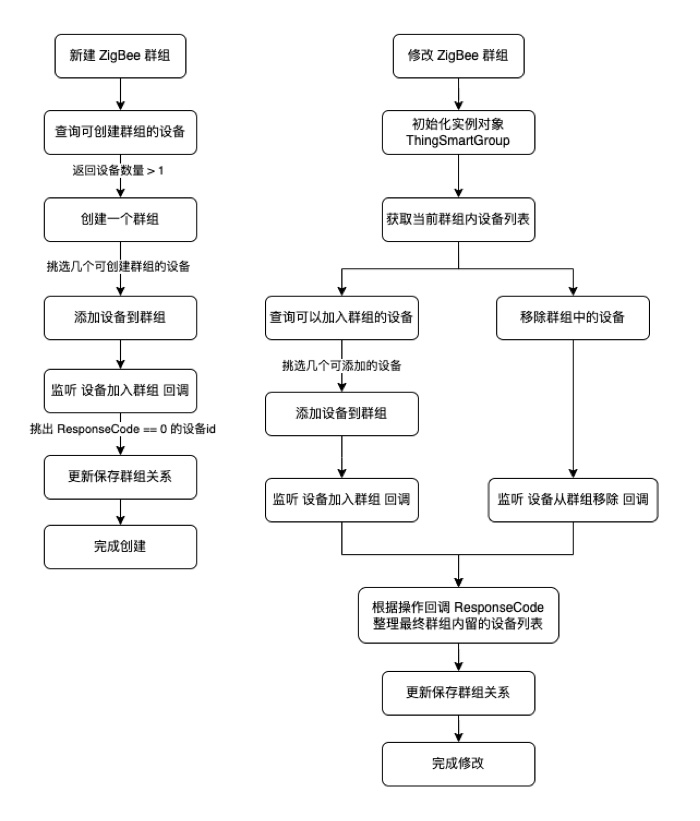
支持 Zigbee 子设备、智能网关 Pro 子设备、Sub-G 子设备等复用 Zigbee 网络协议的设备组建群组。
查询可创建/加入群组的设备
接口说明
export class TSmartGroup {
	public static async getDeviceList(productId: string, ownerId: string, gwId?: string): Promise<TSmartGroupDevListModel[] | undefined>
}
参数说明
| 参数 | 说明 |
|---|---|
| productId | 群组的产品 ID |
| gwId | 群组的网关 ID,可选,查询可创建/加入Zigbee 群组的设备时需要传 |
| homeId | 家庭 ID |
示例代码
const list = await TSmartGroup.getDeviceList(this.deviceModel?.productId!, this.deviceModel?.ownerId!, this.deviceModel?.parentId)
创建一个群组
接口说明
export class TSmartGroup {
	public static async create(params: TSmartGroupAddParams, progress?:(p: Record<string, number>) => void)
}
TSmartGroupAddParams 参数说明
| 参数 | 说明 |
|---|---|
| name | 群组名称 |
| homeId | 要创建群组的家庭 ID |
| productVer | 产品版本 |
| productId | 创建群组入口设备的产品 ID |
| devIdList | 设备 ID 列表 |
| groupType | 创建群组的类型
|
示例代码
const list = await TSmartGroup.getDeviceList(this.deviceModel?.productId!, this.deviceModel?.ownerId!, this.deviceModel?.parentId)
let devs: string[] = []
list?.forEach(d => {
  devs.push(d.devId!)
})

const group = await TSmartGroup.create({
  name: '新建群组',
  productId: this.deviceModel?.productId ?? "",
  productVer: this.deviceModel?.productVer ?? "1.0.0",
  homeId: Number(this.deviceModel?.ownerId),
  devIdList: devs,
  groupType: TSmartGroupType.Zigbee
})
更新保存群组关系
接口说明
export class TSmartGroup {
	public async updateGroupRelations(devList: string[]): Promise<void>
}
参数说明
| 参数 | 说明 |
|---|---|
| devList | 设备列表的 ID 数组 |
示例代码
let res = await group.updateGroupRelations(devList)
群组控制
初始化群组实例
接口说明
export class TSmartGroup {
	public static init(groupId: string): TSmartGroup | undefined
}
修改群组名称
接口说明
export class TSmartGroup {
	public async updateGroupName(name: string): Promise<void>
}
解散一个群组
接口说明
export class TSmartGroup {
	public async dismissGroup(): Promise<void>
}
发送群组控制指令
接口说明
export class TSmartGroup {
	public async publishDps(dps: string)
}
控制回调接口
接口说明
export class TSmartGroup {
	public registerListener(listener: TSmartGroupListener)
    public unregisterListener()
}
TSmartGroupListener
export interface TSmartGroupListener {
  onDpsChanged: (groupId: string, dps: DpsType) => void;
  onInfoUpdated: (groupId: string) => void;
  onRemoved: (groupId: string) => void;
}
查询群组列表
const r = group?.groupModel.deviceList
该内容对您有帮助吗?
是意见反馈该内容对您有帮助吗?
是意见反馈
关注“涂鸦智能”
涂鸦服务尽在掌握

关注“全球智能商业”
第一时间获取物联网资讯