定时任务
更新时间:2026-01-22 09:34:27LLM 副本以 Markdown 格式查看下载 PDF
智能生活 App SDK 提供了基本的定时能力,支持设备定时和群组定时,设备可以是 Wi-Fi 设备、蓝牙 Mesh 子设备、Zigbee 子设备。同时封装了针对设备功能(DP)的定时器信息的增删改查接口。App 通过定时接口设置好定时器信息后,云模组会自动根据定时要求进行预订的操作。
功能说明
-
封装类:
类名 说明 TSmartTimer 定时任务接口封装 -
以下多个接口用到了
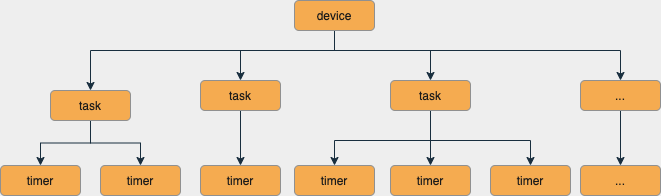
taskName参数,具体可理解为一个分组,一个分组可以有多个定时器。每个定时属于或不属于一个分组,分组仅用于展示。例如:-
一个开关可能有多个功能,可以根据每个设备功能设置一个定时分组。
-
每个分组可以添加多个定时器,用于控制这个设备功能各个时段的开启或关闭。
每个定时任务下可以包含多个定时器。如下图所示:
-
增加定时任务
为设备或群组新增一个定时器,到指定的任务(task)下。每个设备或群组定时的上限为 30 个。
接口说明
export class TSmartTimer {
  public static async addTimer(params: TSmartTimerParams): Promise<number>
}
参数说明
| 参数名 | 释义 | 是否可选 |
|---|---|---|
| params | 添加定时所需要的参数 | 必选 |
TSmartTimerParams
| 参数 | 说明 |
|---|---|
| task | 定时任务名称 |
| loops | 循环次数,格式为 0000000(每一位数字的取值可以是 0:关闭、1:开启),从左至右依次表示周日、周一、周二、周三、周四、周五、周六。如每个周一循环该任务,则取值为 0100000 |
| bizId | 设备或群组 ID |
| bizType | 0:设备、1:设备群组 |
| time | 定时的时间,如 18:00 |
| dps | 设备功能命令 |
| status | 是否开启定时 |
| isAppPush | 是否需要推送 |
| aliasName | 备注信息 |
示例代码
TSmartTimer.addTimer({
  task: 'timer_task_name',
  loops: '1111111',
  bizId: this.device?.devId ?? "",
  bizType: 0,
  time: "14:29",
  dps: {"20": true},
  status: true,
  isAppPush: false,
  aliasName: 'timer_task_aliasName'
})
更新定时
接口说明
export class TSmartTimer {
	public static async updateTimer(params: TSmartTimerParams): Promise<void>
}
参数说明
| 参数名 | 释义 | 是否可选 |
|---|---|---|
| params | 更新定时所需要的参数 | 必选 |
TSmartTimerParams
| 参数名 | 类型 | 描述 |
|---|---|---|
| task | string | 定时名 |
| loops | string | 循环次数 |
| bizId | string | 设备/群组 ID |
| bizType | number | 业务类型。0:设备、1:群组 |
| time | string | 定时时间 |
| dps | Record<string, Object> | 定时执行的 DP |
| status | boolean | 定时状态。true:开启、false:关闭 |
| isAppPush | boolean | 定时执行时是否发送 App 推送。true:发送、false:不发送 |
| aliasName | string | 定时别名 |
示例代码
TSmartTimer.updateTimer({
  task: 'timer_task_name',
  loops: '0111111',
  bizId: this.device?.devId ?? "",
  bizType: 0,
  time: "14:29",
  dps: {"20": true},
  status: true,
  isAppPush: false,
  aliasName: 'timer_task_aliasName'
})
更新定时状态
接口说明
export class TSmartTimer {
	public static async updateTimerTaskStatus(task: string, bizId: string, bizType: number, updateType: number): Promise<void>
}
参数说明
| 参数名 | 释义 | 是否可选 |
|---|---|---|
| task | 定时名 | 必选 |
| bizId | 设备/群组 ID | 必选 |
| bizType | 业务类型。0:设备、1:群组 |
必选 |
| updateType | 定时状态。1:开启、0:关闭 |
必选 |
示例代码
await TSmartTimer.updateTimerTaskStatus("timer_task_name", this.device?.devId ?? "", 0, 1)
移除定时
接口说明
export class TSmartTimer {
  public static async removeTimer(timerId: string, bizId: string, bizType: number): Promise<void>;
}
参数说明
| 参数名 | 释义 | 是否可选 |
|---|---|---|
| timerId | 定时 ID | 必选 |
| bizId | 设备/群组 ID | 必选 |
| bizType | 业务类型。0:设备、1:群组 |
必选 |
示例代码
TSmartTimer.removeTimer("111", this.device?.devId ?? "", 0)
查询设备定时
接口说明
export class TSmartTimer {
  public static async getTimerList(task: string, bizId: string, bizType:number): Promise<TSmartTimerModel[]>
}
参数说明
| 参数名 | 释义 | 是否可选 |
|---|---|---|
| task | 定时名 | 必选 |
| bizId | 设备/群组 ID | 必选 |
| bizType | 业务类型。0:设备、1:群组 |
必选 |
示例代码
const res = await TSmartTimer.getTimerList("timer_task_name", this.device?.devId!, 0)
console.log("timer res - :" + res)
查询设备下的所有定时
接口说明
export class TSmartTimer {
	public static async getTimerTaskList(bizId: string, bizType: number): Promise<TSmartCategoryTimersModel[]>
}
参数说明
| 参数名 | 释义 | 是否可选 |
|---|---|---|
| task | 定时名 | 必选 |
| bizId | 设备/群组 ID | 必选 |
| bizType | 业务类型。0:设备、1:群组 |
必选 |
示例代码
const res = await TSmartTimer.getTimerTaskList(this.device?.devId!, 0)
console.log("timer res - :" + res)
该内容对您有帮助吗?
是意见反馈该内容对您有帮助吗?
是意见反馈
关注“涂鸦智能”
涂鸦服务尽在掌握

关注“全球智能商业”
第一时间获取物联网资讯