

Device Control
Smart devices have gained ground in many sites and industries, but how to deliver secure and flexible permission management has become a challenge. In the old days, application scenarios were pretty simple, and a mobile app was used to control only one smart device. However, nowadays, more and more IoT devices are serving smart scenes. Each mobile app is used to control a host of smart devices.
In specific scenarios, certain devices are controlled by multiple users. For example, furniture-like smart power strips can be switched on or off by all home members. In this case, the following requirements must be met: a mobile app can be used to control multiple devices. Multiple users can be authorized to mutually control multiple devices. Therefore, group management and smart scenes are designed to achieve these purposes.
This topic describes how to achieve device control.
Device DPs
-
The
dpsproperty ofDpsTypetype for the classTSmartDeviceModeldefines the current device status. The status is known as one or more data points (DPs). -
In each dictionary of
dps,keymatchesdpIdof a DP, anddpValuematches thevalueof the DP.You can check the definitions of DPs for a product on the Tuya Developer Platform. The following figure shows a list of DPs.
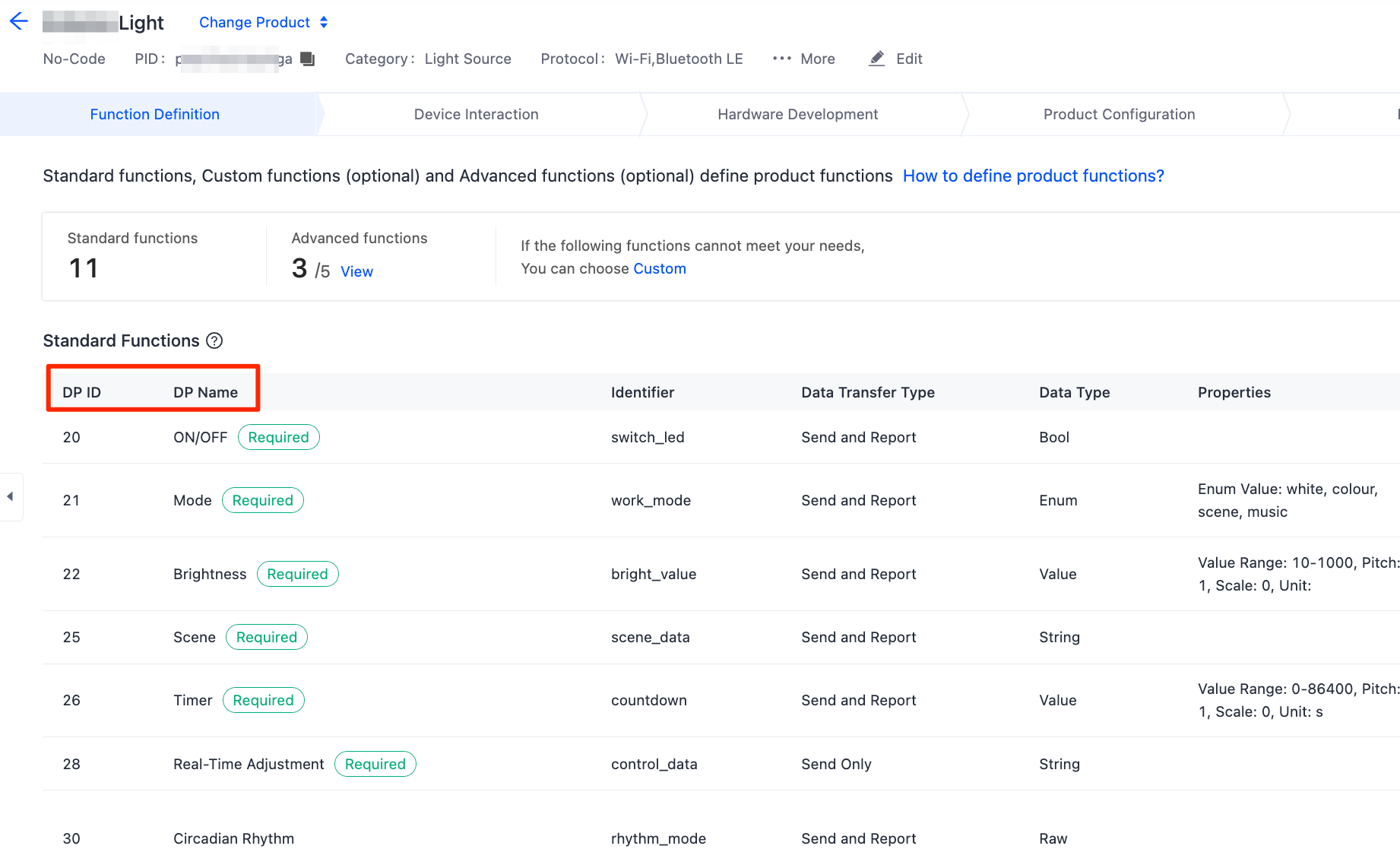
For more information, see Product Functions.
Command format
Send a command in the following format:
{
    "(dpId)":"(dpValue)"
}
The following sample code shows the DPs 1, 4, 5, 6, and 15 of a light product that is created on the Tuya Developer Platform:
async publishDps() {
    // Define DPs (choose one or a combination as needed)
    let dps: DpsType = {};

    // Example 1: Set a DP of Boolean type (switch)
    dps = { "1": true };

    // Example 2: Set a DP of string type (color)
    dps = { "4": "ff5500" };

    // Example 3: Set a DP of enum type (level)
    dps = { "5": "2" };

    // Example 4: Set a DP of value type (temperature)
    dps = { "6": 20 };

    // Example 5: Set a DP of raw type (infrared data)
    dps = { "15": "1122" };

    // Example 6: Send multiple DPs in a command
    dps = {
      "1": true,
      "4": "ff5500"
    };


    try {
      // Send DP control commands
      await this.device?.publishDps(JSON.stringify(dps));
      console.log("publishDps success");
      // The DPs are sent successfully. The status is reported through the device status callback.
    } catch (error) {
      console.error("publishDps failure: " + JSON.stringify(error));
    }
  }
Things to note
Data types must be correct when a control command is sent. Example:
- A DP of value type can be sent in the format of
{"2": 25}rather than{"2": "25"}. - A byte array of raw type is a hexadecimal string with an even number of digits. In this case, the array can be sent in the format of
@{@"1": @"011f"}rather than@{@"1": @"11f"}.
Device control
Send DPs to a device to change its status or features.
Control a device through an auto select channel, local-area network (LAN), or cloud. The auto select channel is recommended.
Auto select channel
Check the availability of channels in the sequence specified by communication.communicationModes that is defined in the device model TSmartDeviceModel, and select an appropriate channel to control the device.
    try {
      // Send DP control commands
      await this.device?.publishDps(JSON.stringify(dps));
      console.log("publishDps success");
      // The DPs are sent successfully. The status is reported through the device status callback.
    } catch (error) {
      console.error("publishDps failure: " + JSON.stringify(error));
    }
LAN
Control a device over the LAN only. The device must be online on a LAN.
    try {
      // Send DP control commands
      await this.device?.publishDps(JSON.stringify(dps), TSmartDpsPublishMode.LOCAL);
      console.log("publishDps success");
      // The DPs are sent successfully. The status is reported through the device status callback.
    } catch (error) {
      console.error("publishDps failure: " + JSON.stringify(error));
    }
Cloud
Control a device through the cloud only. The device must be online in the cloud.
    try {
      // Send DP control commands
      await this.device?.publishDps(JSON.stringify(dps), TSmartDpsPublishMode.CLOUD);
      console.log("publishDps success");
      // The DPs are sent successfully. The status is reported through the device status callback.
    } catch (error) {
      console.error("publishDps failure: " + JSON.stringify(error));
    }
Is this page helpful?
YesFeedbackIs this page helpful?
YesFeedback




