

Get Resources of Video Clips
Last Updated on : 2024-06-26 09:40:33Copy for LLMView as MarkdownDownload PDF
Get the resources of video clips that are stored in the cloud within the specified time range.
API address
GET: /v1.0/users/{uid}/devices/{device_id}/storage/stream/hls
Request parameter
| Parameter name | Type | IN | Required | Description |
|---|---|---|---|---|
| uid | String | uri | true | The user ID. |
| device_id | String | uri | true | The device ID. |
| time_g_t | Long | query | true | The start time. |
| time_l_t | Long | query | true | The end time. |
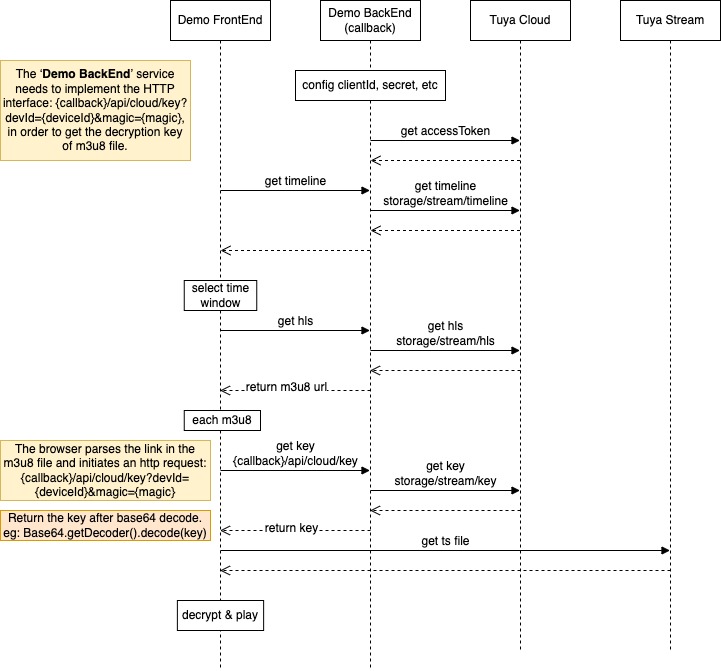
| callback | String | query | true | The HTTP callback address. To get the decryption key of video clips stored in the cloud, the callback service needs to call the HTTP API: {callback}/api/cloud/key?devId={deviceId}&magic={magic}. |
Return parameter
| Parameter name | Type | Description |
|---|---|---|
| result | StorageHLSVO | The returned result. |
Description of result
| Parameter name | Type | Description |
|---|---|---|
| list | List | The list of video clips. |
Description of list
| Parameter name | Type | Description |
|---|---|---|
| url | String | The HLS playback URL of a specified video file. |
| start_time | Long | The start time of a specified video clip. The 10-digit timestamp is in seconds. |
| stop_time | Long | The end time of a specified video clip. The 10-digit timestamp is in seconds. |
Request example
GET: /v1.0/users/ay156402688****oY5W/devices/6c08578d894****11afye1/storage/stream/hls?time_g_t=1637639832&time_l_t=1637675832&callback=http://localhost:3333
Return example
{
    "result": {
        "list": [
            {
                "stop_time": 1638177232,
                "url": "https://****.tuyacn.com:****/cloudrecord/6c08578d894****11afye1/c6i9jnhv5aoq5nqq0hjgStT86FTi****.m3u8",
                "start_time": 1638177212
            }
        ]
    },
    "t": 1638177247793,
    "success": true
}
Error code
For more information, see error code.
Sample integration of videos in the cloud
Is this page helpful?
YesFeedbackIs this page helpful?
YesFeedbackMarketing Cooperation
Business Cooperation
Customer Service
Media Inquiry





