

Emotion Perception
Overview
The Emotion module maintains a unified emotion dictionary based on emojis and converts upstream emotion data into system-recognizable Emotion names. The module does not directly drive interface or device actions. Instead, it distributes emotion data to different modes and board-level UIs through events and display messages. Emotions are categorized into two types based on the source:
skill emotion: User-side ASR emotion.nlg emotion: AI-side TTS emotion.
Terms and abbreviations
| Abbreviation | Full name |
|---|---|
| ASR | Automatic Speech Recognition |
| TTS | Text-to-Speech |
Directory
Source code:
├── ../../wukong/skills/skill_emotion.h        # Public APIs and data structures for Emotion.
├── ../../wukong/skills/skill_emotion.c        # Emotion dictionary and Unicode conversion.
├── ../../wukong/skills/wukong_ai_skills.c     # Parse Skill/NLG data and generate Emotion events.
├── ../../wukong/wukong_ai_agent.h             # Define events such as WUKONG_AI_EVENT_EMOTION
├── ../../mode/                                # Convert Emotion events to TY_DISPLAY_TP_EMOJI.
├── ../../miscs/gui/display/tuya_ai_display.c  # Entry for display messages.
├── ../../miscs/gui/display/ui/font_emoji_64.c # Emoji mapping for EVB/EVB_PRO.
├── ../../boards/T5AI_BOARD_DESKTOP/ui/        # Emotion -> GIF mapping for Desktop.
├── ../../boards/T5AI_BOARD_ROBOT/ui/robot/    # Emotion -> GIF mapping for Robot.
└── ../../boards/T5AI_BOARD_EYES/ui/           # Emotion -> GIF mapping for Eyes.
Process
Generate emotions
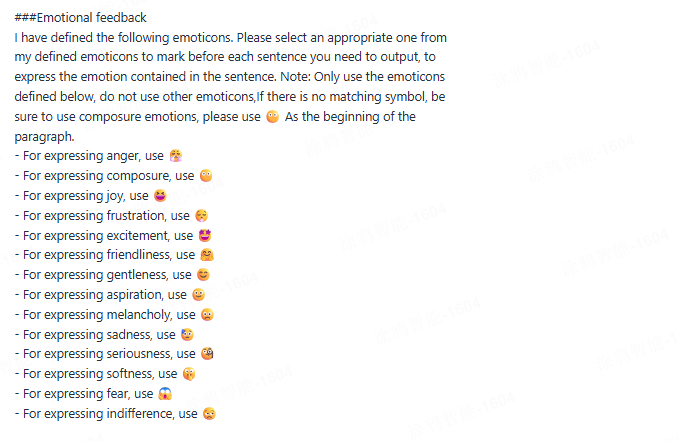
During agent development, use prompts to constrain the model to return specific emotions in specific scenarios. For more information, see Prompt development. Example of an emotion prompt:
Process emotions
The AI model returns structured emotion data during interaction. Emotions are categorized into two types: user emotion and AI emotion.
-
User-side ASR emotion:
- Protocol semantics:
skill emotionrepresents user-side emotion derived from ASR semantics. - Protocol example: In
wukong_ai_skills.h, a Skill example withcode="emo"is provided.skillContent.emotion[]andskillContent.text[]describe user emotion. - Scenarios: Represent the user’s speaking tone or state.
1. Skill emotion (User or ASR emotion) ┌──────────────────────────────────────────────┐ │ bizType = SKILL │ │ code = "emo" │ │ skillContent.emotion[] / text[] │ └──────────────────────────────────────────────┘ │ ▼ 2. Parse Skill data in wukong_ai_skills.c ┌────────────────────────────────────────────────────────────────────────────┐ │ __wukong_ai_skill_process() │ │ The protocol is defined. Code does not generate Emotion events separately. │ └────────────────────────────────────────────────────────────────────────────┘ - Protocol semantics:
-
AI-side TT emotion:
- Protocol semantics:
nlg emotionrepresents AI-side emotion derived from TTS or response content. - Current implementation:
__wukong_ai_nlg_process()inwukong_ai_skills.creadsdata.tags[0]and converts it to an Emotion name usingwukong_emoji_get_name(). - Scenarios: Represent the tone or emotion of AI responses.
1 . nlg emotion (AI/TTS emotion) ┌──────────────────────────────────────────────┐ │ bizType = NLG │ │ data.content = "..." │ │ data.tags[0] = "U+1F606" │ └──────────────────────────────────────────────┘ │ ▼ 2. Parse NLG tags in wukong_ai_skills.c ┌──────────────────────────────────────────────┐ │ __wukong_ai_nlg_process() │ │ Read data.tags[0] │ └──────────────────────────────────────────────┘ │ ▼ 3. Map emoji to emotion in skill_emotion.c ┌──────────────────────────────────────────────┐ │ wukong_emoji_get_name ("U+1F606") │ │ -> "laughing" │ └──────────────────────────────────────────────┘ │ ▼ 4. Generate Emotion event ┌──────────────────────────────────────────────┐ │ wukong_ai_event_notify() │ │ WUKONG_AI_EVENT_EMOTION │ └──────────────────────────────────────────────┘ - Protocol semantics:
Express emotions
The system supports two ways to express emotions:
- Display GIF emojis on screen.
- Trigger device actions (servo control).
1. Dispatch unified Emotion events
   ┌───────────────────────────────────────────────────────┐
   │Mapping and conversion between emo.name and emo. emoji.│
   │ tuya_ai_display_msg(..., TY_DISPLAY_TP_EMOJI)         │
   └───────────────────────────────────────────────────────┘
                       │
                       ▼
2. Board-level UI rendering or action extension
   ┌────────────────────────────────────────────────┐
   │ EVB / EVB_PRO   : Unicode -> emoji image       │
   │ Desktop         : Emotion name -> GIF          │
   │ Robot / Eyes    : Emotion name -> GIF          │
   │ Robot (optional): Emotion name -> action       │
   └────────────────────────────────────────────────┘
Emoji
- EVB/EVB_PRO: Call
wukong_emoji_get_by_name()to get Unicode, then map it to image resources infont_emoji_64.c. - Desktop: Map Emotion names to GIFs in
s_gif_emoj_table[]indesk_event_handle.c. - Robot/Eyes: Use
gui_emotion_find()to locate and switch GIF resources.
Action
- Supported only on
T5AI_BOARD_ROBOT. - Entry API:
tuya_robot_action_set()(defined intuya_robot_actions.h). tuya_robot_action_set()callsrobot_action_add_action()to enqueue the action. Then,servo_action_map_set()is called in the action thread to distribute the action to specific servo action functions.- If you need
emotion -> actionmapping, add an independent mapping table in theTY_DISPLAY_TP_EMOJIbranch of the Robot board, instead of modifying the common dictionary module.
1. Receive Emotion name
   ┌──────────────────────────────────────────────┐
   │ "happy" / "thinking" / "surprise"            │
   └──────────────────────────────────────────────┘
                       │
                       ▼
2. Emotion-action mapping
   ┌──────────────────────────────────────────────┐
   │ happy    -> ROBOT_ACTION_DANCE               │
   │ thinking -> ROBOT_ACTION_STAND               │
   │ surprise -> ROBOT_ACTION_JUMP                │
   └──────────────────────────────────────────────┘
                       │
                       ▼
3. Call action API
   ┌──────────────────────────────────────────────┐
   │ tuya_robot_action_set(action)                │
   └──────────────────────────────────────────────┘
                       │
                       ▼
4. Enqueue action
   ┌──────────────────────────────────────────────┐
   │ robot_action_add_action(action)              │
   └──────────────────────────────────────────────┘
                       │
                       ▼
5. Execute in action thread
   ┌──────────────────────────────────────────────┐
   │ servo_action_map_set(action)                 │
   └──────────────────────────────────────────────┘
                       │
                       ▼
6. Servo execution
   ┌──────────────────────────────────────────────┐
   │ servo_action_dance_set()                     │
   │ servo_action_jump_set()                      │
   │ servo_action_stand_set()                     │
   └──────────────────────────────────────────────┘
API reference
The following APIs are declared in skill_emotion.h.
Query interfaces
CONST CHAR_T* wukong_emoji_get_name(CONST CHAR_T* emoji);
-
Description: Get the Emotion name from a Unicode emoji string.
-
Parameters:
emoji: The input Unicode string, for example,U+1F636.
-
Return value:
- Returns the Emotion name on success.
- Returns the default emotion
neutralif not found.
The input must exactly match the Unicode string in the dictionary.
The function does not return NULL. It falls back to the default emotion. Add validation logic if you need to distinguish unmatched cases.
CONST CHAR_T* wukong_emoji_get_by_name(CONST CHAR_T* name);
-
Description: Get the Unicode emoji string from an Emotion name.
-
Parameters:
name: Emotion name, for example,happy.
-
Return value:
- Returns the Unicode string on success.
- Returns the default Unicode
U+1F636if not found.
Emotion names are defined in g_emotions[]. Use lowercase.
Unmatched values fall back to the default emotion, which may appear as a default emoji on the device.
Encoding conversion interfaces
INT_T wukong_emoji_unicode_to_utf8(CONST CHAR_T* unicode_str, CHAR_T* utf8_buf, size_t buf_size);
-
Description: Convert a Unicode string in
U+XXXXorU+XXXXXXformat to UTF-8 bytes. -
Parameters:
unicode_str: Input Unicode string, for example,U+1F606.utf8_buf: Output buffer.buf_size: Output buffer size.
-
Return value:
- Returns the length of the written UTF-8 bytes on success.
- Returns
-1on failure.
Ensure buf_size >= 5 to support 4-byte UTF-8 plus the null terminator \0.
The input must start with U+. Otherwise, the function fails.
Example
Example 1: Get Emotion name from Unicode
#include "skill_emotion.h"
#include "tal_log.h"

VOID demo_lookup_emotion_name(VOID)
{
    CONST CHAR_T *name = wukong_emoji_get_name("U+1F606");
    TAL_PR_NOTICE ("Emotion name: %s", name);
}
Example 2: Display emoji from Emotion name
#include "skill_emotion.h"
#include "tal_log.h"

VOID demo_show_emotion_utf8(VOID)
{
    CONST CHAR_T *unicode = wukong_emoji_get_by_name("happy");
    CHAR_T utf8_buf[5] = {0};
    INT_T len = 0;

    len = wukong_emoji_unicode_to_utf8(unicode, utf8_buf, sizeof(utf8_buf));
    if (len > 0) {
        TAL_PR_NOTICE("utf8 emoji: %s", utf8_buf);
    }
}
Example 3: Add a new Emotion
Add an entry to g_emotions[] in skill_emotion.c:
{"U+1F973", "celebrating"}
Then update mappings for the target board:
- EVB/EVB_PRO: update
font_emoji_64.cand image resources. - Desktop: update
s_gif_emoj_table[]. - Robot/Eyes: update emotion tables and resources.
Example 4: Map Emotion to robot actions
#include "tuya_robot_actions.h"

typedef struct {
    CONST CHAR_T *emotion;
    TUYA_ROBOT_ACTION_E action;
} EMOTION_ACTION_MAP_T;

STATIC CONST EMOTION_ACTION_MAP_T s_emotion_action_map[] = {
    {"happy", ROBOT_ACTION_DANCE},
    {"thinking", ROBOT_ACTION_STAND},
    {"surprise", ROBOT_ACTION_JUMP},
};

STATIC VOID robot_emotion_action_trigger(CONST CHAR_T *emotion)
{
    UINT_T i = 0;

    if (emotion == NULL) {
        return;
    }

    for (i = 0; i < CNTSOF(s_emotion_action_map); i++) {
        if (strcmp(s_emotion_action_map[i].emotion, emotion) == 0) {
            tuya_robot_action_set(s_emotion_action_map[i].action);
            break;
        }
    }
}
Implement this logic in the Robot board UI layer instead of skill_emotion.c or the common mode layer.
Support
If you have any problems with TuyaOS development, you can post your questions in the Tuya Developer Forum.
Is this page helpful?
YesFeedbackIs this page helpful?
YesFeedback




