

On-App AI Lighting Scene Generation: TFLite On-Device Inference and Dynamic Model Hot-Update Mechanism
Lighting is the emotional carrier and style signature of a home.
Today, smart lighting increasingly focuses on ambiance creation and aesthetic expression. Users (including consumers, designers, and sales/installation professionals) want simpler ways to quickly achieve professional lighting effects. However, current lighting scene configuration faces significant obstacles:
- Complex operations: Requires completing multiple steps sequentially — room selection, device filtering, per-light parameter adjustment — making the process lengthy.
- High professional barrier: Requires knowledge of color temperature, brightness, dynamic effects, and other fundamental lighting concepts; otherwise, achieving the desired effect is difficult.
- Low efficiency: Manual adjustment during multi-device batch configuration is time-consuming, unable to meet fast delivery or high-frequency creation demands.
- Experience-dependent: Lacking intelligent recommendations, users can only rely on trial and error, with high costs of experimentation.
To address this, Tuya Smart launches the On-App AI Generative Lighting Scene Solution, based on a proprietary lightweight lighting scene generation model that generates professional lighting plans locally on mobile devices with a single tap. Users simply select a style preference or usage scenario (e.g., entertaining guests, watching movies, sleeping), and the system batch-generates multiple lighting plans adapted to room and device combinations, making professional-grade spatial ambiance readily accessible.
On-Device AI Generative Lighting Scenes: Zero-Barrier Whole-Home Ambiance Creation
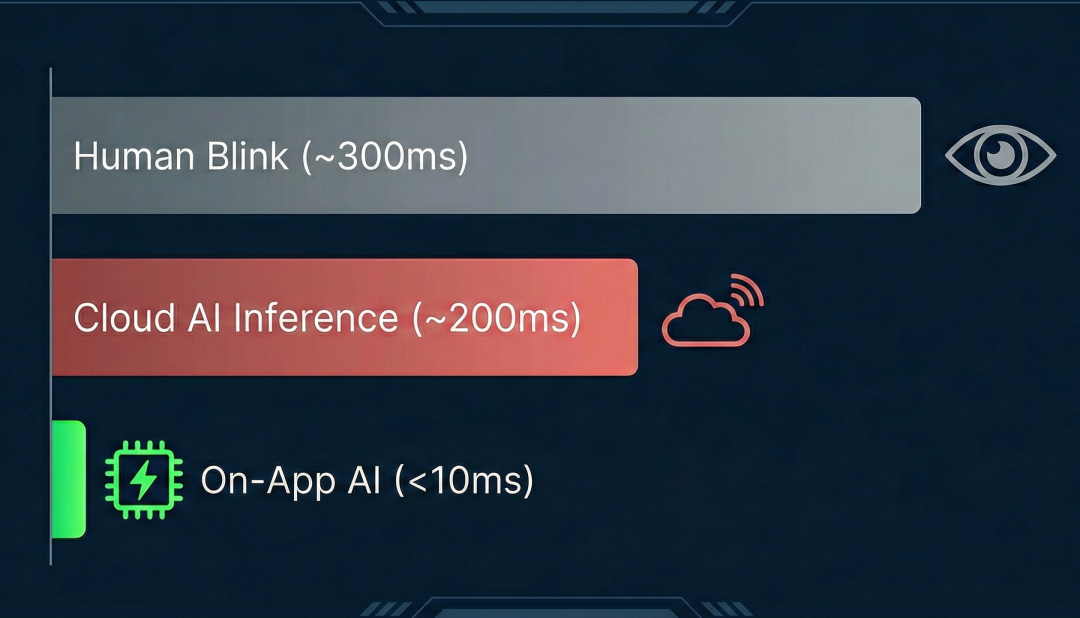
Based on On-App AI on-device lighting scene capabilities, Tuya provides an efficient, low-cost, real-time responsive AI lighting solution for smart lighting products. By deploying a lightweight lighting scene generation model locally on mobile devices, this solution achieves millisecond-level (<10ms) generation of professional whole-home lighting effects without cloud inference, significantly reducing usage barriers and operational costs while comprehensively improving user experience and scalable deployment efficiency.
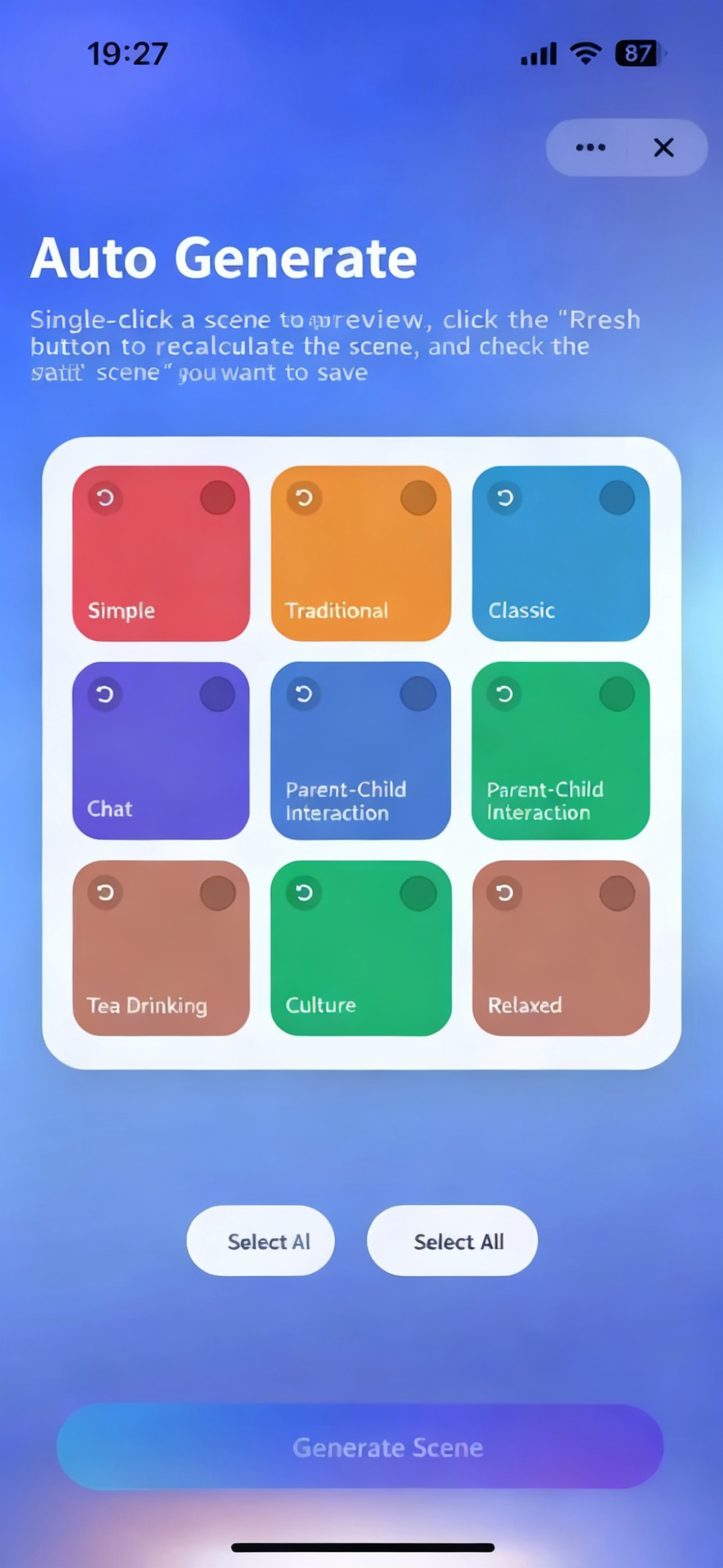
The system combines room types (living room/bedroom/dining room) with device combinations (light strips/spotlights/ceiling lights) to generate 9 lighting scenes with distinct styles in one tap. An AI action prediction engine automatically matches device control commands (Actions), ensuring effects are executable — truly achieving "what you see is what you get."
Users can quickly complete personalized configuration through intuitive interactions:
- Real-time preview: Tap to execute lighting actions with instant device feedback, presenting the ambiance effect in real time.
- Flexible replacement: Supports replacing individual lighting plans or refreshing only unselected plans while automatically preserving selected ones.
- Batch save: Supports saving multiple AI-generated scenes at once for long-term retention and on-demand recall.
Technical Solution Deep Dive: Reshaping the Smart Lighting Experience
1. Mobile On-Device AI Architecture
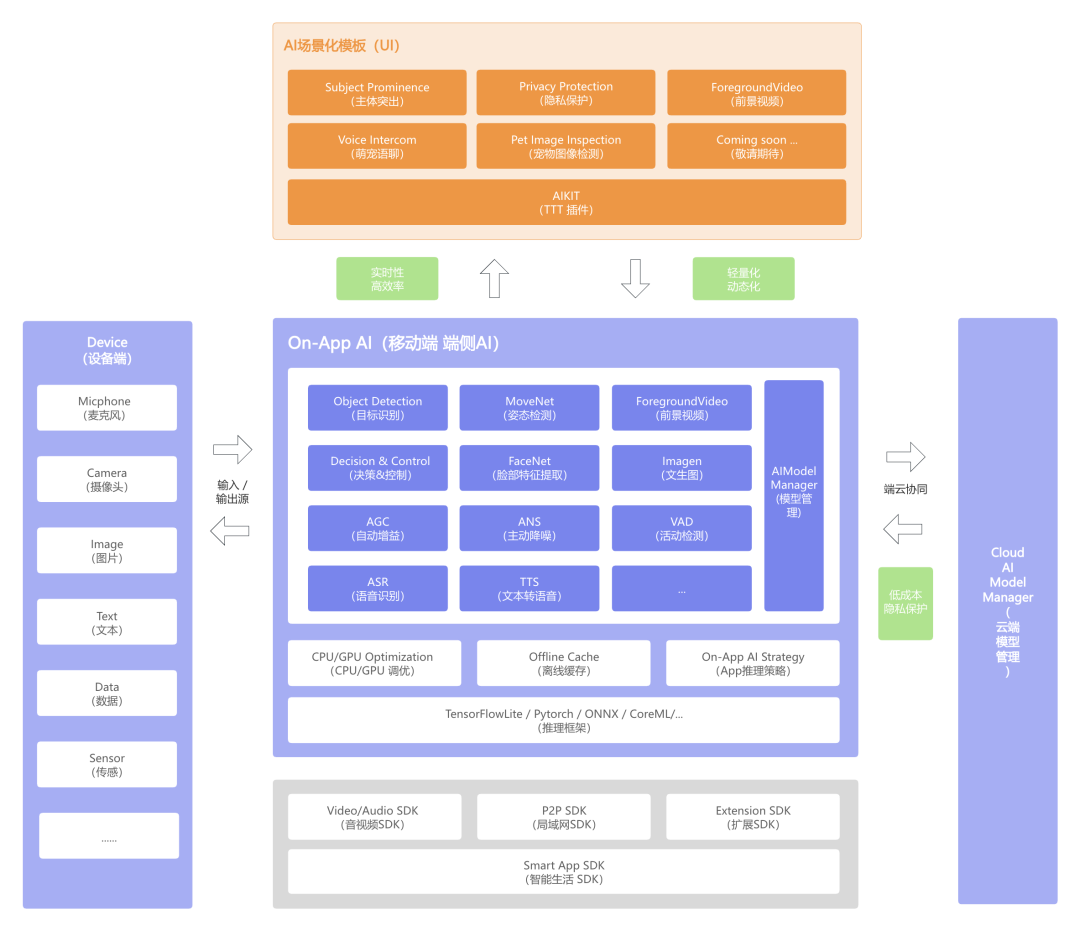
Mobile model deployment uses the TensorFlow Lite framework, offering advantages of efficient inference, low latency, and low power consumption, supporting local offline operation to enhance user experience and response speed.
2. Technical Processing Pipeline
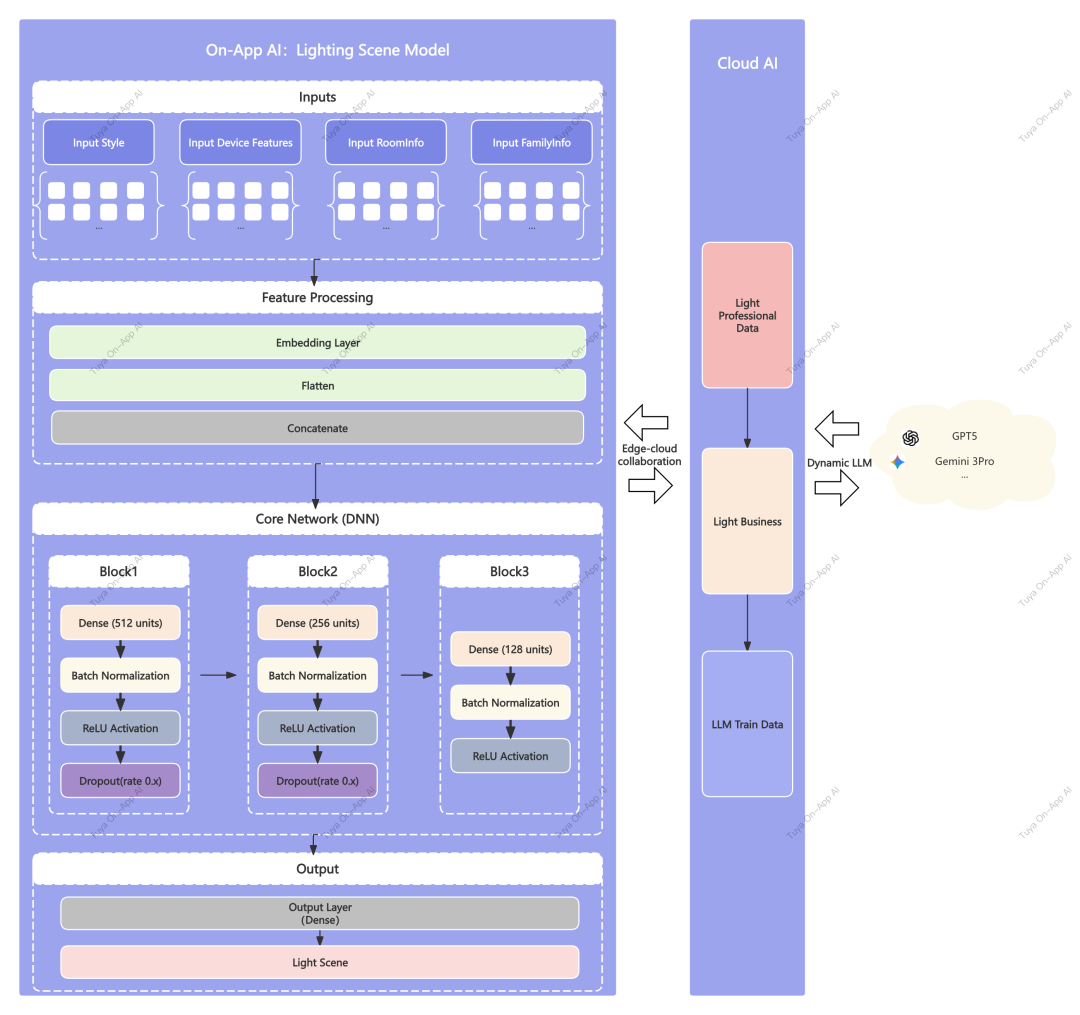
Overview of the technical processing pipeline:
- The cloud trains on industry-grade lighting recipe data combined with LLM large models to generate user-level lighting recipes.
- On-App AI vectorizes input information delivered from the cloud, including style, device features, room information, and home information.
- The on-device Core Network DNN extracts features layer by layer, outputs inference data, which is then assembled by the on-device lighting business module into complete lighting scene information for preview display.
Three Core Technologies Driving "Professional Lighting at Your Fingertips"
1. More Flexible AI Architecture: Ultra-Lightweight and Dynamic Orchestration
Through mobile-specific model optimization techniques, achieving perfect decoupling of algorithmic capability from application size, balancing high performance with low overhead.
1.1 Mobile-Specific Lightweight Model (Lighting Scene Model)
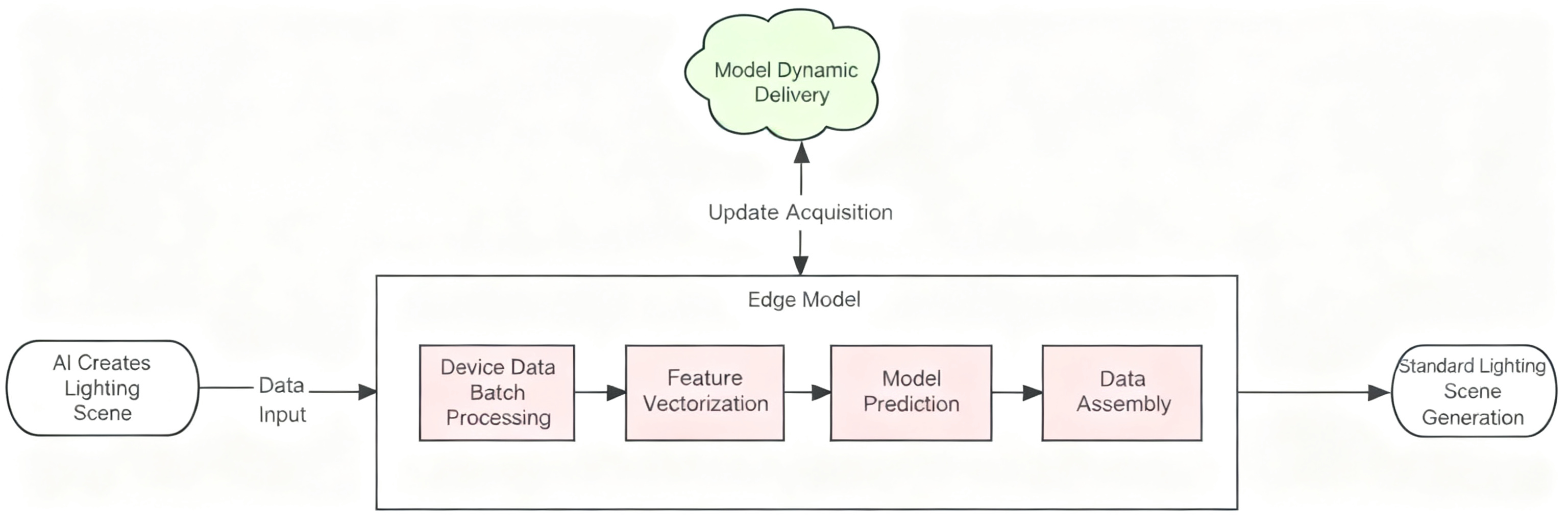
Optimized for mobile NPU/GPU characteristics, we performed deep pruning and quantization on Tuya’s proprietary professional lighting scene model, building a "small but beautiful" model with both low parameter count and low memory footprint. While maintaining professional-grade prediction accuracy, it can precisely and rapidly infer complex lighting parameters under constrained on-device computing power, breaking the conventional assumption that professional models can only run on cloud servers.
1.2 Full Lifecycle Dynamic Model Management (Dynamic Lifecycle)
By introducing "on-demand loading" and "online hot-update" mechanisms, the app’s initial installation package contains only basic functions, with AI models dynamically downloaded based on actual user scenarios. Support for online OTA model upgrades ensures devices always run the optimal algorithm without requiring app version re-releases to fix issues or improve effects — achieving "always fresh" functionality.
2. Superior User Experience: Millisecond Response and Interaction Redesign
Leveraging the immediacy of on-device computing power to completely eliminate lag caused by network latency, transforming tedious "parameter adjustment" into intuitive "effect selection."
2.1 On-Device Real-time Inference
Abandoning the traditional cloud-based large model’s lengthy pipeline of "upload-queue-generate-download," completely avoiding wait times caused by network fluctuations.
Benchmark data: On multiple mid-to-low-end Android and iOS devices, inferring a complete lighting scene based on 10 device feature data points averages under 10ms. Compared to a human blink (approximately 300ms), this latency is virtually imperceptible — achieving true "instant results at your fingertips."
2.2 Efficient WYSIWYG Creation Flow
Evolving from "manual per-light color adjustment" to "AI batch generation," users need no professional lighting knowledge. On the AI generation page, they can quickly obtain multiple professional-grade lighting plan options adapted to their setup. Real-time preview of physical environment changes with one-tap save is supported. This "browse-to-create" mode reduces the professional lighting design barrier to zero, with efficiency improved by tens of times.
3. Edge-Cloud Collaboration: Cost Reduction and Data Sovereignty
Adopting a distributed architecture of "cloud for heavy training, device for light inference," maximizing utilization of idle on-device computing power while building a privacy moat.
3.1 Distributed Computing Architecture: Optimized Cost Structure
Complex large-scale professional data training remains in the cloud for iteration, while high-frequency, high-volume user-level inference requests are fully delegated to user devices. This distributed collaboration not only significantly reduces cloud server concurrency pressure and expensive GPU/token costs, but also substantially decreases bandwidth consumption by eliminating frequent real-time network interactions — providing a more cost-effective computing environment for applications.
3.2 On-Device Closed Loop: User-Controlled Data Sovereignty (Privacy by Control)
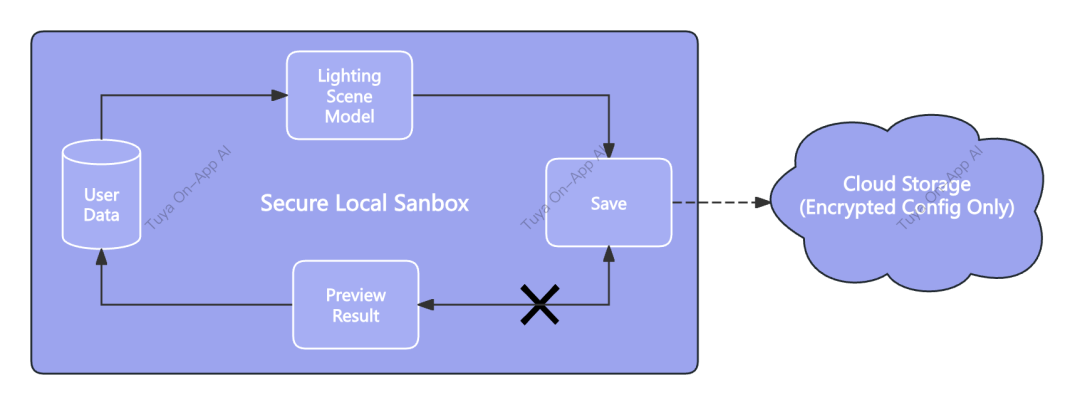
Building a complete on-device inference closed loop — all trial calculations and generation processes are completed locally on the phone, with unselected data immediately destroyed. Data is only encrypted and uploaded to cloud storage when the user taps "Save." This "no save, no upload" mechanism grants users complete control over their data, making the smart experience more secure and transparent.
Diversified Scenario Expansion: Unleashing AI Lighting Value
The AI Generative Lighting Scene Solution is integrated into the SmartLife app / Tuya App (v7.1.0 and above), compatible with all smart luminaires, light strips, spotlights, and other lighting devices supporting the Tuya ecosystem.
Try it now: Enter an SMB home, tap "+" in the top-right corner of the home page → Select "Add New Lighting Scene" → Select room → Select type → Tap "Auto Generate" to begin your smart lighting journey!
This solution not only serves home users but also demonstrates powerful scalability across multiple vertical scenarios:
- Home DIY lighting design: Users select intent tags like "Party" or "Reading," and AI automatically generates whole-home lighting plans.
- Smart luminaire sales demos: Sales staff generate multiple lighting effects on-site with one tap, improving customer conversion rates.
- Commercial and hotel rapid deployment: Batch-generate unified lighting templates for standardized floor plans, saving installation and commissioning time.
- Offline emergency configuration: Create or switch lighting scenes locally without network access, ensuring baseline experience.
- Elderly and child-friendly interaction: No complex operations needed — tap a style to apply, lowering the usage barrier.
Development Guide and Support
1. Development Tutorials
- AI Generative Lighting Scene Solution: https://developer.tuya.com/cn/miniapp/solution-ai/ability/lamp-solution/aiLightingScene/overview
- AI Generative Lighting Scene Template Source Code: https://github.com/Tuya-Community/tuya-ray-materials?path=template/AILightingSceneTemplate
2. Technical Support
For any issues during development, please post your questions on the Tuya Developer Forum:
https://www.tuyaos.com/viewforum.php?f=10
Is this page helpful?
YesFeedbackIs this page helpful?
YesFeedback




