

On-App AI Media Compositing: EfficientDet-D0 Subject Recognition and Cloud Template Dynamic Compositing
Many people find that travel photos, pet shots, and lifestyle photos turn out flat and lacking in atmosphere. Centering a subject or adding special effects is extremely complex and tedious for non-tech-savvy users — time-consuming and exhausting. Is there a simple, easy-to-use tool that can recognize people and pets with one tap, intelligently center them, and instantly transform photos and videos into cinematic quality shots?
01 Tuya Helps You Generate Atmospheric Portrait Photos with One Tap
Based on its powerful On-App AI technology architecture, Tuya launches the AI Portrait + Video Foreground development solution, combined with smart hardware to deliver a complete one-stop service chain. Leveraging mobile AI capabilities, it automatically detects and identifies target subjects in photos and videos, uses intelligent algorithms to rapidly calculate the subject’s center, and achieves precise centering. Combined with foreground templates delivered from the cloud (including static and dynamic templates), images are edited, encoded, and packaged — ultimately generating fun, subject-prominent "portrait-grade" photos or videos with a single tap.
While delivering outstanding visual effects, the solution also balances real-time performance, privacy security, and cost-effectiveness — making it an innovative choice for photo and video editing.
On-App AI Overall Architecture Diagram
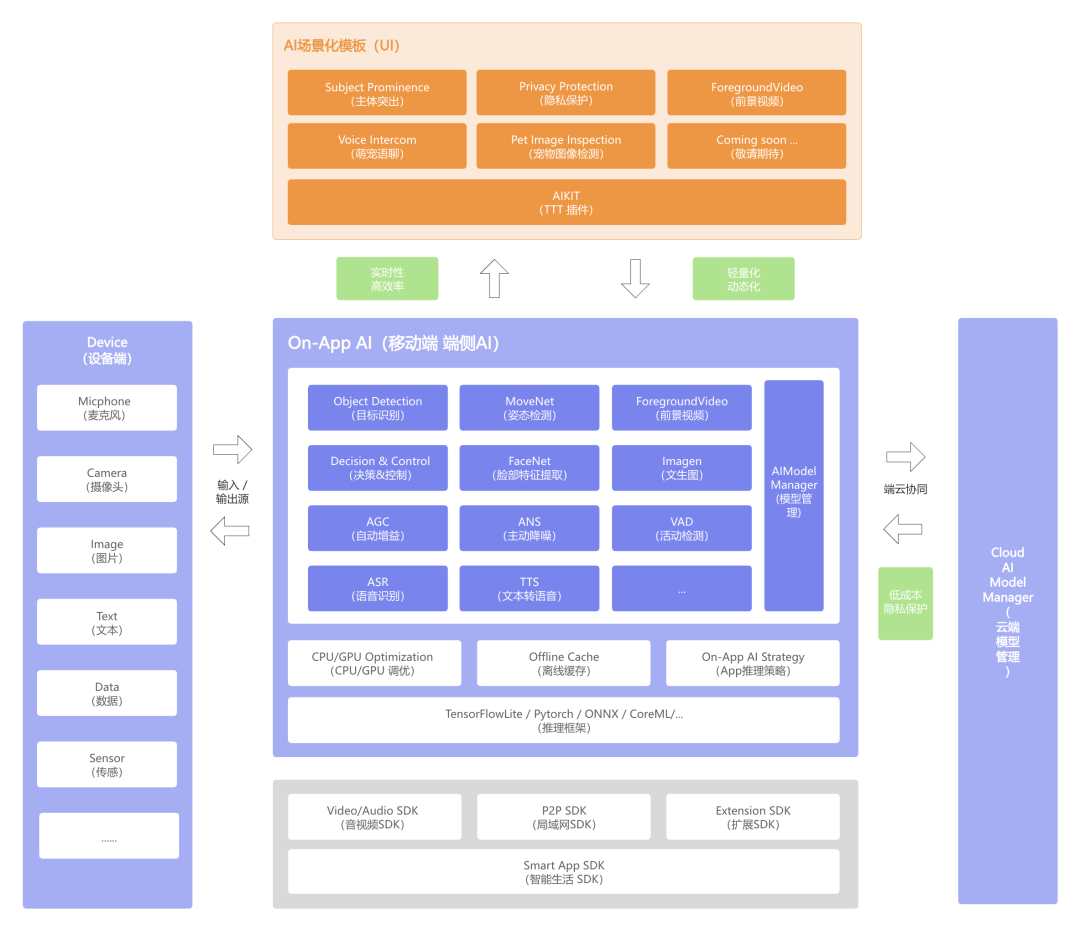
For example: a pet feeder equipped with an IPC captures a funny or adorable moment of a pet. The phone instantly receives the related photo or video, uploads it to the Tuya-empowered app, and recognizes the pet while centering the frame with one tap. Tuya also provides a foreground template library for users to freely select and add — quick export is available after editing. The entire process is simple and convenient, far smarter than traditional editing features. The solution is currently applicable to any scenario requiring subject prominence and atmosphere enhancement.
Reference examples for a more intuitive understanding of the rendering effect:
- Original candid shot of a dog — slightly plain and ordinary:
Original Dog Photo

- After smart centering and one-tap foreground template addition, the photo has a much more atmospheric feel:
After Foreground Template Applied

- Animated images can also be exported as video.
02 Deep Dive into Core Technology and Highlights
1. What Is the Core Technology?
For mobile model deployment, we use TensorFlow Lite — offering efficient inference, low latency, and low power consumption, with support for local offline operation. Subject centering + beautiful foreground templates help users effortlessly elevate content quality.
Cloud Foreground Template Delivery Flow Diagram
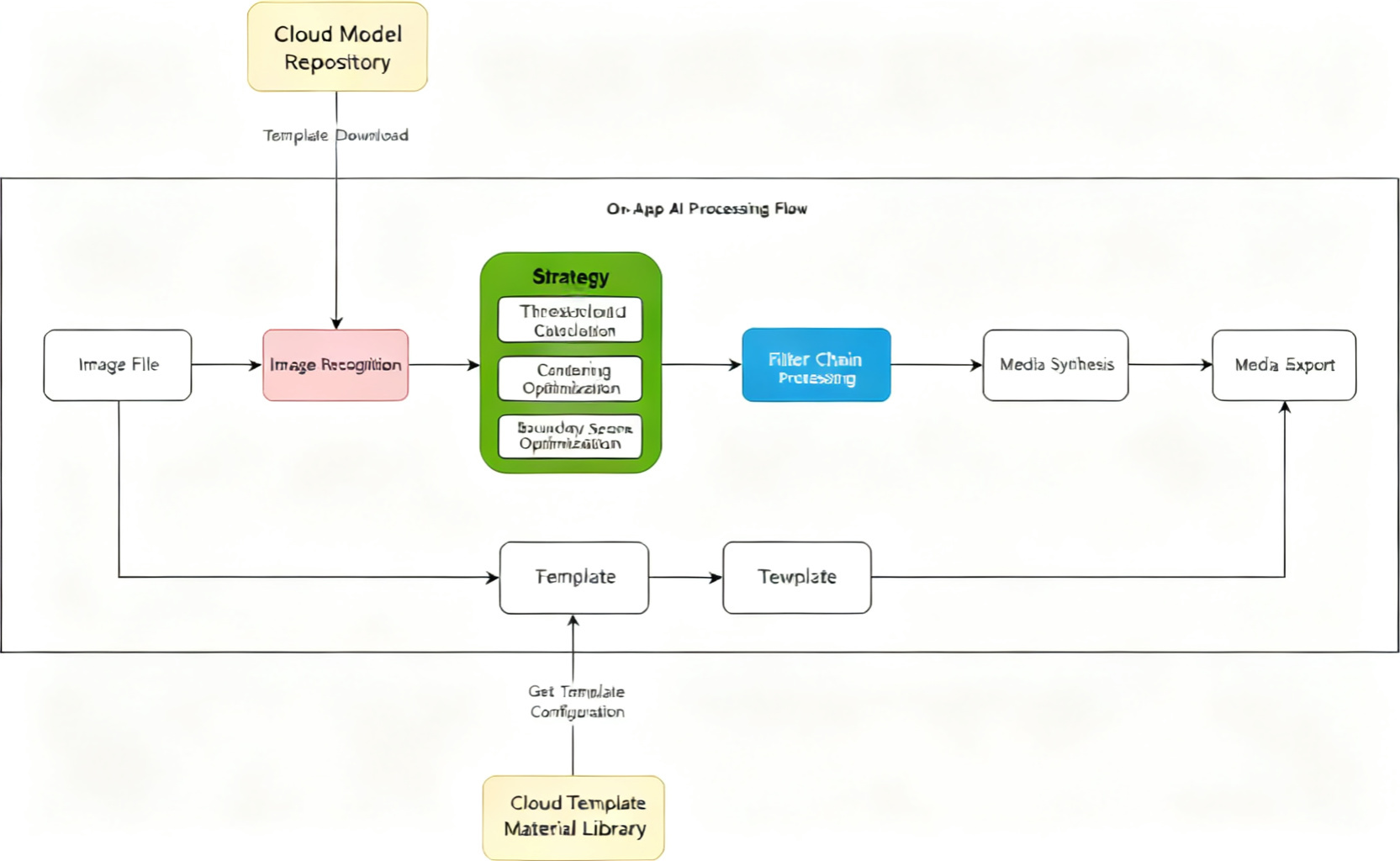
- Intelligent recognition and centering: Combined with the lightweight AI object detection model EfficientDet-D0, the system achieves millisecond-level recognition of subject position and category, automatically adjusting the subject to the center of the frame.
- Foreground effect management and compositing: Tuya uses a proprietary media compositor. The cloud provides a foreground template library supporting dynamic configuration, updates, and delivery — capable of generating new images and videos, as well as compositing audio.
Note: In a future update, Tuya will support developers uploading custom foreground templates — stay tuned.
2. Technical Highlights
2.1 More Flexible AI Architecture: Lightweight and Dynamic
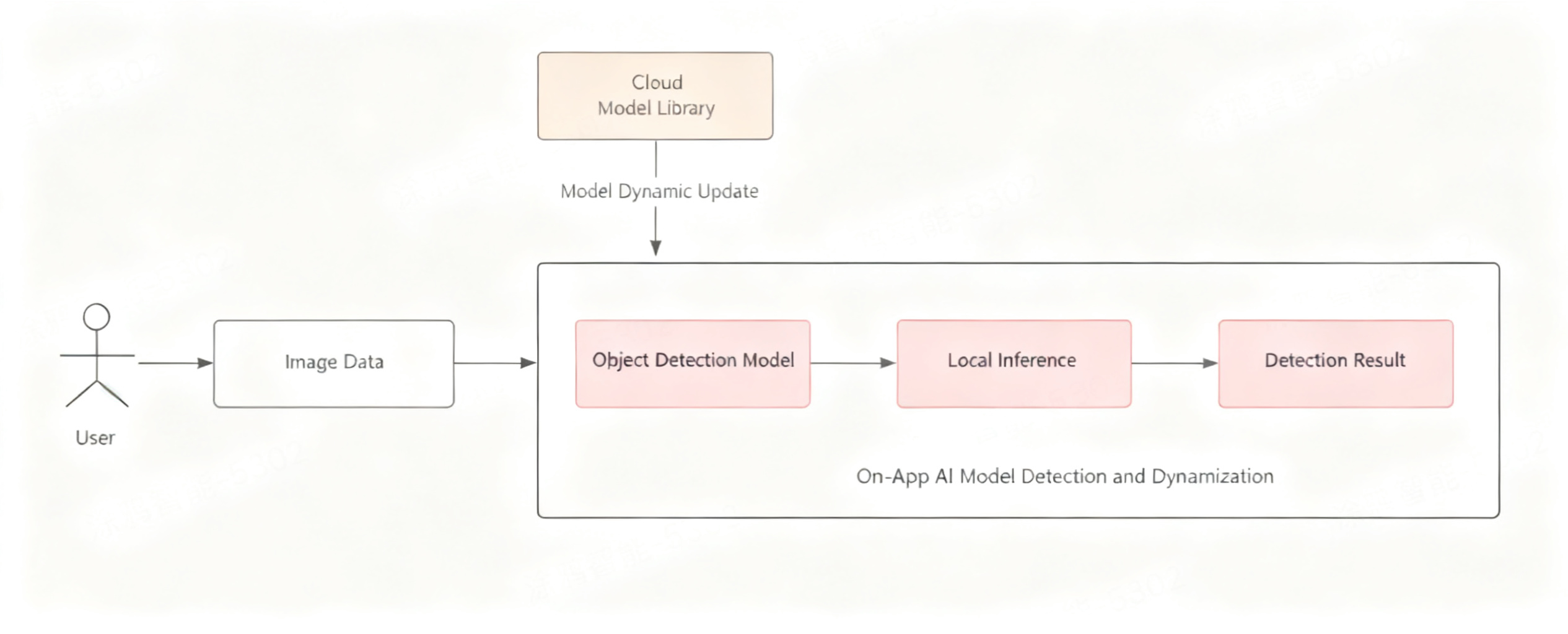
- Lightweight detection model: Tuya uses EfficientDet-D0, a lightweight object detection model specifically optimized for mobile. With fewer parameters, lower computation, and fast inference, it precisely detects the position and category of specified subjects (such as pets and people) in photos and videos. Combined with intelligent analysis to quickly filter out segments without subjects, it effectively reduces computational load and improves processing efficiency.
- Dynamic model management: Uses an on-demand loading dynamic model management mechanism, supporting online model download, updates, and deployment — always ensuring the optimal model version is in use while reducing initial installation package size and improving runtime efficiency.
Model Detection and Dynamic Runtime Flow Diagram
2.2 Superior User Experience: Real-time and High Efficiency
- Real-time interactive processing: Leveraging efficient local computation, Tuya delivers a smooth, lag-free user experience without network dependency — achieving fast response and real-time processing.
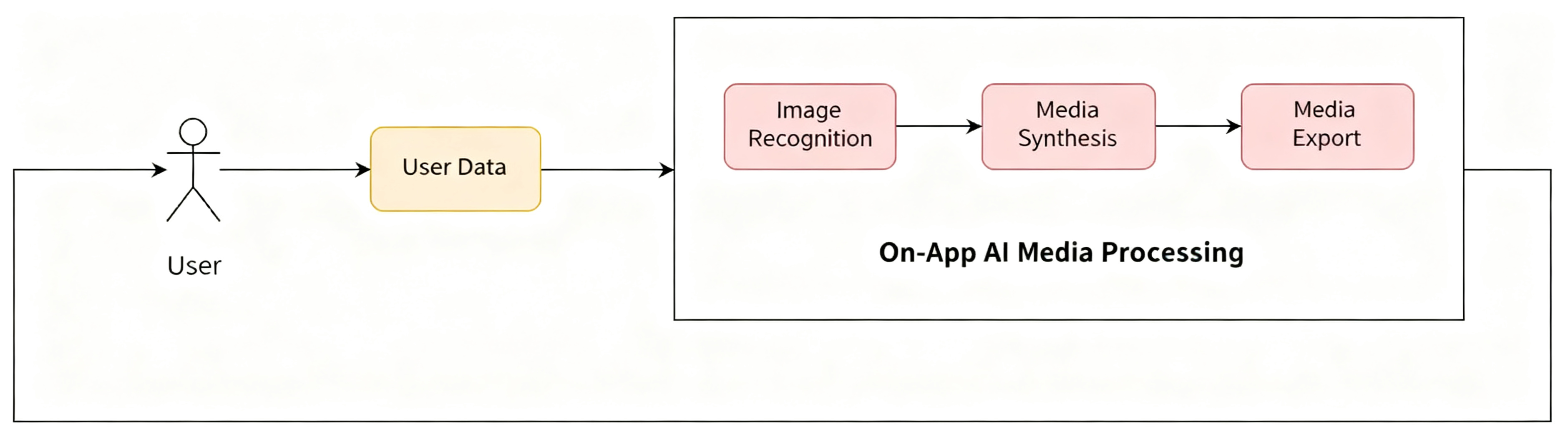
- Intelligent algorithms for enhanced results: During media compositing, when the offset between the subject center and the foreground template center exceeds a threshold, the system automatically scales the subject to ensure centering. When an image contains multiple subjects, the system composites directly without centering optimization — avoiding showing only partial content to ensure the best compositing result.
- Fine-tuned models for higher accuracy: Over years of work, Tuya has accumulated a massive dataset of subject images across diverse scenarios and lighting conditions. After data desensitization, model training is fine-tuned to ensure robust generalization during inference.
Media Processing Flow Diagram
2.3 More Secure Computing: Low Cost and Privacy Protection
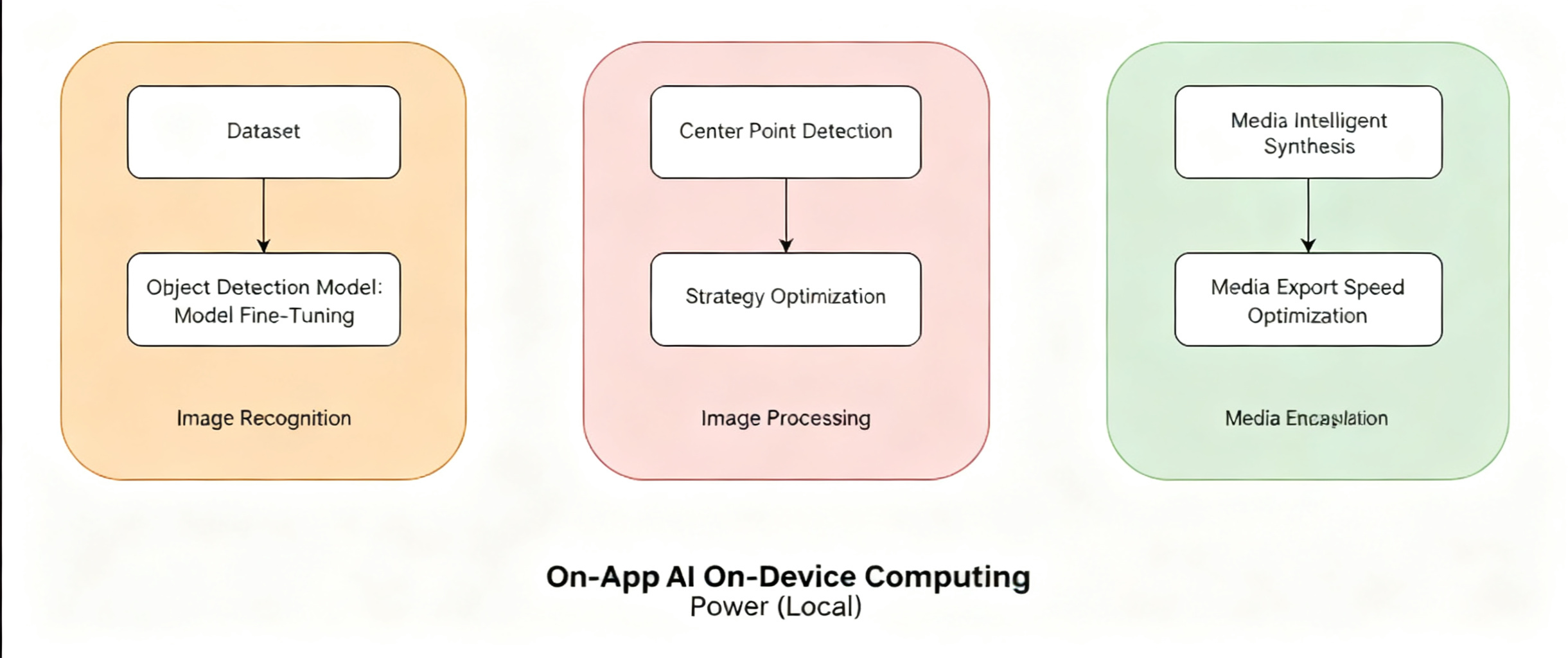
- Reduced processing cost: Compared to cloud processing, local processing is lower cost and reduces cloud workload. Computing power consumption decreases by 25 TFLOPs per 10,000 operations, saving approximately 10% in costs.
- Privacy protection: All processing is completed locally, significantly reducing latency, improving response speed, and avoiding data transmission — effectively protecting user privacy and building a more secure, efficient computing environment.
Local Processing Flow Diagram
03 Development Guide and Support
1. Development Tutorial
Full development tutorial available at:
https://developer.tuya.com/cn/miniapp/solution-ai/ability/picture-solution/aiPhotos/overview
2. Technical Support
For any issues during development, please post your questions on the Tuya Developer Forum:
https://www.tuyaos.com/viewforum.php?f=3
Is this page helpful?
YesFeedbackIs this page helpful?
YesFeedback




