

On-App AI Image Enhancement: ResUNet Denoising + Low-Light Enhancement + Distortion Correction On-Device Processing
We all know that lighting is the foundation of camera imaging, and different lighting conditions significantly affect image quality. Many cameras, constrained by their installation environment (such as dim rooms, strong backlighting, and other poor lighting conditions), often produce images that suffer from insufficient brightness, grayscale noise, facial glare, and missing details. Wide-angle lenses can further introduce edge distortion and facial stretching, directly impacting the visual experience and reducing the accuracy of facial recognition and video analysis.
For users who are especially security-conscious, this creates an extremely poor experience. So without replacing the camera, how can developers and brand owners quickly improve image clarity?
1. Fix Image Quality Directly with AI — No Camera Replacement Needed
Tuya launches the new On-App AI Image Enhancement technology, which supports AI-powered image optimization and restoration. It can automatically detect degraded and blurry frames, and help boost brightness, reduce noise, optimize detail, and correct distortion — significantly improving image clarity and detail, meeting visual needs across multiple scenarios including surveillance, photography, and facial recognition.
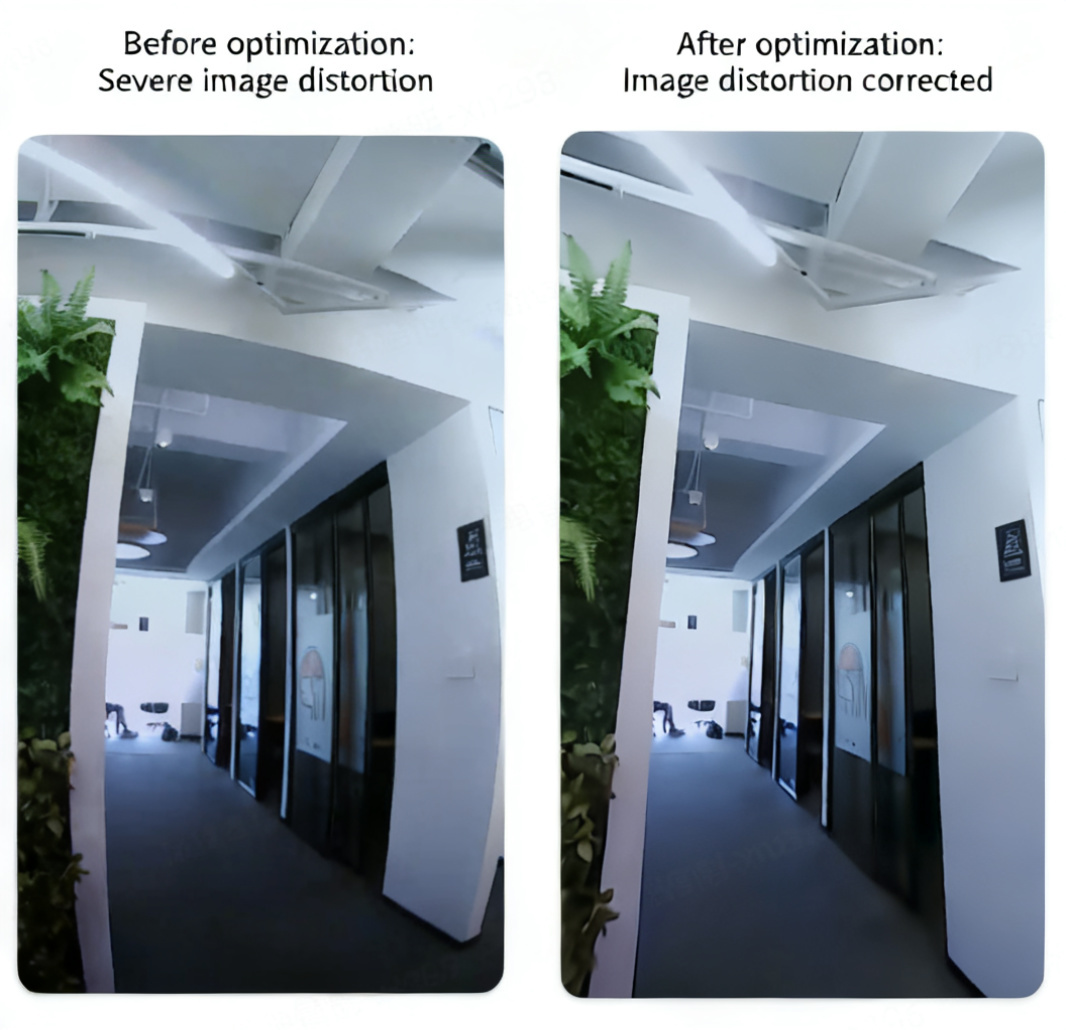
To give a more intuitive sense of how this technology improves camera image quality, we recorded image comparisons of the same camera before and after integrating this technology across different scenarios:
Image Enhancement Effect Comparison 1
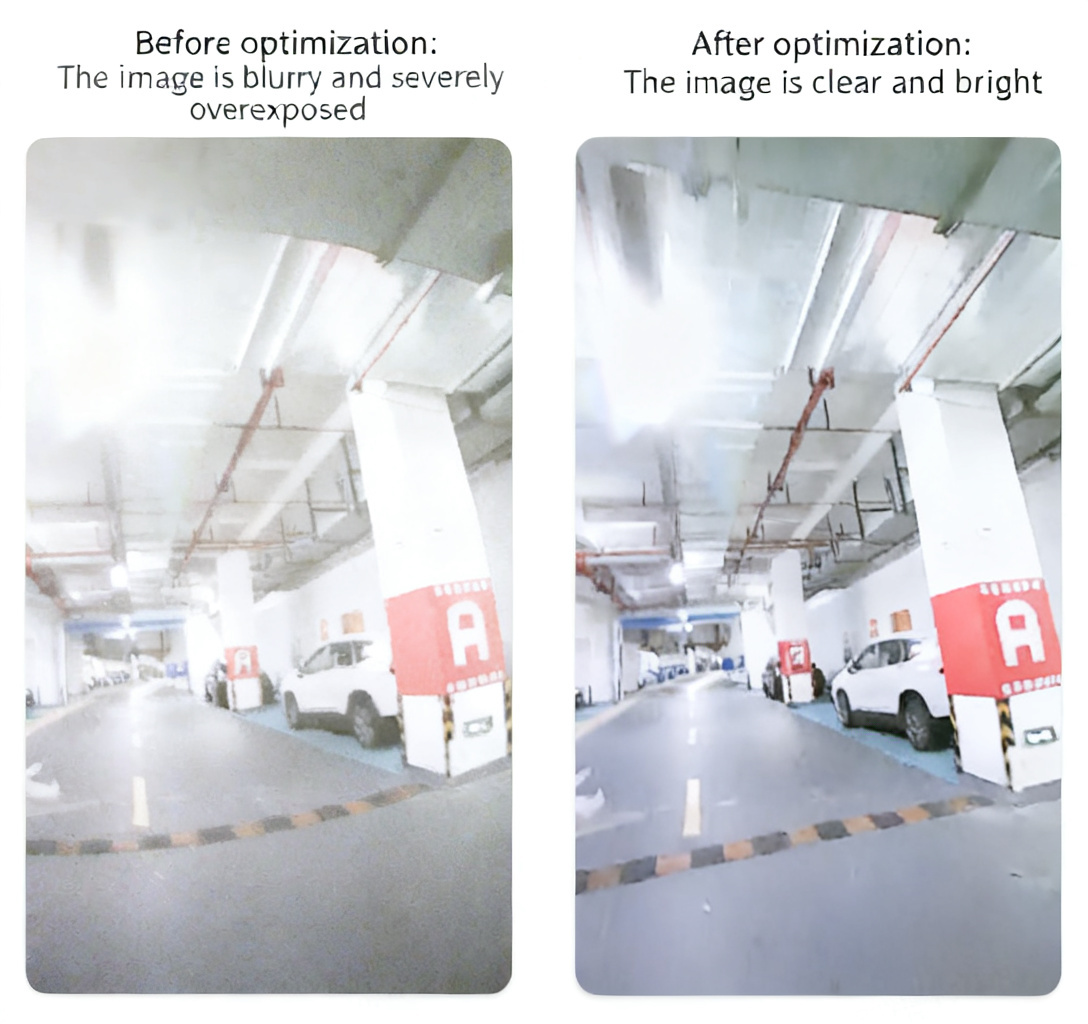
Image Enhancement Effect Comparison 2
2. Three Core Processing Pipelines for High-Quality Images
Image Enhancement Processing Pipeline Diagram
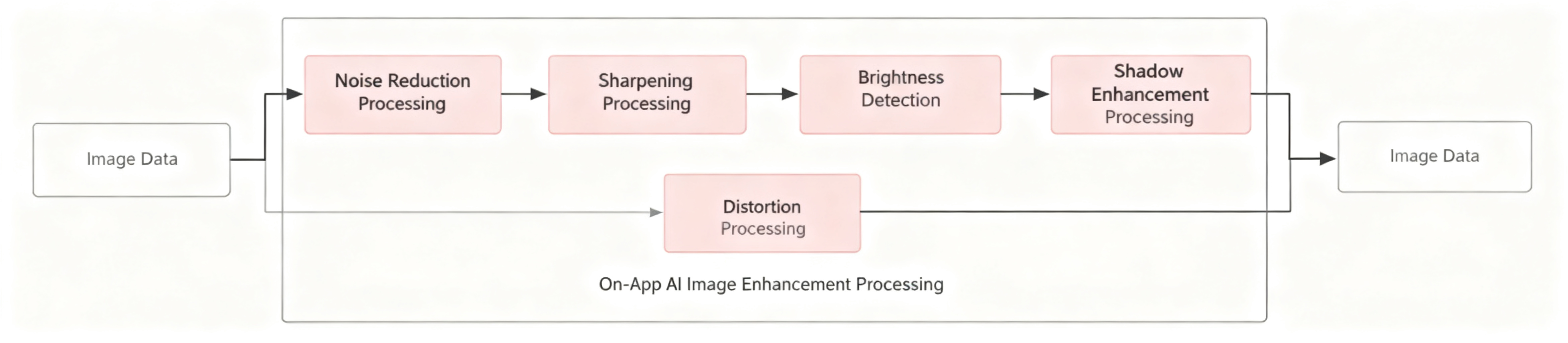
The core technical processing steps for improving image quality include three main stages:
1. Noise Reduction
This solution uses Tuya’s proprietary lightweight noise reduction model, capable of performing efficient and rapid denoising on video images within 1 second.
2. Low-Light Enhancement
The system performs overall brightness analysis on the image and brightens darker areas (brightness values between 0.1 and 0.3 are classified as dark). After processing, the overall image brightness improves by 20%–30%, achieving a balanced exposure across the frame.
3. Distortion Correction
Tuya’s distortion correction technology uses the Zhang calibration method: it obtains camera intrinsic parameters and distortion coefficients, and uses these parameters to compute a distortion correction mapping table. Once distortion is detected in an image, real-time correction is applied to ensure the frame remains undistorted.
3. Deep Dive into Core Technical Highlights
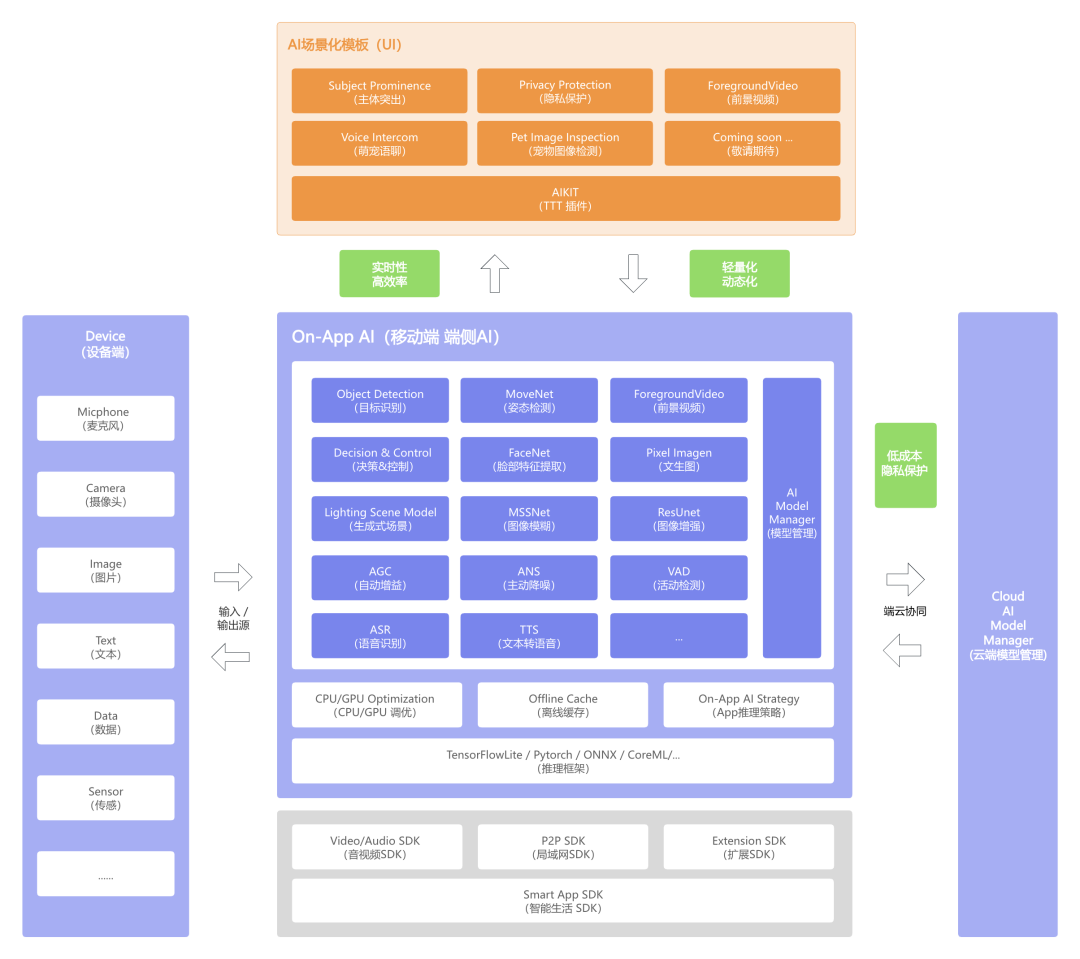
Tuya’s On-App AI Image Enhancement technology uses TensorFlow Lite for mobile model deployment. This framework offers efficient inference, low latency, and low power consumption advantages, supporting local offline operation on devices to rapidly improve user experience and response speed.
On-App AI Overall Architecture Diagram
1. More Flexible AI Architecture: Lightweight and Dynamic
Lightweight and Dynamic Architecture Diagram
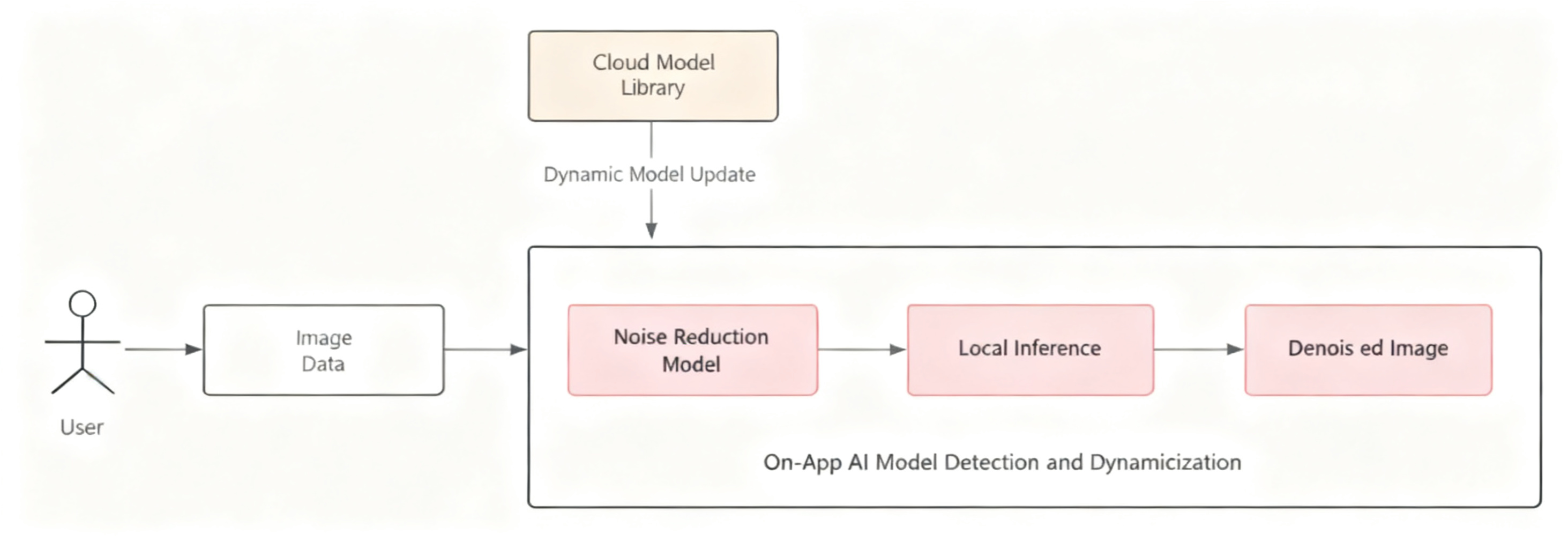
1.1 Lightweight Detection Model
Based on a dataset of over 100,000 samples deeply collected by Tuya in security protection scenarios, we trained the model using a lightweight ResUNet network. This enables precise capture of real noise characteristics while accurately preserving image detail and texture — significantly improving inference speed and resource efficiency without compromising denoising quality.
1.2 Dynamic Model Management
For model dynamism, Tuya uses an on-demand loading dynamic model management mechanism. The advantage of this approach is that it can download, update, and deploy models in real time based on actual needs, ensuring the application always runs on the optimal version. This not only enables rapid introduction of the latest algorithms during feature iterations, but also avoids bundling all models into a single package — effectively reducing the initial installation size and storage footprint, while improving overall runtime efficiency and user experience without sacrificing accuracy or performance.
2. Superior User Experience: Real-time and High Efficiency
Real-time Processing Architecture Diagram
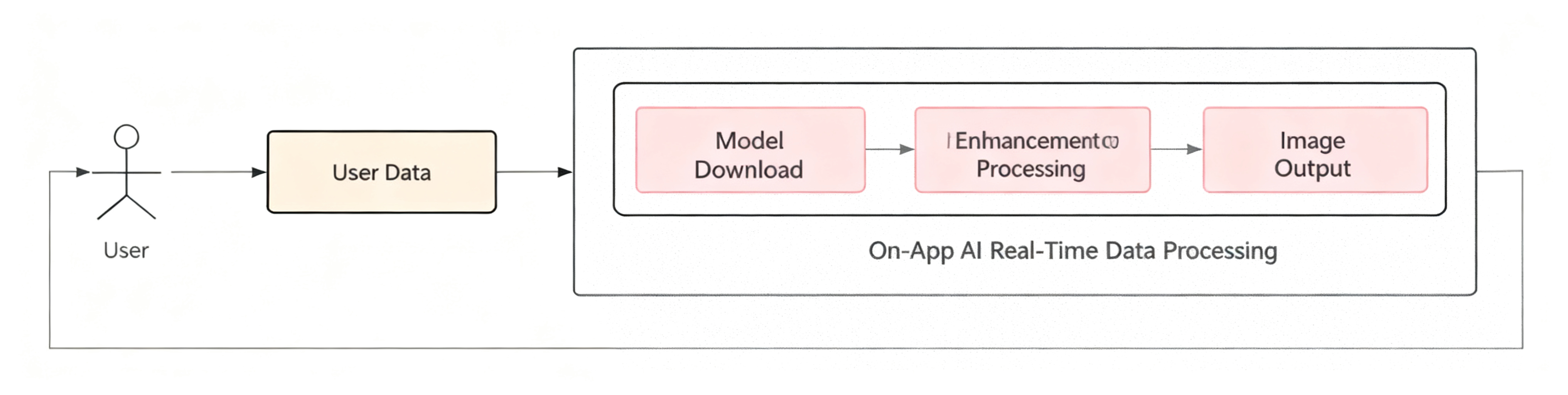
2.1 Real-time Interactive Processing
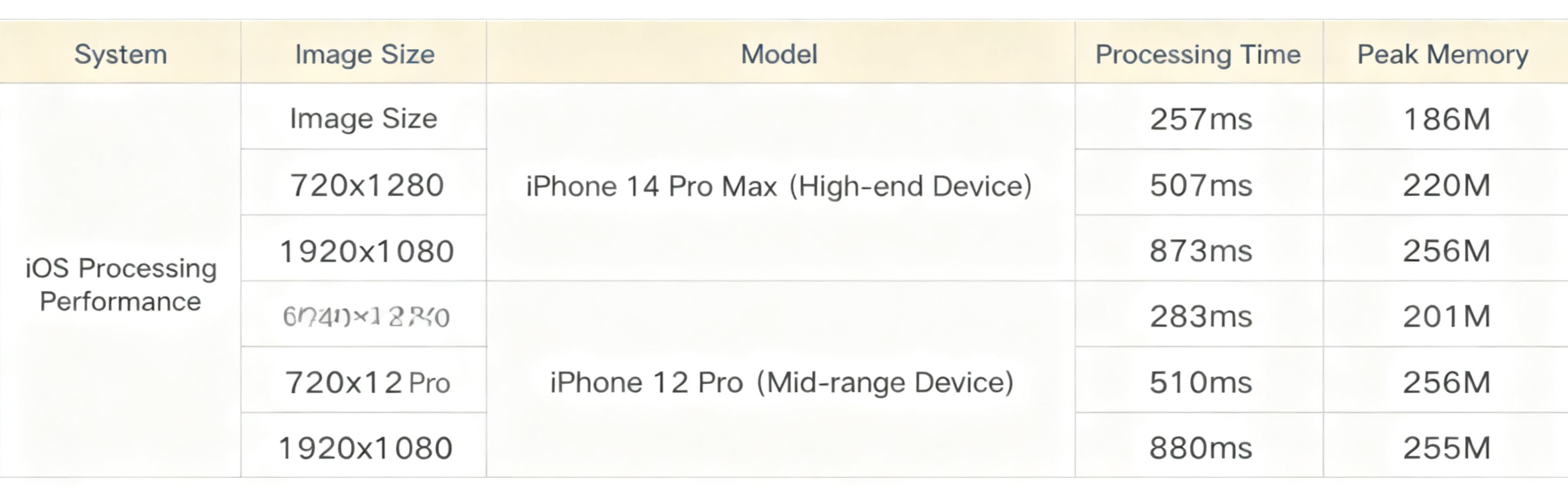
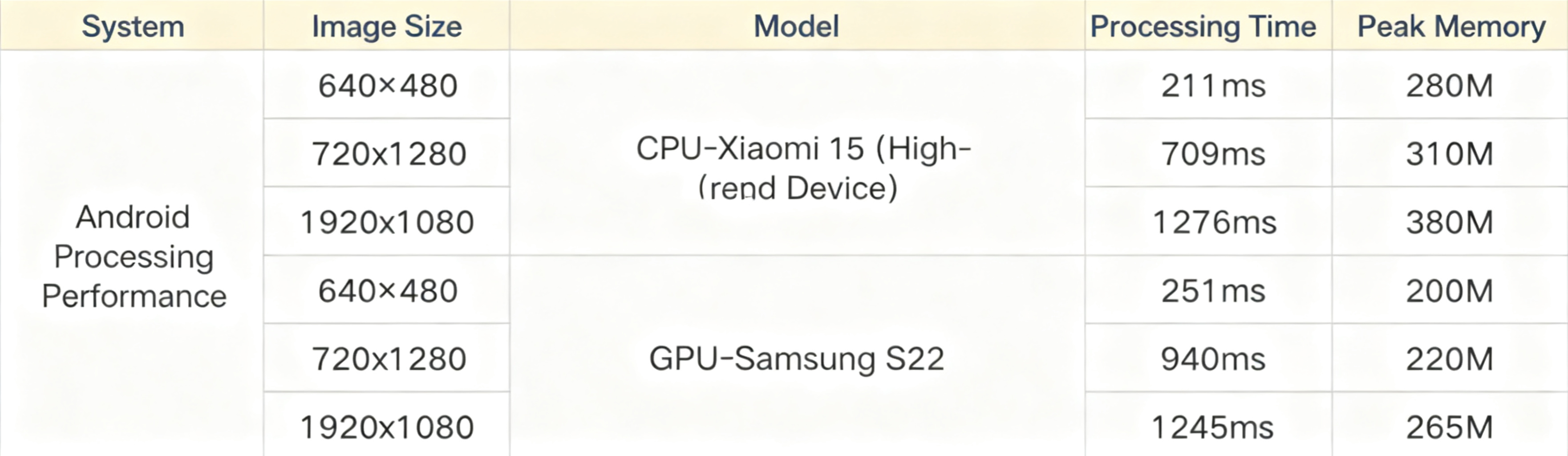
On mid-to-high-end devices, this technology achieves near-second-level inference output with high real-time performance and low latency. We specifically tested iOS and Android mobile devices across different models and image sizes — performance benchmark data below:
iOS Performance Benchmark Data
Android Performance Benchmark Data
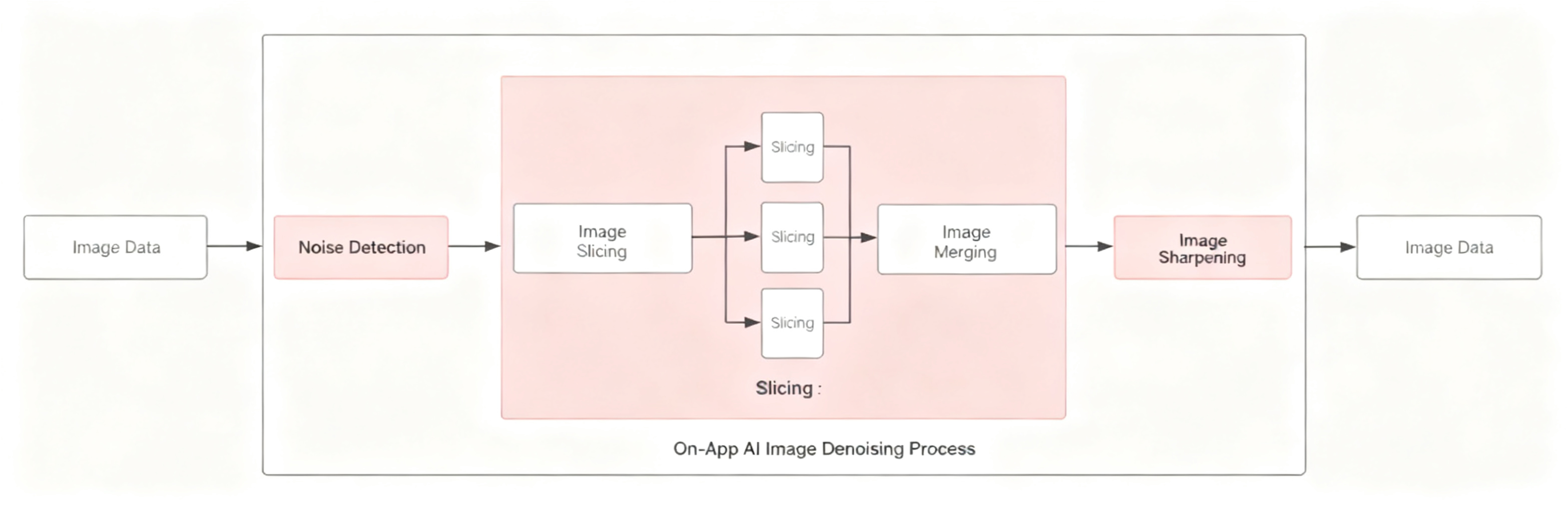
2.2 Image Tiling for Enhanced Quality
- First, the original image is sliced into tiles of a preset size, enabling efficient use of mobile computing resources;
- Each tile is then fed into the noise reduction model for independent processing, ensuring consistent fidelity in detail and texture;
- Finally, all denoised tiles are seamlessly merged through smooth boundary blending, restoring a high-quality image file identical in dimensions to the original.
Image Tiling Processing Flow Diagram
3. Lower Computation Cost
On-Device Computing Cost Comparison
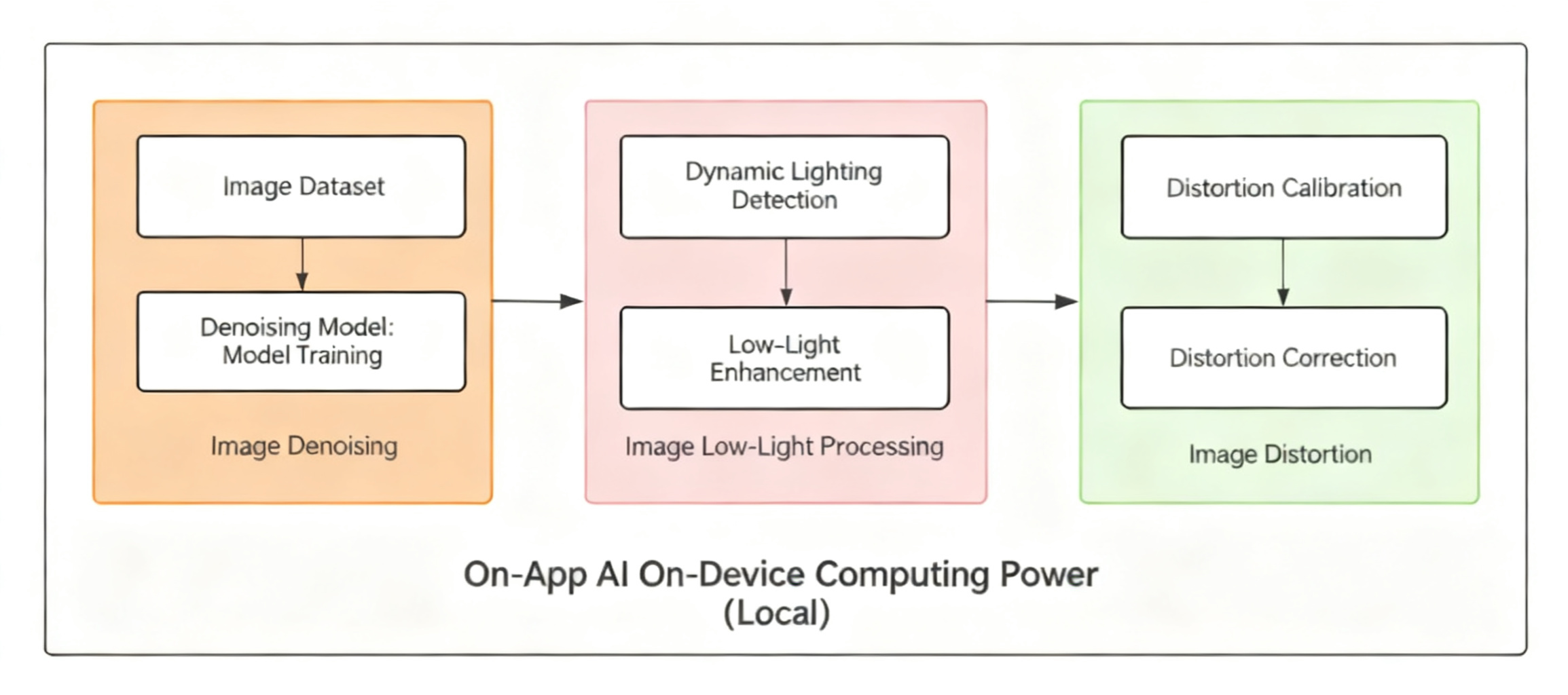
In various security protection application scenarios, the advantage of mobile-side AI image processing over cloud-based solutions is even more pronounced. The primary reason is that once the camera captures footage at the entrance, inference and computation can be completed directly on the local device — no need to upload raw images to the cloud for processing.
For example: visitor facial recognition, anomalous behavior detection, lighting optimization and noise reduction — all can be completed locally. This significantly reduces network transmission of video and image data, saves bandwidth and server computing resources, and effectively reduces latency.
4. Development Guide and Support
1. Development Tutorial
Full development tutorial available at:
https://developer.tuya.com/cn/miniapp/solution-ai/ability/picture-solution/aiPictureEnhance/ability-set/cloud
2. Technical Support
For any issues during development, please post your questions on the Tuya Developer Forum:
https://www.tuyaos.com/viewforum.php?f=3
Is this page helpful?
YesFeedbackIs this page helpful?
YesFeedback




