

On-App AI Video Editing: Multi-Model-Driven IPC Event Capture and Automatic Vlog Generation
IPC Highlights is an "AI video value-added service" built by the Tuya AI Cloud Developer Platform specifically for all smart hardware with cameras. By automatically identifying preset targets or custom events through AI large models, it captures highlights from the camera (such as pets being playful, a baby’s first steps, sunrises and sunsets), and generates a personalized Vlog with special effects in one tap. It meets all-scenario needs including baby/pet monitoring, lifestyle entertainment, and scenic travel — helping users effortlessly record the highlight moments in their lives!
For users with video processing needs, Tuya also provides a rich library of AI capability templates built on On-App AI, deploying AI inference models into the app. With the core philosophy of "more flexible AI architecture, superior user experience, and safer computing costs," it helps businesses and developers seamlessly integrate advanced AI technology into mobile devices. Through innovative technical architecture and continuously optimized AI inference models, it can not only automatically highlight video subjects but also protect video privacy content with one tap — eliminating the need for extensive post-production editing.
Currently, Tuya has partnered with leading compliant domestic large models such as DeepSeek, Tongyi Qianwen, and Doubao; internationally, it connects with top AI models including ChatGPT, Claude, and Gemini — empowering smarter IPC capabilities!
Through Tuya’s IPC Highlights feature, businesses can significantly boost app daily active users and user retention. Combined with subscription-based value-added services, they can easily improve ARPU (average revenue per user) and achieve a low-cost, high-margin monetization model. Specific scenario deployment examples include:
- Maternal and infant brands: Automatically generates "Baby Daily Highlights" for parents who can’t always be present or find time to organize their baby’s growth clips.
- Pet clinics: Based on AI behavior analysis, automatically edits and synthesizes a "Pet Health Monitoring Weekly Report" video on a weekly basis to meet owners’ needs for understanding their pet’s daily behavior.
- Property management companies: Displays real-time community environment changes and automatically edits "Community Four Seasons Landscape Time-lapse Videos" for a more attractive residential environment showcase.
1. Core Feature Highlights
1. Precise Capture
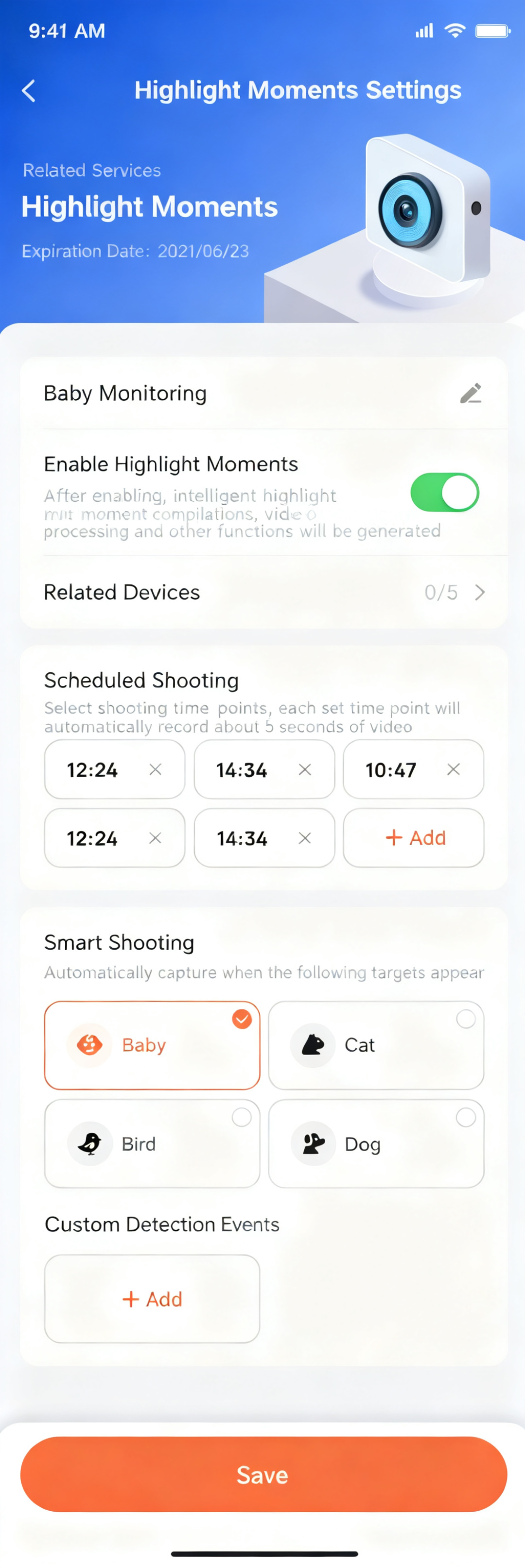
Tuya allows users to preset capture targets for the IPC, such as babies, cats, dogs, birds, etc. Users can also define custom events — for example, having the smart IPC monitor "changes in foot traffic at the entrance" or capture "the moment a flower blooms." Powered by strong AI large models, it not only captures key footage around the clock, but also supports scheduled capture settings (automatic capture at specified times each day).
- Scheduled capture: Suitable for user scenarios with predictable timing, such as sunrises and sunsets, or flowers blooming and falling;
- Smart fixed labels: Includes mobile subjects like "cat," "dog," "bird," and "baby," covering everyday general entertainment scenarios;
- User-defined scene events: Supports users actively inputting scenes for the IPC to automatically capture — more flexible and powerful, suited for exploratory users with complex scenario needs.
Custom Capture Rule Interface
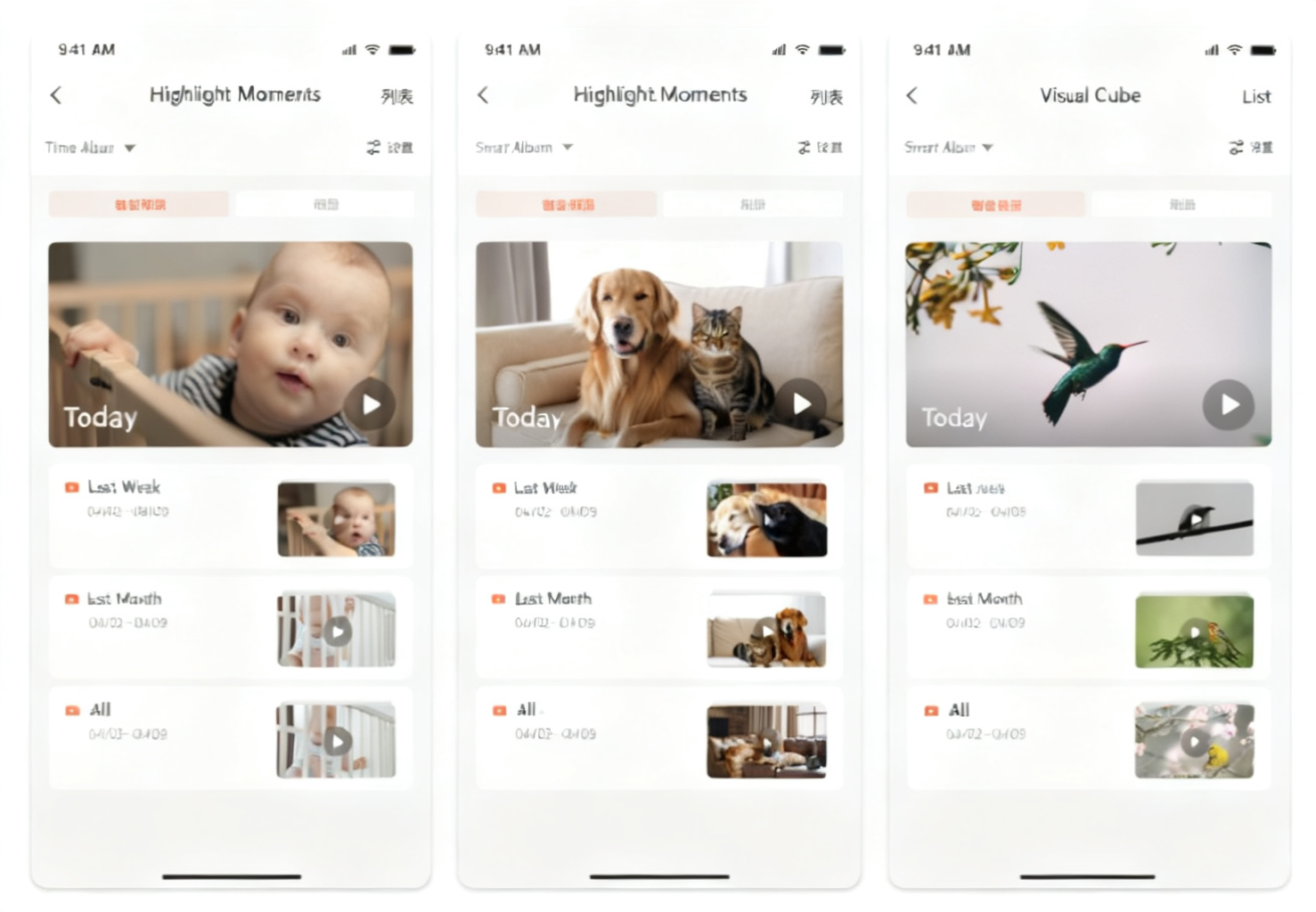
Tuya supports AI automatically generating 5–10 second short video clips, permanently stored in the cloud to preserve memories.
Cloud Album Display
2. One-Tap Generation
- AI Vlog: Tuya supports automatically compositing highlight video compilations within a specified time period; users can also quickly preview historical video highlights from that period.
Album Video Compilation Selection Interface
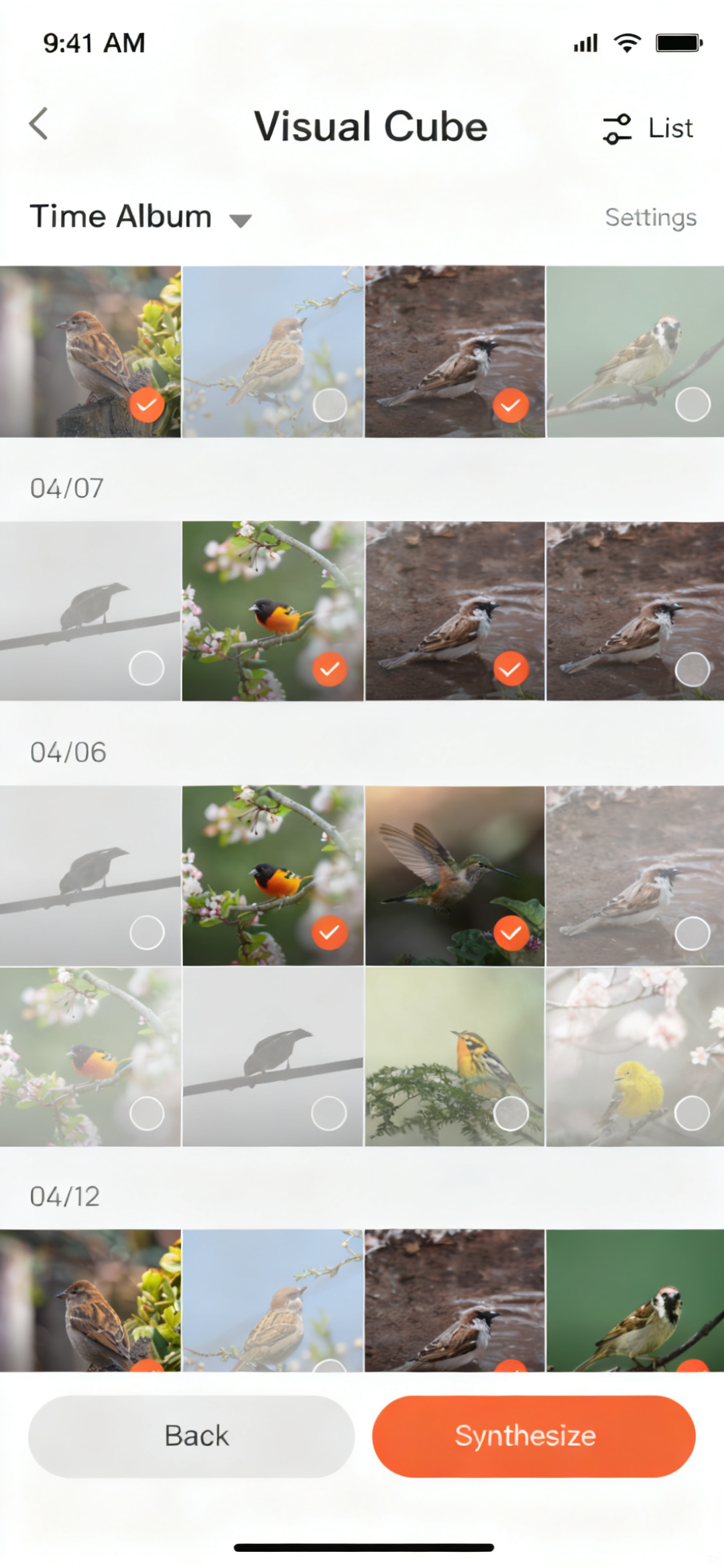
- Moments sharing: Tuya has built a video highlight workshop where users can select up to 5 clips and add background music and special effects (such as pet zoom-in, portrait close-up) with one tap — instantly creating viral social media content.
- Ultra-simple operation: Users just set the rules, and AI automatically handles the rest — even beginners can master professional editing!
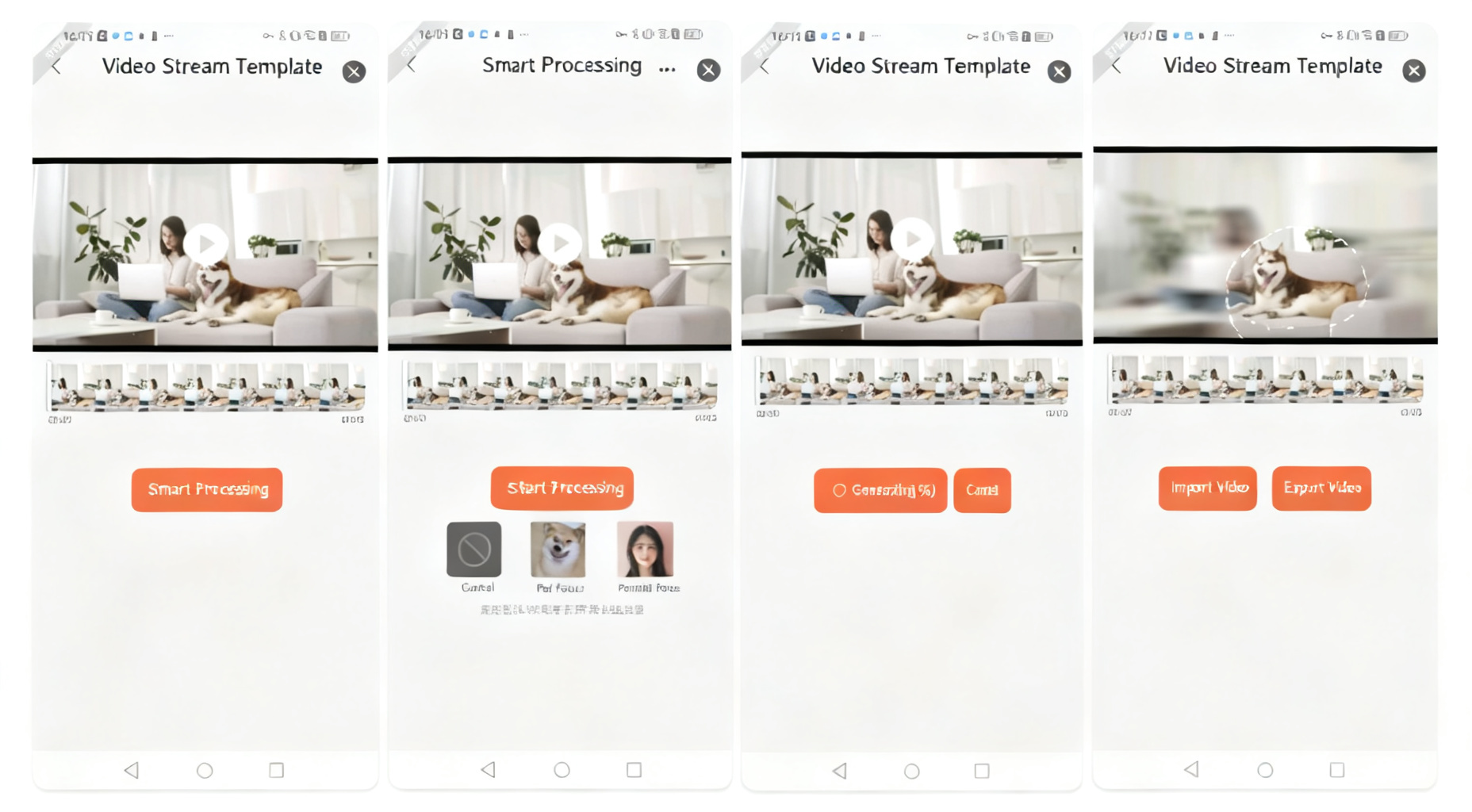
One-Tap Subject Enhancement and Privacy Protection
3. Zero Hardware Cost
Users need no camera hardware upgrades to enjoy this feature. After purchasing, users simply upgrade the Tuya public version App or brand App to V6.6.0+ and the feature activates automatically — even old devices instantly become "smart powerhouses."
2. On-App AI Video Templates Streamline Editing
To help users improve video editing efficiency, Tuya provides a rich library of AI capability templates within IPC Highlights, supporting users in post-processing videos. Current templates mainly include: AI subject enhancement and AI one-tap privacy protection — with more powerful templates continuously being released!
1. On-App AI Video Privacy Protection Template
Tuya’s video privacy protection template features significantly enhanced AI recognition. After uploading a video, audio and video are decoded frame by frame. AI precisely identifies moving or stationary subjects and automatically highlights them, while applying frosted glass or mosaic treatment to other areas — simple to operate, highly efficient, and easy for any user. Widely applicable to detection & recognition, geofencing, security monitoring, video editing, and other device categories.
For example, after applying video privacy protection to a dog in a home environment:
Video Screenshot Before Processing

Video Screenshot After Processing

2. On-App AI Video Subject Enhancement Template
The AI video subject enhancement template uses AI capabilities for real-time object detection, automatically locating and identifying subjects, then applying image algorithms for intelligent adaptive zoom — making subjects more prominent and frames more focused. The processed video is then encoded and packaged to output optimized video content.
Even in complex outdoor scenarios, Tuya’s On-App AI video subject solution can still precisely identify target objects, perform motion tracking, and zoom in.
3. How to Maximize Business Value with This Feature?
1. Target Audiences for Promotion
Any user with IPC device needs can leverage Tuya’s IPC Highlights feature, such as:
- Home users: Families with babies or pets, young people who love documenting life
- Vertical industries: Maternal and infant brands, pet service providers, security system integrators
- Content creators: Vlog bloggers and community operators needing short video material
2. Monetization Strategies
2.1 Recommended Business Models
- Hardware + service bundles: New camera products can bundle a "7-day free trial" to effectively improve software payment conversion; can also be offered as VIP gifts with hardware purchases to boost hardware conversion rates.
- Holiday marketing: Promote "Family Memory Yearbook" during Chinese New Year; automatically push "Pet Growth Diary" on pet birthdays.
- B2B partnerships: Co-launch exclusive services like "Baby Growth Diary" with maternal and infant brands, sharing user pools.
- Flexible subscription plans: Support weekly/monthly/annual billing to flexibly match user needs — for example, pet stores can launch "Pet VIP Packages."
2.2 Tuya One-Stop Empowerment
- From product listing, marketing push (service hall pop-ups, message notifications, etc.) to revenue sharing settlement, Tuya provides full one-stop pipeline support.
- Tuya continuously updates and provides comprehensive promotional material packages including short video demos and social media poster templates — reducing customer marketing production costs.
4. Step-by-Step Development Guide
1. Developing the IPC Highlights General Solution
1.1 Prerequisites
IPC Highlights is implemented as a mini program. Developers need to first upgrade the Tuya Smart or SmartLife app version bound to the mini program to 6.6.0 or above, then apply for development permissions:
https://service.console.tuya.com/8/3/list?source=support_center
1.2 Module Capabilities
Highlights module capabilities include: service detail settings, smart album, full album, and AI editing.
Feature documentation, interaction flows, and development paths:
https://t.tuya.com/AY1D3VnRON
2. Developing AI Capability Templates
2.1 Video Subject Enhancement Solution
Module capability development for AI video subject enhancement includes: video resource import/export, local music list retrieval, background music preview, and AI video stream processing.
Step-by-step tutorial:
https://t.tuya.com/AY1D3VnRRh
2.2 Video Privacy Protection Solution
Module capability development for AI video stream privacy protection includes: video subject enhancement, environment masking, background music for video streams, and mixing weight adjustment (original audio vs. background music).
Step-by-step tutorial:
https://t.tuya.com/AY1D3VnRb6
Note: The video stream privacy protection API is integrated into the IPC Highlights mini program template. Before development, ensure version consistency with the IPC Highlights mini program.
3. Technical Support
For any issues during development, please post your questions on the Tuya Developer Forum:
https://developer.tuya.com/cn/miniapp/solution-ai/ability/video-solution/aiVideoPrivacyProtection/overview
Is this page helpful?
YesFeedbackIs this page helpful?
YesFeedback




