

Tuya Breaks Through Bluetooth Matter Bridging Technology!
Tuya Breaks Through Bluetooth Matter Bridging Technology! Brands Can Easily Access Apple, Google, and Other Third-Party Smart Ecosystems
To address the long-standing fragmentation problem in the smart home space, the Matter protocol was introduced in 2022! It’s like creating a "universal language" for devices from different brands, enabling them to communicate and interoperate seamlessly.
As an early participant in the Matter protocol, Tuya has been deeply committed to Matter bridging technology, dedicated to breaking down barriers between ecosystems. Following the successful implementation of third-party Bridge device bridging, scene bridging, and gateway replacement capabilities (click to view details), we’ve made another major breakthrough: achieving Matter bridging capability for Bluetooth devices! This means both Zigbee devices and Bluetooth devices in Tuya’s ecosystem can easily connect to third-party ecosystems like Apple Home and Google Home through Matter gateways, truly realizing seamless interconnection of cross-protocol, cross-ecosystem, and cross-platform smart devices!
01 From Zigbee to Bluetooth: Comprehensive Evolution of Bridging Capabilities
Previously, Tuya-powered Matter gateways could already perfectly bridge Zigbee devices, enabling cross-ecosystem linkage for numerous sensors, switches, and other networked devices.
Now, through continuous technical breakthroughs and innovation by the team, both standard Bluetooth LE devices and Bluetooth mesh devices can successfully join the bridging lineup! This important breakthrough means users are no longer limited to a single device type. Whether it’s Zigbee door sensors, various sensors, or Bluetooth light bulbs and switches, all can easily connect to third-party ecosystems through Tuya-powered Matter gateways, achieving true "interconnection of everything"!
02 Final Effect Demonstration
Next, let’s look at specific scenario demonstrations to see how Tuya’s Bluetooth Matter bridging function brings users a more convenient and open smart living experience!
Below are the four smart devices needed for this scenario demonstration:
-
Zigbee Smart Door Sensor
-
Bluetooth LE Smart Light Bulb
-
Tuya-Powered Matter Gateway
-
HomePod mini (can serve as a gateway, used to sync device status between the Tuya-Powered App and Apple Home App)
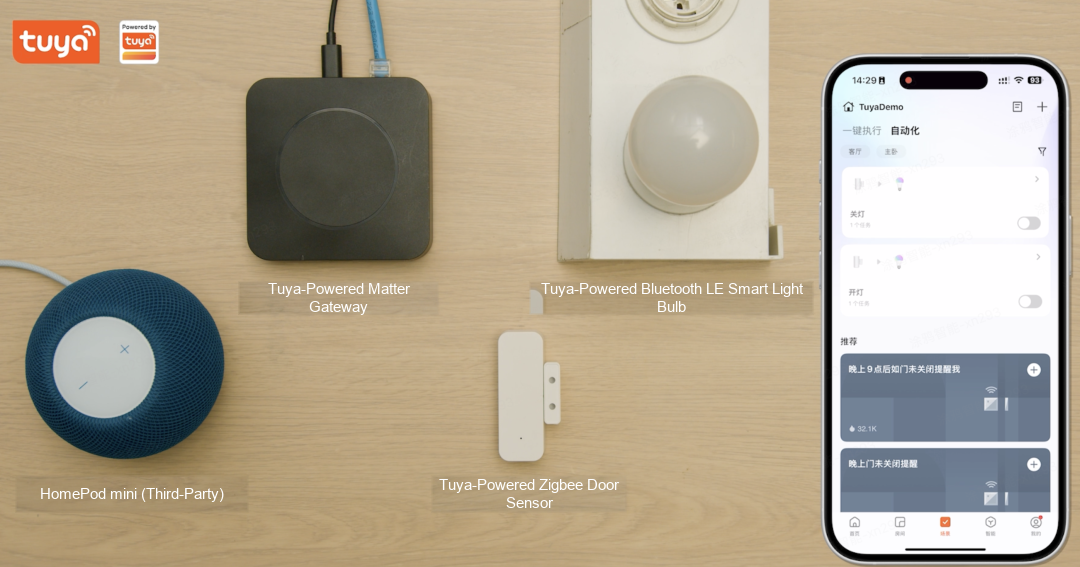
Figure: Four smart devices used in the Matter bridging scenario demonstration — Zigbee Smart Door Sensor, Bluetooth LE Smart Light Bulb, Tuya-Powered Matter Gateway, and HomePod mini
Now, let’s proceed with the scenario demonstration!
Step 1: Connect Tuya-Powered Bluetooth Devices
Through the Tuya-Powered App, we first pair the Bluetooth LE light bulb. Once complete, you can easily manage functions like on/off and dimming:
-
Open the Tuya-Powered App, the Bluetooth light bulb shows online status
-
Tap the switch button on the App, and the light responds instantly
-
Supports brightness adjustment, color temperature switching, and other personalized controls
Watch the video for specific operation steps:
Step 2: Cross-Protocol Devices, Achieving Scenario-Based Smart Linkage
Through the Tuya-Powered Matter gateway, we successfully achieved seamless linkage between Zigbee devices and Bluetooth devices within Tuya’s ecosystem, and implemented the following scenario functions:
- Create a scene in the Tuya-Powered App: "Door sensor opens, simultaneously triggers light on; door sensor closes, triggers light off"
- When the door sensor is opened, the Bluetooth LE light turns on immediately; when the door sensor closes, the light bulb also turns off
Watch the video for specific operation steps:
Step 3: Matter Cross-Ecosystem Bridging and Status Synchronization
The most exciting part is that we’ve successfully achieved bridging + status synchronization between Tuya’s ecosystem and Apple’s ecosystem! The following effects can be experienced:
-
Share the Tuya Matter gateway to the Apple ecosystem
-
Sub-devices under the gateway, such as door sensors and lights, automatically sync to Apple Home with normal device status
-
When opening/closing the door sensor, the light can be correctly triggered in both ecosystems
-
Device status display is synchronized in real-time and consistent between Tuya’s ecosystem and Apple’s ecosystem
Watch the video for the specific demonstration:
03 Development Tutorial
TuyaOS Gateway Development Framework version 3.13.11 supports Matter bridging of Bluetooth sub-devices, currently only released on the SigmaStar platform; for other chip platforms that need these two features enabled, click [Read Original] at the end to contact Tuya Business BD.
Copy the link below to install the Tuya Wind IDE plugin and learn about the TuyaOS development process:
https://developer.tuya.com/cn/docs/iot-device-dev/tuyaos-wind-ide?id=Kbfy6kfuuqqu3
- Apply for Development Framework Permission
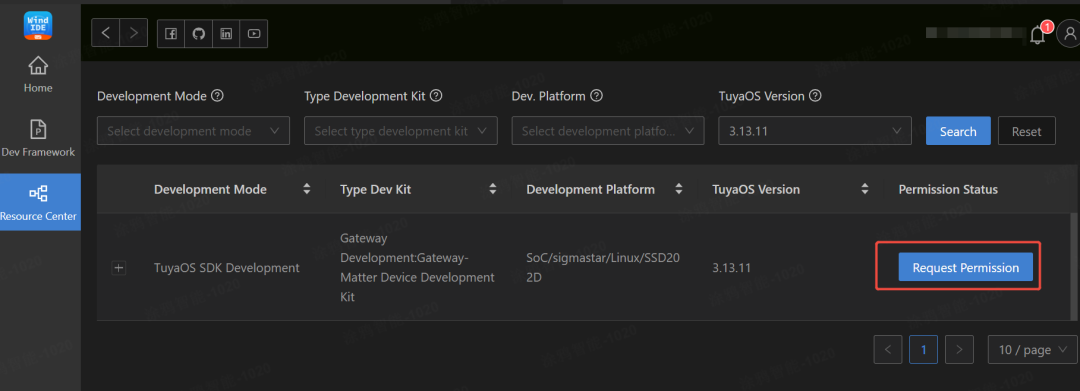
Figure: Step 1 — Apply for Development Framework permission in the Tuya Wind IDE Resource Center
- After approval, download the development framework. Go to the Wind IDE homepage and click Create Framework
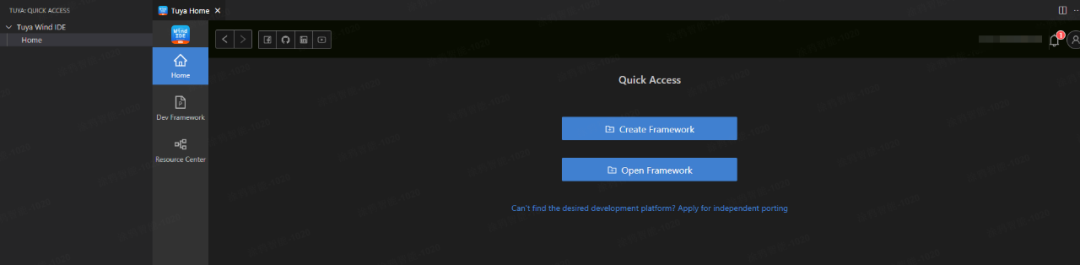
Figure: Step 2 — After approval, click 'Create Development Framework' on the Wind IDE homepage
In the popup menu, select the following information and click Finish.
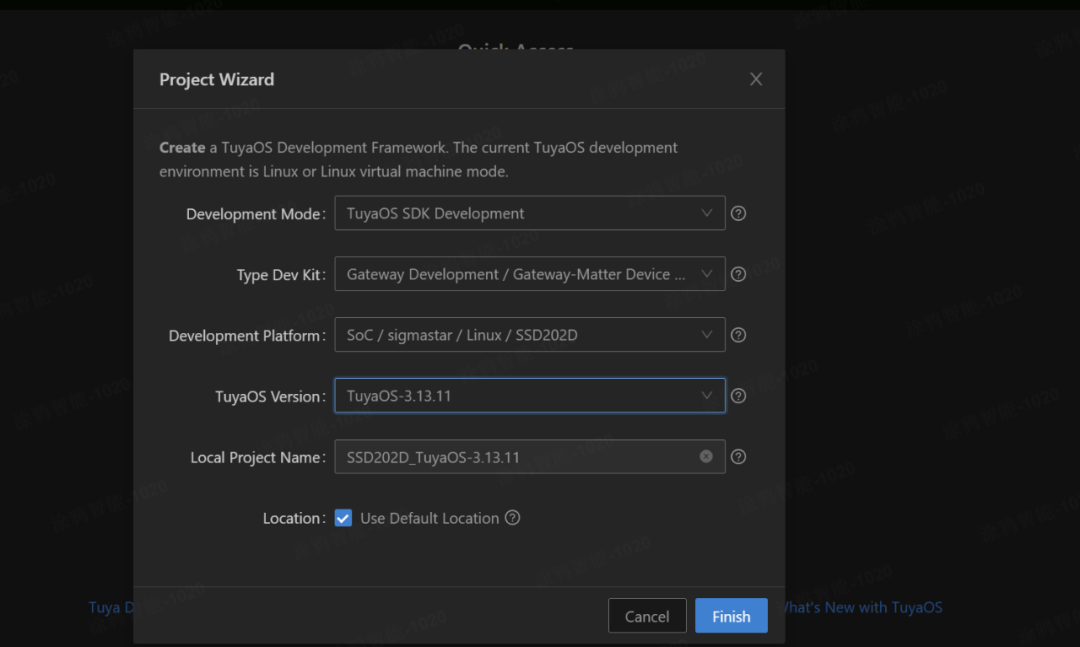
Figure: Select the development framework options in the popup menu and click Finish
- Compile the demo and you’re done!
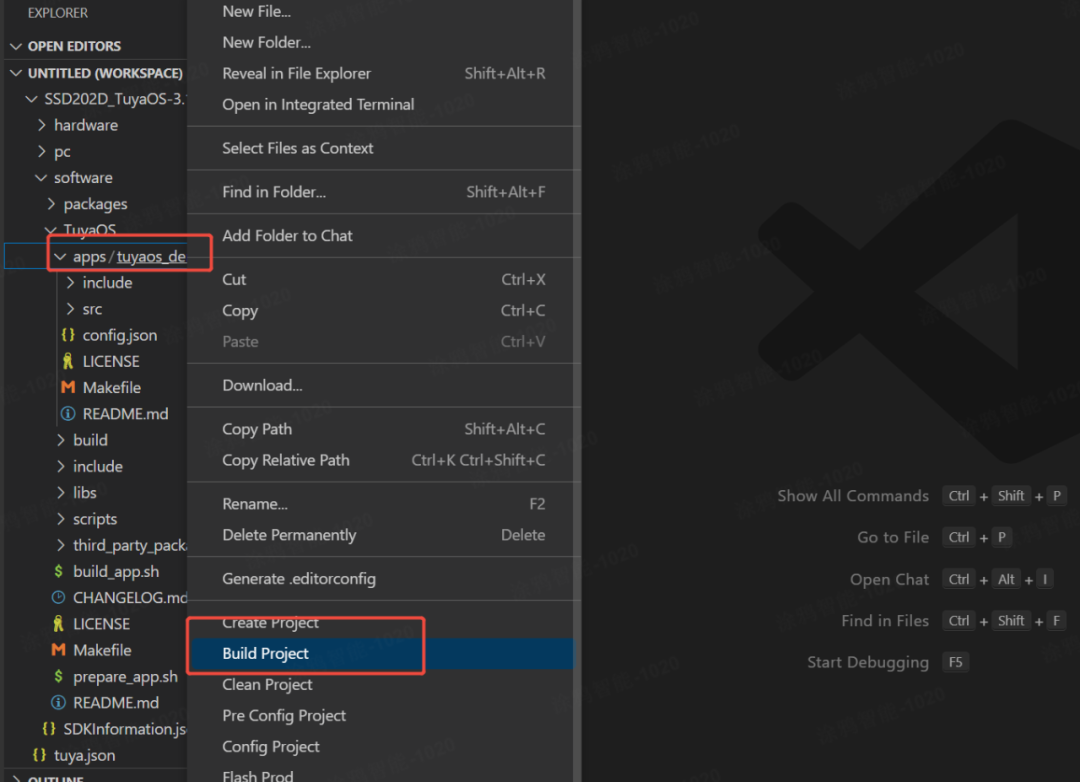
Figure: Step 3 — One-click compilation of the Matter bridging demo
04 Developer Q&A
If you encounter any issues during development, you’re welcome to log in to the Tuya Developer Technical Forum to ask questions, where technical staff will assist you promptly:
https://www.tuyaos.com/viewforum.php?f=13
Is this page helpful?
YesFeedbackIs this page helpful?
YesFeedback




