

Tuya's Low-Cost PLC Technology Goes Live!
Where There’s Power, There’s Network! Tuya’s Low-Cost PLC Technology Goes Live, with Broader Communication Range + More Impressive Localized Group Control Speed
I. The Importance of PLC Technology: Turning Power Lines into Network Cables
- What is PLC?
PLC (Power Line Communication) is a communication technology that uses power lines as the transmission medium, superimposing high-frequency signals through modulation technology to achieve data transmission. It requires no additional wiring and can directly turn power lines into network cables, ultimately achieving "dual use of one line" for both power and communication.
For example:
-
Applied in homes, PLC adapters can transform home outlets into "network interfaces," automatically extending the network in rooms with weak Wi-Fi signals, making whole-home smart device interconnection faster and smoother;
-
Applied to electricity meters, power companies can receive real-time electricity usage data reported by meters, directly replacing manual meter reading;
-
Applied in remote rural areas, PLC power lines can achieve broadband wide-area coverage at lower cost.
1.1 Core Principles
- Modulation and Demodulation: Through digital modulation technologies such as OFDM (Orthogonal Frequency Division Multiplexing) and PSK (Phase Shift Keying), PLC can encode raw data signals into 1-30MHz high-frequency carriers. Using signal coupling devices, these are frequency-domain multiplexed with the power line’s 50/60Hz power frequency current, ultimately achieving dual-frequency co-transmission communication within the power line medium;
- Coupling and Separation: The transmitting end injects high-frequency signals into the power line through a coupler, while the receiving end separates the high-frequency signals through a filter and demodulates them into raw data.
1.2 PLC Advantages
-
No Additional Wiring Required: Developers can directly use existing power lines for data transmission, significantly saving construction costs;
-
Wide Coverage: Power lines naturally cover homes, buildings, industrial, and other scenarios;
-
Strong Penetration: Signals can pass through walls and floors, avoiding wireless signal attenuation caused by obstacles;
-
Anti-Interference Capability: Through frequency band division and error correction coding technology, it can resist power line noise interference.
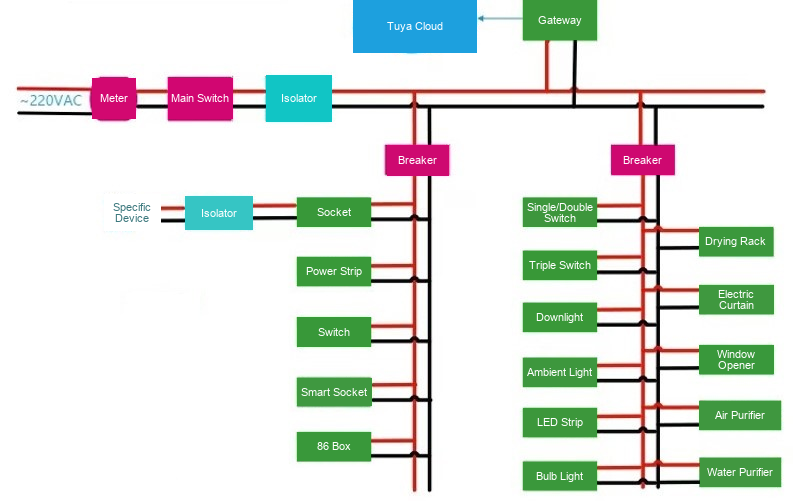
Figure: PLC system architecture — green boxes represent PLC devices; power lines serve as the communication medium
[Note] Green boxes represent PLC devices
- PLC System Device Composition
A PLC system typically consists of the following devices:
- Gateway Device: A PLC gateway is a network interconnection device based on power line communication technology. It uses existing power lines as the data transmission medium, achieving protocol conversion and interconnection between the power network and other communication networks (such as Ethernet, Wi-Fi, cellular networks, etc.);
- Terminal Devices (such as switches, outlets): Connect to the gateway through PLC modules and subsequently access the internet, while also providing relay functionality.
II. Tuya’s PLC Technology Features
- Software Features
1.1 PLC Network Management (Networking)
1.1.1 PLC Network Architecture Design
① Topology Structure
Tuya adopts a tree-layered topology with the hierarchy: GW → CCO → PCO → STA
-
GW (Gateway): Network management node, facilitating protocol conversion and interconnection between the power network and other communication networks;
-
CCO (Central Coordinator): PLC network root node, responsible for network-wide resource scheduling and routing management;
-
PCO (Proxy Coordinator): Intermediate node, combining data forwarding and sub-device management capabilities;
-
STA (Station Device): Edge terminal node with no subordinate sub-devices.
② Dynamic Role Conversion Mechanism
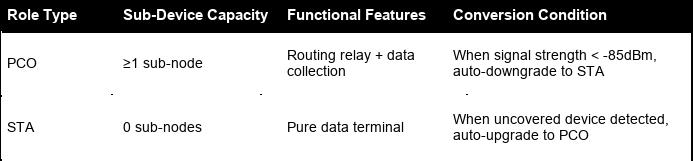
Figure: PLC Dynamic Role Conversion Mechanism — topology: GW → CCO → PCO → STA with automatic role switching
1.1.2 Networking Implementation
Watch the video to experience Tuya’s extreme speed of pairing 200 devices in 4 minutes, with an average pairing time of only 1.2s per device:
Networking Steps:
STEP 1. CCO Initialization
STEP 2. Sub-devices join the CCO’s PLC network
STEP 3. Sub-devices send information to Tuya Cloud to complete activation
This networking solution has been verified in real-world scenarios, supporting large-scale deployment of up to 200 nodes, with average per-node networking time ❤️ seconds, showing more competitive advantages compared to similar solutions on other platforms.
1.2 PLC Local Groups
Tuya’s PLC technology also performs impressively in localized group management, featuring low latency, high consistency, and high reliability.
Tuya supports users in customizing device groups on the App, enabling one-click triggering of multi-device action synchronization, eliminating cloud dependency, meeting real-time management needs, and achieving localized group management capability. PLC group core metric advantages are shown in the table below:
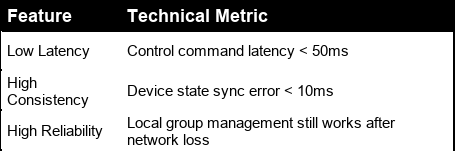
Figure: PLC Local Group core metrics — low latency, high consistency, and high reliability advantages
1.3 PLC Local Scenes
In offline conditions, Tuya still supports users in using the App and local network for localized management; even without a gateway device, scene panels can operate smoothly.
Tuya deeply integrates the App with PLC scene panels, supporting users in customizing device linkage scenes and achieving dual-mode capability of offline management and cloud status synchronization. After scene configuration is complete, users can trigger preset actions with one click through physical buttons or the App, completing device management without network dependency while ensuring strong consistency between cloud and device states.
1.3.1 Core Function Implementation
① Scene Configuration and Management
- Physical Button Binding: After mapping scenes to PLC scene panel physical buttons, gesture operations such as single click, double click, and long press can be used;
- Multi-Device Linkage: Through the Tuya App’s cross-device binding of PLC device function points, more complex scene logic can be defined (e.g., turning on device A switch while synchronously turning off device B light)
② Dual-Mode Management Mechanism
- Offline Management Mode: Scene logic programs are pre-stored in the panel’s local chip. When the gateway loses network or power, the system controls devices directly through power lines, with command response latency ≤50ms;
- Online Management Mode: When the gateway is online, management commands and status information are relayed through the cloud and synchronously updated to the App interface, ensuring consistency between App display status and actual device status.
1.4 PLC Real-Time Performance
Through technologies such as physical layer high-frequency modulation, link layer deterministic scheduling, and network layer fast self-healing, Tuya’s PLC technology can achieve millisecond-level real-time management in complex power line environments.
- Hardware Features
2.1 What Factors Affect Communication Distance?
-
Theoretical Distance: Typical communication distance is 200 meters (comprehensively affected by line quality, noise, and other factors);
-
Practical Limitations: Power line impedance, line branching, and load changes can cause signal attenuation;
-
Noise Interference: High-frequency noise generated by appliances (such as motors, switching power supplies) reduces the signal-to-noise ratio;
-
Frequency Band Allocation: Different countries/regions have different power line communication frequency bands (e.g., China is 3-500KHz, Europe is 3-148.5KHz).
2.2 Comprehensive Comparison with Wireless Communication
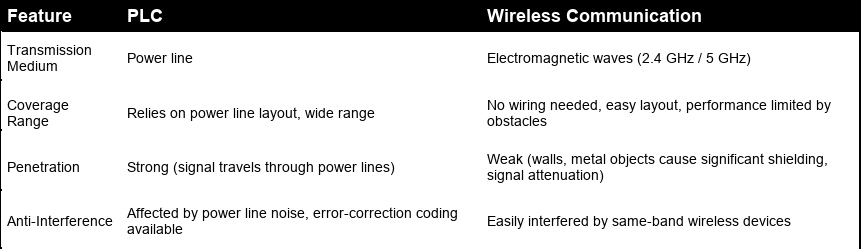
Figure: Comprehensive comparison between PLC and wireless communication technologies — covering distance, penetration, anti-interference, and applicable scenarios
2.2.1 Applicable Scenario Comparison
① PLC Advantage Scenarios
- Mainly suitable for scenarios with complex building structures (such as multi-story factories, villas) where wireless signals have difficulty penetrating;
- In long-distance, stable communication-requiring industrial control scenarios (such as power inspection, equipment monitoring), PLC can发挥 greater utility.
② Wireless Communication Advantage Scenarios
- Mobile device networking scenarios (such as phones, tablets), where wireless communication deployment is more flexible and convenient;
- Suitable for short-distance, high-bandwidth demand scenarios (such as video transmission).
2.2.2 PLC Core Value
- Utilizing power lines to achieve "where there’s power, there’s network," solving communication coverage issues in complex environments;
- PLC technology can发挥 unique advantages in smart grids, industrial automation, and other fields, serving as an effective complement to wired and wireless communication.
III. Tuya Makes PLC Device Development More Efficient
- Simpler Development with SDK
Through Tuya-provided related SDKs, developers only need to focus on function point value changes during PLC device development. Based on function point values, the associated hardware can be operated; data reporting and status synchronization are automatically completed by the gateway and sub-device SDKs, greatly improving development efficiency. Developers only need to focus more on their areas of expertise, such as relay operations and lighting effects.
For gateway-side SDK development, only two interfaces (initialization and service startup interfaces) need to be called to support PLC gateway capability.
- Multi-Gateway Coexistence
Each network has an independent NID (Network ID), and devices under the same gateway also share the same NID. By assigning independent NIDs to each gateway, communication between sub-devices under different gateways is ensured not to interfere with each other, enabling multiple gateways to share the same set of power lines.
- Group OTA Upgrade
By combining the wide coverage characteristics of power line communication with group collaborative management technology, Tuya has redefined the firmware OTA management paradigm for large-scale smart devices, providing core support for infrastructure intelligence. Currently, a single gateway can support simultaneous upgrades of up to 200 sub-devices, with upgrade time shortened a hundredfold compared to upgrading devices one by one.
- Stronger Security
On top of standard PLC security, Tuya has added security strategies. Through a one-device-one-key approach, data transmission security is guaranteed, effectively preventing data tampering or illegal interception.
IV. Obtaining the PLC Development Framework
- How to Download the PLC Sub-Device Development Framework
Developers can directly obtain the PLC hardware development framework through Tuya Wind IDE. The specific process is as follows:
1.1 Install the Tuya Wind IDE plugin and learn about the TuyaOS development process: https://developer.tuya.com/cn/docs/iot-device-dev/tuyaos-wind-ide?id=Kbfy6kfuuqqu3
Note: PLC sub-devices are developed in a Windows environment. Developers only need to install Tuya Wind IDE on Windows.
1.2 Launch Tuya Wind IDE, enter the "Resource Center," select as shown in the image below to apply for development framework permission, fill in Tuya’s business email (business email: zouxk@tuya.com), and click to submit the application.
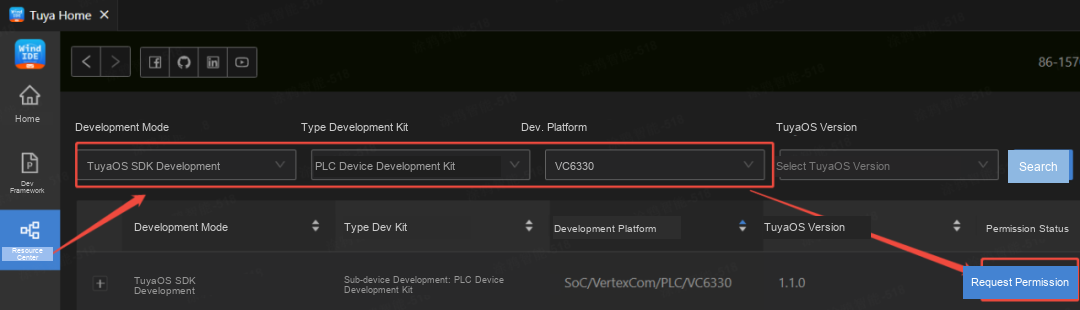
Figure: Step 1 — Apply for PLC Sub-Device development framework permission in the Tuya Wind IDE Resource Center
1.3 After approval, enter the homepage and click "Create Development Framework."
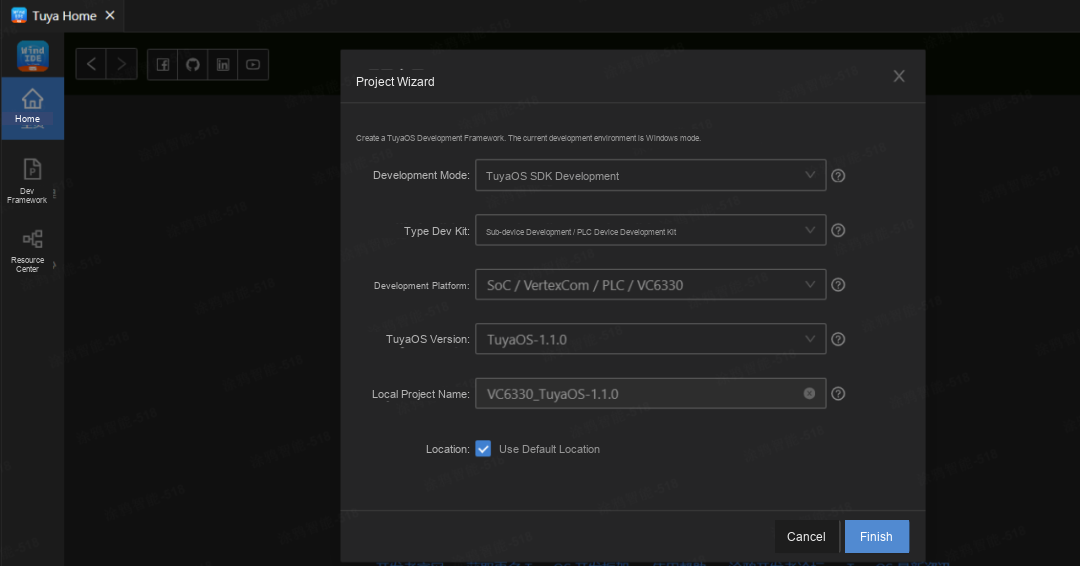
Figure: Step 2 — After approval, click 'Create Development Framework' for PLC Sub-Device
1.4 One-Click Compilation
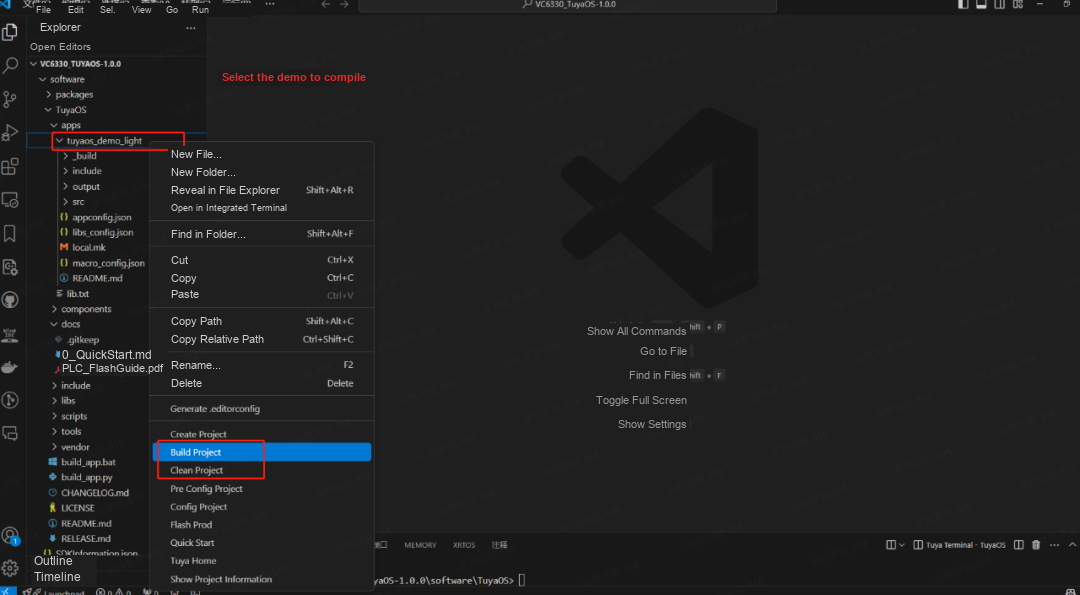
Figure: Step 3 — One-click compilation of the PLC Sub-Device development framework
1.5 Experience the PLC demo on the S130N-ISI module (the module can be obtained by contacting Tuya Business). For the S130N-ISI module specifications, please refer to the development package included after downloading the PLC development framework.
- How to Download the PLC Gateway Development Framework
You can directly obtain the PLC gateway development framework through Tuya Wind IDE.
2.1 Install the Tuya Wind IDE plugin: https://developer.tuya.com/cn/docs/iot-device-dev/tuyaos-wind-ide?id=Kbfy6kfuuqqu3
2.2 Launch Tuya Wind IDE, enter the "Resource Center," select as shown in the image below to apply for development framework permission, fill in Tuya’s business email (business email: zouxk@tuya.com), and submit the application.
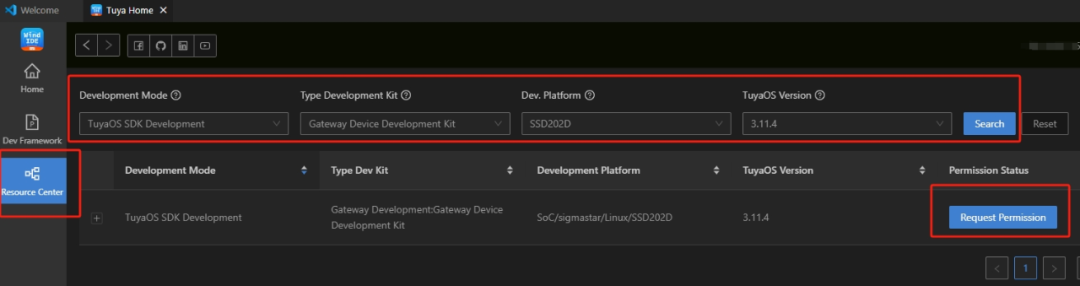
Figure: Step 1 — Apply for PLC Gateway development framework permission in the Tuya Wind IDE Resource Center
2.3 After approval, enter the homepage, click "Create Development Framework," and select as shown in the image below to create the development framework.
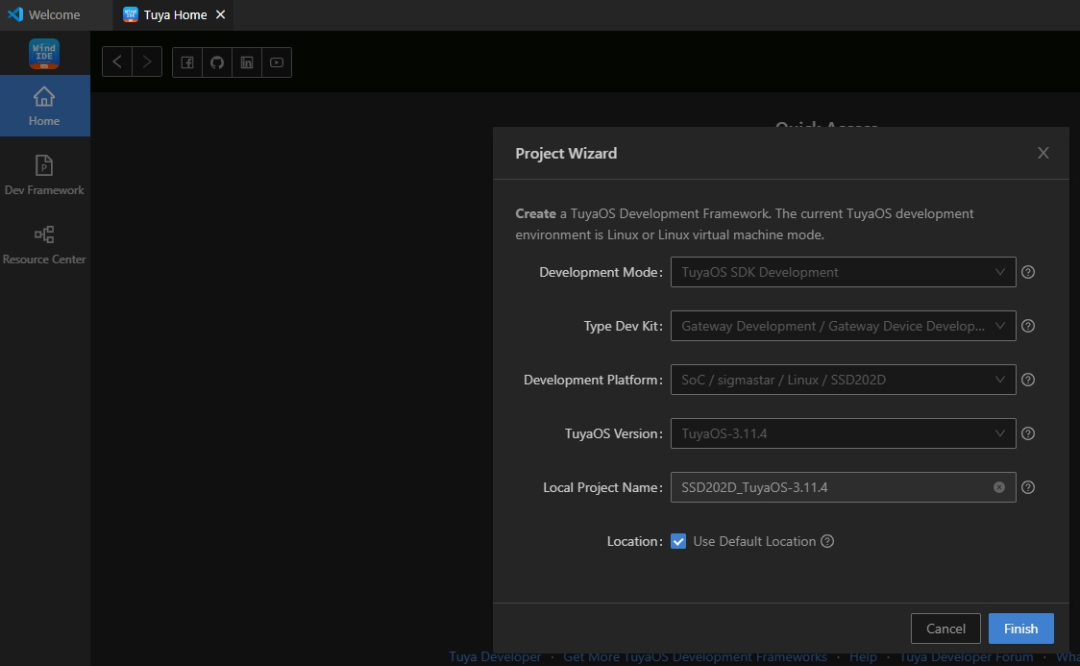
Figure: Step 2 — Create the PLC Gateway development framework — select platform and framework options
2.4 One-Click Compilation
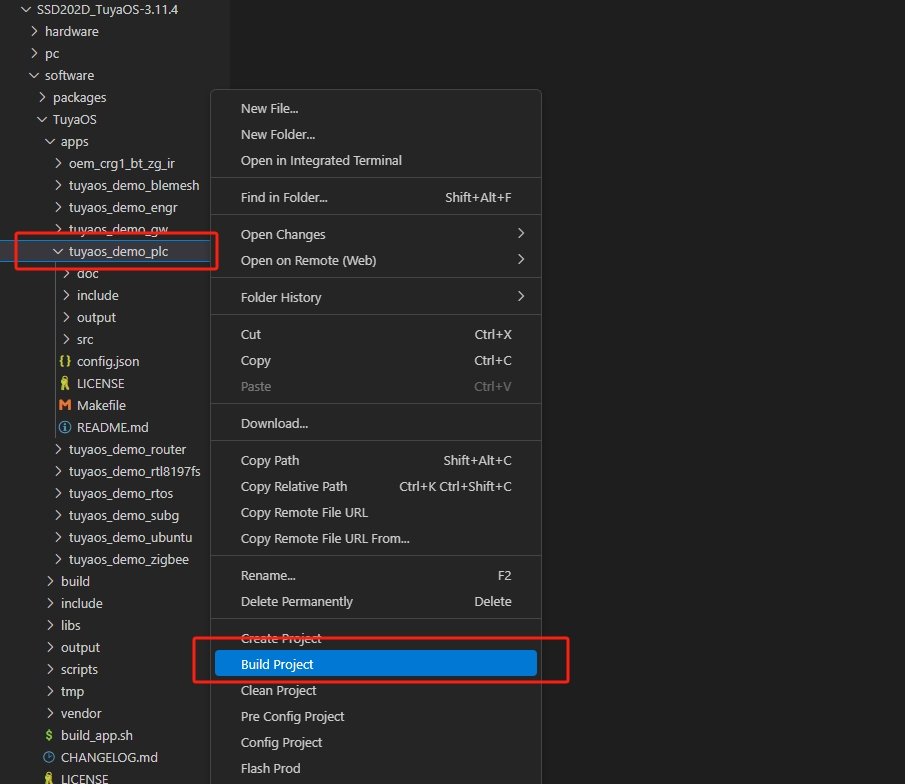
Figure: Step 3 — One-click compilation of the PLC Gateway development framework
V. What to Do If You Encounter Issues During Development?
If you encounter any issues during the development process, you can ask questions on the two developer forums below, where technical staff will assist you promptly.
- Gateway Issues Forum
Chinese:
https://www.tuyaos.com/viewforum.php?f=13
English:
https://www.tuyaos.com/viewforum.php?f=29
- Sub-Device Issues Forum
Chinese:
https://www.tuyaos.com/viewforum.php?f=46
English:
https://www.tuyaos.com/viewforum.php?f=47
VI. Developer Documentation Center
- Gateway Developer Documentation Center
Chinese:
https://developer.tuya.com/cn/docs/iot-device-dev/tuyaos-gateway-plc?id=Kefi12yrl1edr
English:
https://developer.tuya.com/en/docs/iot-device-dev/tuyaos-gateway-plc?id=Kefi12yrl1edr
- Sub-Device Developer Documentation Center
Chinese:
https://developer.tuya.com/cn/docs/iot-device-dev/PLC_Sub-device_development_framework?id=Kefi27lv0hbha
English:
https://developer.tuya.com/en/docs/iot-device-dev/PLC_Sub-device_development_framework?id=Kefi27lv0hbha
Is this page helpful?
YesFeedbackIs this page helpful?
YesFeedback




