

Memory Rule Configuration
Overview
This topic describes memory rules, which let an agent extract, store, and recall key information from conversations. By configuring memory rules, you enable the agent to retain long-term memory across sessions, better understand user preferences, remember important facts, and deliver a more personalized service experience.
Memory rules consist of two parts:
- Memory extraction rules: Define what information to extract from conversations and how to categorize and store it.
- Memory query rules: Define how to recall existing memories during each conversation turn, including the quantity and quality threshold for recall.
Memory extraction rules
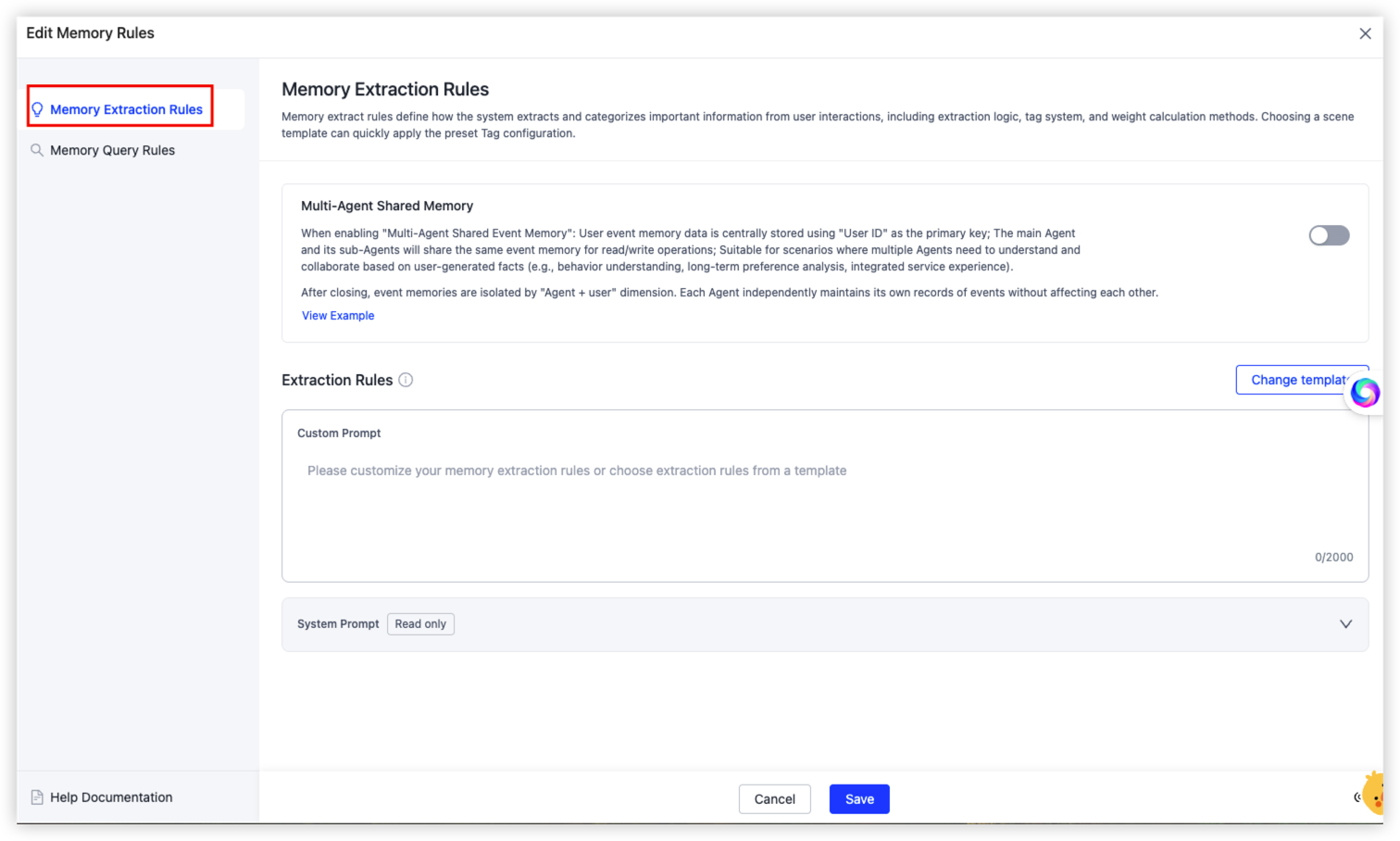
Memory extraction rules define how the system extracts and categorizes important information from user interactions, including the extraction logic, tag system, and weight calculation method.
Multi-agent shared memory
When your application involves a primary agent working with multiple sub-agents, this toggle controls the scope of memory sharing.
| Status | Description |
|---|---|
| Enable | User event memory is stored centrally with the user ID as the primary key. The primary agent and its sub-agents share the same event memory for read and write operations. Use this mode when multiple agents need to collaborate on serving the same user based on historical events, for example, to support behavior analysis, long-term preference tracking, and a unified service experience. |
| Disable | Event memory is isolated by the "agent + user" dimension. Each agent maintains its own event records independently, without affecting the others. |
- If multiple agents in your application need to collectively understand a user’s complete profile (for example, one agent handles chat and another handles recommendations), we recommend that you enable shared memory.
- If each agent has independent responsibilities and memory content must not overlap, we recommend that you keep it disabled.
Extraction rules: custom prompt
The custom prompt tells the system which dimensions of information to extract from conversations. You can define the memory categories and specific examples to focus on based on your business scenario.
-
How to configure: In the Custom Prompt text box, list the information dimensions to extract by category. The character limit is 2,000.
-
Example (emotional companion scenario):
**Relationships and social**: Names of family members, friends, teachers, and classmates, along with their interactions with or comments about the user. **Habits and preferences**: Dietary restrictions, daily routines (for example, "I usually go to bed at 9"), catchphrases, and specific behavior patterns. **Emotions and status**: Physical discomfort (such as illness or teething), mood changes (such as happiness or praise from a teacher), and the user's current developmental stage. **Cognition and viewpoints**: Opinions about things (for example, "think dinosaurs are cool"), learning progress (for example, "learning to jump rope"), wishes, and fears. **Future plans**: Scheduled activities, trips, upcoming birthdays, and near-term goals. -
Writing tips:
- Pair each category with specific examples to improve extraction accuracy.
- Focus on core business information. Avoid defining too many irrelevant categories, which can cause extraction noise.
- You can modify and save the prompt at any time. Changes take effect in subsequent new conversations.
Extraction rules: scenario template
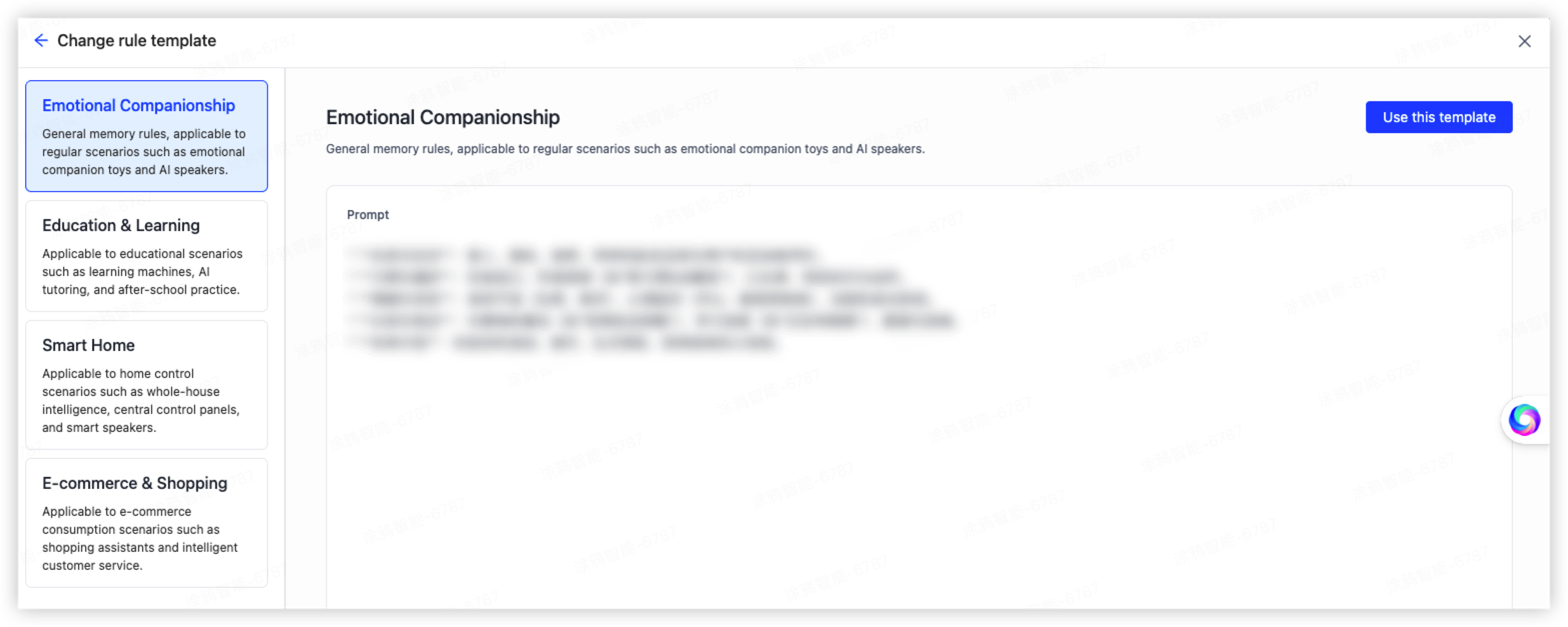
If you are unsure how to write a custom prompt, the platform provides multiple preset scenario templates that you can apply with a single click.
| Template name | Application scenarios |
|---|---|
| Emotional companion | Emotional companion toys, AI speakers, and similar products |
| Office | Voice recorders, office robots, and other office products |
| Education | Learning tablets, AI tutoring, after-class practice, and other education products |
| Smart home | Smart home, central control panels, smart speakers, and other home control products |
| E-commerce | Shopping guides, intelligent customer service, and other e-commerce products |
Usage: Click Change template, select the target scenario from the list on the left, preview the prompt, and then click Use this template to apply it. You can continue to edit the template after it is applied.
Each template also provides some best practices, which describes recommended configuration methods and tuning strategies for that scenario.
System prompt
The system prompt is the platform’s built-in base extraction logic. It is read-only and works together with the custom prompt to keep the foundational memory extraction capability stable and reliable.
Memory query rules
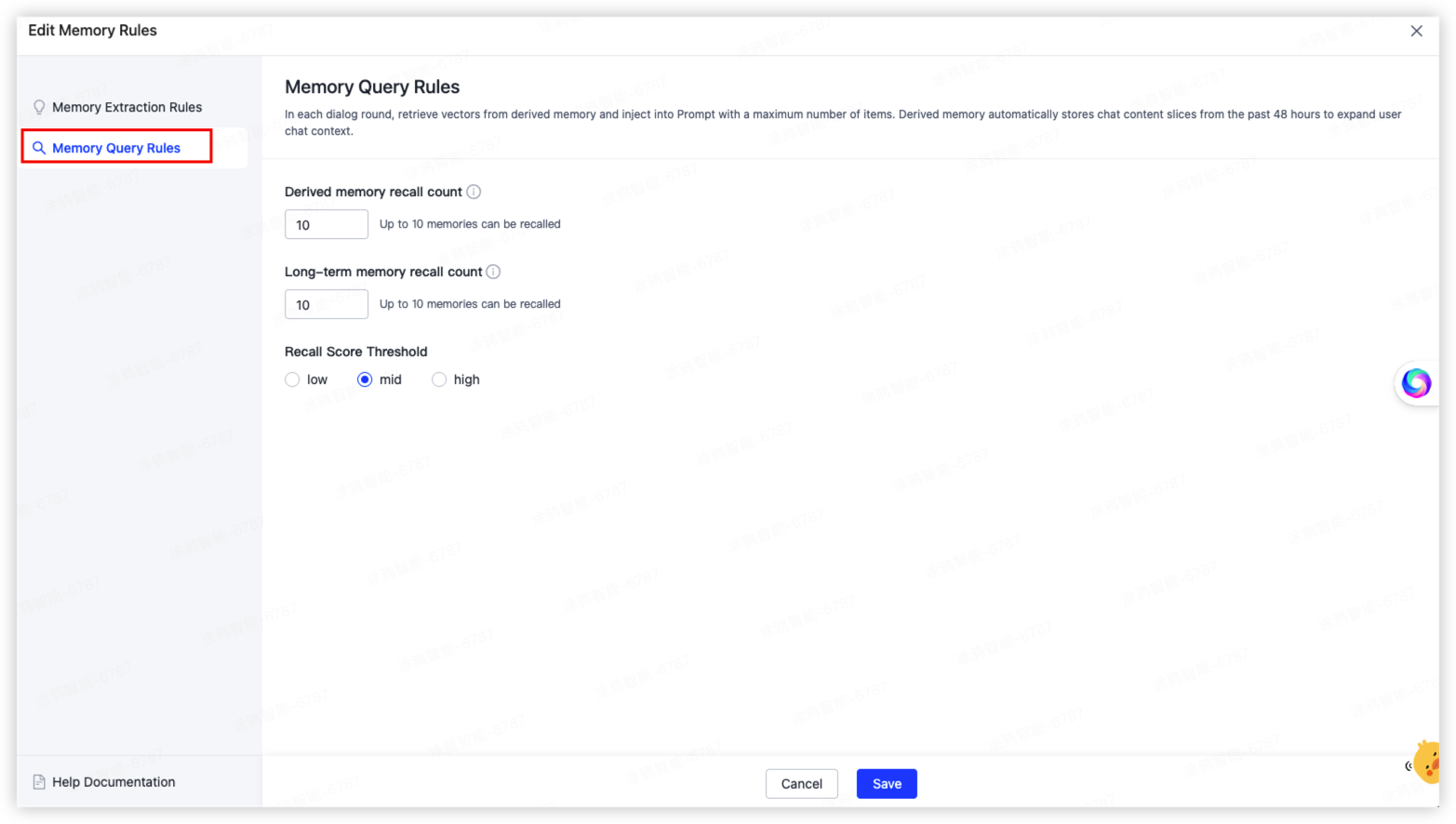
Memory query rules define how the system retrieves relevant content from existing memories and injects it into the prompt context during each conversation turn, to enhance the response quality of the agent.
Derived memory recall count
- Description: The maximum number of entries retrieved from derived memory through vector search and injected into the prompt during each conversation turn.
- About derived memory: The system automatically stores conversation content slices from the past 48 hours to extend context and help the agent understand recent chat history.
- Value range: Up to 10 entries.
- Recommendation: Set a higher value for scenarios with many conversation turns and strong context dependencies. For simple Q&A scenarios, set a lower value to reduce token consumption.
Long-term memory recall count
- Description: The maximum number of entries retrieved from long-term memory through vector search and injected into the prompt during each conversation turn.
- About long-term memory: Structured user information that memory extraction rules extract from historical conversations. Long-term memory is stored permanently, without any time window limitation.
- Value range: Up to 10 entries.
- Recommendation: Set a higher value for scenarios that require deep personalization, such as emotional companion or educational tutoring, to fully leverage user profile information.
Recall score threshold
The recall score threshold controls the relevance filter strength for recalled memories. Available values:
| Threshold | Description |
|---|---|
| Low | Applies lenient recall conditions. Returns more memory entries with broader coverage, but may include content with weaker relevance. |
| Medium | Balances recall volume and relevance. Suitable for most scenarios (Default). |
| High | Applies strict recall conditions. Returns only highly relevant memory entries with high precision, but may miss some useful information. |
Recommendation: Use the default value Medium for initial integration, and then adjust based on actual test results. If recalled content is too noisy, raise the threshold to High. If key information is missed, lower it to Low.
Configuration process
-
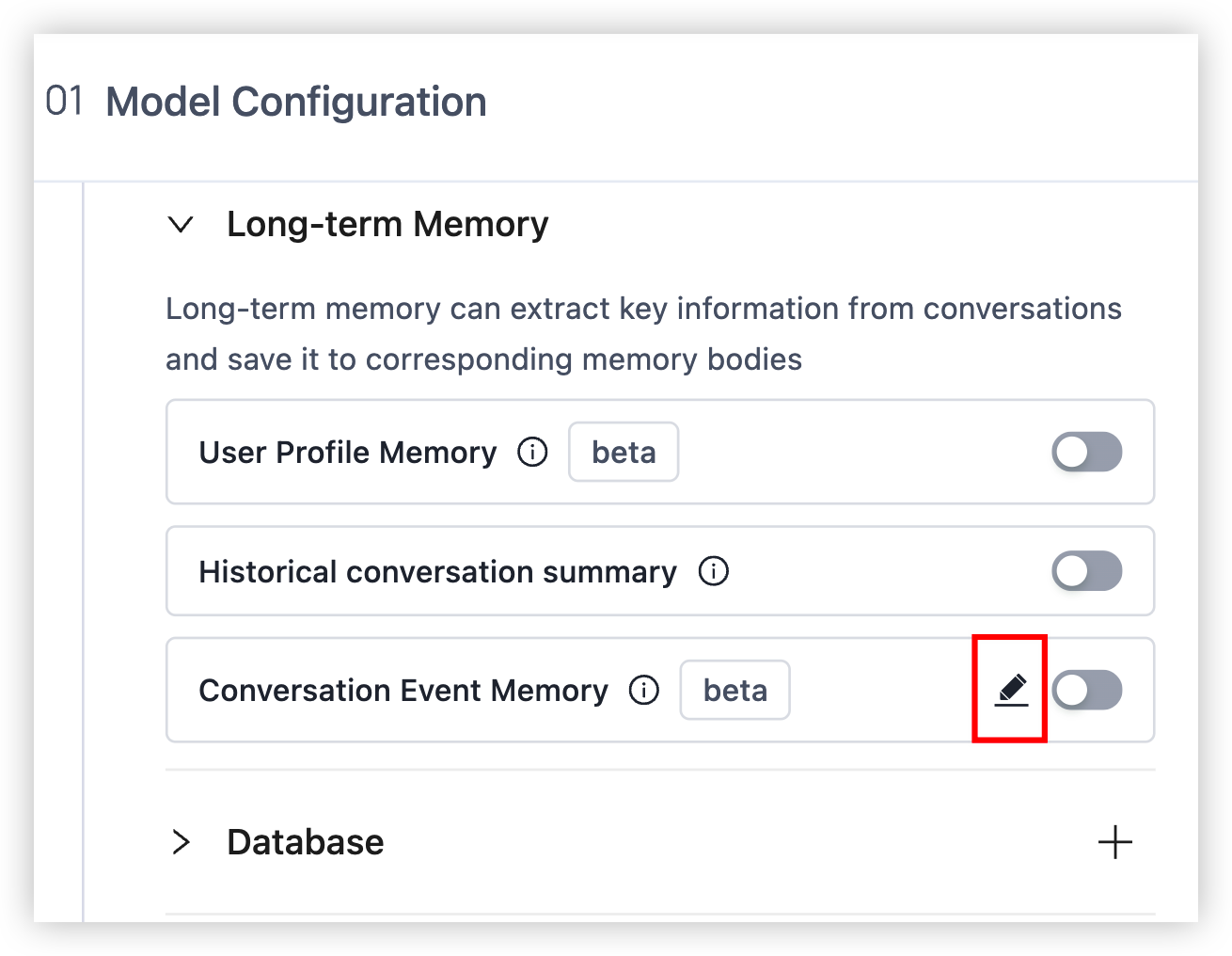
Go to the agent editing page and open Edit Memory Rules.
-
On the Memory Extraction Rules page, decide whether to enable multi-agent shared memory based on your needs.
-
Select a scenerio template as a starting point, or write a custom prompt directly to define the information dimensions to extract.
-
On the Memory Query Rules page, configure the recall count and score threshold for both derived memory and long-term memory. After completing the configuration, click Save.
-
After you save the configuration, the agent automatically extracts and recalls memory in subsequent conversations.
Is this page helpful?
YesFeedbackIs this page helpful?
YesFeedback




