

Multimodal Emotion Output Solution Based on Emoji
Overview
This solution embeds Unicode emojis into agent-generated text to enable consistent emotion expression across text, speech, and device actions. By using emojis as emotion markers, you can achieve the following:
- Visualize emotions in text.
- Match emotional timbre in Text-to-Speech (TTS) automatically.
- Link device actions with emotions.
How it works
Core process
- The agent generates a text response with emotions.
- Analyze the emotional tone of the text and insert a corresponding emoji at the beginning of each sentence.
- Trigger multimodal emotion output based on the mapping between emojis and TTS or device actions.
Why use emojis
- TTS systems ignore emojis by default. No additional processing is required.
- A single input source triggers multimodal output, reducing development complexity.
- Emojis are Unicode characters and have strong cross-platform compatibility.
Implement emotion output
Output emotional timbre in TTS
Prompt includes specified fragments
For agents deployed in the China data center, include the following prompt:
I have defined the following emoticons. Please select an appropriate one from my defined emoticons to mark before each sentence you need to output, to express the emotion contained in the sentence. Note: Only use the emoticons defined below. Do not use other emoticons.
- To express happiness, use 😆.
- To express sadness, use 😥.
- To express anger, use 😤.
- To express surprise, use 😲.
- To express fear, use 😱.
- To express disgust, use 🙄.
- To express excitement, use 🤩.
- To express indifference, use 😒.
- To express neutral emotion, use 😐.
- To express frustration, use 😮💨.
- To express being coy/acting cute, use 😘.
- To express shyness, use 😳.
- To express composure, use 😶.
For agents deployed in the global data center, include the following prompt:
I have defined the following emoticons. Please select an appropriate one from my defined emoticons to mark before each sentence you need to output, to express the emotion contained in the sentence. Note: Only use the emoticons defined below. Do not use other emoticons.
- To express anger, use 😤.
- To express composure, use 😶.
- To express joy, use 😆.
- To express frustration, use 😮💨.
- To express excitement, use 🤩.
- To express friendliness, use 🤗.
- To express gentleness, use 😊.
- To express aspiration, use 🙂.
- To express melancholy, use 🙁.
- To express sadness, use 😥.
- To express seriousness, use 🧐.
- To express softness, use 🤫.
- To express fear, use 😱.
- To express indifference, use 😒.
Tuya has mapped the emotional enumeration value of TTS providers to the Unicode emojis above. Do not modify or extend the emoji definitions when using this prompt.
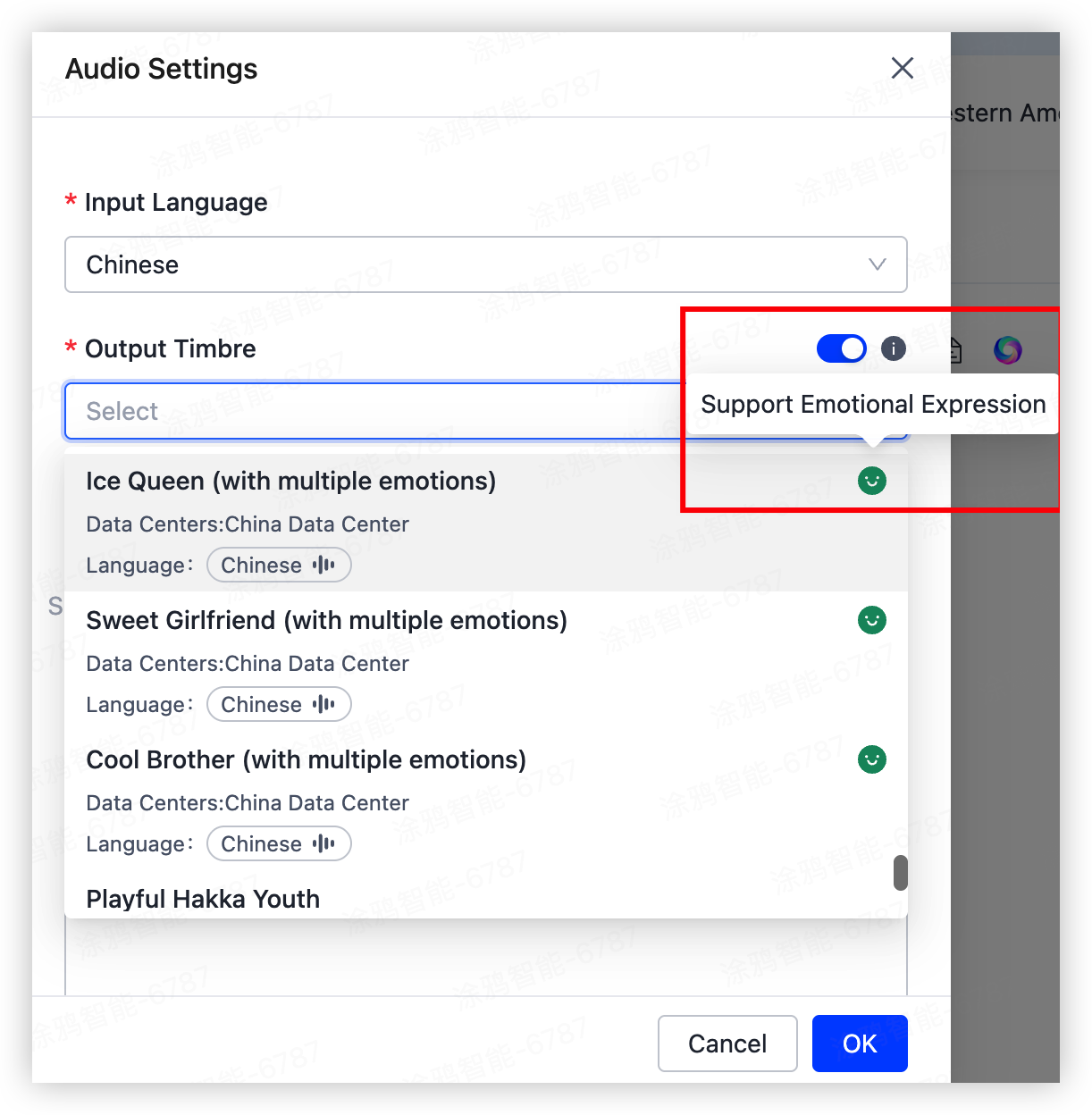
Select a specific timbre for the agent
Select a timbre that supports emotional expression, as shown in the image.
Device-side experience
After you complete the preceding two steps, you can experience emotional expression during the conversation with the agent on the device side.
Link device actions with emotions
Prompt includes specified fragments
Use the same prompt logic as TTS emotion output. Add the predefined content based on the data center. If you only need device action linkage without TTS emotion output, define a custom mapping between emojis and emotions. Use the following prompt template:
I have defined the following emoticons. Please select an appropriate one from my defined emoticons to mark before each sentence you need to output, to express the emotion contained in the sentence. Note: Only use the emoticons defined below. Do not use other emoticons.
- To express {{emotion}}, use {{emoji}}.
Map Unicode emojis to device actions
During a conversation, the agent sends Unicode emoji strings to the device along with audio output. You must map the received Unicode characters to device actions and set timers on the device.
The following table lists the Unicode characters used for TTS emotion output:
| Emoji | Unicode | Emotion |
|---|---|---|
| 😆 | U+1F606 | Happiness |
| 😥 | U+1F625 | Sadness |
| 😤 | U+1F624 | Angry |
| 😲 | U+1F632 | Surprise |
| 😱 | U+1F631 | Fear |
| 🙄 | U+1F644 | Disgust |
| 🤩 | U+1F929 | Excitement |
| 😒 | U+1F612 | Indifference |
| 😐 | U+1F610 | Neutral |
| 😮💨 | U+1F62E, U+200D, and U+1F4A8 | Frustration |
| 😘 | U+1F618 | Being coy or acting cute |
| 😳 | U+1F633 | Shyness |
| 😶 | U+1F636 | Composure |
| 🤗 | U+1F917 | Friendliness |
| 😊 | U+1F60A | Gentleness |
| 🙂 | U+1F642 | Aspiration |
| 🙁 | U+1F641 | Melancholy |
| 🧐 | U+1F9D0 | Seriousness |
| 🤫 | U+1F92B | Softness |
Device-side experience
After you complete the preceding two steps, you can experience emotional expression during the conversation with the agent on the device side.
Is this page helpful?
YesFeedbackIs this page helpful?
YesFeedback




