

Voiceprint Recognition
Overview
Voiceprint Recognition is a voice interaction capability provided by the Tuya Developer Platform that enables device-side AI agents to identify who is speaking.
Traditional automatic speech recognition (ASR) focuses on what a speaker says. Voiceprint recognition identifies the speaker during voice interaction. This capability helps AI devices distinguish between users and respond accordingly.
As the identity layer in voice interaction, voiceprint recognition helps a device move from understanding content to understanding the speaker.
Scenario
Anti-interference interaction (specified user response)
In multi-person environments such as homes or offices, the device recognizes and responds only to the voice input of specified users. This helps reduce interference from other voices in the background.
For example:
- Respond only to commands from the device owner.
- Ignore TV sounds or nearby conversations.
Multi-speaker conversation recognition (conversation annotation)
In multi-speaker scenarios, the device automatically distinguishes between speakers and labels them in conversation records.
For example:
- Distinguish who said what in chat logs.
- Support context understanding across multi-speaker conversations.
Lightweight meeting records (temporary identity grouping)
In a temporary conversation or meeting, the device can identify and group different speakers, even when users have not enrolled voiceprints in advance. The device can keep identifying the same speaker as the same person for a period of time.
For example:
- Generate records with speaker labels.
- Support temporary speaker tracking.
How to enable
Enable on the platform
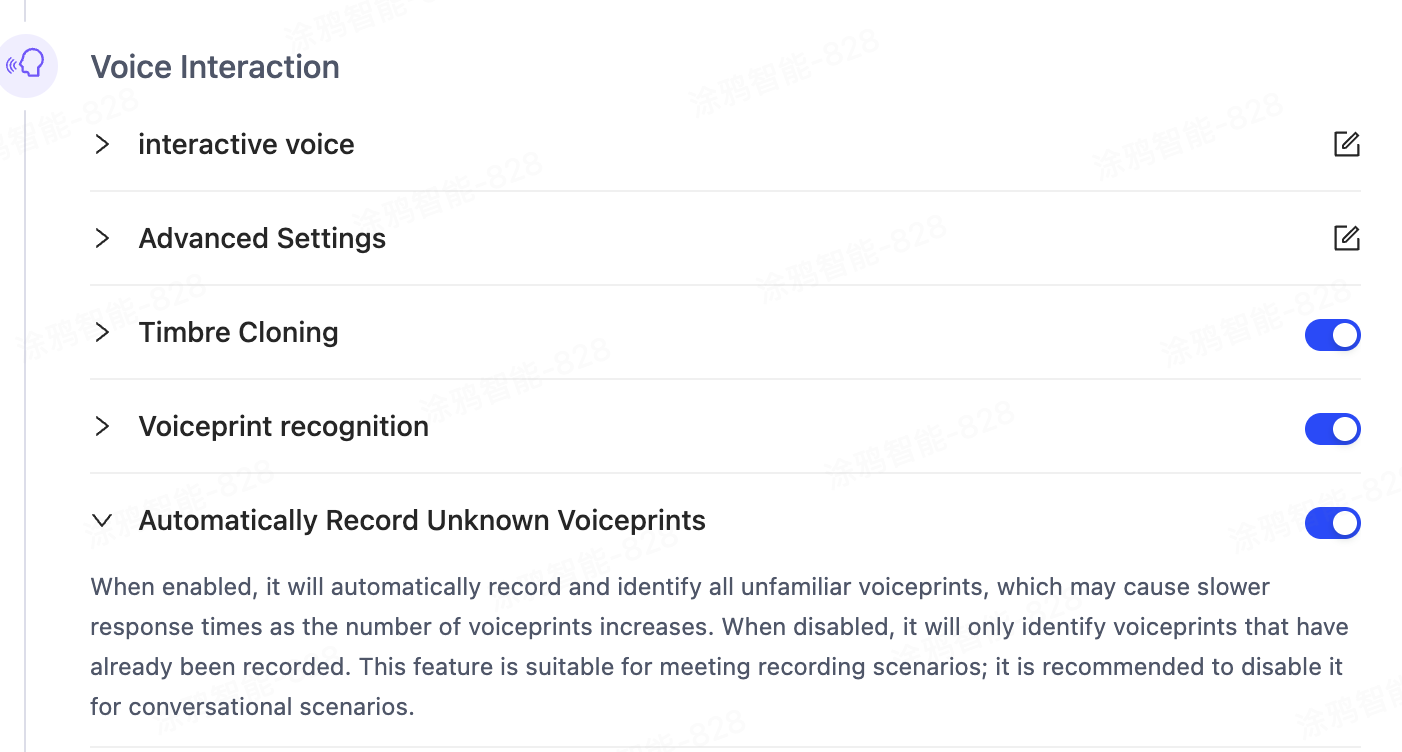
In the agent development process, go to Model Configuration > Voice Interaction, and turn on Voiceprint Recognition. You can also turn on the additional feature Automatically Record Unknown Voiceprints. After you enable the feature, publish the agent version for the change to take effect.
Enable on the user side
After you enable the feature on the platform and publish the agent, devices under the bound product ID (PID) can process voiceprint recognition requests. The feature does not automatically take effect for end users. End users must turn on Voiceprint Recognition in the device panel before they can enroll and use voiceprints.
For more information about binding an agent, see AI Capabilities Development.
User experience
Use the Tuya general AI panel or no-code panel
After users activate a device, they can find Voiceprint Recognition in the panel and open the feature page to manage and use it. The following example shows the general AI panel:
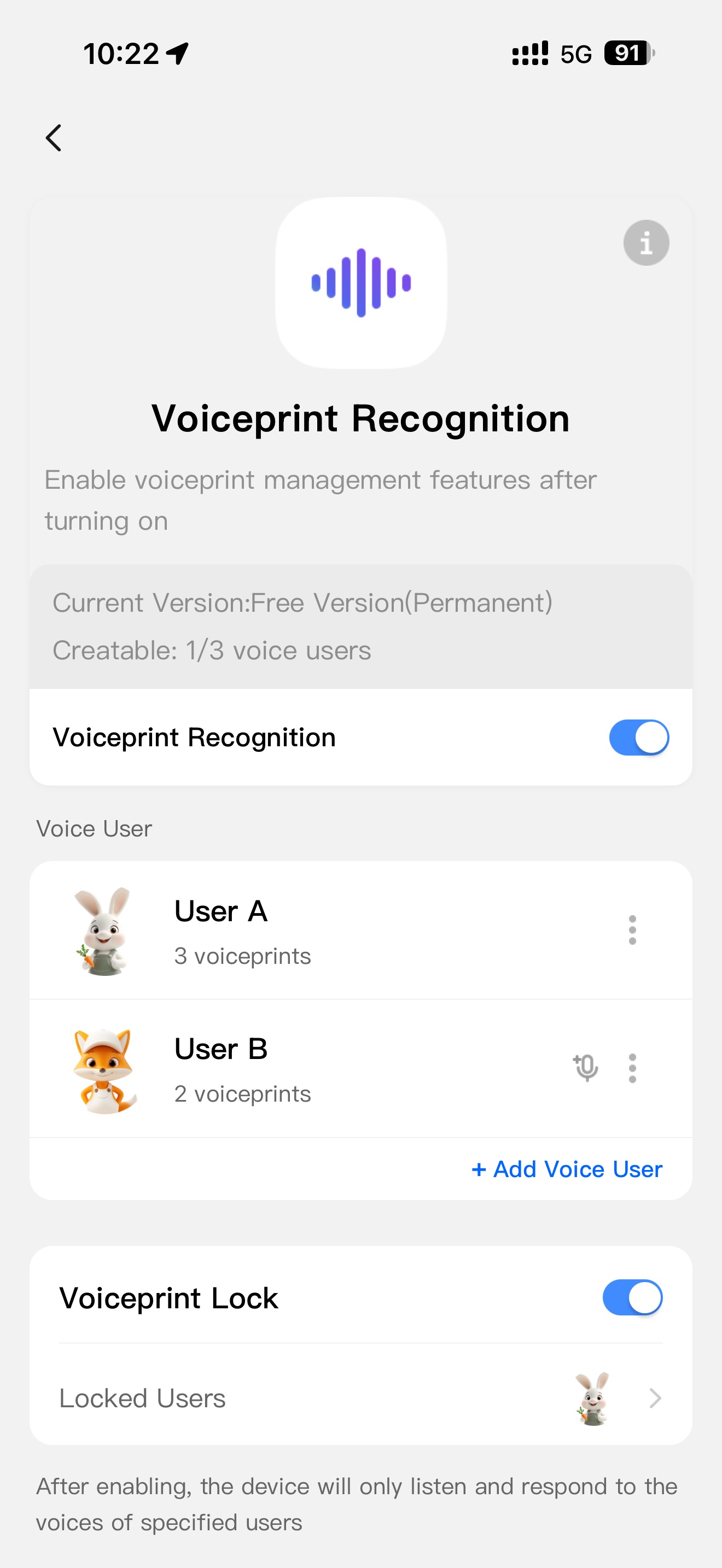
The following features are supported:
- Voiceprint user management: users can enroll voice samples of themselves and family members. Supports adding or deleting users and enrolling alternate voiceprints.
- Voiceprint recognition switch: When enabled, the device automatically performs voiceprint recognition in each conversation round.
- Voiceprint lock: The device responds only to voice input from the specified voiceprint user. Other voices are ignored.
- Auto enrollment: No manual voiceprint enrollment is required. The device automatically captures unknown voice characteristics and recognizes them as the same temporary user for a period of time. This applies to scenarios such as meeting records.
Use a custom panel
If you use a custom panel, Tuya plans to provide voiceprint recognition page components for Panel MiniApp and software development kit (SDK) support to help you develop and integrate this feature. Check the MiniApp Developer Platform for updates.
Billing
Voiceprint recognition is an AI extension capability. The waiver for basic AI resource consumption does not cover this capability.
You can enable and use it in one of the following ways.
Option 1: Subscription mode (recommended)
Add the product ID (PID) to subscription mode. The platform provides a daily free quota and a paid AI usage quota for each device, and applies flexible limits to excess usage. When users subscribe to paid services in the app, the device can use voiceprint recognition.
For more information about subscription mode, see Agent Deployment and Billing.
Option 2: Pay-as-you-go mode
If voiceprint recognition causes extra AI resource consumption for your device and the usage exceeds the device exemption quota, the platform meters the actual usage. You must purchase quota credits to offset the usage and keep the agent running. In this mode, you must implement device-side usage limits and subscription billing on your own. Tuya does not centrally manage voiceprint recognition usage limits for the device.
For more information about metering rules and pricing for voiceprint recognition, see Agent Metering and Billing.
Privacy and data security
Regional availability
This feature is currently available only in China, India, and Singapore.
User authorization requirements
Voiceprint recognition involves biometric data. You must obtain user authorization before you use this capability. If you use a Tuya official panel, the panel includes a built-in authorization flow. If you use a custom panel, you must implement the authorization logic.
Data storage policy
Tuya stores voiceprint data in the cloud in encrypted form. Voiceprints enrolled by users are retained until the user deletes them. Temporary voiceprints are automatically cleared after 24 hours.
Additional notes
Voiceprint quantity limits
During recognition, the device matches against all voiceprints enrolled in the user’s current home, including alternate voiceprints. As the number of voiceprints increases, the device may experience response delays and reduced accuracy. To ensure recognition performance, this feature currently supports up to 5 voiceprint users (with a maximum of 15 voiceprints) and 5 temporary voiceprints per home.
Accuracy
Voiceprint recognition accuracy depends on the quality of the enrolled audio, environmental noise, the number of voiceprints, and session length. In small-scale scenarios, the recognition success rate exceeds 97%. With more than 20 voiceprints, the success rate may drop to 92%–95%. The actual recognition accuracy depends on the device and its environment.
Latency
Voiceprint recognition increases conversation processing time. Under good network conditions, the average latency is 200–400 ms. The actual latency depends on the device and its environment.
Usage boundaries
- Voiceprint recognition provides only voice identity labels. It does not provide strong authentication and cannot guarantee 100% accuracy.
- Voiceprint recognition cannot replace login or payment verification, and is not suitable for legal or security-critical scenarios.
Is this page helpful?
YesFeedbackIs this page helpful?
YesFeedback




