

Production Authorization
This topic describes how to obtain a license, write it to devices, and integrate the production test interfaces into your firmware.
License
The license is an encryption certificate issued by Tuya to allow a device to connect to the Tuya IoT operating system. Each device must be assigned a unique license for authentication. A license grants permission for a single device to connect to and access the cloud.
A license contains the following fields:
| Field | Description |
|---|---|
uuid |
The unique ID of the specified device. Globally unique and cannot be flashed to multiple devices. |
auth_key |
Authentication key that corresponds to the uuid. |
pin |
Short code used for QR code pairing on Wi-Fi devices. Available only after the advanced capability is enabled. |
Get the license
You can request a free license or purchase one.
Write license
The license can be delivered in two ways: a license list and a credential.
License list
Delivered as an Excel spreadsheet containing a list of clear keys (uuid and auth_key). Licenses are generated when the order is redeemed, and the corresponding clear keys are provided. You manage the key pairs.
Flashing method: Use your own tools to write the authorization information to devices individually.
Credential
Delivered as a string of characters (internally referred to as a Token). When redeeming the order, select one of the following delivery modes:
| Delivery mode | Contents |
|---|---|
| Credential | Firmware and authorization information |
| Credential (authorization only) | Authorization information only, without firmware |
Flashing method: Use Tuya’s production test tool to parse and write the authorization information to devices.
The firmware information will be verified when you flash credentials to devices. If the firmware cannot be verified, flashing cannot proceed. Ensure that you provide the accurate PID, firmware key, and firmware version number when placing your orders.
Scenario
Select a delivery mode based on your production method:
| Production method | Recommended delivery method |
|---|---|
| Production using Tuya’s production test tool | Credential is required |
| Production using custom tools | Either a credential or a license list |
How to use
- License list: After obtaining the spreadsheet, implement your own writing script. After each product passes testing, your server writes a key pair (
uuidandauth_key) to the device. - Credential: Use Tuya’s production test tool to edit the routing and load the testing script. After each product passes testing, the tool writes a key pair to the device.
Production test workflow
Prepare firmware
- Complete business code development and integrate the
ty_rvc_mf_initcall into the initialization entry. - Compile the firmware.
- Upload the firmware to the Tuya Developer Platform.
Download Production Toolkit
Download the corresponding Production Toolkit for your product category from the Tuya Developer Platform. The package includes the required production test tool.
Hardware connection
Device serial port (TX/RX/GND)
       │
   TTL-to-USB adapter
       │
   PC USB port
- Serial port configuration: 9600 bps, 8N1
- After the connection is established, you can use the production test tool.
Run production test
-
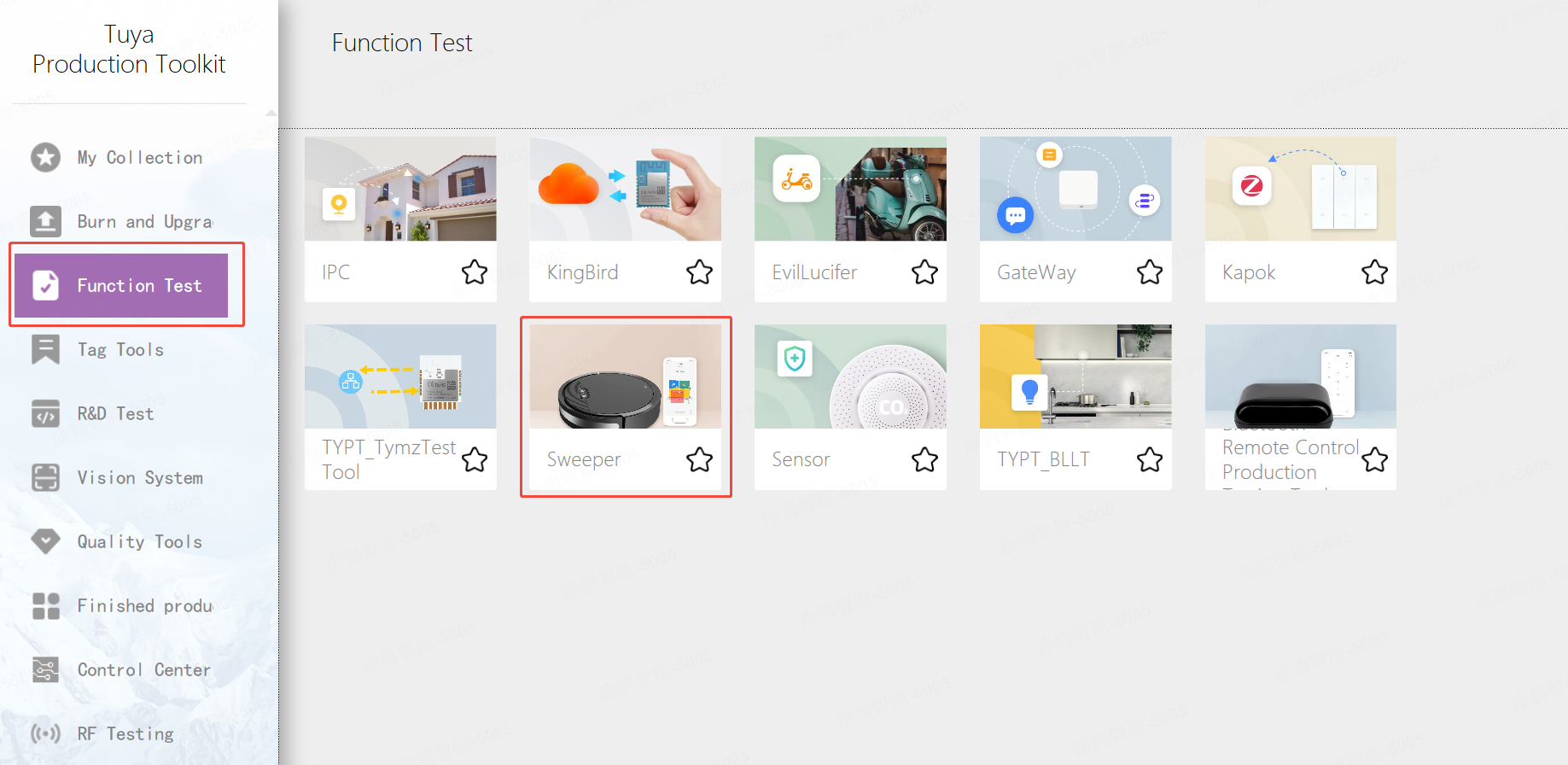
Under Functional Test, select Sweeper.
-
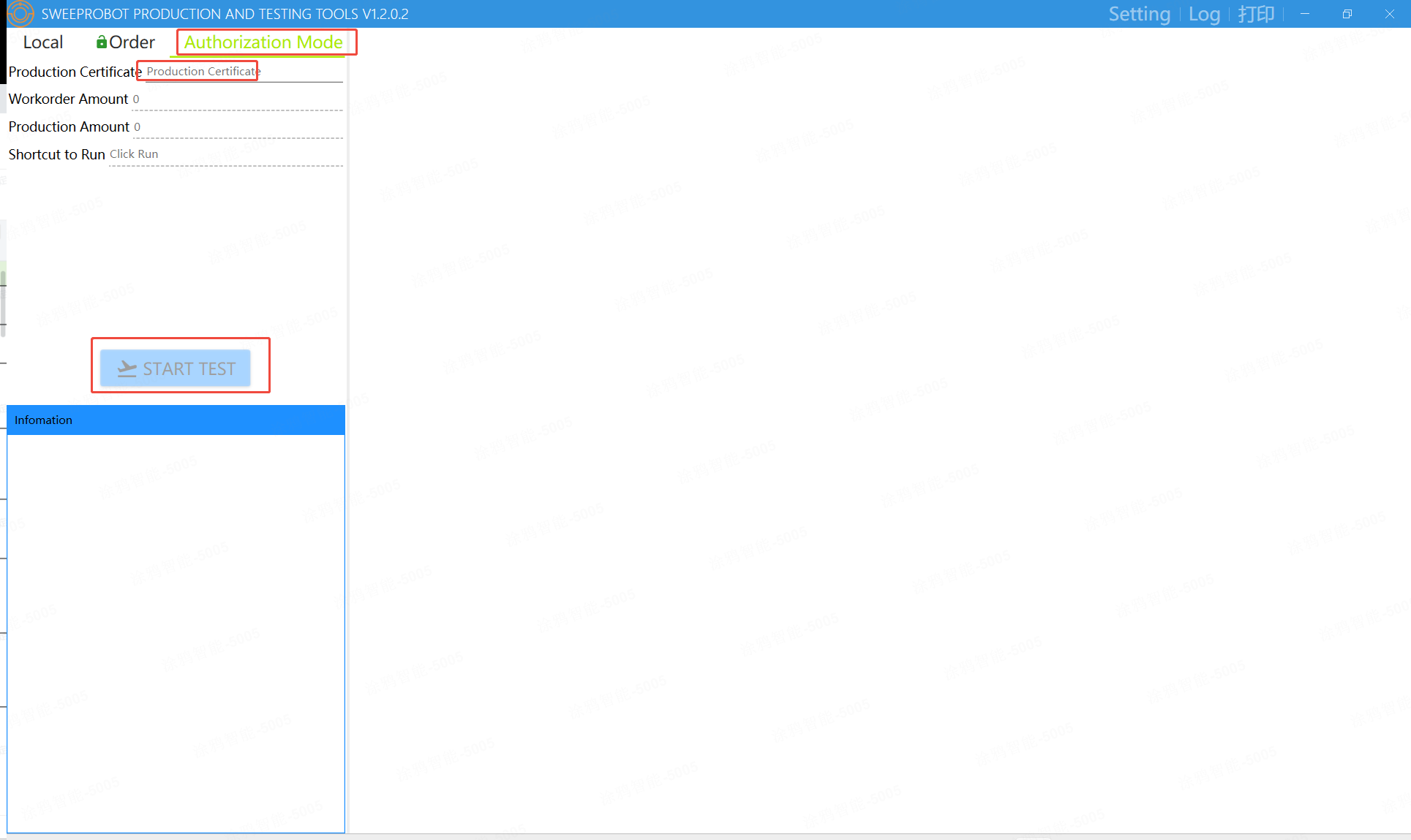
Select Authorization Mode, enter the Production Certificate, and then click Start Test.
-
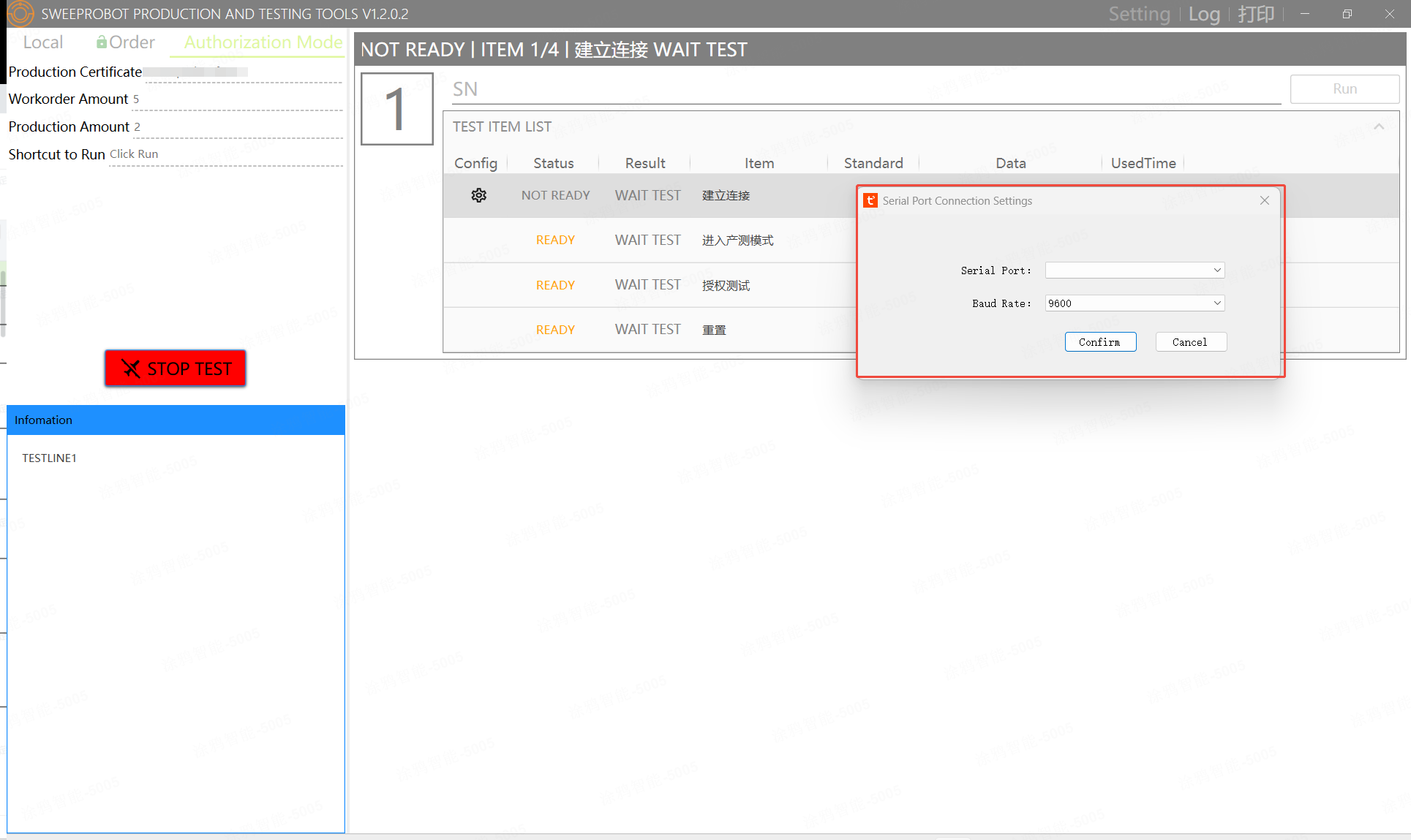
In Test Item List > Config, click the configuration button. In the Serial Port Connection Settings window, select the serial port and baud rate.
API reference
API description
ty_rvc_mf_init is the production authorization initialization entry provided by the Tuya Robot Vacuum (RVC) SDK. It is called during device startup to determine whether the device should enter production test and to write authorization information during production test.
Function signature
OPERATE_RET ty_rvc_mf_init(IN CHAR_T *user_sw_ver, TY_RVC_MF_DATA_EVENT_CB mf_info_cb);
Parameters
| Parameter | Type | Direction | Description |
|---|---|---|---|
user_sw_ver |
CHAR_T * |
in | Firmware version string, for example, "1.0.0". |
mf_info_cb |
TY_RVC_MF_DATA_EVENT_CB |
in | Authorization information callback. Triggered when the production test tool sends the license and used to write the data to flash memory. |
Return values
| Return value | Description |
|---|---|
OPRT_OK |
The production test entry is disabled (normal production device), or no command is received within the 500 ms detection window and the function exits normally. |
| Other error codes | Internal initialization failure, such as memory allocation, timer creation, or thread creation failure. |
Both production test entry disabled and timeout without receiving commands return OPRT_OK. The caller does not need to distinguish between these cases.
Callback type
typedef INT_T (*TY_RVC_MF_DATA_EVENT_CB)(IN void *param);
The actual type of the callback parameter param is GW_BASE_IF_S *. The callback is triggered after the production test tool sends the license. Write the license to flash memory in the callback.
How it works
Key timing parameters:
| Parameter | Value | Description |
|---|---|---|
MF_DETECT_MSTIME |
500 ms | Production test detection window. The process exits after timeout. |
UART_BAUD_RATE |
9600 bps | Production test UART baud rate. |
| Auto-disable production test mode | 15 minutes | A disable flag is written 15 minutes after successful activation, preventing future entry into production test mode. |
Code integration example
Implement the authorization information callback
/**
 * @brief Validate manufacturing authorization base info.
 * @param[in] base_if GW base interface data.
 * @return OPRT_OK on success, error code on invalid data.
 */
STATIC OPERATE_RET __ty_mf_info_validate(CONST GW_BASE_IF_S *base_if)
{
    if (base_if == NULL) {
        PR_ERR("mf info param null");
        return OPRT_INVALID_PARM;
    }
    if (base_if->uuid[0] == '\0' || strlen(base_if->uuid) > GW_UUID_LEN) {
        PR_ERR("mf info uuid invalid");
        return OPRT_INVALID_PARM;
    }
    if (base_if->auth_key[0] == '\0' || strlen(base_if->auth_key) > AUTH_KEY_LEN) {
        PR_ERR("mf info auth_key invalid");
        return OPRT_INVALID_PARM;
    }
    if (base_if->pin[0] == '\0' || strlen(base_if->pin) >= SIZEOF(base_if->pin)) {
        PR_ERR("mf info pin invalid");
        return OPRT_INVALID_PARM;
    }
    return OPRT_OK;
}

/**
 * @brief Manufacturing authorization info callback.
 * @param[in] param GW_BASE_IF_S pointer.
 * @return OPRT_OK on success, error code on failure.
 */
STATIC INT_T ty_mf_info_cb(void *param)
{
    GW_BASE_IF_S *base_if = (GW_BASE_IF_S *)param;
    GW_BASE_IF_S local_info = {{0}};
    OPERATE_RET rt = OPRT_OK;

    if (base_if == NULL) {
        return OPRT_INVALID_PARM;
    }
    memcpy(&local_info, base_if, SIZEOF(GW_BASE_IF_S));
    rt = __ty_mf_info_validate(&local_info);
    if (OPRT_OK != rt) {
        return rt;
    }
    PR_NOTICE("mf info ok, uuid=%s", local_info.uuid);
    /* Write the uuid, auth_key, and pin to flash memory. */
    return OPRT_OK;
}
Call during initialization
static OPERATE_RET ty_iot_sdk_init(CHAR_T *p_token)
{
    /* ... Other initialization ... */

    /* Production test initialization. Must be called before tuya_iot_wf_dev_init. */
    ty_rvc_mf_init(TY_APP_VERSION, ty_mf_info_cb);

    /* Continue with normal initialization */
    TUYA_CALL_ERR_RETURN(tuya_iot_wf_dev_init(...));
    /* ... */
}
ty_rvc_mf_init must be called before tuya_iot_wf_dev_init and tuya_iot_soc_init. If a production test command is received within the 500 ms detection window, the function blocks in the production test process and the subsequent initialization logic is not executed.
TKL interface adaptation description
The production test communication and hardware operations used by ty_rvc_mf_init depend on the TKL (Tuya Kernel Layer). When porting to a new platform, implement the required interfaces in vendor/<platform>/tuyaos/tuyaos_adapter/.
UART interface adaptation
Production test serial port communication relies on the interfaces defined in tkl_uart.h. Although the TAL layer encapsulates UART operations, the platform must implement the following TKL interfaces:
| Interface | Function signature | Description |
|---|---|---|
tkl_uart_init |
OPERATE_RET tkl_uart_init(TUYA_UART_NUM_E port_id, TUYA_UART_BASE_CFG_T *cfg) |
Initialize the UART. Production test uses TUYA_UART_NUM_0 with a baud rate of 9600/8N1. |
tkl_uart_deinit |
OPERATE_RET tkl_uart_deinit(TUYA_UART_NUM_E port_id) |
Release serial port resources after the production test ends. |
tkl_uart_write |
INT_T tkl_uart_write(TUYA_UART_NUM_E port_id, VOID_T *buff, UINT16_T len) |
Send the production test protocol response frame to the host. |
tkl_uart_read |
INT_T tkl_uart_read(TUYA_UART_NUM_E port_id, VOID_T *buff, UINT16_T len) |
Read host data from the receive buffer (non-blocking). |
tkl_uart_rx_irq_cb_reg |
VOID_T tkl_uart_rx_irq_cb_reg(TUYA_UART_NUM_E port_id, TUYA_UART_IRQ_CB rx_cb) |
Register RX interrupt callback. The TAL uses this callback to write data into the internal ring buffer. |
The fixed configuration of the serial port during the production test is as follows:
TUYA_UART_BASE_CFG_T base_cfg = {
    .baudrate = 9600,
    .databits = TUYA_UART_DATA_BIT_8,
    .parity   = TUYA_UART_PARITY_NONE,
    .stopbits = TUYA_UART_STOP_BIT_1,
    .flowctrl = TUYA_UART_FLOWCTRL_NONE,
};
The TAL UART driver uses an interrupt-driven ring buffer architecture. tkl_uart_read reads data only from the ring buffer. Therefore, tkl_uart_rx_irq_cb_reg must be implemented correctly and the RX interrupt must be registered. Otherwise, received data is lost and the production test cannot run properly.
MAC interface adaptation
When the production test tool needs to read the Wi-Fi module MAC address, the SDK calls the following interface in tkl_wifi.h:
| Interface | Function signature | Description |
|---|---|---|
tkl_wifi_get_mac |
OPERATE_RET tkl_wifi_get_mac(CONST WF_IF_E wf, NW_MAC_S *mac) |
Read the Wi-Fi module MAC address and report it to the host for record keeping. |
NW_MAC_S is defined as follows:
typedef struct {
    BYTE_T mac[6];   /* MAC address, 6 bytes, network byte order */
} NW_MAC_S;
If the platform does not need the production test tool to manage the MAC (for example, the MAC is pre-programmed at the factory), you can implement tkl_wifi_get_mac to directly read the pre-programmed MAC, and implement tkl_wifi_set_mac as an empty operation (return OPRT_OK).
Notes
| Item | Description |
|---|---|
| Timing | It must be called before tuya_iot_wf_dev_init. |
| Blocking characteristics | After entering the production test, the function blocks until the production test is complete. |
| Production test close flag | The SDK automatically writes a close flag to the DB file 15 minutes after successful activation. |
| Callback memory safety | The GW_BASE_IF_S pointer received by mf_info_cb is valid only during the callback execution and must be copied immediately if needed. |
| License uniqueness | The uuid is bound to the device and has global uniqueness. You cannot burn the same uuid to multiple devices. |
| Serial port resources | The serial port is exclusively occupied by the SDK during the production test and must not be accessed simultaneously by the application. |
Is this page helpful?
YesFeedbackIs this page helpful?
YesFeedback




