

AI Detection & Video Message
Tuya IoT Cloud leverages advanced AI analytics to achieve precise object recognition, including but not limited to birds and packages. The app’s message center intuitively shows detection results through video playback, significantly enhancing the user experience.
Development guide
For more information, see ty_sdk_motion_detect.c.
API description
Initialize
/**
 * @brief        rule module init
 * @param[in]    result_cb callback of cloud result
 * @param[in]    video_msg_cb  callback of video ms
 * @return       error code
 * - OPRT_OK     success
 * - Others      failure
 */
OPERATE_RET tuya_ipc_rule_init(IN RULE_AI_RESULT_CB ai_result_cb, IN RULE_VIDEO_MSG_CB video_msg_cb);
Parameters
| Parameter | Description |
|---|---|
| ai_result_cb | The results of cloud-based AI detection. |
| video_msg_cb | The results of video messages. |
Trigger events
After an event is triggered, the device uploads images and videos to the cloud for target detection.
/**
 * @brief        trigger event for rule module
 * @param[in]    event refer to NOTIFICATION_NAME_E
 * @param[out]   sn  event identification, used to distinguish different events
 * @return       error code
 * - OPRT_OK     success
 * - Others      failure
 */
OPERATE_RET tuya_ipc_rule_trigger_event(IN INT_T event, OUT UINT_T *sn);
Parameters
| Parameter | Description |
|---|---|
| event | The event type. |
| sn | The sequence number of the specified event, used to distinguish different events. |
Stop streaming
Regarding cloud AI for pets, streaming shall be stopped when motion detection ends, or when the cloud detects no pets. In that case, the result_list output parameter of the ai_result_cb callback does not contain the ai_pet field.
/**
 * brief Stop streaming based on sn
 * @param[in]    sn  event identification. used to distinguish different events
 * @return       OPERATE_RET
 */
OPERATE_RET tuya_ipc_rule_stop_stream_by_sn(IN UINT_T sn);
Parameters
| Parameter | Description |
|---|---|
| sn | The sequence number of the specified event, used to distinguish different events. |
Report events
Report smart events
/**
 * @brief        report ai message
 * @param[in]    ai_result     ai result
 * @param[in]    is_notify  show in message center if TRUE
 * @return       error code
 * - OPRT_OK     success
 * - Others      failure
 */
OPERATE_RET tuya_ipc_rule_report_ai_msg(IN CHAR_T *ai_result, IN BOOL_T is_notify);
Report smart events and video messages
/**
 * @brief        report ai message and video message
 * @param[in]    ai_result  ai result
 * @param[in]    video_msg  video message
 * @param[in]    is_notify  show in message center if TRUE
 * @return       error code
 * - OPRT_OK     success
 * - Others      failure
 */
OPERATE_RET tuya_ipc_rule_report_ai_msg_with_video_msg(IN CHAR_T *ai_result, IN CHAR_T *video_msg, IN BOOL_T is_notify);
Report smart events when no target is detected
/**
 * @brief        report event if ai result is not detected
 * @param[in]    event      refer to NOTIFICATION_NAME_E
 * @param[in]    ai_result  ai result
 * @param[in]    is_notify  show in message center if TRUE
 */
OPERATE_RET tuya_ipc_rule_report_event(IN INT_T event, IN CHAR_T *ai_result, IN BOOL_T is_notify);
Report smart events and video messages when no target is detected
/**
 * @brief        report event with video msg if ai result is not detected
 * @param[in]    event      refer to NOTIFICATION_NAME_E
 * @param[in]    ai_result  ai result
 * @param[in]    video_msg  video message
 * @param[in]    is_notify  show in message center if TRUE
 */
OPERATE_RET tuya_ipc_rule_report_event_with_video_msg(IN INT_T event, IN CHAR_T *ai_result, IN CHAR_T *video_msg, IN BOOL_T is_notify);
For pet cloud AI capabilities, it is not necessary to call the event reporting interface. Event reporting is handled by the cloud.
Develop low power bird feeder product
The low power bird feeder is an intelligent bird feeding device that integrates AI visual recognition and squirrel expulsion capabilities. Utilizing advanced AI algorithms, this product can automatically identify bird species while recording precious bird-watching moments. The device features a low power design and supports extended outdoor operation, providing a convenient bird-watching solution for enthusiasts.
Operating modes
App panel
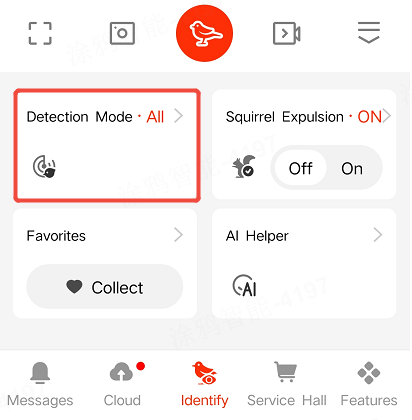
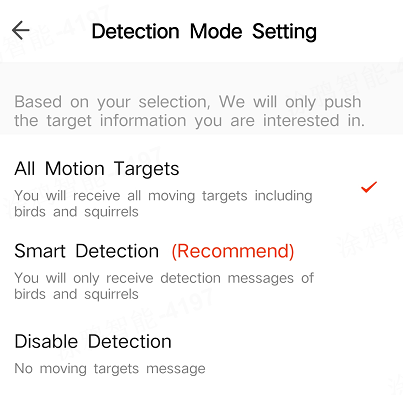
All motion targets mode
- Feature description: The user will receive notifications for all motion targets, including birds and squirrels.
- Processing flow: In this mode, when motion detection is triggered, local storage, cloud storage, and cloud AI detection must be enabled. If a target is detected, call the event detection interface to report the event. For interface definition, refer to the event reporting section. If no target is detected, call
tuya_ipc_notify_alarmto report an event.
Smart detection mode
- Feature description: The user will only receive detection notifications for birds and squirrels (moving targets).
- Processing flow: In this mode, when motion detection is triggered, cloud AI detection must be enabled. If a target is detected, enable local storage and cloud storage, and call the event detection interface to report the event. For interface definition, refer to the event reporting section. If no target is detected, the device enters sleep mode.
Disable detection mode
- Feature description: There are no push notifications for moving targets.
- Processing flow: Simply do not trigger motion detection.
How it works
Is this page helpful?
YesFeedbackIs this page helpful?
YesFeedback




