

Device Pairing
This topic describes how to pair devices using the Tuya Spatial app.
Device pairing entry
-
Open the Tuya Spatial app, and tap the Devices tab at the bottom. In the top left corner of the page, switch to the specific project space, for example, South Area.
-
In the top right corner of the project homepage, tap the Add (+) button to enter the Add Device page.
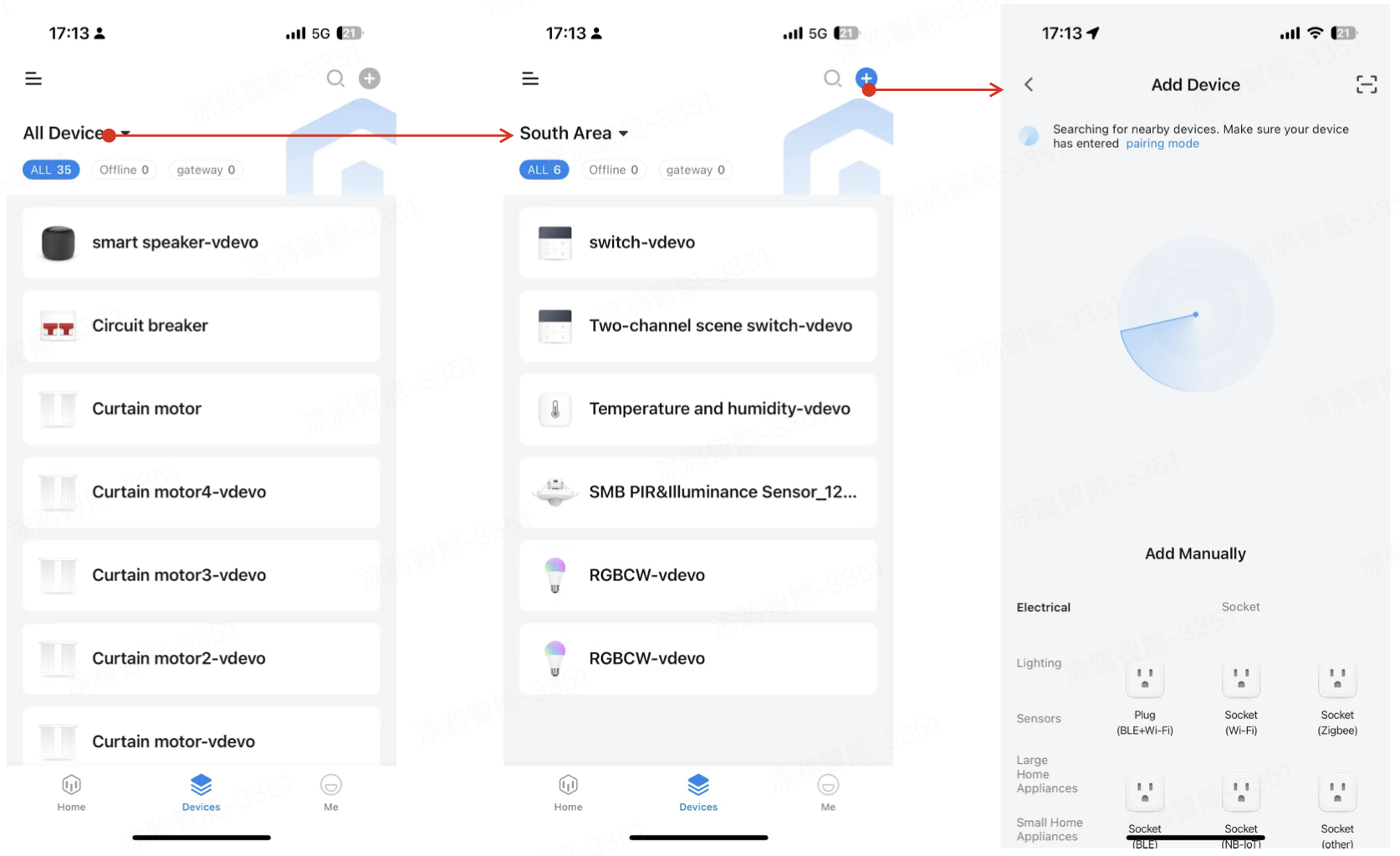
Pair smart devices
On the pairing page, you can select the level-1 or level-2 category of the specified device. For example, Electrical > Switches or Lighting > Light Sources. Based on the selected category, the system will guide you through the corresponding pairing process.
The pairing interaction logic is consistent with the SmartLife app. For more information, see Add a device.
Supported device protocols
- Wi-Fi pairing: Supports both access point (AP) mode and Easy Connect (EZ) mode.
- Zigbee pairing: Used for adding sub-devices to a wireless gateway.
- Bluetooth pairing: Includes Bluetooth mesh, Bluetooth, and dual-mode (Bluetooth + Wi-Fi).
- IPC pairing in QR code mode
- Wired pairing
- Scan to pair: Supports NB-IoT, GPRS, cloud photo frames, and other devices that connect directly to the internet.
Activate an edge gateway
-
To activate an edge gateway, you can first obtain an activation token. The token is valid for 5 minutes.
-
You can tap the button to get a new token. After retrieval, the token display will show a countdown. Once the countdown ends, the token will be greyed out, and the button to get a new token will be highlighted.
-
You can copy the token with one tap for easy subsequent use.
For more information, see Activate the edge gateway. If you have any other questions, contact the Tuya staff assigned to your project.
Complete device pairing
- Follow the on-screen instructions to complete the corresponding pairing steps.
- After successful pairing, the system will automatically return to the device list page.
- You can check the status and information of the added device in the device list.
Is this page helpful?
YesFeedbackIs this page helpful?
YesFeedback




