

Time and Time Zone Service
Overview
This topic describes the core functionality, APIs, and usage methods of the TuyaOS SDK’s time and time zone service. It helps you develop smart devices that require features such as time display, scheduled tasks, and time conversion.
Concepts
Time zone
-
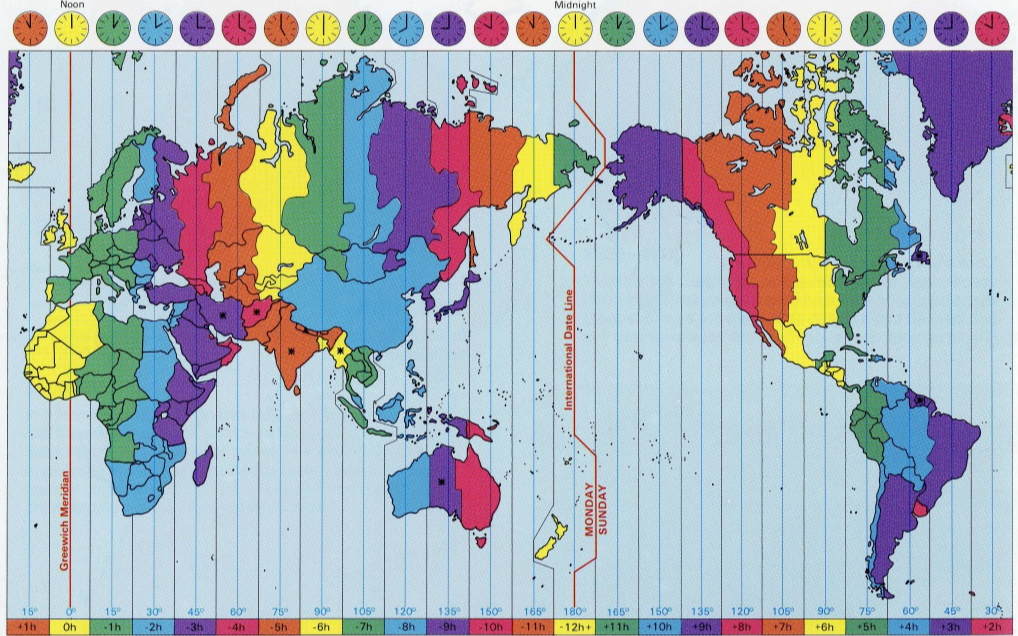
Definition: To standardize global time management, the international community divides the Earth’s surface into 24 zones (time zones) along meridians from east to west. Time in adjacent time zones differs by 1 hour.
-
Core rules:
- Within the same time zone, the sunrise time difference between its easternmost and westernmost points does not exceed 1 hour.
- As one moves eastward, the time increases by one hour for each time zone.
- Moving westward decreases the time by one hour per time zone.
- Crossing N time zones results in a time increase or decrease of N hours.
-
Time standards:
Standard Full name Description GMT Greenwich Mean Time The traditional zero time zone standard. UTC Coordinated Universal Time UTC became the official standard of world time in 1972. In everyday use, GMT and UTC can be considered equivalent (both represent zero time zone time), but UTC is the more precise modern standard.
-
Time zone diagram:
Daylight saving time (DST)
-
Definition: A system of adjusting time artificially to conserve energy, also known as daylight savings time or summer time.
-
Implementation principle:
- The clock is typically set forward in the spring and set back in the fall.
- This encourages people to sleep and wake up earlier, reducing lighting energy consumption.
- It makes better use of natural daylight resources.
-
Implementation status:
- There are nearly 110 countries or regions observing DST.
- The specific implementation periods and rules differ from country to country.
- Time needs to switch automatically according to local policies.
-
Typical time adjustment:
- Standard time → DST: Clocks are set forward by 1 hour (for example, 02:00 → 03:00).
- DST → Standard time: Clocks are set back by 1 hour (for example, 03:00 → 02:00).
TuyaOS SDK automatically handles DST transitions, so you do not need to intervene manually.
Local timer
-
Definition: A mechanism that downloads scheduled tasks to the device for local execution, allowing the device to autonomously check whether a task is due.
-
Core rules:
- Works offline: Downloaded scheduled tasks can still be executed even when the device is offline.
- High reliability: Deliver more stable execution, without relying on a network connection.
- Low latency: Local decision-making enables fast trigger response.
-
Workflow:
- While the device is online, scheduled tasks are sent via the app panel.
- Tasks are stored persistently in the device’s local storage.
- The device periodically checks the tasks based on local time (including time zone and DST).
- Upon reaching the trigger time, the specified operation is automatically executed.
- Task execution results can be reported to the cloud once the device is back online.
How it works
For specific command types, refer to Complex Protocol Control.
Local schedule relies on accurate local time. Make sure your device’s time is synchronized with the cloud before using the schedule feature.
Features and implementation
Key capabilities
The time and time zone service provides comprehensive time management capabilities for devices.
- Time zone management: Automatically retrieves time zone information from the cloud after pairing, and intelligently configures it based on the phone’s longitude and latitude.
- DST support: Automatically identifies local DST policies and applies adjustments at the scheduled transition points.
- Time synchronization: Automatically calibrates the device clock during each interaction with the cloud. Synchronization is triggered under the following conditions:
- Device time is slower than server time.
- Device time is faster than server time by more than 5 seconds.
- Device is powered on for the first time.
- Multiple formats: Supports UTC time, local time, calendar dates, and second/millisecond-level timestamps.
- Time conversion: Provides bidirectional conversion between calendar dates and timestamps.
Application scenarios
- Time display: Gets local time for UI presentation.
- Scheduled tasks: Executes scheduled operations based on accurate time.
- Time conversion: Converts between different time formats.
API description
Convert date and time to timestamp
/**
* @brief change posix time to TIME_T, redefine the std C func mktime
*
* @param[in] tm the time in posix time format
* @return the time in TIME_T format
*/
TIME_T tal_time_mktime(IN CONST POSIX_TM_S *tm);
Parameter description:
tm: Pointer to a POSIX time structure, containing fields such as year, month, day, hour, minute, and second.
Return value:
- Returns the corresponding UTC timestamp (in seconds).
Convert timestamp to date and time
/**
* @brief change TIME_T to posix time, redefine the std C func gmtime_r
*
* @param[in] tm the time in TIME_T format
* @param[out] result the time in posix time format
* @return the time in posix time format
*/
POSIX_TM_S *tal_time_gmtime_r(IN CONST TIME_T *tm, OUT POSIX_TM_S *result);
Parameter description:
tm: Pointer to a UTC timestamp (in seconds).result: Output pointer to a POSIX time structure, used to store the conversion result.
Return value:
- Returns the
resultpointer (same as the input parameter).
Get date and time in UTC
/**
* @brief get TuyaOS UTC time in posix time format
*
* @param[out] tm the IoTOS UTC time in posix time format
* @return OPRT_OK on success. Others on error, please refer to tuya_error_code.h
*/
OPERATE_RET tal_time_get(OUT POSIX_TM_S *tm);
Parameter description:
tm: Output parameter, stores the date-time structure of the current system’s UTC time.
Return value:
OPRT_OK: Success.- Other values: Failure. Refer to
tuya_error_code.h.
Get the timestamp in seconds
/**
* @brief get TuyaOS UTC time in TIME_T format
*
* @return the current second time in TIME_T format
*/
TIME_T tal_time_get_posix(VOID);
Return value: Returns the current system’s UTC timestamp (in seconds).
Get the timestamp in milliseconds
/**
* @brief get TuyaOS UTC time in SYS_TICK_T format
*
* @return the current micro-second time in SYS_TICK_T format
*/
SYS_TICK_T tal_time_get_posix_ms(VOID);
Return value: Returns the current system’s UTC timestamp (in milliseconds).
Get the system uptime
/**
* @brief how long times system run
*
* @param[out] pSecTime the current time in second
* @param[out] pMsTime the current time in micro-second
* @return VOID
*/
VOID tal_time_get_system_time(OUT TIME_S *pSecTime,OUT TIME_MS *pMsTime);
Parameter description:
pSecTime: Output parameter, system uptime (seconds part).pMsTime: Output parameter, system uptime (milliseconds part).
Check time synchronization status
/**
* @brief check TuyaOS time synchronize status
*
* @return OPRT_OK on synchronized. Others on not
*/
OPERATE_RET tal_time_check_time_sync(VOID);
Return value:
OPRT_OK: Time has been synchronized with the cloud.- Other values: Time is not synchronized.
Get local time
Automatically adapts to time zone and DST rules.
/**
* @brief get TuyaOS local time (local, contains the time zone and summer time zone)
*
* @param[in] in_time the time need translate
* @param[out] tm the local time in posix format
* @return OPRT_OK on success. Others on error, please refer to tuya_error_code.h
*
* @note if in_time is 0, return the IoTOS local time, otherwise, translate the in_time to
* local time
*/
OPERATE_RET tal_time_get_local_time_custom(IN TIME_T in_time, OUT POSIX_TM_S *tm);
Parameter description:
in_time: The UTC timestamp to be converted. If it is0, get the current local time. Otherwise, convert this timestamp to local time.tm: Output parameter, stores the converted local time structure (which has already accounted for time zone and DST).
Return value:
OPRT_OK: Success.- Other values: Failure. Refer to
tuya_error_code.h.
Example
Example 1: Get the local time
OPERATE_RET example_get_local_time(VOID)
{
    POSIX_TM_S tm;
    memset(&tm, 0, SIZEOF(tm));

    // Get the current local time (considering time zone and daylight saving time).
    OPERATE_RET ret = tal_time_get_local_time_custom(0, &tm);
    if (OPRT_OK != ret) {
        PR_ERR("get local time failed: %d", ret);
        return ret;
    }

    PR_DEBUG("Local time: %04d-%02d-%02d %02d:%02d:%02d",
            tm.tm_year + 1900, tm.tm_mon + 1, tm.tm_mday,
            tm.tm_hour, tm.tm_min, tm.tm_sec);

    return OPRT_OK;
}
Example 2: Get a high-precision timestamp
OPERATE_RET example_get_timestamp(VOID)
{
    // Get a timestamp in seconds
    TIME_T sec = tal_time_get_posix();
    PR_DEBUG("UTC timestamp (sec): %u", sec);

    // Get a timestamp in milliseconds
    SYS_TICK_T ms = tal_time_get_posix_ms();
    PR_DEBUG("UTC timestamp (ms): %llu", ms);

    // Separate the seconds and milliseconds parts
    TIME_T sec_part = (TIME_T)(ms / 1000);
    UINT_T ms_part = (UINT_T)(ms % 1000);
    PR_DEBUG("Separated: %u.%03u seconds", sec_part, ms_part);

    return OPRT_OK;
}
Example 3: Convert time format
OPERATE_RET example_time_conversion(VOID)
{
POSIX_TM_S tm;
TIME_T timestamp;
// 1. Set a date and time: 2025-12-24 10:30:00
memset(&tm, 0, SIZEOF(tm));
tm.tm_year = 2025 - 1900; // The year starts from 1900
tm.tm_mon = 12 - 1; // The month starts from 0 (0-11)
tm.tm_mday = 24;
tm.tm_hour = 10;
tm.tm_min = 30;
tm.tm_sec = 0;
// 2. Convert date to timestamp
timestamp = tal_time_mktime(&tm);
PR_DEBUG("Date to timestamp: %u", timestamp);
// 3. Convert timestamp to date
POSIX_TM_S result;
tal_time_gmtime_r(×tamp, &result);
PR_DEBUG("Timestamp to date: %04d-%02d-%02d %02d:%02d:%02d",
result.tm_year + 1900, result.tm_mon + 1, result.tm_mday,
result.tm_hour, result.tm_min, result.tm_sec);
return OPRT_OK;
}
Example 4: Check time synchronization status
OPERATE_RET example_check_sync_status(VOID)
{
    OPERATE_RET ret = tal_time_check_time_sync();

    if (OPRT_OK == ret) {
        PR_DEBUG("Time synchronized with cloud server");

        // The time has been synchronized, and you can now perform time-dependent operations
        POSIX_TM_S tm;
        tal_time_get_local_time_custom(0, &tm);
        PR_DEBUG("Current local time: %02d:%02d:%02d",
                tm.tm_hour, tm.tm_min, tm.tm_sec);
    } else {
        PR_DEBUG("Time not synchronized yet, please wait...");
        // You can register callbacks or delay time-dependent operations
    }

    return ret;
}
Is this page helpful?
YesFeedbackIs this page helpful?
YesFeedback




