

Photo Album
Functional description
Tuya IPC Development Framework, in addition to providing live video recording and playback, also offers another method for "playback" files: the album feature. This feature enables the storage of important files (such as images and MP4 videos) in a designated location. Users can then view, download, or delete these files through the entries on the app.
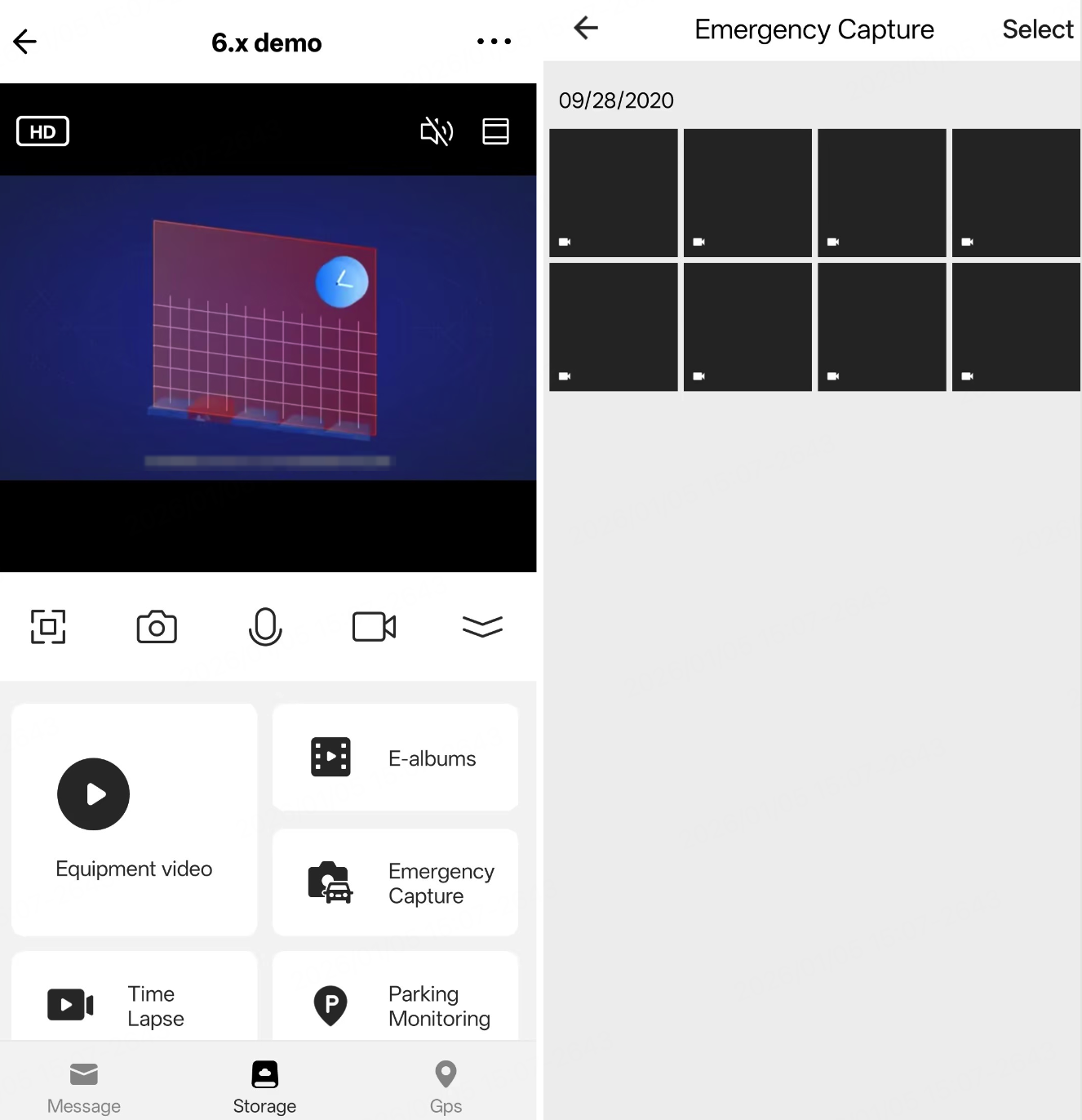
Development guide
Directory and file structure
To view files within the album, the app shall provide the specified album name for the device. To simplify development and debugging, the album name in the current version is fixed and identical on both the device SDK and the app.
The device-side working directory is as follows:
DCIM                                       // The storage directory, located in the top level directory in the SD card file system.
    ├── ipc_emergency_record
    │    ├── aaa.jpg
    │    ├── bbb.mp4
    │    ├── ccc.mp4
    │    └── idx.bin   // The index file. Do not delete.
Currently, only the album name ipc_emergency_record is supported.
For MP4 files generated by transcoding functions not provided in the development kit, you will need to implement the decoding and transmission of these MP4 files yourselves during the interactive process of viewing and playing them on the app.
API description
Initialize the feature
/**
 * @brief Initialize album storage
 *
 * @param[in] album_info: Album info
 * @param[in] path_info: Storage mount path
 * @param[in]album_media_info: Main video & audio stream info
 *
 * @return OPRT_OK on success. Others on error, please refer to tuya_error_code.h
 */
OPERATE_RET tuya_ipc_album_ss_init(IN TUYA_IPC_ALBUM_INFO_T* album_info, IN TUYA_IPC_ALBUM_WORKING_PATH_NAME_T* path_info, IPC_MEDIA_INFO_T *album_media_info);
The album file storage solution provided by the development kit is optional. You can also implement your own solution for saving and querying album files. For specific implementation details, refer to the Things to note section.
Write files to the album directory
/**
 * @brief Write info of newly added file
 *
 * @param[in] album_name: Album name
 * @param[in] pInfo: Newly added file info
 *
 * @return OPRT_OK on success. Others on error, please refer to tuya_error_code.h
 *
 * @warning: Not thread safe
 */
OPERATE_RET tuya_ipc_album_write_file_info(IN CHAR_T* album_name, IN ALBUM_FILE_INFO_T* pInfo);
Move or copy recording or image files to the album directory in advance. Then, call this interface to complete the information logging.
The video file parameters must match those of the mainstream.
Query files within the album
/**
 * @brief Get album index info by album name
 *
 * @param[in] album_name: Album name
 * @param[in] chan: IPC chan num, start from 0
 * @param[out] len: Len of p_index_file (SS_ALBUM_INDEX_HEAD_T + SS_ALBUM_INDEX_ITEM_T)
 * @param[out] p_index_file: SS_ALBUM_INDEX_HEAD_T index header, followed SS_ALBUM_INDEX_ITEM_T
 *
 * @return OPRT_OK on success. Others on error, please refer to tuya_error_code.h
 */
OPERATE_RET tuya_ipc_album_query_by_name(IN CHAR_T* album_name, IN INT_T chan, OUT INT_T* len, OUT SS_ALBUM_INDEX_HEAD_T** p_index_file);
This interface is called only when the app sends a query command.
Set download status
/**
 * @brief Set album download status, start or cancel
 *
 * @param[in] new_status: Start or cancel download
 * @param[in] p_info: Dowload file count and info
 *
 * @return OPRT_OK on success. Others on error, please refer to tuya_error_code.h
 */
OPERATE_RET tuya_ipc_album_set_download_status(IN SS_ALBUM_DOWNLOAD_STATUS_E new_status, IN SS_ALBUM_DOWNLOAD_START_INFO_T* p_info);
This interface is called only when the app sends a command to download a file. When the app starts downloading a file, the SDK internally starts a new thread to send the file data.
Delete files within the album
/**
 * @brief Delete file info
 *
 * @param[in] sessionId: P2P sesssion id
 * @param[in] album_name: Album name
 * @param[in] cnt: File num to delete
 * @param[in] file_info_arr: File infos to delete
 *
 * @return OPRT_OK on success. Others on error, please refer to tuya_error_code.h
 */
OPERATE_RET tuya_ipc_album_delete_by_file_info(IN INT_T sessionId, IN CHAR_T* album_name, IN INT_T cnt, IN SS_FILE_PATH_T* file_info_arr);
This interface is called only when the app sends a command to delete a file.
Multi-lens support
For devices with multiple image sensors (multi-lens), the SDK usage is largely the same as for single-lens devices. You only need to adjust several parameters.
Multi-lens devices require a special configuration for the product ID (PID). For the configuration method, please contact your account manager.
Initialize the SDK
TUYA_IPC_ENV_VAR_T env;
memset(&env, 0, sizeof(TUYA_IPC_ENV_VAR_T));
....
env.image_sensor_count = 3;

ret = tuya_ipc_init_sdk(&env);
The number of image sensors of the device is set through the input parameter image_sensor_count.
This feature is planned to be supported in version v3.14.0.
Configure media information
For single-lens devices, set the media information only once.
OPERATE_RET tuya_ipc_media_adapter_set_media_info(INT_T device, INT_T channel, DEVICE_MEDIA_INFO_T media_info);
For multi-lens devices, you must configure the parameters for each sensor based on its actual output. Example:
INT_T i = 0;
for (i = 0; i < IPC_CHANNEL_NUM; i++) {
    .....
    tuya_ipc_media_adapter_set_media_info(0, i, &device_media_info[i]);
}
Initialize ringbuffer
For single-lens devices, initialize the ringbuffer only once.
OPERATE_RET tuya_ipc_ring_buffer_init(INT_T device, INT_T channel, IPC_STREAM_E stream, RING_BUFFER_INIT_PARAM_T* pparam);
For multi-lens devices, refer to the following calling method:
INT_T i = 0;
for (i = 0; i < IPC_CHANNEL_NUM; i++) {
for(ringbuffer_stream_type = E_IPC_STREAM_VIDEO_MAIN; ringbuffer_stream_type < E_IPC_STREAM_MAX; ringbuffer_stream_type++ ) {
if(ringbuffer_stream_type == E_IPC_STREAM_AUDIO_MAIN) {
param.bitrate = audio_sample[E_IPC_STREAM_AUDIO_MAIN]* audio_databits[E_IPC_STREAM_AUDIO_MAIN]/1024;
param.fps = audio_fps[E_IPC_STREAM_AUDIO_MAIN];
param.max_buffer_seconds = 0;
param.request_key_frame_cb = NULL;
ret = tuya_ipc_ring_buffer_init(0, i, ringbuffer_stream_type, ¶m);
} else {
param.bitrate = video_bitrate[ringbuffer_stream_type];
param.fps = video_fps[ringbuffer_stream_type];
param.max_buffer_seconds = 0;
param.request_key_frame_cb = NULL;
ret = tuya_ipc_ring_buffer_init(0, i, ringbuffer_stream_type, ¶m);
}
if(ret != 0) {
PR_ERR("init ring buffer fails. %d %d", ringbuffer_stream_type, ret);
return OPRT_MALLOC_FAILED;
}
PR_DEBUG("init ring buffer success. channel:%d", ringbuffer_stream_type);
}
}
Write audio and video frame data
Each sensor must write its frame data to the corresponding ringbuffer. Otherwise, preview issues may occur when switching lenses.
RING_BUFFER_USER_HANDLE_T tuya_ipc_ring_buffer_open(INT_T device, INT_T channel, IPC_STREAM_E stream, RBUF_OPEN_TYPE_E open_type);

OPERATE_RET tuya_ipc_ring_buffer_append_data(RING_BUFFER_USER_HANDLE_T handle, UCHAR_T *addr, UINT_T size, MEDIA_FRAME_TYPE_E type, UINT64_T pts);

OPERATE_RET tuya_ipc_ring_buffer_close(RING_BUFFER_USER_HANDLE_T handle);
For multi-lens devices, refer to the following calling method:
STATIC RING_BUFFER_USER_HANDLE_T s_ring_buffer_handles[IPC_CHANNEL_NUM][E_IPC_STREAM_MAX] = {NULL,};

void * __frame_append_task(void *args)
{
  ....

  while(1){
    if (0 == tkl_venc_get_frame(0, 0, &frame)) {
      for (i = 0; i < IPC_CHANNEL_NUM; i++) {
        if (s_ring_buffer_handles[i][E_IPC_STREAM_VIDEO_MAIN] == NULL) {
          s_ring_buffer_handles[i][E_IPC_STREAM_VIDEO_MAIN] = tuya_ipc_ring_buffer_open(0, i, E_IPC_STREAM_VIDEO_MAIN, E_RBUF_WRITE);
        }

        if (s_ring_buffer_handles[i][E_IPC_STREAM_VIDEO_MAIN]) {
          tuya_ipc_ring_buffer_append_data(s_ring_buffer_handles[i][E_IPC_STREAM_VIDEO_MAIN], frame_buff,
                                           frame.used_size + naluSeiLen, frame.frametype, frame.pts);

        } else {
          PR_ERR("tuya_ipc_ring_buffer_open %d failed,channle:%d\n", i, E_IPC_STREAM_VIDEO_MAIN);
        }
      }
    } else {
      tkl_system_sleep(10);
    }
  }

  for (i = 0; i < IPC_CHANNEL_NUM; i++) {
    if (s_ring_buffer_handles[i][E_IPC_STREAM_VIDEO_MAIN] != NULL) {
      tuya_ipc_ring_buffer_close(s_ring_buffer_handles[i][E_IPC_STREAM_VIDEO_MAIN]);
    }
  }

  .....
}
Channel selection for playback and album viewing
After the multi-lens feature is correctly configured, the app displays a channel/lens switch option during preview. Switching automatically plays the video stream of the selected channel.
Additionally, after a preview channel is selected, the device receives the MEDIA_STREAM_LIVE_VIDEO_CHANNEL_SWITCH signaling command with the specific channel number. You can handle other business logic based on this channel number.
The playback and album features provided by the SDK do not currently support multi-channel switching. If multi-channel playback is required, you need to design and implement this functionality on your own.
Things to note
- Refer to the demo code in the development kit, focusing on the calling sequence in
main.candty_sdk_sd_album.c. - For devices that support the album or a recorder, the PID requires special configuration to display the specified album entry. For the PID configuration rules, contact your account manager.
FAQs
How to view and download non-SDK stream files (such as MP4) in the album?
The development kit provides one method for file saving and viewing, but this is not mandatory. You can still implement your own logic for saving and viewing album files.
You can design and implement the management and maintenance of photo folders, images, and video files yourself. The SDK imposes no restrictions.
When using a non-SDK album file management solution, do not call SDK album interfaces such as tuya_ipc_album_ss_init. Calling these interfaces may cause unexpected issues.
To view and play files on the app, you need to follow the signaling interaction process:
-
Query album files
MEDIA_STREAM_ALBUM_QUERY:
If you implement your own album file saving, you need to convert the album name upon receiving this command and query/return information for all files within the album. The returned data structure must useC2C_ALBUM_INDEX_HEAD. The memory for this data must be dynamically allocated usingtal_malloc. The SDK will automatically free this space after use. If you need to enable online playback of album video files, pay attention to theversionfield inC2C_ALBUM_INDEX_HEADin the response protocol. -
Download files
MEDIA_STREAM_ALBUM_DOWNLOAD_START:
Upon receiving this command, you need to implement the file data sending functionality yourself. It is recommended to start a new thread for sending frame data. Call the following interface to send files:OPERATE_RET tuya_imm_p2p_app_download_data(IN CONST CHAR_T *dev_id, IN CONST UINT_T client, TUYA_DOWNLOAD_DATA_TYPE type, IN CONST void * pHead, IN CONST CHAR_T * pData);The following settings are applied:
dev_id: Input parameter, set toNULL.client: Thechannelparameter carried when receiving the signaling.type: Fixed valueTUYA_DOWNLOAD_ALBUM.pHead: Data type isC2C_DOWNLOAD_ALBUM_HEAD.pData: The data buffer to be sent.
It is recommended to send the file in segments. When sending the last segment, set the
fileEndfield inpHeadto1. After all file downloads are completed, clearpHeadand changefileIndexto-1to indicate the end of the download. -
Terminate download
MEDIA_STREAM_ALBUM_DOWNLOAD_CANCEL: Upon receiving this signaling, immediately terminate the download thread and release any allocated resources. -
Delete files
MEDIA_STREAM_ALBUM_DELETE: Upon receiving this signaling, delete the specified file within the album. After deletion, report the status by calling the following interface:OPERATE_RET tuya_imm_p2p_delete_video_finish(IN CONST CHAR_T *dev_id, IN CONST UINT_T client, TUYA_DOWNLOAD_DATA_TYPE type, INT_T success);The following settings are applied:
dev_id: Input parameter, set toNULL.client: Thechannelparameter carried when receiving the signaling.type: Fixed valueTUYA_DOWNLOAD_ALBUM.success: The value is0on failure, and1on success.
-
Play album videos online
MEDIA_STREAM_ALBUM_PLAY_CTRL: This control command is complex and includes:- Start playback:
TY_CMD_IO_CTRL_ALBUM_PLAY_START - Stop playback:
TY_CMD_IO_CTRL_ALBUM_PLAY_STOP - Pause playback:
TY_CMD_IO_CTRL_ALBUM_PLAY_PAUSE - Resume playback:
TY_CMD_IO_CTRL_ALBUM_PLAY_RESUME
You need to implement the above functions one by one. After playback starts, you must implement file parsing and transmission yourself. When sending frame data, use
tuya_imm_p2p_app_album_play_send_data. Upon playback completion, usetuya_imm_p2p_album_play_send_finishto synchronize progress. Refer to the demo for the calling procedure. - Start playback:
The above features need to be implemented one by one. After playback starts, you need to implement file parsing and sending on your own.
-
Use
tuya_imm_p2p_app_album_play_send_datato send frame data. Note the timestamps in the attached header information,timestampandpts:timestamp: Unix timestamp in ms.pts: Relative timestamp in μs.
Refer to the Demo for details.
-
Use
tuya_imm_p2p_album_play_send_finishto synchronize progress after playback is complete. Refer to the Demo for the calling process.
How to display album thumbnails in the app?
After the app queries all files in the album, it automatically requests thumbnail data for display.
The protocol interaction and docking method are as follows:
- The app sends
MEDIA_STREAM_ALBUM_QUERY. - The device returns file information in the album.
- The app immediately sends
MEDIA_STREAM_ALBUM_DOWNLOAD_STARTto download thumbnails. The download method is the same as described above, usingtuya_imm_p2p_app_download_data. The difference is that thethumbnailfield is set to1, indicating the type of data to be downloaded. - Thumbnail specifications:
- File format: .jpg
- Resolution: 480 × 480
Is cyclic overwrite supported?
The developer controls how album files are written. Therefore, cyclic overwrite function must also be implemented by the developer. It is recommended to implement space management to prevent issues when the storage becomes full. When deleting old files, call tuya_ipc_album_delete_by_file_info to clear index records. Otherwise, query issues may occur.
If you implement your own file storage and do not use tuya_ipc_album_write_file_info, you do not need to call tuya_ipc_album_delete_by_file_info. However, you still need to implement cyclic overwrite yourself.
Does the SDK support recording and playback for multi-lens devices?
The SDK does not currently support recording storage and playback for multi-lens devices. You must implement these features yourself.
For multi-lens device playback, the ipcChan parameter in the MEDIA_STREAM_PLAYBACK_QUERY_DAY_TS signaling specifies the lens for recording queries. Because subsequent playback control signaling does not include ipcChan, the device must retain this parameter from the query stage to identify the target lens during playback.
Does multi-lens mode occupy more memory?
Yes. Memory usage depends on the bitrate of audio and video streams and the ringbuffer duration.
Example:
For a device with 3 channels:
- Mainstream bitrate: 1.5 Mbps
- Substream bitrate: 0.5 Mbps
- Ringbuffer duration: 10 seconds
Total memory usage:
((1.5 / 8 * 1024) * 10 + (0.5 / 8 * 1024) * 10) * 3 = 7680 KB
You can choose whether to keep substreams based on your memory constraints.
Is this page helpful?
YesFeedbackIs this page helpful?
YesFeedback




