

Infrared Feature
This topic describes the infrared (IR) transmission and learning capabilities based on the RTOS Gateway SDK-WR11-G. It helps you quickly get started with development and troubleshooting. The IR application component in this solution supports only the fastlz IR code library (standard DP_V3 version).
APIs
Initialize IR features
OPERATE_RET tuya_svc_ir_control_init(TY_GW_IR_INIT_ATTR_T *attr);
Report learned IR codes
/* Pass an empty string to devid for gateway IR learning report. */

OPERATE_RET tuya_svc_ir_code_learn(IN CONST CHAR_T *devid, IN CONST CHAR_T *p_data, IN UINT_T data_len);
Report IR learning status
OPERATE_RET tuya_ir_study_stat_report(IN TY_IR_STUDY_CTL_E mode);
Report IR learning errors
OPERATE_RET tuya_ir_study_error_report(VOID_T);
Release resources
/* Call this API to release resources after using the IR code. */

OPERATE_RET tuya_ir_code_free(IN TY_IR_CODE_S *ir_code, IN UCHAR_T code_num);
Data structure
TY_GW_IR_INIT_ATTR_T
typedef VOID (*GW_IR_SEND_APP_CB)(IN TY_IR_CODE_S *timecode, IN UCHAR_T code_num);
typedef VOID (*GW_IR_STUDY_APP_CB)(IN TY_IR_STUDY_CTL_E mode);

typedef struct {
    GW_IR_SEND_APP_CB           gw_ir_send_cb; // Callback for IR transmission. Implement custom transmission logic.
    GW_IR_STUDY_APP_CB          gw_ir_study_cb;// Callback for IR learning. Implement custom learning logic.
}TY_GW_IR_APP_CBS_S;

typedef struct {
    TY_GW_IR_APP_CBS_S          ir_cbs;        // Callbacks for gateway IR transmission and learning.
} TY_GW_IR_INIT_ATTR_T;
TY_IR_STUDY_CTL_E
typedef     CHAR_T      TY_IR_STUDY_CTL_E;
#define    TY_IR_STUDY_START            0
#define    TY_IR_STUDY_EXIT             1
TY_IR_CODE_S
typedef struct
{
    USHORT_T    *code;       // The IR time code to send.
    USHORT_T    code_len;    // The length of the time code.
    BYTE_T      send_count;  // The number of repetitions.
    UINT_T      feq;         // The transmission frequency.
    USHORT_T    delay;       // ms
}TY_IR_CODE_S;
Example
Initialize IR component
STATIC VOID_T tuya_irapp_sysdp_send_cb(IN TY_IR_CODE_S *ir_code, IN UCHAR_T code_num)
{

}

STATIC VOID_T tuya_irapp_sysdp_study_cb(IN TY_IR_STUDY_CTL_E irstudy_mode)
{

}


    TY_GW_IR_INIT_ATTR_T ir_attr = {
        .ir_cbs.gw_ir_send_cb = tuya_irapp_sysdp_send_cb,
        .ir_cbs.gw_ir_study_cb = tuya_irapp_sysdp_study_cb,
    };
    op_ret = tuya_svc_ir_control_init(&ir_attr);
    if (OPRT_OK != op_ret)
    {
        PR_ERR("tuya_svc_ir_control_init err:%d !",op_ret);
        return op_ret
}
Send IR codes
Do not implement transmission or learning logic in callbacks to avoid blocking SDK callbacks.
/* Implement gw_ir_study_cb. */

STATIC VOID_T tuya_irapp_sysdp_send_cb(IN TY_IR_CODE_S *ir_code, IN UCHAR_T code_num)
{
    if (NULL == ir_code || 0 == code_num) {
        PR_ERR("invalid param.");
        return;
    }

    /* Implement custom transmission logic. */

    tuya_ir_code_free(ir_code, code_num);
}
IR learning
Do not implement transmission or learning logic in callbacks to avoid blocking SDK callbacks.
/* Implement gw_ir_study_cb. */

STATIC VOID_T tuya_irapp_sysdp_study_cb(IN TY_IR_STUDY_CTL_E irstudy_mode)
{
    if(TY_IR_STUDY_START == irstudy_mode)
    {
        PR_NOTICE("ir study start...");
        tuya_ir_study_stat_report(TY_IR_STUDY_START);

         /* Implement custom learning logic. */
         if () {
            tuya_svc_ir_code_learn("", data, data_len);
            PR_NOTICE("ir study successed...");
         } else {
            tuya_ir_study_error_report();
            PR_NOTICE("ir study failed...");
         }
    }
    else if(TY_IR_STUDY_EXIT == irstudy_mode)
    {
        PR_NOTICE("ir study stop...");
        tuya_ir_study_stat_report(TY_IR_STUDY_EXIT);

         /* Recycle resources after learning. */

    }
}
Things to note
-
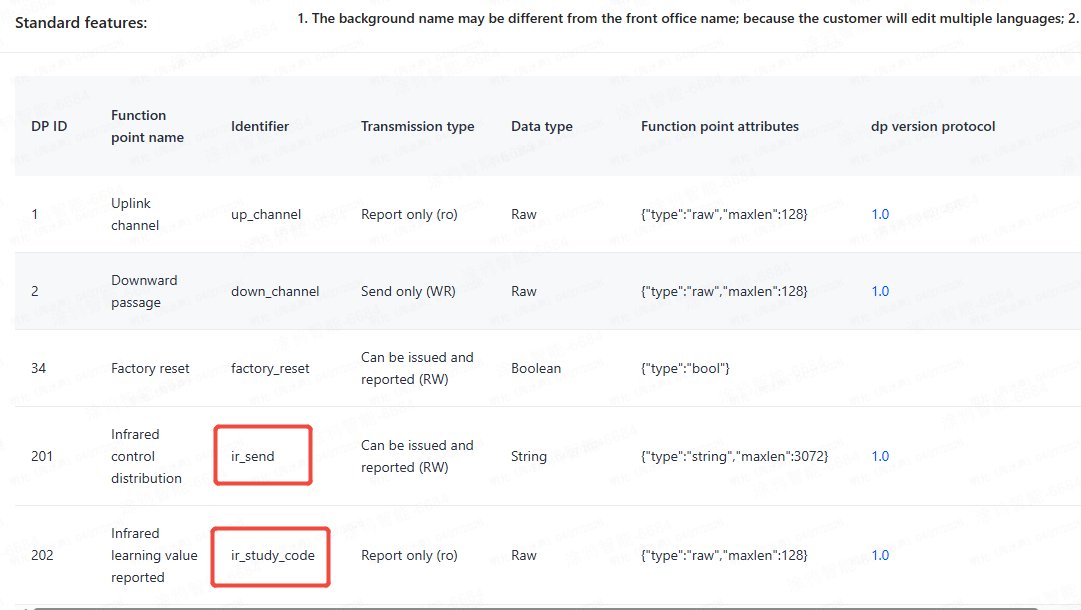
Before using IR features, configure DP201 and DP202 under the gateway PID in the backend.
-
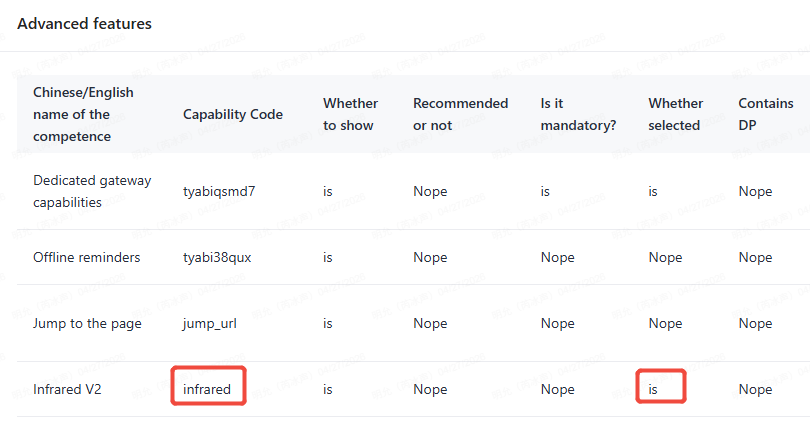
If the gateway does not receive MQTT messages when transmitting IR codes from the panel, check whether IR V2 is enabled.
-
Call the IR initialization API before gateway initialization (
tuya_iot_wf_sdk_initortuya_iot_wr_wf_sdk_init). For more information, see Device Initialization.
Troubleshooting
The code library match fails during learning
Check whether the received IR time code matches the actual code. Use kingst to capture the waveform and compare it with the received code. Ensure the deviation is less than 20 us.
The IR-controlled device does not respond
Use kingst to capture and compare the transmitted waveform with the IR timing code. Ensure the deviation is less than 20 us. You can increase the compensation values for high and low levels to reduce the hardware timer errors.
Is this page helpful?
YesFeedbackIs this page helpful?
YesFeedback




