

Firmware Configuration
Last Updated on : 2024-06-21 04:19:21Copy for LLMView as MarkdownDownload PDF
Configuration list
1-way to 3-way magnetic latching relay
Channels 1 to 7
| Name | Configurable items |
|---|---|
| Button | IO port can be left empty. |
| Relay | IO port is required and cannot be empty. |
| Indicator | It can be left empty. The power indicator is realized by hardware when it is empty or multiplexed by the network light. |
Master Control Settings
| Name | Configurable items |
|---|---|
| Master control indicator | IO can be left empty. |
| Master control button | IO port is required and cannot be empty. |
| Channel status | Power-off (default); Power-on; Power-off memory. |
| Button trigger type | Level trigger or edge trigger. |
Network pairing
| Name | Configurable items |
|---|---|
| Reset long press seconds | The default time is 3s, which can be configured in the range of 3 to 10s. |
| Triggering method of the first-time network pairing | The power distribution network keeps flashing to prevent accidental touch/ Long press the distribution network for 3min timeout to prevent accidental touch (default)/Power distribution network 3min timeout to prevent accidental touch. |
| Wi-Fi light status when network unconnected | On/Off (default)/Indicate relay status. |
| Wi-Fi light status when network connected | On (default)/light off/indicating relay status. |
| Network indicator multiplexing relay status | Cannot be multiplexed or multicolored. |
| Indicator color mixing | The indicator can be mixed color (default)/Indicator cannot be mixed color. |
| Network indicator | I/O port must be selected and cannot be empty. |
1-way to 3-way electrical latching relay
Channels 1 to 7
| Name | Configurable items |
|---|---|
| Button | IO can be left empty. |
| Magnetic latching relay closed | IO port must be selected, cannot be empty. |
| Magnetic latching relay is off | IO port must be selected, cannot be empty. |
| Indicator | Can be left empty, the power indicator is realized by hardware when it is left empty, or the network light status is multiplexed. |
Master Control Settings
| Name | Configurable items |
|---|---|
| Master control indicator | IO can be left empty. |
| Master control button | IO port must be selected, cannot be empty. |
| Channel Status | Power-off (default)/Power-on/Power-off memory. |
| Key trigger type | Level trigger/Edge trigger. |
| Relay Type | Electrical Latching Relay/Magnetic Latching Relay (selected). |
| Relay drive time | Default 60s, configuration within the range of 40 to 100ms. |
Network configuration
| Name | Configurable items |
|---|---|
| Reset long-press seconds | The default is 3s, which can be configured in the range of 3-10s. |
| First Trigger Mode of Distribution Network | The power distribution network keeps flashing to prevent accidental touches/ Long press the distribution network for 3min timeout to prevent accidental touches (default)/Power distribution network 3min timeout to prevent accidental touches. |
| Wi-Fi light status when not connected to the Internet | On/Off (default)/Indicate relay status. |
| Wi-Fi light status when connected to the Internet | On (default)/light off/indicating relay status. |
| Network indicator multiplexing relay status | Cannot be multiplexed (default) or multicolored. |
| Indicator color mixing | The indicator can be mixed color (default)/cannot be mixed color. |
| Network indicator | The I/O port is required and cannot be empty. |
Configuration example
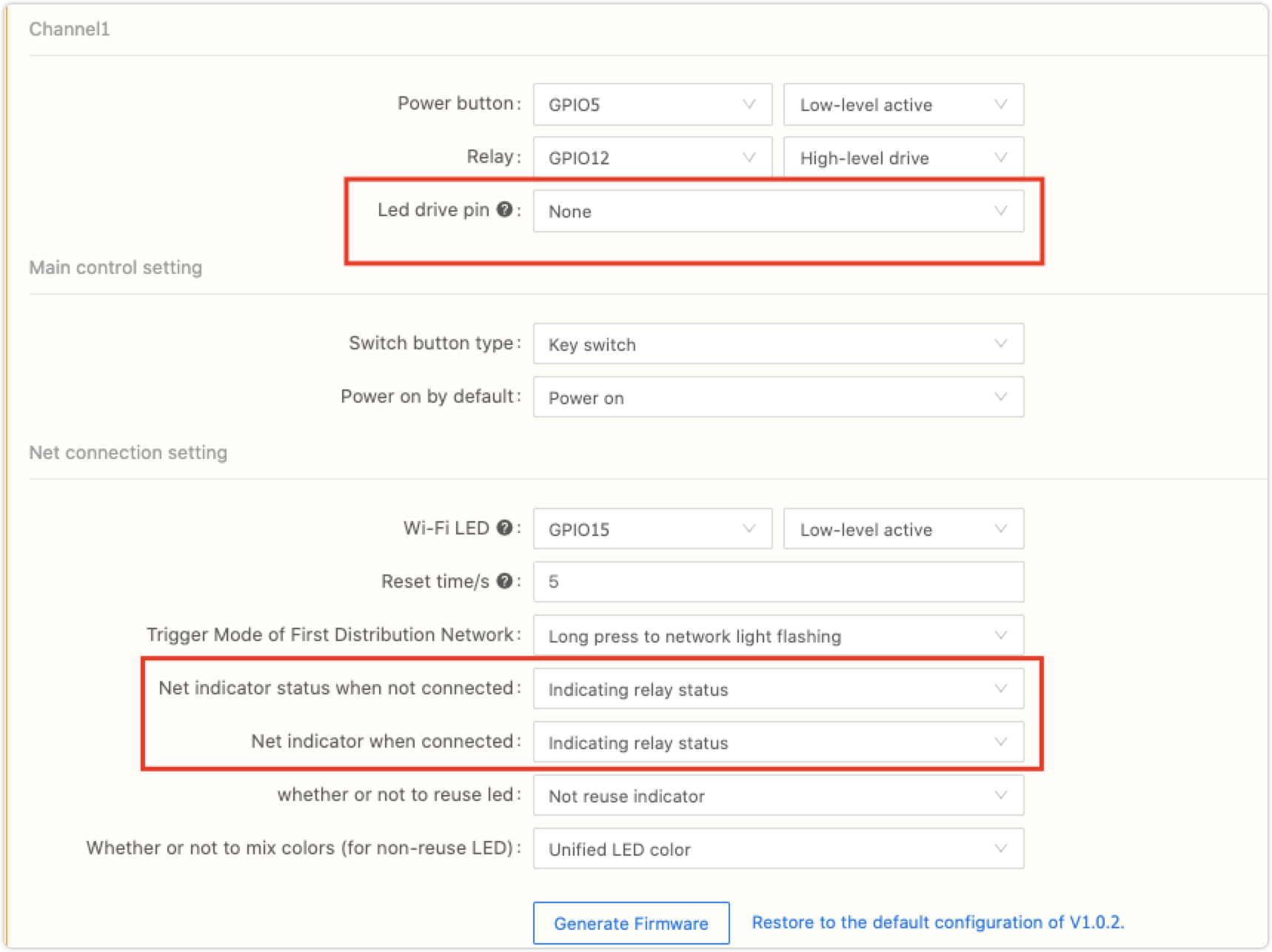
Single light multiplexing configuration
- When it enters the network pairing state, the indicator light flashes.
- Network pairing timeout or distribution network, indicating the status of the relay.
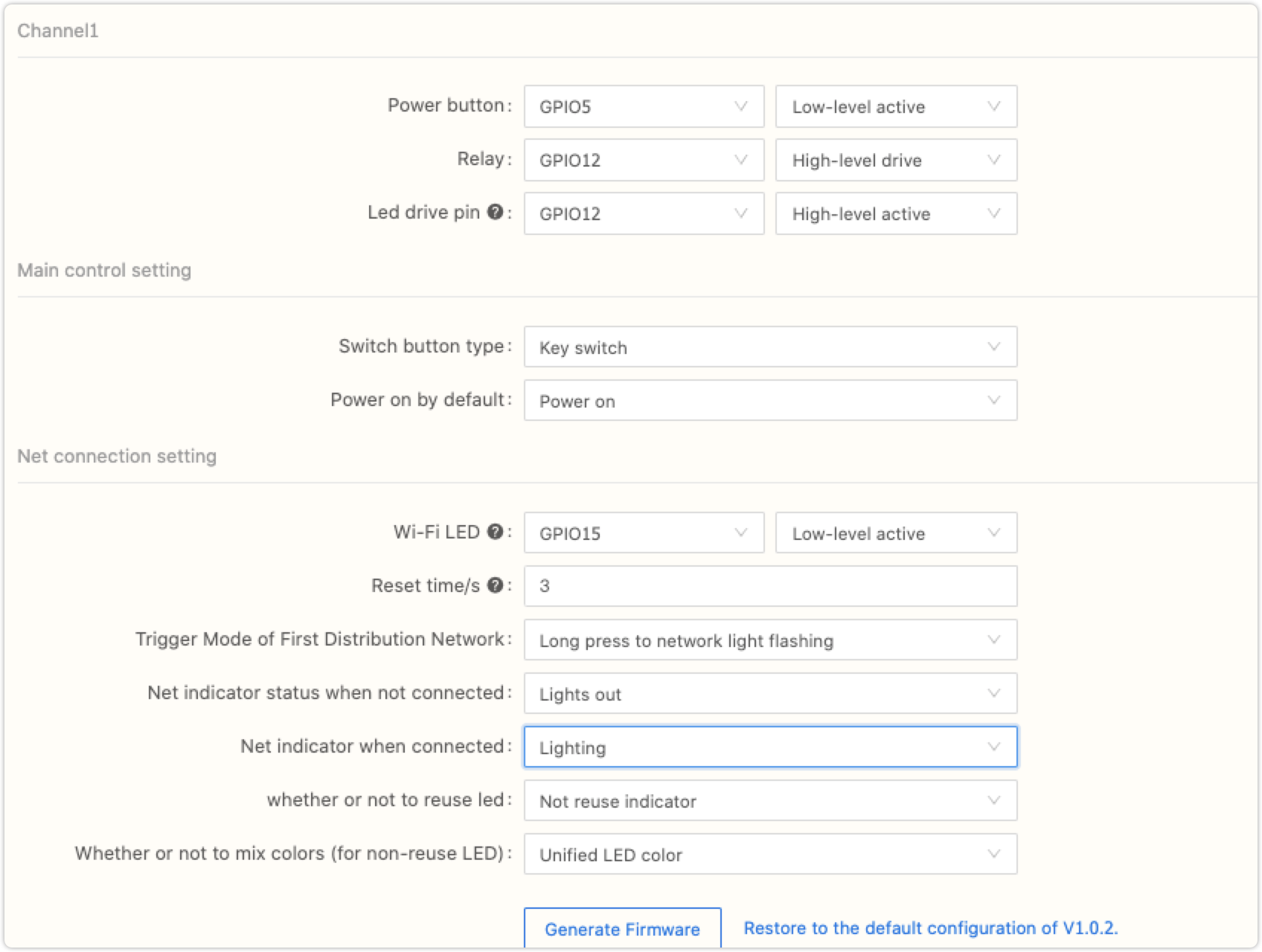
Dual-light configuration
- When the Wi-Fi indicator is not connected to the Internet, the Wi-Fi indicator is off.
- Enter the network pairing state, the Wi-Fi indicator flashes.
- When Wi-Fi is connected, the indicator light is on.
- The power indicator light always indicates the status of the relay;
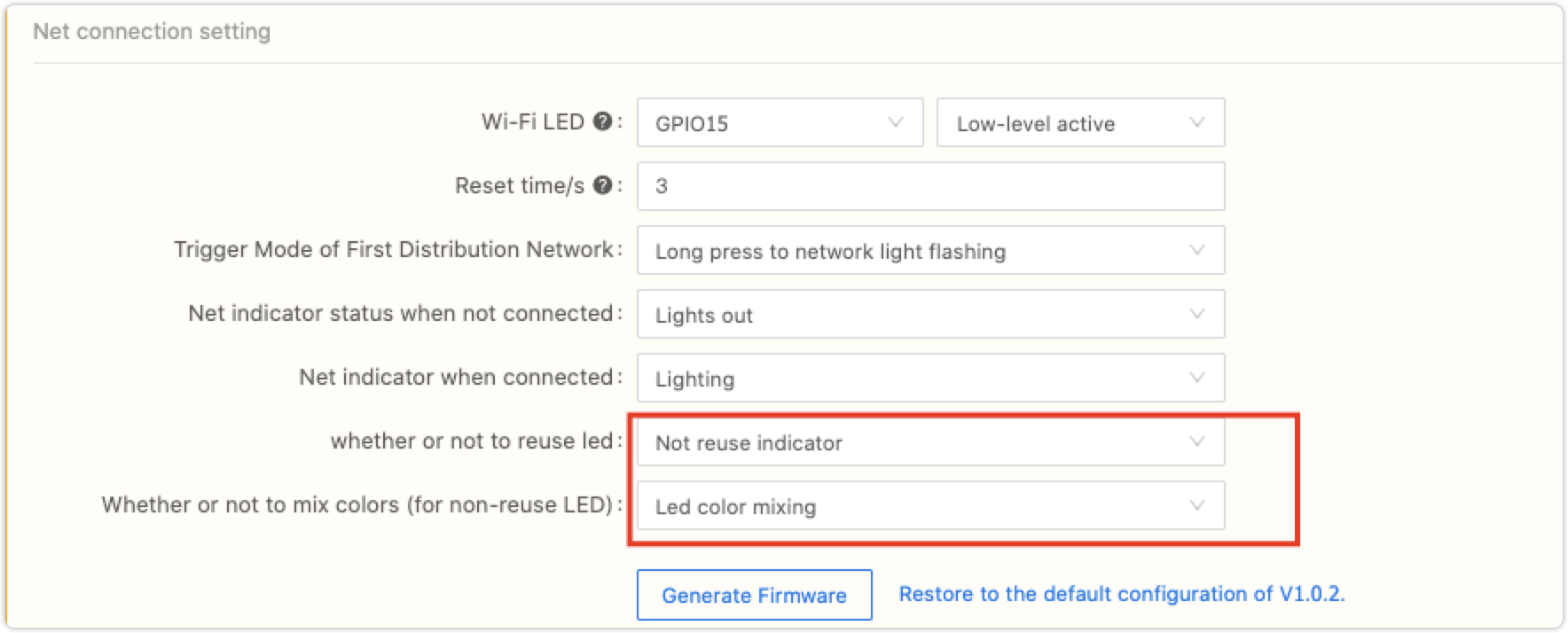
Mixed colors of indicators
- When the network indicator and the relay indicator are not multiplexed, two-color lights are used. When the two light beads meet to light up at the same time.
- The indicator light can be mixed colors: the third light can be mixed.
- The indicator light cannot be mixed colors: only the relay indicator light is on.
Is this page helpful?
YesFeedbackIs this page helpful?
YesFeedbackMarketing Cooperation
Business Cooperation
Customer Service
Media Inquiry





