

WBRV Module Datasheet
WBRV is a low-power embedded Wi-Fi and Bluetooth voice module developed by Tuya Smart. It consists of a highly integrated wireless RF chip RTL8720CF-VU2+CI1302 with built-in Wi-Fi stacks and various library functions.
Overview
WBRV is a Wi-Fi AI module that supports voice control. It integrates the Tuya AI platform, enables interaction through voice, and connects to major AI platforms via the Tuya AI Agent. It supports large language models such as Doubao, DeepSeek, Qwen, OpenAI, and Gemini. It features button wake-up, wake-word activation, and free talk capabilities, providing users with a vivid and engaging AI voice interaction experience. It is suitable for smart products in voice interaction scenarios.
WBRV combines a low-power KM4 microcontroller unit (MCU), WLAN MAC, and 1T1R (1 transmitter/1 receiver) design. This module provides output frequency up to 100 MHz, 384 KB embedded SRAM, 4 MB flash memory, and configurable GPIOs that can function as digital peripherals for diverse applications.
WBRV is a real-time operating system (RTOS), integrated with all wireless MAC and TCP/IP libraries. All these resources can help you develop your own embedded Wi-Fi products.
Features
- Built-in low-power KM4 MCU that also acts as an application processor.
- Clock rate of 100 MHz.
- Operating voltage range: 3.6V to 5.5V.
- Peripherals: 11 × GPIOs, 1 × UART (5V), 1 × Log_UART, 1 × MIC interface, and 1 × speaker interface.
- Wi-Fi and Bluetooth connectivity
- IEEE 802.11b/g/n20.
- Channels 1–14@2.4 GHz (CH1-11 for US/CA and CH1-13 for EU/CN).
- Support security protocols, including WPA2 and WPA2 PSK (AES).
- Support Bluetooth LE 5.4.
- The maximum output power is +17.5 dBm for IEEE 802.11b transmission.
- Support Wi-Fi Easy Connect (EZ mode) pairing mode on Android and iOS devices.
- Onboard PCB antenna.
- It has passed CE and FCC certifications.
- Operating temperature range: -40°C to +85°C.
Scope of applications
- Smart building
- Smart home
- Smart socket
- Smart lighting
- Smart bus
- Industrial wireless control
- Baby monitor
- IP camera
Module interfaces
Dimensions and footprint
-
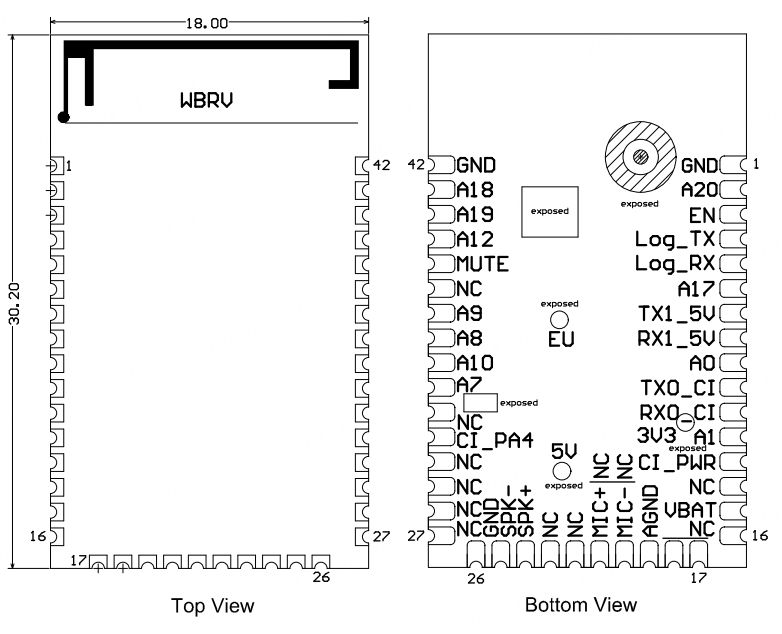
WBRV has three rows of pins with a 1.4 mm pin spacing.
-
The WBRV dimensions are 18±0.35 mm (W) × 30.2±0.35 mm (L) × 3.0±0.15 mm (H). The figure below shows the dimensions of the WBRV module.
Pinout
| Pin | Symbol | I/O type | Description |
|---|---|---|---|
| 1 | GND | P | Ground pin. |
| 2 | A20 | I/O | GPIOA_20, which supports hardware PWM, corresponding to Pin 1 on the IC. |
| 3 | EN | I/O | The enable pin that is active low. The module has pulled up the high level, and users can control this pin externally. |
| 4 | Log_TX | I/O | GPIOA_16, which can be reused as the UART_Log_TX pin for log printing. |
| 5 | Log_TX | I/O | GPIOA_15, which can be reused as the UART_Log_RX pin for receiving log information. |
| 6 | A17 | I/O | GPIOA_17, which supports hardware PWM, corresponding to Pin 38 on the IC. |
| 7 | TX1_5V | I/O | GPIOA_14, UART1_TXD (MCU interface serial port), 5V level. |
| 8 | RX1_5V | I/O | GPIOA_13, UART1_RXD (MCU interface serial port), 5V level. |
| 9 | A0 | I/O | GPIOA_0, corresponding to Pin 15 on the IC. It is pulled high during startup to enter flashing mode. External pull-up resistors should not be used. |
| 10 | TX0_CI | I/O | Firmware flashing port TX0 of the audio chip. |
| 11 | RX0_CI | I/O | Firmware flashing port RX0 of the audio chip. |
| 12 | A1 | I/O | GPIOA_1, corresponding to Pin 16 on the IC. It is pulled high during startup to enter testing mode. External pull-up resistors should not be used. |
| 13 | CI_PWR | P | The power control enable pin of the voice chip, active high, corresponding to A11 on RTL8720CF. |
| 14 | NC | - | Not connected. |
| 15 | VBAT | P | Power input pin, with a power supply range of 3.6V to 5.5V. |
| 16 | NC | - | Not connected. |
| 17 | NC | - | Not connected. |
| 18 | NC | - | Not connected. |
| 19 | AGND | P | Analog ground pin. |
| 20 | MIC- | AI | Negative input of microphone. |
| 21 | MIC+ | AI | Positive input of microphone. |
| 22 | NC | - | Not connected. |
| 23 | NC | - | Not connected. |
| 24 | SPK+ | AO | Positive output of audio. |
| 25 | SPK- | AO | Negative output of audio. |
| 26 | GND | P | Ground pin. |
| 27 | NC | - | Not connected. |
| 28 | NC | - | Not connected. |
| 29 | NC | - | Not connected. |
| 30 | NC | - | Not connected. |
| 31 | CI_PA4 | I/O | Debugging pin for the voice chip, not for user use. |
| 32 | NC | - | Not connected. |
| 33 | A7 | I/O | GPIOA_7, corresponding to Pin 21 on the IC. It can be reused as SPI_CS. |
| 34 | A10 | I/O | GPIOA_10, corresponding to Pin 24 on the IC. It can be reused as SPI_MISO. |
| 35 | A8 | I/O | GPIOA_8, corresponding to Pin 22 on the IC. It can be reused as SPI_SCK. |
| 36 | A9 | I/O | GPIOA_9, corresponding to Pin 23 on the IC. It can be reused as SPI_MOSI. |
| 37 | NC | - | Not connected. |
| 38 | MUTE | O | The enable pin for the built-in audio power amplifier. Not for customer use. |
| 39 | A12 | I/O | GPIOA_12, which supports hardware PWM, corresponding to Pin 26 on the IC. |
| 40 | A19 | I/O | GPIOA_19, which supports hardware PWM, corresponding to Pin 40 on the IC. |
| 41 | A18 | I/O | GPIOA_18, which supports hardware PWM, corresponding to Pin 39 on the IC. |
| 42 | GND | P | Ground pin. |
P indicates the power pin, and I/O indicates the input and output pin.
Electrical parameters
Absolute electrical parameters
| Parameter | Description | Minimum value | Maximum value | Unit |
|---|---|---|---|---|
| Ts | Storage temperature | -55 | 125 | °C |
| VBAT | Supply voltage | -0.3 | 5.5 | V |
| Electrostatic discharge voltage (human body model) | TAMB-25°C | - | 2 | kV |
| Electrostatic discharge voltage (machine model) | TAMB-25°C | - | 0.5 | kV |
Operating conditions
| Parameter | Description | Minimum value | Typical value | Maximum value | Unit |
|---|---|---|---|---|---|
| Ta | Operating temperature | -40 | - | 85 | °C |
| VBAT | Operating voltage | 3.6 | - | 5.5 | V |
| VIL | I/O low-level input | - | - | 0.8 | V |
| VIH | I/O high-level input | 2.0 | - | - | V |
| VOL | I/O low-level output | - | - | 0.4 | V |
| VOH | I/O high-level output | 2.4 | - | - | V |
| Imax | I/O drive current | - | - | 16 | mA |
| Cpad | Input pin capacitor | - | 2 | - | pF |
Radio frequency (RF) power
-
Power consumption during continuous transmission (TX)
Symbol Mode Power Average value Peak (Typical) value Unit IRF 802.11b, 11 Mbit/s 17 dBm 217 268 mA IRF 802.11b, 11 Mbit/s 18 dBm 231 283 mA IRF 802.11g, 54 Mbit/s 15 dBm 159 188 mA IRF 802.11g, 54 Mbit/s 17.5 dBm 177 213 mA IRF 802.11n, BW20 MCS7 13 dBm 145 167 mA IRF 802.11n, BW20 MCS7 16.5 dBm 165 193 mA -
Power consumption during continuous reception (RX)
Symbol Mode Average value Peak (Typical) value Unit IRF 802.11b, 11 Mbit/s 63 65 mA IRF 802.11g, 54 Mbit/s 65 67 mA IRF 802.11n, HT20 MCS7 65 67 mA
Power consumption in operating mode
| Operating mode | Status (Ta = 25°C) | Average value | Peak (Typical) value | Unit |
|---|---|---|---|---|
| Pairing over Bluetooth | The module is in Wi-Fi Easy Connect (EZ) mode. The Wi-Fi network status indicator blinks quickly. | 61 | 272 | mA |
| Pairing over AP | The module is in AP mode. The Wi-Fi network status indicator blinks slowly. | 59 | 272 | mA |
| Pairing over AP | The module is in Wi-Fi Easy Connect (EZ) mode. The Wi-Fi network status indicator blinks quickly. | 62 | 280 | mA |
| Connected and idle mode | The module is connected to the cloud. The network status indicator is steady on. | 51 | 260 | mA |
| Connected and operating mode | The module is connected to the cloud. The network status indicator is steady on. | 59 | 268 | mA |
| Weakly connected | The connection between the module and the access point is intermittent. The network status indicator is steady on. | 62 | 264 | mA |
| Disconnected | The module is disconnected from the cloud. The network status indicator is steady off. | 57 | 268 | mA |
| Module disabled | The module’s enable (EN) pin is pulled down. | 1.5 | 1.6 | mA |
RF parameters
Basic RF features
| Parameter | Description |
|---|---|
| Frequency range | 2.400 to 2.4835 GHz |
| Wi-Fi standard | IEEE 802.11b/g/n (channels 1 to 14) |
| Bluetooth standard | Bluetooth LE 5.4 |
| Data transmission rate |
|
| Antenna type | PCB antenna with a peak gain of 1.25 dBi |
Transmitter (TX) performance
-
Continuous TX performance:
Parameter Minimum value Typical value Maximum value Unit RF average output power, 802.11b CCK mode, 1 Mbit/s - 17.5 - dBm RF average output power, 802.11g OFDM mode, 54 Mbit/s - 14.5 - dBm RF average output power, 802.11n OFDM mode, MCS7 - 13.5 - dBm RF average output power, Bluetooth LE 5.4, 1 Mbit/s - 6.5 - dBm Frequency error -20 - 20 ppm EVM@802.11b CCK 11 Mbit/s mode, 17.5 dBm - - -10 dB EVM@802.11g OFDM 54 Mbit/s mode, 14.5 dBm - - -29 dB EVM@802.11n OFDM MCS7 mode, 13.5 dBm - - -30 dB
-
Receiver (RX) performance:
Parameter Minimum value Typical value Maximum value Unit PER < 8%, RX sensitivity, 802.11b CCK mode, 1 Mbit/s - -97 - dBm PER < 10%, RX sensitivity, 802.11g OFDM mode, 54 Mbit/s - -75 - dBm PER < 10%, RX sensitivity, 802.11n OFDM mode, MCS7 - -72 - dBm PER < 10%, RX sensitivity, Bluetooth 5.4, 1 Mbit/s - -93 - dBm
Antenna information
Antenna type
This module has an onboard PCB antenna with a peak gain of 1.25 dBi.
Antenna interference reduction
When a PCB antenna is used on a Wi-Fi module, we recommend that the module antenna is at least 15 mm away from other metal components. This can optimize the Wi-Fi performance.
Footprint and production instructions
Mechanical dimensions
The WBRV PCB dimensions are 18±0.35 mm (W) × 30.2±0.35 mm (L) × 0.8±0.1 mm (H). The figure below shows the mechanical dimensions of WBRV.
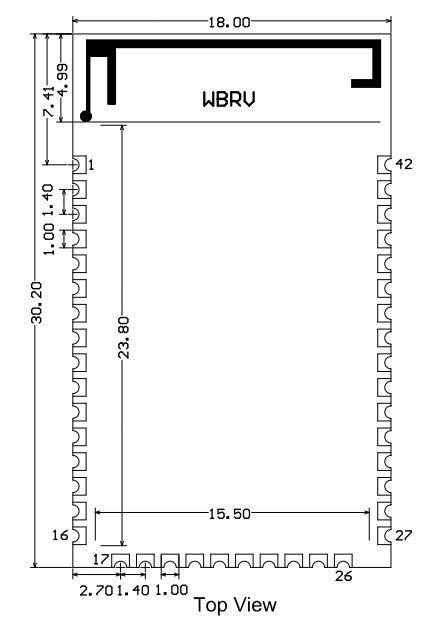
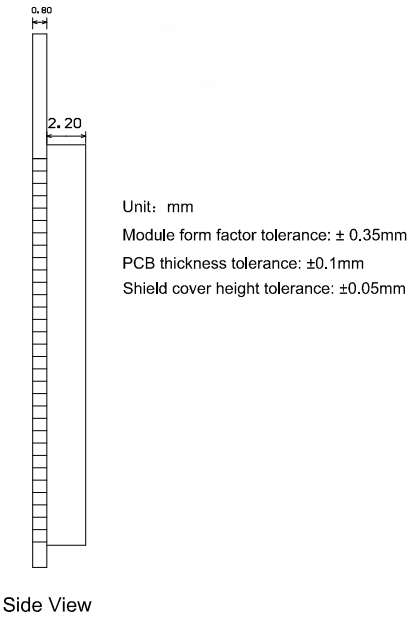
The default tolerance of the dimensions is ±0.35 mm. If you have special requirements for key dimensions, specify them in the datasheet after consultations.
Recommended PCB footprint
WBRV pinout:
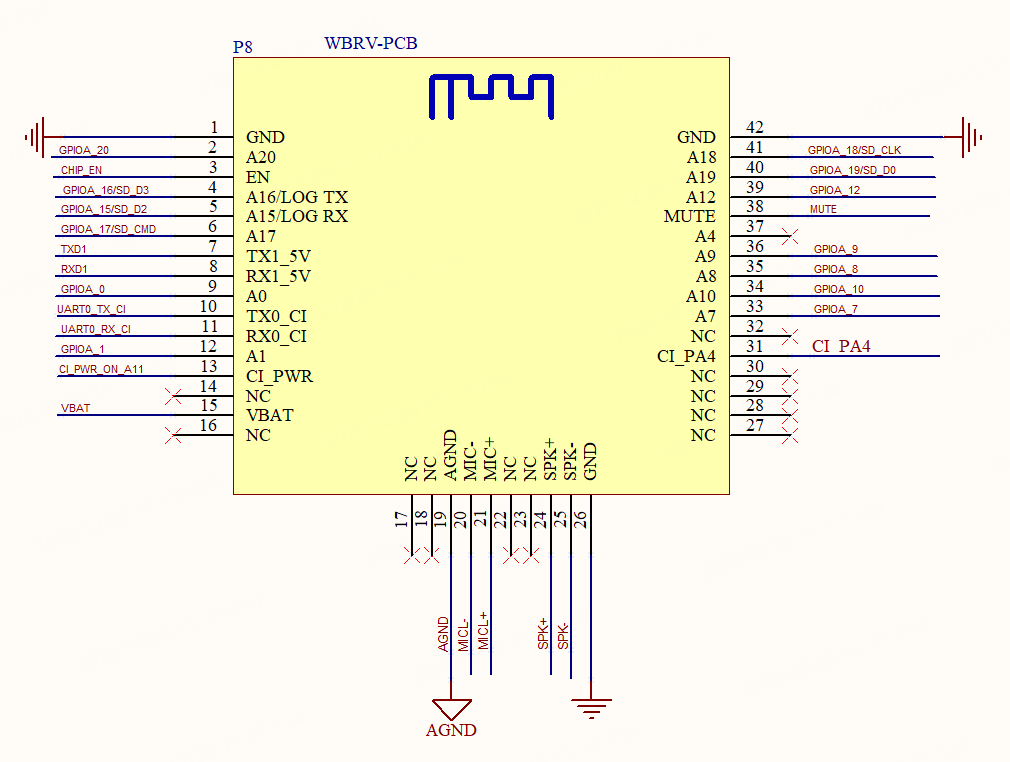
WBRV PCB footprint:
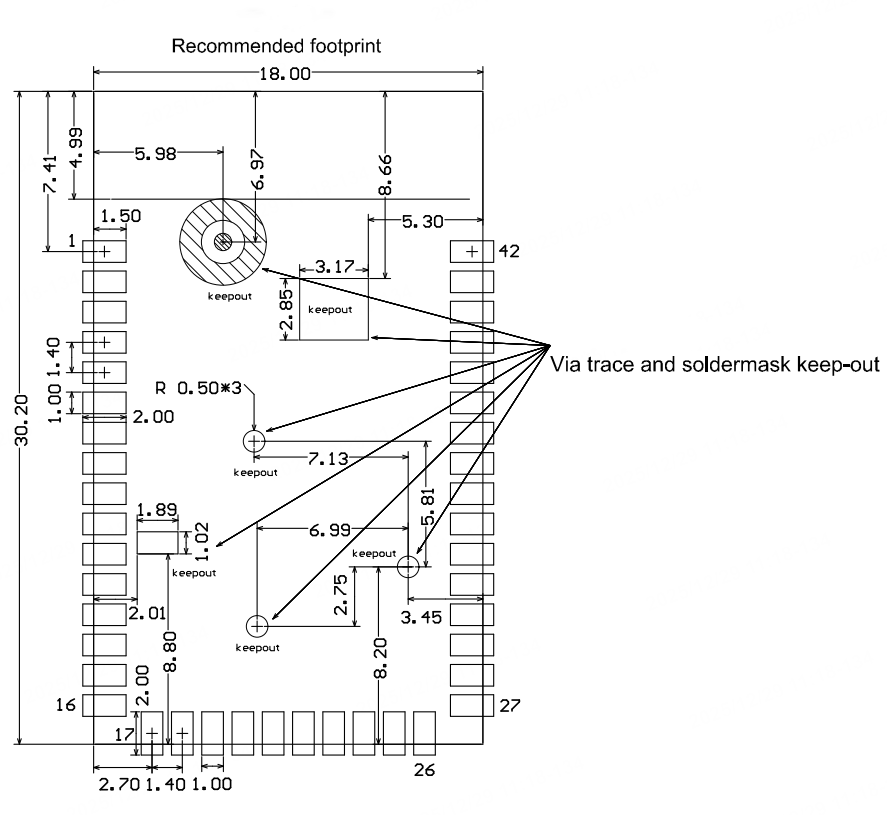
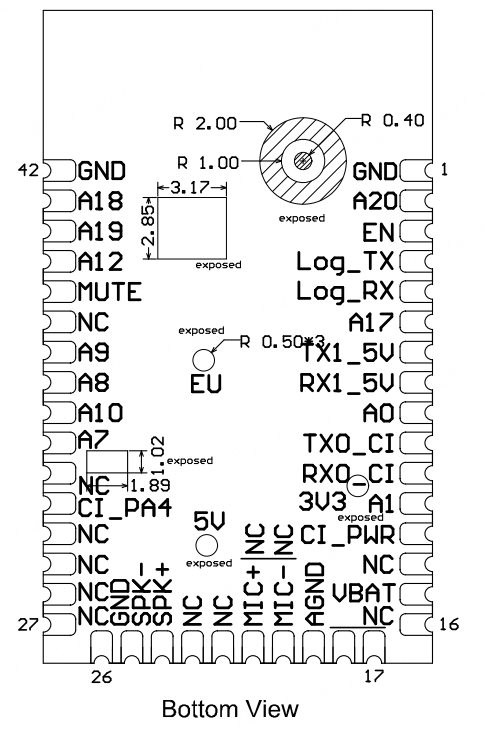
The area indicated as keep-out in the diagram above does not require tinning and should not have any traces routed through it.
Production instructions
-
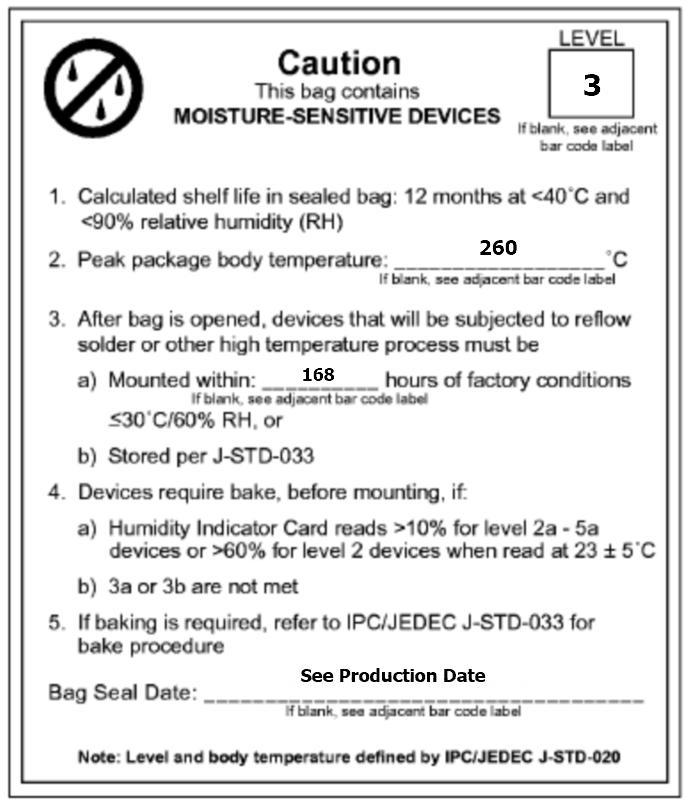
For the modules that can be packaged with the surface-mount technology (SMT) or in in-line form, you can select either of them according to the PCB design solutions of customers. If a PCB is designed to be SMT-packaged, package the module with the SMT. If a PCB is designed to use an in-line package, use wave soldering. Complete soldering within 24 hours after the module is unpacked. Otherwise, we recommend that you place the module in a drying cupboard with a relative humidity level below 10%, or pack the module in vacuum again. Then, record the packing time and duration of exposure. The total exposure time cannot exceed 168 hours.
- Instruments or devices required for the SMT process:
- Surface mount system
- SPI
- Reflow soldering machine
- Thermal profiler
- Automated optical inspection (AOI) equipment
- Instruments or devices required for the wave soldering process:
- Wave soldering device
- Wave soldering fixture
- Constant-temperature soldering iron
- Tin bar, tin wire, and flux
- Thermal profiler
- Instruments or devices required for the baking process:
- Cabinet oven
- Electrostatic discharge (ESD) protection and heat-resistant trays
- ESD protection and heat-resistant gloves
- Instruments or devices required for the SMT process:
-
A delivered module must meet the following storage requirements:
-
The moisture-proof bag must be placed in an environment where the temperature is below 40°C and the relative humidity is lower than 90%.
-
The shelf life of a dry-packaged product is 12 months from the date when the product is packaged and sealed.
-
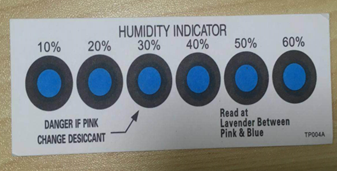
A humidity indication card (HIC) is put in the sealed package.
-
-
The module needs to be baked in the following cases:
- The vacuum packaging bag is damaged before unpacking.
- After unpacking, no HIC is found in the packaging bag.
- After unpacking, the HIC indicates a humidity level of 10% or higher. In this case, the circle turns pink on the HIC.
- The total exposure time has lasted for over 168 hours since unpacking.
- More than 12 months have passed since the first sealing of the bag.
-
The baking parameter settings are described below:
- Baking temperature: 40°C for reel packaging with relative humidity ≤ 5%. And 125°C for tray packaging with relative humidity ≤ 5% (use a heat-resistant tray, rather than a plastic container).
- Baking time: 168 hours for reel packaging and 12 hours for tray packaging.
- Temperature for triggering an alert: 50°C for reel packaging and 135°C for tray packaging.
- Production can begin after a module has cooled down to below 36°C under natural conditions.
- If a module remains unused for over 168 hours after being baked, it needs to be baked again.
- If a batch of modules is not baked after exposure for more than 168 hours, do not use wave soldering to solder them. Because these modules are level-3 moisture-sensitive devices, they are very likely to get damp when exposed beyond the allowable time. In this case, if they are soldered at high temperatures, device failure or poor soldering performance might occur.
-
In the whole production process, take electrostatic discharge (ESD) protective measures.
-
To guarantee the pass rate, we recommend that you use the SPI and AOI to monitor the quality of solder paste printing and mounting.
Recommended oven temperature curve
Select a proper soldering technique according to the process. For more information, refer to the recommended oven temperature curve of either reflow soldering or wave soldering. The set temperatures might deviate from the actual temperature measurements. All temperatures shown in this module datasheet are obtained through actual measurements.
Technique 1: SMT process (recommended oven temperature curve of reflow soldering)
Set the oven temperatures according to the following curve.
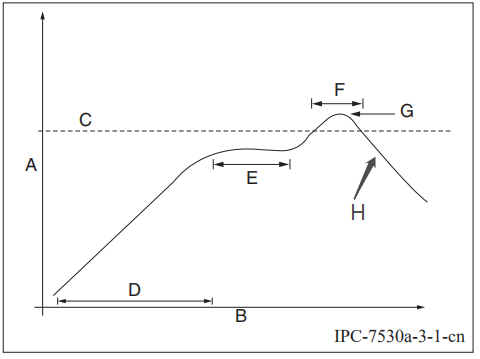
- A: temperature axis
- B: time axis
- C: alloy liquidus temperature from 217°C to 220°C
- D: ramp-up slope from 1°C/s to 3°C/s
- E: keep a constant temperature from 150°C to 200°C for a time period of 60s to 120s
- F: temperature above liquidus temperature for 50s to 70s
- G: peak temperature from 235°C to 245°C
- H: ramp-down slope from 1°C/s to 4°C/s
The curve above is based on solder paste SAC305. For more information about other solder pastes, see the recommended oven temperature curve in the specified solder paste specifications.
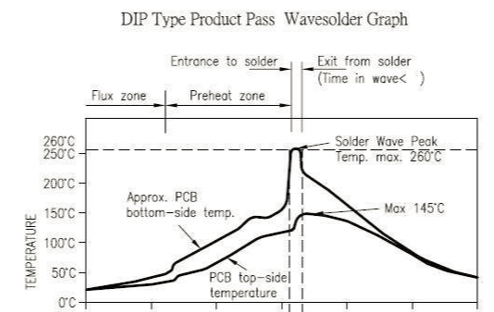
Technique 2: Wave soldering process (oven temperature curve of wave soldering)
Set the oven temperatures according to the following temperature curve of wave soldering. The peak temperature is 260°C±5°C.
| Suggestions on wave soldering | Suggestions on manual repair soldering | ||
|---|---|---|---|
| Preheat temperature | 80°C to 130°C | Soldering temperature | 360°C ± 20°C |
| Preheat duration | 75s to 100s | Soldering duration | Less than 3s/point |
| Contact duration at the peak | 3s to 5s | N/A | N/A |
| Solder tank temperature | 260°C ± 5°C | N/A | N/A |
| Ramp-up slope | ≤ 2°C/s | N/A | N/A |
| Ramp-down slope | ≤ 6°C/s | N/A | N/A |
Storage conditions
MOQ and packaging information
| Product model | MOQ (pcs) | Shipping packaging | Modules per reel | Reels per carton |
|---|---|---|---|---|
| WBRV | 4,400 | Tape and reel | 1,100 | 4 |
Appendix: Statement
Important Notice to OEM integrators
-
This module is limited to OEM installation ONLY.
-
This module is limited to installation in mobile or fixed applications, according to Part 2.1091(b).
-
The separate approval is required for all other operating configurations, including portable configurations with respect to Part 2.1093 and different antenna configurations
-
For FCC Part 15.31 (h) and (k): The host manufacturer is responsible for additional testing to verify compliance as a composite system. When testing the host device for compliance with Part
15 Subpart B, the host manufacturer is required to show compliance with Part 15 Subpart B while the transmitter module(s) are installed and operating. The modules should be transmitting and the evaluation should confirm that the module’s intentional emissions are compliant (i.e. fundamental and out of band emissions). The host manufacturer must verify that there are no additional unintentional emissions other than what is permitted in Part 15 Subpart B or emissions are complaint with the transmitter(s) rule(s).
The Grantee will provide guidance to the host manufacturer for Part 15 B requirements if needed.Important Note
Notice that any deviation(s) from the defined parameters of the antenna trace, as described by the instructions, require that the host product manufacturer must notify Tuya that they wish to change the antenna trace design. In this case, a Class II permissive change application is required to be filed by the TUYA, or the host manufacturer can take responsibility through the change in FCC ID (new application) procedure followed by a Class II permissive change application.
End Product Labeling
When the module is installed in the host device, the FCC label must be visible through a window on the final device or it must be visible when an access panel, door or cover is easily re-moved. If not, a second label must be placed on the outside of the final device that contains the following text: "Contains FCC ID: 2ANDL-WBRV".
The FCC ID can be used only when all FCC compliance requirements are met.
Antenna Installation
(1) The antenna must be installed such that 20 cm is maintained between the antenna and users,
(2) The transmitter module may not be co-located with any other transmitter or antenna.
(3) Only antennas of the same type and with equal or less gains as shown below may be used with this module. Other types of antennas and/or higher-gain antennas may require additional authorization for operation.
| Antenna type | BT/Wlan 2.4G |
|---|---|
| PCB | 1.25dBi |
In the event that these conditions cannot be met (for example, certain laptop configurations or co-location with another transmitter), then the FCC authorization is no longer considered valid, and the FCC ID cannot be used on the final product. In these circumstances, the OEM integrator will be responsible for re-evaluating the end product (including the transmitter) and obtaining a separate FCC authorization.
Manual Information to the End User
The OEM integrator has to be aware not to provide information to the end user regarding how to install or remove this RF module in the user’s manual of the end product which integrates this module. The end user manual shall include all required regulatory information/warnings as shown in this manual.
Federal Communication Commission Interference Statement
This device complies with Part 15 of the FCC Rules. Operation is subject to the following two conditions: (1) This device may not cause harmful interference, and (2) this device must accept any interference received, including interference that may cause undesired operation.
This equipment has been tested and found to comply with the limits for a Class B digital device, pursuant to Part 15 of the FCC Rules. These limits are designed to provide reasonable protection against harmful interference in a residential installation. This equipment generates, uses, and can radiate radio frequency energy and, if not installed and used in accordance with the instructions, may cause harmful interference to radio communications. However, there is no guarantee that interference will not occur in a particular installation. If this equipment does cause harmful interference to radio or television reception, which can be determined by turning the equipment off and on, the user is encouraged to try to correct the interference by one of the following measures:
- Reorient or relocate the receiving antenna.
- Increase the separation between the equipment and receiver.
- Connect the equipment into an outlet on a circuit different from that to which the receiver is connected.
- Consult the dealer or an experienced radio/TV technician for help.
Any changes or modifications not expressly approved by the party responsible for compliance could void the user’s authority to operate this equipment. This transmitter must not be co-located or operating in conjunction with any other antenna or transmitter.
List of applicable FCC rules
This module has been tested and found to comply with Part 15 requirements for Modular Approval.
The modular transmitter is only FCC authorized for the specific rule parts (i.e., FCC transmitter rules) listed on the grant, and that the host product manufacturer is responsible for compliance with any other FCC rules that apply to the host not covered by the modular transmitter grant of certification. If the grantee markets their product as being Part 15 Subpart B compliant (when it also contains unintentional-radiator digital circuitry), then the grantee shall provide a notice stating that the final host product still requires Part 15 Subpart B compliance testing with the modular transmitter installed.
This device is intended only for OEM integrators under the following conditions: (For module device use)
- The antenna must be installed such that 20 cm is maintained between the antenna and users, and
- The transmitter module may not be co-located with any other transmitter or antenna.
As long as 2 conditions above are met, further transmitter tests will not be required. However, the OEM integrator is still responsible for testing their end-product for any additional compliance requirements required with this module installed.
Radiation Exposure Statement
This equipment complies with FCC radiation exposure limits set forth for an uncontrolled environment. This equipment should be installed and operated with a minimum distance of 20 cm between the radiator & your body.
Is this page helpful?
YesFeedbackIs this page helpful?
YesFeedback




